MR8740、MR8741_user_manual_eng_20191016H.pdf - 第387页
18.3 Error Messages 375 Chapter 18 Maintenance and Service 14 18 A screen message appears whenever an error occurs. In either case, take the remedial action indicated. A beep may sound if the beepe r setting on the [Envi…
18.2 Initializing the Instrument
374
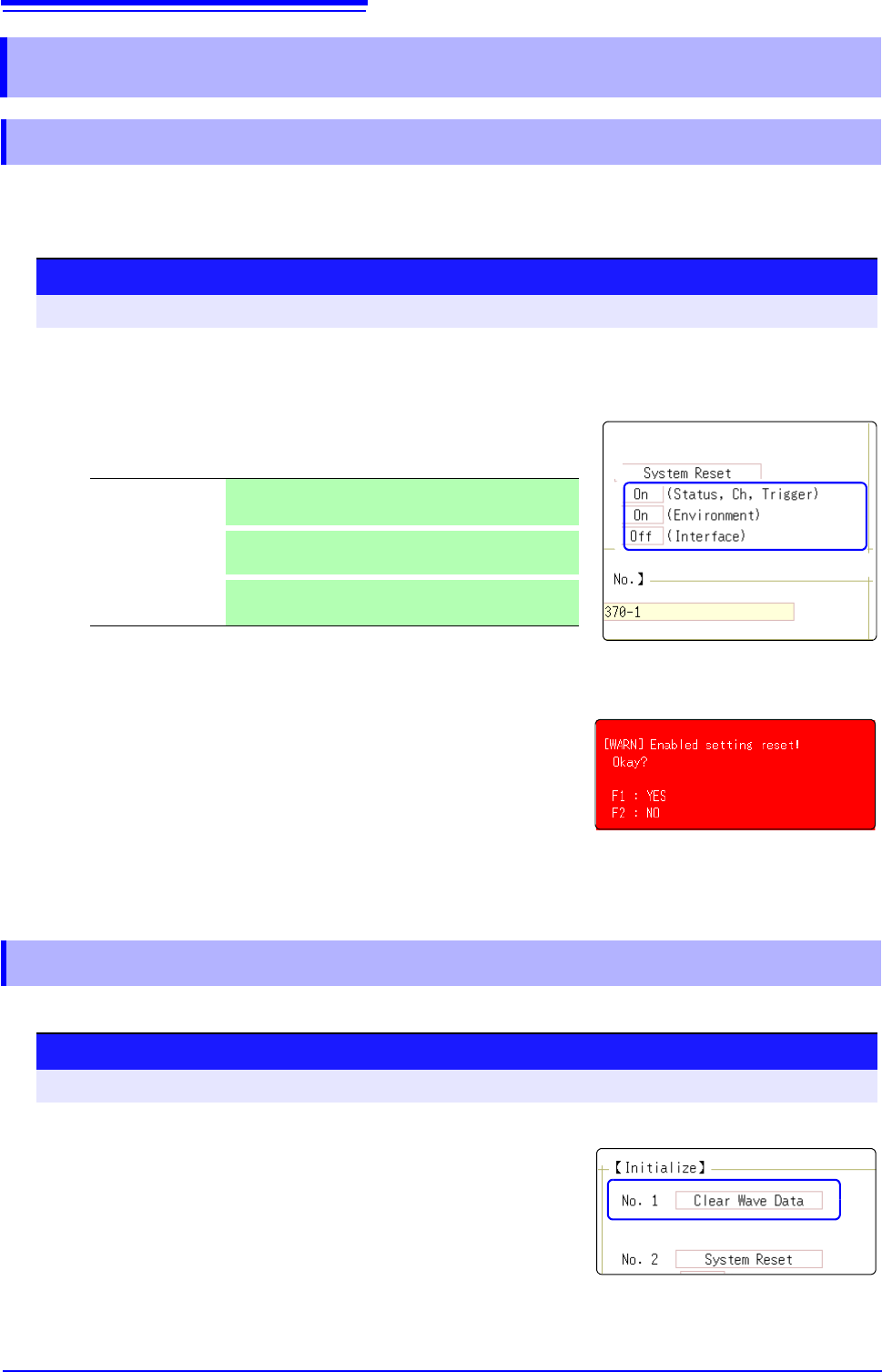
Select groups of settings currently in force on the instrument, and initialize the settings. Initialization returns
the instrument to the factory default state. By default, the setting of [Setting (Stat, Ch, Trig)] and [Setting
(Env)] are selected for initialization in this screen.
Discard the waveform data saved in memory and initialize the data.
18.2 Initializing the Instrument
18.2.1 Initializing System Settings (System Reset)
1
2
3
Procedure
To open the screen: Right-click and select [SYSTEM] [Init] sheet
1
Move the flashing cursor to the item you want to initialize.
2
Select [On].
Select [Off] for the groups of settings that you do not want to initial-
ize.
3
Move the flashing cursor to the [System Reset].
4
Select [Exec].
A confirmation dialog box appears.
5
Select [Yes].
To cancel initializing:
Select [No].
Initialization is complete when "System initialized" appears.
(Status, Ch, Trig-
ger)
Current settings in Status screen, Channel screen,
and Trigger setting window (Default setting: On)
(Environment)
Current settings in the Environment sheet and File
Save sheet (Default setting: On)
(Interface)
Current settings in the Interface sheet (Default setting:
Off)
18.2.2 Initializing Waveform Data
Procedure
To open the screen: Right-click and select [SYSTEM] [Init] sheet
1
Move the flashing cursor to the [Clear Wave Data].
2
Select [Exec].
Initialization is complete when "Waveform data erased." appears.
18.3 Error Messages
375
Chapter 18 Maintenance and Service
14
18
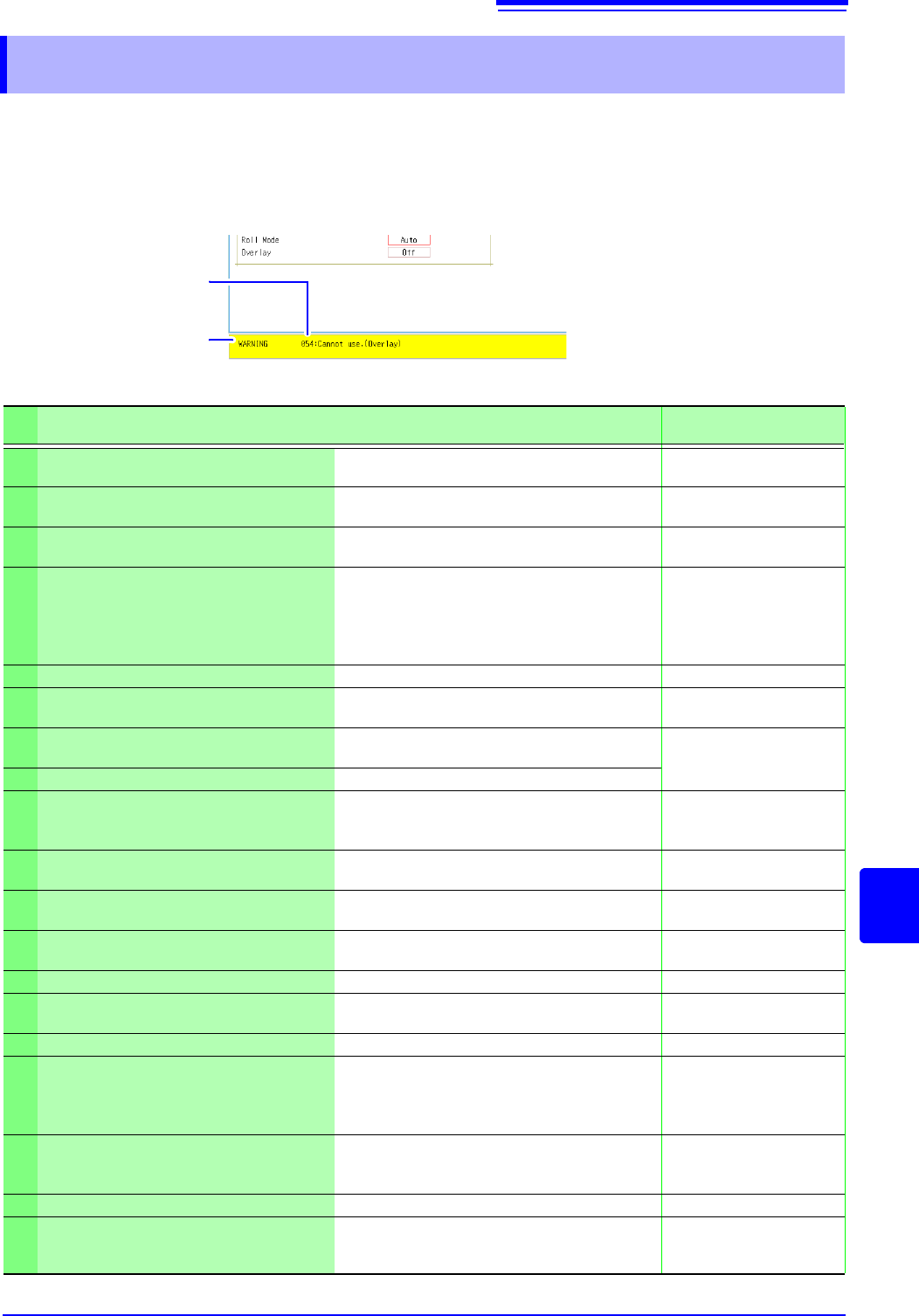
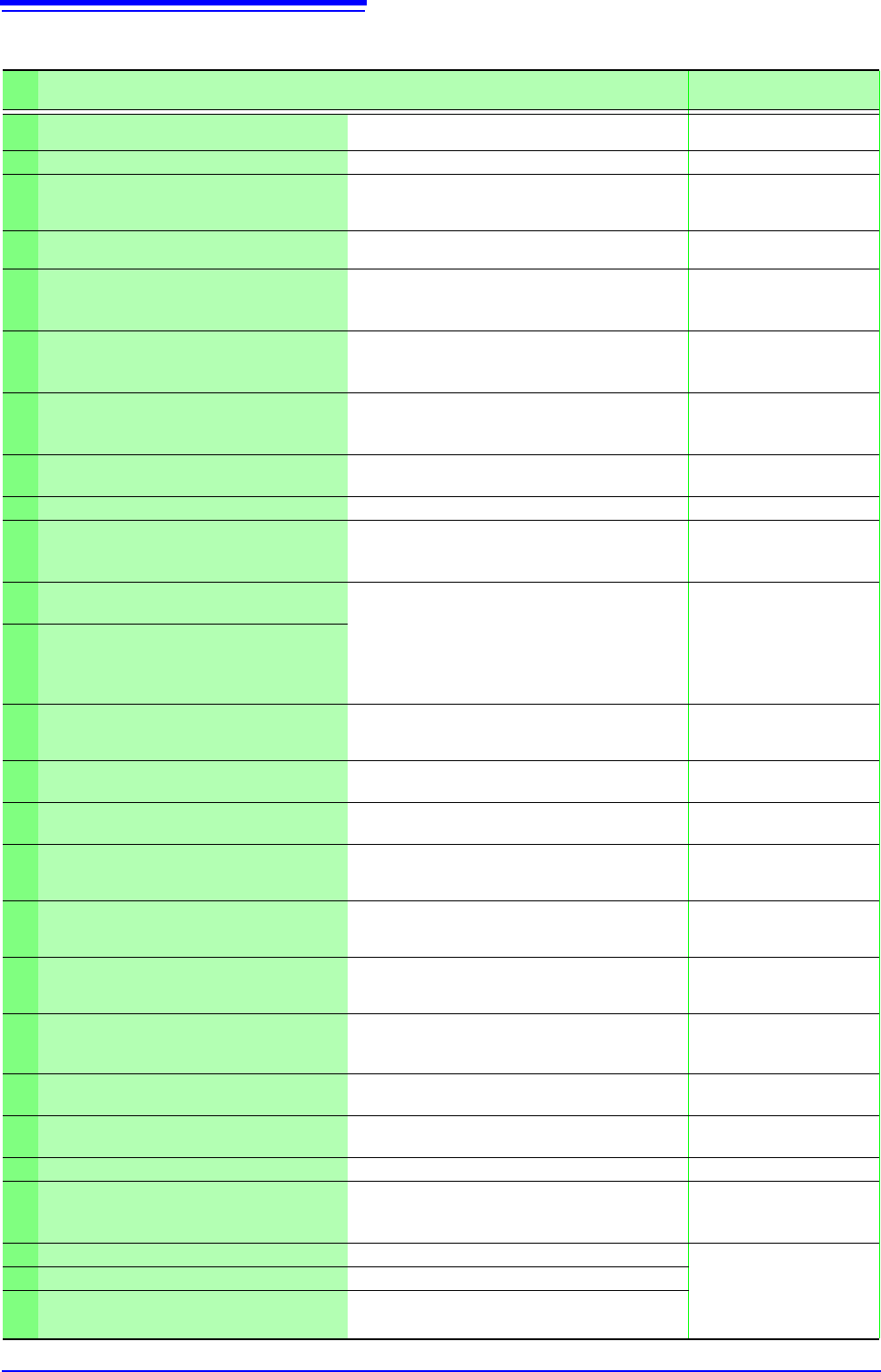
A screen message appears whenever an error occurs. In either case, take the remedial action indicated.
A beep may sound if the beeper setting on the [Environment] sheet is [Warn] or
[Warn+Action].
See: "Chapter 14 System Environment Settings" (p.309)
18.3 Error Messages
Message
Displayed Message
Number (Msg No.)
Warning Display
Appears just once when an error
occurs. Disappears within a few
seconds.
Also disappears when clicking
the mouse.
Displayed Warnings
Msg
No.
Message Remedial Action Reference
10
Mount media. Set the recording media.
"2.3 Recording Media Prep-
aration" (p.53)
11
Illegal format. Wrong recording format. Reformat the media.
"2.3.2 Formatting Storage
Media" (p.54)
12
Can not write.
Write-protection is enabled on the storage
media. Disable it.
-
13
Disk full while accessing the file.
Saving is not possible because of insufficient
space on the storage media. Delete files or re-
place the storage media. If measuring,
Stop measurement, then replace the storage
media.
"4.4.4 Deleting Files & Fold-
ers" (p.106)
14
File is read only. File is read only. Deletion is not permitted.
-
15
Access to the file was denied.
An internal fault may have occurred in the in-
strument. Turn the instrument off and back on
-
16
The file name already exists: cannot
save.
Change the file name.
"4.4.6 Renaming Files &
Folders" (p.107)
17
The folder name already exists. Change the folder name.
18
Not enough free space in the folder to
create file.
Either delete files in the saving destination
folder, or change to another saving destina-
tion.
-
19
Folder not empty.
The folder is not empty, be sure you want to
delete.
-
20
The maximum length of a file name, in-
cluding its path, is 255 characters.
File names including the path must not exceed
255 characters.
-
21
Internal error.
An internal error occurred. Check the storage
media.
-
22
No waveform data to save. Acquire waveform data.
-
24
There is no calculation result.
There is no calculation result. Save results af-
ter performing calculation.
"Chapter 9 Numerical Cal-
culation Functions" (p.211)
26
Invalid folder path. Route cannot be specified.
-
27
When executing, select [No] as the save
property.
As other dialogs are displayed, selective sav-
ing cannot be carried out. Either set the selec-
tive saving during execution to [No] or close
the dialog and re-save.
"4.2.3 Saving Data Selec-
tively (SAVE)" (p.93)
28
Pressed key invalid (waveform evalua-
tion).
Unable to perform operation because wave-
form evaluation is enabled. Turn off waveform
evaluation.
"13.3 Setting the Waveform
Evaluation Mode" (p.300)
29
The record length was restricted. -
-
31
A/B cursor positions invalid.
The A/B cursors overlap. Check the cursor po-
sitions.
"6.2 Specifying a Waveform
Range (A/B Cursor)"
(p.124)
18.3 Error Messages
376
32
Zero-adjustment needed. Perform zero-adjustment.
"2.6 Adjusting the Zero Po-
sition (Zero-Adjust)" (p.58)
33
Disabled key. Close the dialog.
-
34
Invalid key pressed (Overlay)
The key operation is prohibited because Over-
lay is enabled.
"7.3 Displaying New Wave-
forms Over Past Waveforms
(Overlay)" (p.146)
36
No trigger has been set. Set trigger criteria.
"Chapter 8 Trigger Set-
tings" (p.189)
38
Use of logic channels has reduced ana-
log waveform resolution from 16 to 12
bits.
Using channels LA - LB reduces resolution of
Ch1 - Ch2 to 12 bits.
"7.9 Setting Details of Mod-
ules" (p.161)
39
Auto balance failed.
Check if no load is applied to the strain gauge
transducer and the strain gauge transducer is
correctly connected to a measuring object.
"7.9.4 Setting Model 8969
and U8969 Strain Unit"
(p.165)
40
Voltage Sag triggering is disabled. (Val-
id time base range: 20 s/div to 50 ms/
div)
Voltage Sag triggering can be used only when
the time base is between
20 s/div to 50 ms/div
"8.3.1 Analog Trigger Set-
tings and Types" (p.192)
42
There is not enough data in the memo-
ry.
Measure the data portion required for calcula-
tion.
"10.1 Waveform Calcula-
tion Workflow" (p.228)
43
Stopped. -
-
46
Channels may no longer be able to be
used by frequency units due to logic
use.
If logic channels A and B of the machine are
used, the respective frequency units at chan-
nels 1 and 2 cannot be used.
"3.5.3 Logic Channel"
(p.79)
47
:This unit cannot be used because it is
not AAF aligned.
Display the [Init] sheet on the SYSTEM
screen.
Execute the [System Information] and check
the software items.
If [Not AAF aligned] is displayed, send the
unit for repairs.
-
48
There are units on which AAF cannot be
set to On because of lack of adjustment.
50
Roll Mode is not available.
The Roll Mode cannot be used when Overlay
is enabled.
"7.2 Displaying Waveforms
During Recording (Roll
Mode)" (p.145)
51
Cannot use. (Pre Trigger)
The pre-trigger function is not available when
using external sampling.
"Chapter 16 External Con-
trol (MR8741 Only)" (p.335)
52
Cannot use. (Roll Mode, Memory Divi-
sion)
If the waveform calculation function is used,
these functions cannot be used.
"10.1 Waveform Calcula-
tion Workflow" (p.228)
53
Cannot use. (Roll Mode, Memory Divi-
sion, Wave Calculation)
If one function is used, the other functions
cannot be used.
"7.2 Displaying Waveforms
During Recording (Roll
Mode)" (p.145)
54
Cannot use. (Overlay)
The overlay function is not available when us-
ing the Roll mode.
"7.3 Displaying New Wave-
forms Over Past Waveforms
(Overlay)" (p.146)
55
Cannot use. (Overlay, Memory Division,
Wave Calculation)
If roll mode is used, these functions cannot be
used.
"7.2 Displaying Waveforms
During Recording (Roll
Mode)" (p.145)
57
Cannot set. (External sampling)
Cannot use roll mode when using external
sampling.
"7.2 Displaying Waveforms
During Recording (Roll
Mode)" (p.145)
58
Rated capacity/rated output error.
Rated capacity/Rated output has exceeded
selected range. Input correct value.
Note (p.151)
59
Cannot use. (Roll Mode, Wave Calcula-
tion)
If the memory division function is used, these
functions cannot be used.
"11.1 Recording Settings"
(p.243)
60
No waveform data. Acquire waveform data.
-
68
Recording length is too long.
Shorten the measurement record length.
The maximum record length that can be calcu-
lated is 2,000 div.
"3.4.3 Recording Length
(number of divisions)" (p.70)
91
LAN: Bad IP address. Check the IP address.
"15.1 LAN Settings and
Connection (Before Using
FTP/Internet Browser/Com-
mand Communications)"
(p.314)
95
LAN: Connection timed out. Check the transmission setting.
97
LAN: Network error.
Check the connections between the instru-
ment and connection destination.
Displayed Warnings
Msg
No.
Message Remedial Action Reference