MR8740、MR8741_user_manual_eng_20191016H.pdf - 第307页
13.1 Waveform GO/NG Evaluation (MEM, FFT Funct ion) 295 11 Chapter 13 W aveform Evaluation Function (MR8741 Only) 12 13 Only MR8741 supports the waveform evaluation function. • The wavefo rm evaluation funct ion can be u…

12.8 FFT Analysis Modes
294
13.1 Waveform GO/NG Evaluation (MEM, FFT Function)
295
11
Chapter 13 Waveform Evaluation Function (MR8741 Only)
12
13
Only MR8741 supports the waveform evaluation function.
• The waveform evaluation function can be used from the Memory function (single screen, X-Y single
screen), FFT function (1 screen standard, 1 screen Nyquist).
• GO (pass) or NG (fail) evaluation of the input signal waveform can be performed using an evaluation area
specified by the user.
• This can serve to detect irregular waveforms.
• Depend on evaluation result, GO and NG terminal output the signal.
• All displayed channels can be used for GO/NG evaluation.
Waveform Evaluation
Function
(MR8741 Only) Chapter 13
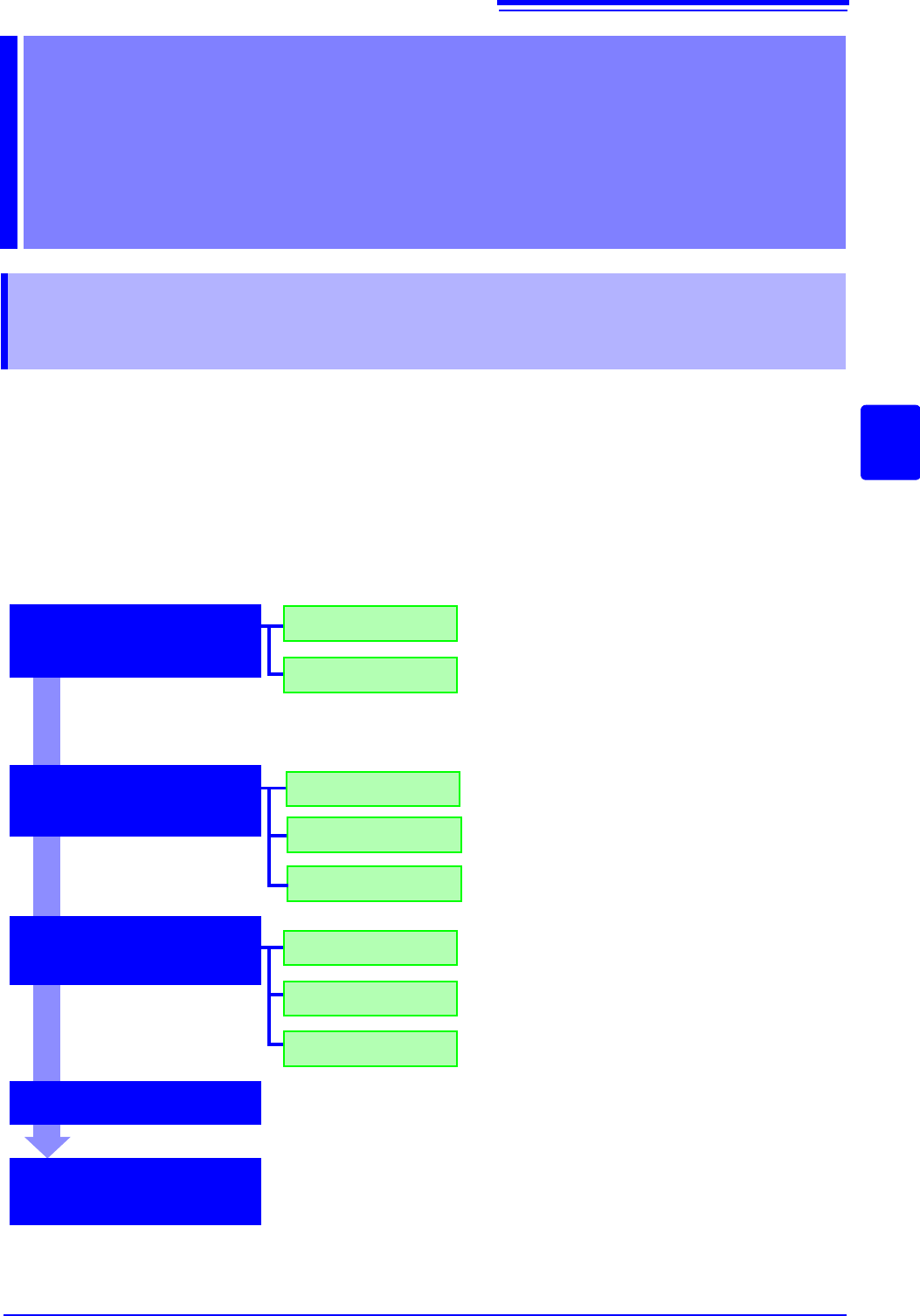
13.1 Waveform GO/NG Evaluation
(MEM, FFT Function)
OUT
Loading
Creating new area
Load the created evaluation area and settings. Use
the File screen.
OFF
ALL OUT
GO
NG
Stop recording on GO result.
GO&ïNG
Setting the evaluation
area
Setting the wave-
form evaluation
Setting the GO/NG
stop mode
Measurement starts
Executing waveform
GO/NG evaluation
Create the evaluation area by using the eight types of
commands.
Store the evaluation area in memory, and after that,
store the data on the media on the File screen.
Disable waveform evaluation.
Return NG if any part of the waveform leaves the
evaluation area.
Return NG if the entire waveform leaves the evalua-
tion area.
Stop recording on NG result.
Stop recording on GO or NG result.
Clicking
[START] starts measurement.
Data acquisition starts when the trigger conditions are met.
Once the evaluation process is complete, the result will be output as the signals
from the external control terminals. If the evaluation result satisfies the stop con-
ditions, automatic saving and automatic printing will be performed, if enabled.
When using memory segmentation, the same block is repeatedly measured as
long as the stop conditions are not satisfied. Once the stop conditions are sat-
isfied, measurement moves to the next block.

13.1 Waveform GO/NG Evaluation (MEM, FFT Function)
296
• Trigger mode: SINGLE Measurement continues until stop mode conditions
are fulfilled and then stops.
• Trigger mode REPEAT, AUTO Recording and waveform evaluation is carried
out continuously. Click [STOP] to terminate the measurement.
• When "auto save" is set to ON, data are stored on media when the stop condi-
tions are satisfied.
• When memory segmentation is ON, data is recorded to the memory block only
when the stop conditions are satisfied.
• During waveform evaluation, evaluation is performed concurrently with mea-
surement when the time axis range is 1 ms/div or less with the roll mode set-
ting ON or during automatic operation with the display at 100 ms/div or less as
a result of the time axis magnification factor. At all other times, evaluation is
performed after measurement is complete.
• When performing evaluation after measurement is complete, this sequence of
two alternating operations (capturing data and performing the evaluation) is
performed repeatedly, so that data is not captured while the evaluation is in
progress. Therefore data are not captured while the evaluation is in progress,
which means that the input signal is not being continuously monitored. The
time required for evaluation is on the order of 100 ms.
• When performing evaluation and measurement concurrently, the waveform is
displayed and evaluated while measurement continues. However, please note
that processing is not necessarily conducted in real time.
• If a high setting is chosen for recording length or if compression is used, the
evaluation cycle becomes slower.
• Waveform scrolling is not available while waveform evaluation is ON. To use
waveform scrolling, you should first turn waveform evaluation OFF.
• Although the waveform display will change if you change display-related set-
tings after measurement completes, the waveform evaluation results from
when the measurement was made are retained. To repeat the evaluation pro-
cess for the waveform after the new settings have been applied, perform
waveform evaluation on the Status basic settings screen.
See:"6.5.1 Magnifying and Compressing Horizontal Axis (Time Axis)" (p.129)
• When using the highlight function with the FFT function, only the highlighted
data is evaluated.