MR8740、MR8741_user_manual_eng_20191016H.pdf - 第389页
18.3 Error Messages 377 Chapter 18 Maintenance and Service 14 18 100 Inappropriate setting of time axis for waveform data. Return the time axis to the time axis setting when the waveform was measured. "3.4.2 Time Ax…
18.3 Error Messages
376
32
Zero-adjustment needed. Perform zero-adjustment.
"2.6 Adjusting the Zero Po-
sition (Zero-Adjust)" (p.58)
33
Disabled key. Close the dialog.
-
34
Invalid key pressed (Overlay)
The key operation is prohibited because Over-
lay is enabled.
"7.3 Displaying New Wave-
forms Over Past Waveforms
(Overlay)" (p.146)
36
No trigger has been set. Set trigger criteria.
"Chapter 8 Trigger Set-
tings" (p.189)
38
Use of logic channels has reduced ana-
log waveform resolution from 16 to 12
bits.
Using channels LA - LB reduces resolution of
Ch1 - Ch2 to 12 bits.
"7.9 Setting Details of Mod-
ules" (p.161)
39
Auto balance failed.
Check if no load is applied to the strain gauge
transducer and the strain gauge transducer is
correctly connected to a measuring object.
"7.9.4 Setting Model 8969
and U8969 Strain Unit"
(p.165)
40
Voltage Sag triggering is disabled. (Val-
id time base range: 20 s/div to 50 ms/
div)
Voltage Sag triggering can be used only when
the time base is between
20 s/div to 50 ms/div
"8.3.1 Analog Trigger Set-
tings and Types" (p.192)
42
There is not enough data in the memo-
ry.
Measure the data portion required for calcula-
tion.
"10.1 Waveform Calcula-
tion Workflow" (p.228)
43
Stopped. -
-
46
Channels may no longer be able to be
used by frequency units due to logic
use.
If logic channels A and B of the machine are
used, the respective frequency units at chan-
nels 1 and 2 cannot be used.
"3.5.3 Logic Channel"
(p.79)
47
:This unit cannot be used because it is
not AAF aligned.
Display the [Init] sheet on the SYSTEM
screen.
Execute the [System Information] and check
the software items.
If [Not AAF aligned] is displayed, send the
unit for repairs.
-
48
There are units on which AAF cannot be
set to On because of lack of adjustment.
50
Roll Mode is not available.
The Roll Mode cannot be used when Overlay
is enabled.
"7.2 Displaying Waveforms
During Recording (Roll
Mode)" (p.145)
51
Cannot use. (Pre Trigger)
The pre-trigger function is not available when
using external sampling.
"Chapter 16 External Con-
trol (MR8741 Only)" (p.335)
52
Cannot use. (Roll Mode, Memory Divi-
sion)
If the waveform calculation function is used,
these functions cannot be used.
"10.1 Waveform Calcula-
tion Workflow" (p.228)
53
Cannot use. (Roll Mode, Memory Divi-
sion, Wave Calculation)
If one function is used, the other functions
cannot be used.
"7.2 Displaying Waveforms
During Recording (Roll
Mode)" (p.145)
54
Cannot use. (Overlay)
The overlay function is not available when us-
ing the Roll mode.
"7.3 Displaying New Wave-
forms Over Past Waveforms
(Overlay)" (p.146)
55
Cannot use. (Overlay, Memory Division,
Wave Calculation)
If roll mode is used, these functions cannot be
used.
"7.2 Displaying Waveforms
During Recording (Roll
Mode)" (p.145)
57
Cannot set. (External sampling)
Cannot use roll mode when using external
sampling.
"7.2 Displaying Waveforms
During Recording (Roll
Mode)" (p.145)
58
Rated capacity/rated output error.
Rated capacity/Rated output has exceeded
selected range. Input correct value.
Note (p.151)
59
Cannot use. (Roll Mode, Wave Calcula-
tion)
If the memory division function is used, these
functions cannot be used.
"11.1 Recording Settings"
(p.243)
60
No waveform data. Acquire waveform data.
-
68
Recording length is too long.
Shorten the measurement record length.
The maximum record length that can be calcu-
lated is 2,000 div.
"3.4.3 Recording Length
(number of divisions)" (p.70)
91
LAN: Bad IP address. Check the IP address.
"15.1 LAN Settings and
Connection (Before Using
FTP/Internet Browser/Com-
mand Communications)"
(p.314)
95
LAN: Connection timed out. Check the transmission setting.
97
LAN: Network error.
Check the connections between the instru-
ment and connection destination.
Displayed Warnings
Msg
No.
Message Remedial Action Reference
18.3 Error Messages
377
Chapter 18 Maintenance and Service
14
18
100
Inappropriate setting of time axis for
waveform data.
Return the time axis to the time axis setting
when the waveform was measured.
"3.4.2 Time Axis Range and
Sampling Rate" (p.67)
"8.12 Using trigger settings
to search measurement da-
ta" (p.209)
101
Some blocks are different in time axis
setting from the others.
Set the same time axis setting for all search
target blocks.
If they cannot be the same, set the search
range to display blocks only.
102
Some blocks are different in units con-
figuration from the others.
Unify the unit configuration of search target
blocks.
If they cannot be the same, set the search
range to display blocks only.
"8.12 Using trigger settings
to search measurement da-
ta" (p.209)
103
No data matching your search condi-
tion.
Check the trigger setting.
104
There is no data in the search target
channel.
Select channels with measurement data in the
search target.
105
There is a block with no data in the
search target channel.
Select blocks with measurement data in the
search target.
106
Some blocks are different in measure-
ment mode of unit from the others.
Blocks different in measurement mode cannot
be searched.
-
108
Some blocks are different in measure-
ment mode of unit from the others.
Set the search range within the display blocks.
"8.12 Using trigger settings
to search measurement da-
ta" (p.209)
110
No space to store waveform data at
copy location.
Create empty space by deleting waveform
data from copy location
"7.10 Register the Waveform
in the U8793 Arbitrary Wave-
form Generator Unit" (
p.184)
111
No space to register arbitrary waveform
data.
Create empty space by deleting waveform
data from registration location.
"7.10 Register the Waveform
in the U8793 Arbitrary Wave-
form Generator Unit" (
p.184)
Displayed Warnings
Msg
No.
Message Remedial Action Reference
18.4 Self-Test (Self Diagnostics)
378
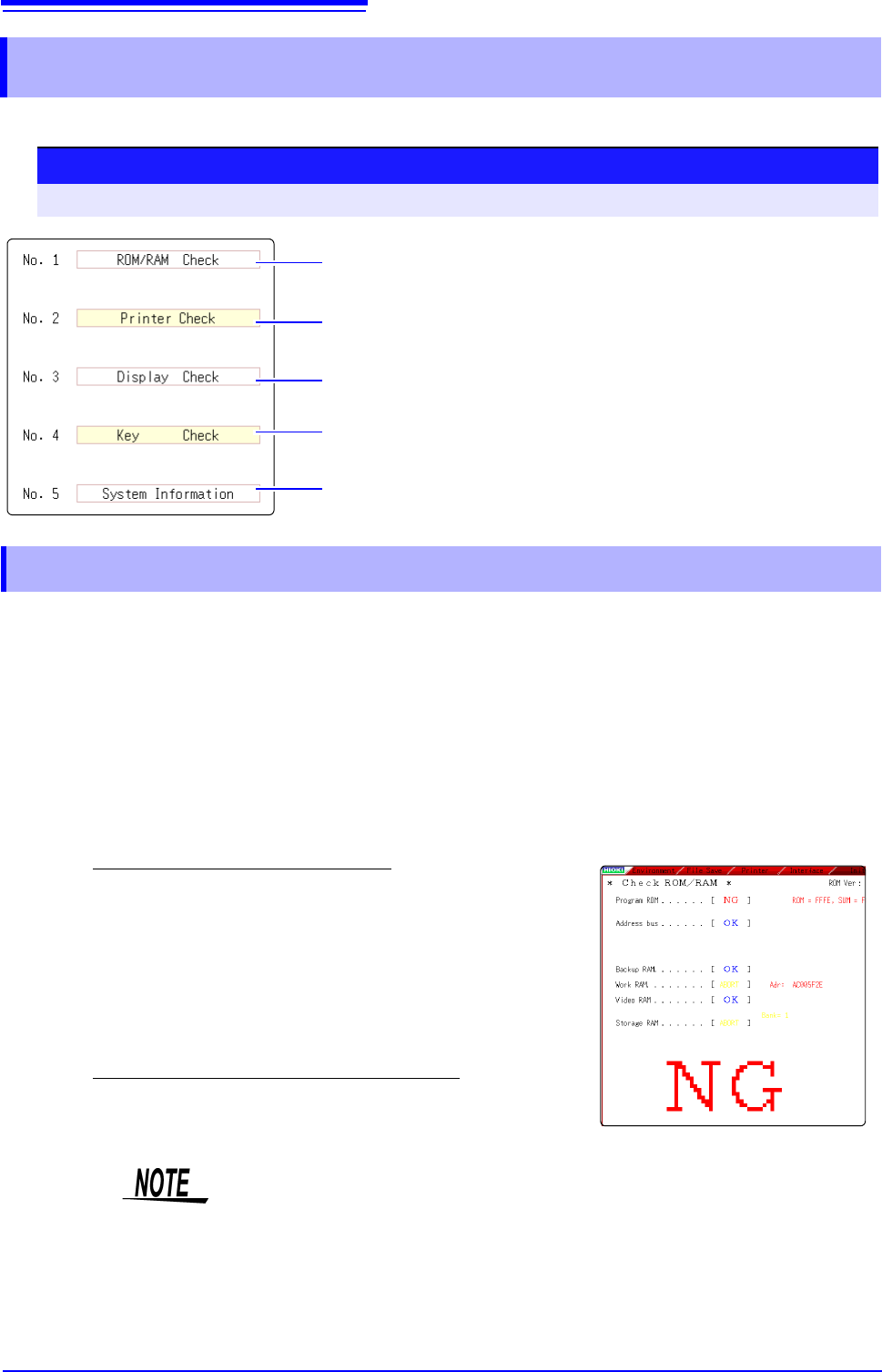
The following self-test checks are available.
This check tests the instrument's internal memory (ROM and RAM).
18.4 Self-Test (Self Diagnostics)
Check the instrument's internal memory (ROM and RAM). The results are
displayed on the screen. (p.378)
The instrument does not support the use of a printer. Clicking this has no effect.
Check the screen display (color check, gradation check). (p.379)
The instrument does not support the use of keys. Clicking this has no effect.
Check the system configuration. (p.379)
Procedure
To open the screen: Right-click and select [SYSTEM] [Init] sheet
18.4.1 ROM/RAM Check
1
Move the flashing cursor to the [ROM/RAM Check] item.
2
Select [Exec].
The ROM/RAM check starts.
The following checks are performed in the sequence shown.
Program ROM
Address busBackup RAMWork RAM
Video RAMStorage RAM
Do not turn the power off during the check.
The judgment results appear when the check finishes.
OK: Normal
NG: Error
If "NG" appears, ask to have the instrument repaired.
Click the mouse to return to the previous screen.
• Performing a ROM/RAM check will cause measurement data to be erased.
Save the measurement data to other media before performing the ROM/RAM
check.
• A ROM/RAM check cannot be stopped part way through.