MR8740、MR8741_user_manual_eng_20191016H.pdf - 第97页
4.1 Data capable of Being Saved & Loaded 85 4 Chapter 4 Saving/Loading Dat a & Managing Files The following kinds of data can be saved by and loaded into the instrument. 4.1 Dat a cap able of Being Saved & Lo…
84
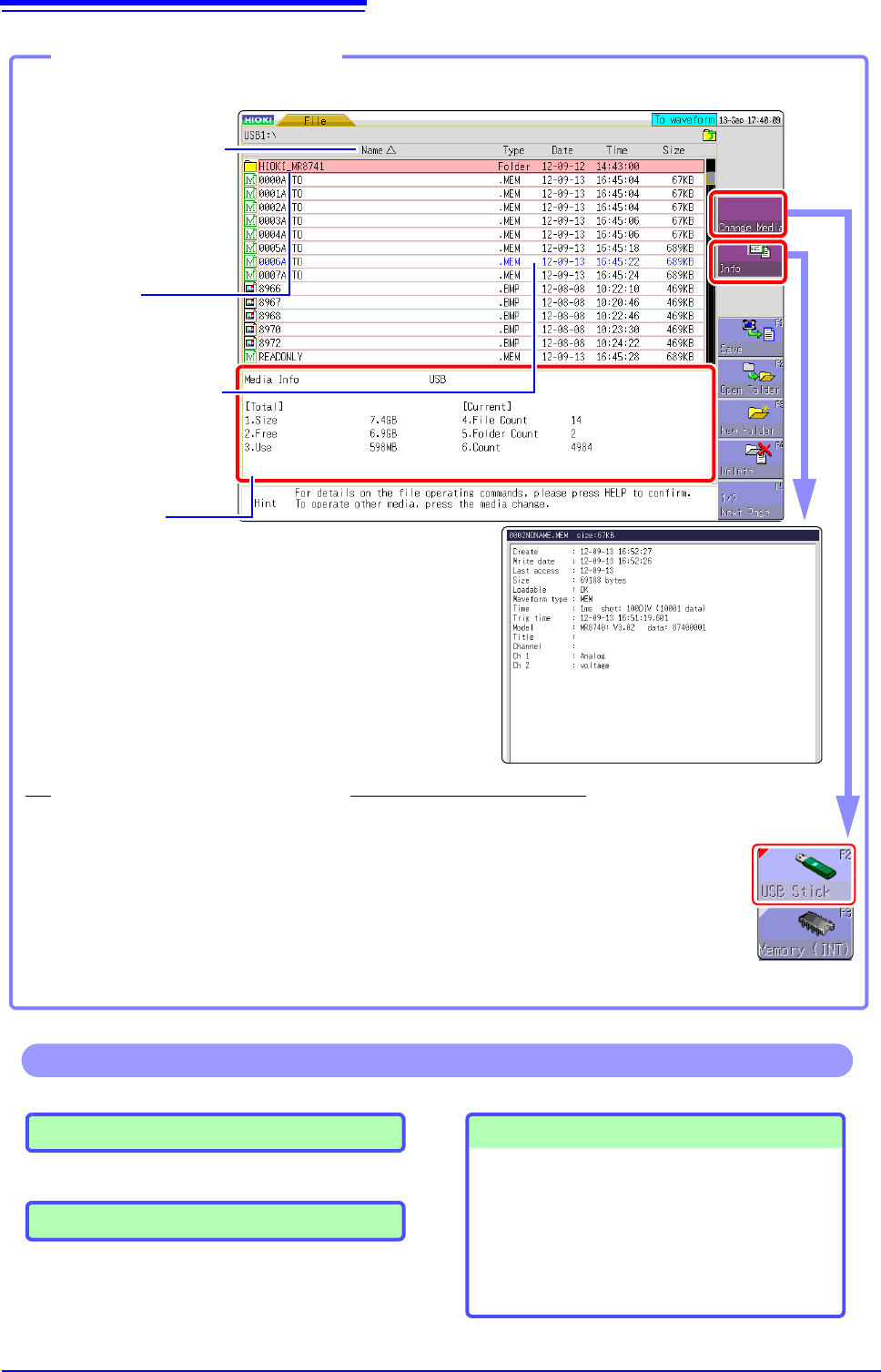
Media information
Shows information about the selected media.
File Count : Shows the number of saved files in the selected folder level.
Folder Count: Shows the number of folders in the selected folder level.
Count : Shows the number of files and folders that can be created in
the selected folder level.
The selected file is indicated by
a flashing cursor.
Opening the File screen
1
Verify that a storage media is inserted.
See: "2.3 Recording Media Preparation" (p.53)
2
Select [Change Media] and select a storage media.
The files on the selected storage media are shown in the file list.
The information about the
selected file is displayed.
To change the media
Read-only files and folders are
shown in blue. Deleting or re-
naming such files is not possi-
ble.
The file order will be
displayed.
: Ascending order
: Descending order
Click
[FILE] in the right-click
menu.
Loading Data (p.99)
Managing Files (p.87)
• Saving data(p.103)
• Creating new folders (p.105)
• Copying files (p.108)
• Sorting files (p.107)
• Deleting files (p.106)
• Renaming files (p.107)
Operations available from the File screen
Formatting Storage Media (p.54)
4.1 Data capable of Being Saved & Loaded
85
4
Chapter 4 Saving/Loading Data & Managing Files
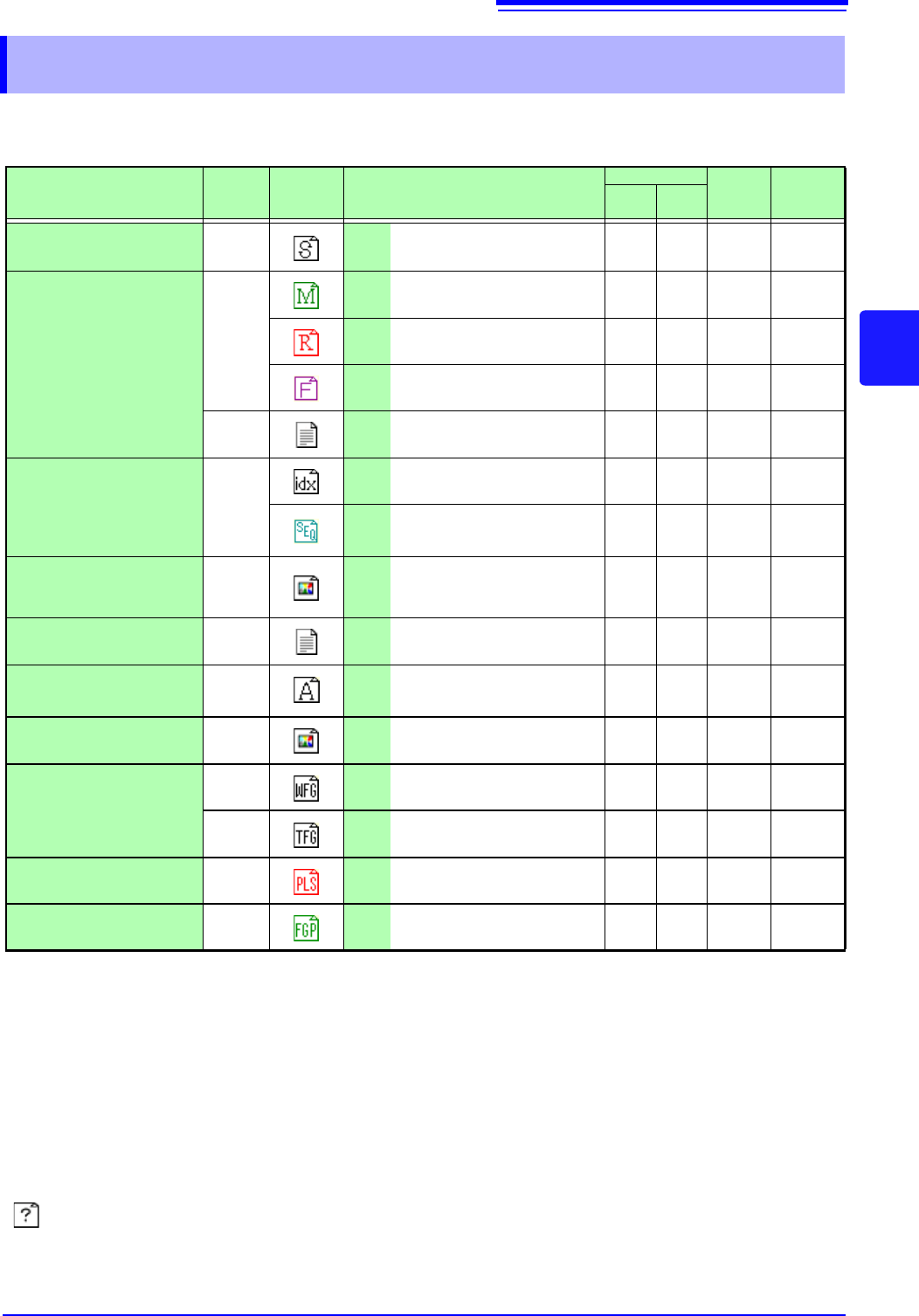
The following kinds of data can be saved by and loaded into the instrument.
4.1 Data capable of Being Saved & Loaded
Data the Instrument Can Save & Load O: Possible/ -: Not Possible
File Type
File
Format
Indica-
tion
File Extension & Description
Save
Load
PC
Readable
Auto
Man-
ual
Settings Data
*1
Binary SET
Settings data
(Measurement Configuration)
-O O -
Waveform Data
*2
Whole of the waveform ac-
quired by the instrument or a
section of the waveform spec-
ified with the A and B
cursors.
Binary
MEM
Memory Function
waveform data
OO O -
*4
REC
Recorder Function
waveform data
OO O -
*4
FFT FFT Function data O O O -
Tex t
CSV Text Data O O - O
Waveform
Management Data
*3
(Divided Saving)
(Index
file)
IDX Index data for divided saving O O O -
SEQ
Index data for memory divi-
sion (automatically created
during batch saving)
OO O -
Captured Screen Image
(Display/Waveform
screens)
BMP
*5
BMP Image Data - O - O
Numerical Calculation
Results
Tex t CSV Text Data O O - O
Waveform evaluation
settings Data
Binary ARE
Settings data (MR8741 only)
(measurement conditions +
waveform evaluation areas)
-O O -
Waveform evaluation
area
BMP BMP
Waveform evaluation area
image data (MR8741 only)
-O O O
Arbitrary
waveform data
Binary WFG
Arbitrary waveform data
(For U8793)
-O O -
Tex t
TFG
Arbitrary waveform data
(For U8793)
-- O O
Arbitrary
waveform data
Binary PLS
Pulse pattern data
(For MR8791)
-O O -
Generation
program data
Pro-
gram
FGP
Generation program data
(For U8793)
-O O -
*1: Multiple data can be saved in the instrument, and loaded selectively. Automatic loading at power-on is also possible.
*2: When the data is to be reloaded on the instrument, save it in binary format. Waveforms and some measurement set-
tings are saved.
When the data is to be loaded on a PC, save it in text format. (p.87)
When saving a section of a waveform, use the A and B cursors to set the section. (p.120), (p.124)
*3: When you want to use memory division and load all blocks at the same time:
Save measurement data using [All blocks]. A directory is automatically created and waveform data for each block
and index data (SEQ) is created. When loading, load this index data.
When loading waveform data of divided saving: Import the IDX index data.
*4: Loading is possible with the Wave Viewer (Wv).
*5: This is a standard Windows
®
graphics format. File in this format can be handled by many graphics programs.
: File type cannot be handled by MR8740/MR8741.

4.1 Data capable of Being Saved & Loaded
86
Data Not Loadable on the Instrument______________________________
• Data saved on devices other than the MR8740/MR8741 Memory HiCorder,
MR8847s Memory HiCorder, and MR8827 Memory HiCorder.
• Image files other than waveform evaluation areas (
)
• file
Files larger than 2 GB cannot be saved.