MR8740、MR8741_user_manual_eng_20191016H.pdf - 第57页
2.2 Connecting Cords 45 2 Chapter 2 Measurement Prep arations When measuring current with a 9018-50 Clamp On Probe You can use a voltage measuremen t unit such as the 8966 Analog Unit to make measuremen ts. For more info…
2.2 Connecting Cords
44
Attach to the measurement object
Connecting the 9769
1
Connect the 9769 to a terminal on the
module.
The orange section of the 9769 must
face up.
2
Connect the strain gauge transducer to
the conversion cable.
3
Attach to the measurement object.
Example: Connecting the 9769 Conversion Cable with the supplied conversion cable
Required item:
9769 Conversion Cable, strain gauge transducer
Connect to module's terminal
Connect to the strain gauge transducer
3
2
1
Applied voltage:
bridge voltage of 2 V
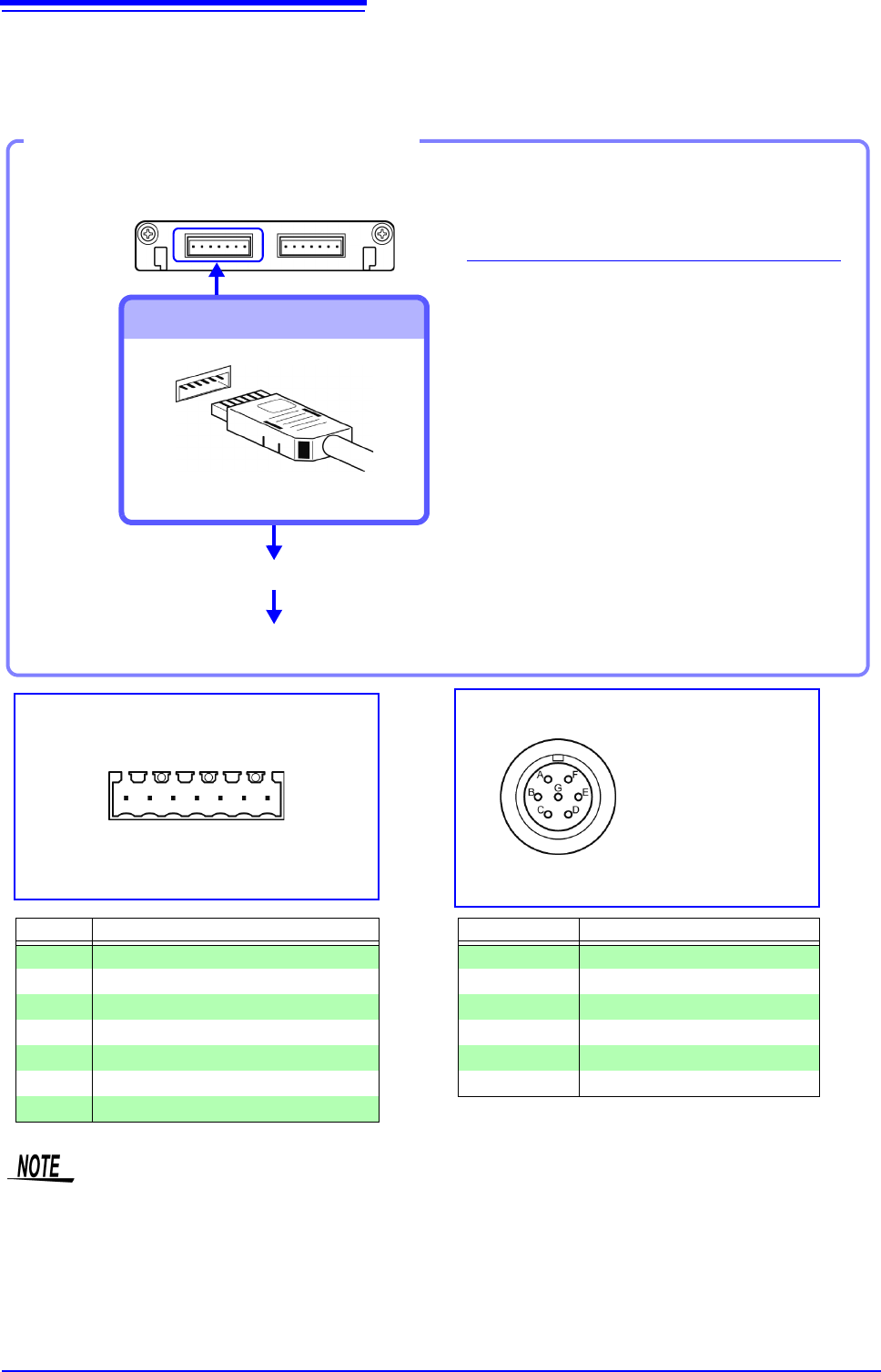
Connector Pinout of the 9769 on strain
gauge transducer side
The metal shell is connected to the GND
of Model 8969.
Connector Pinout of the 8969
(1 is on left when unit top side is facing up)
Pin No. Description
1 BRIDGE+
2 SENSE+
3 INPUT+
4 INPUT-
5 BRIDGE-
6 SENSE-
7 FLOATING COMMON
Pin Mark Description
A BRIDGE+
BINPUT-
C BRIDGE-
DINPUT+
E FLOATING COMMON
F, G N.C.
1234567
• Preforming measurement with a strain gauge requires a bridge box. Use a strain gauge and bridge box
both of which are commercially available.
• The bridge box may be susceptible to the effect of noise. For more information about how to ground the
bridge box, refer to its instruction manual or contact the manufacturer of the bridge box.
• Do not excessively bend the cable and the base between cable and connector, pull on them, nor twist
them. Doing so may cause the conversion cable to break.
8969 Strain Unit
Connection of Model L9769
• Pin F of the module end is connected with Pin A of the strain gauge transducer end.
• Pin G of the module end is connected with Pin C of the strain gauge transducer end.
2.2 Connecting Cords
45
2
Chapter 2 Measurement Preparations
When measuring current with a 9018-50 Clamp On Probe
You can use a voltage measurement unit such as the 8966 Analog Unit to make measurements. For more
information about how to configure the instrument for use in this type of application, see the example settings
in "7.4.1 Scaling Setting Examples" (p.150).
Applicable Modules
• Model 8971 Current Unit
Use to connect: Clamps
• Model 9272-10
Clamp On Sensor
• Model 9709, CT6862, CT6863,
CT6865
AC/DC Current Sensor
• Model CT6841, CT6843,
CT6844, CT6845
AC/DC Current Probe
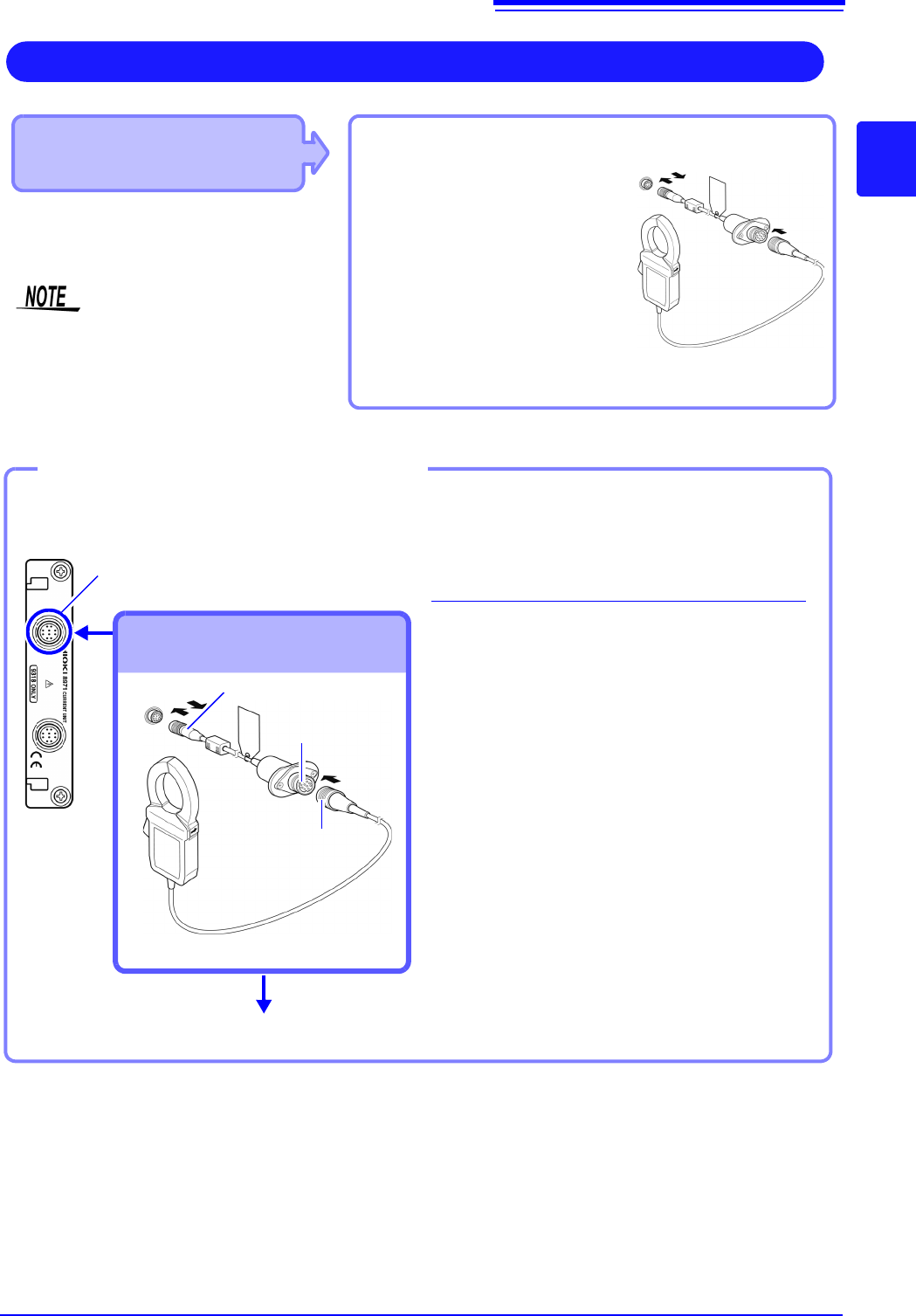
Example:
9272-10+9318
Measuring Current
Coneect Model 9318 Conversion Cable to
the module jack.
• 8971 Current Unit cannot be used with
MR8741.
• With MR8740, up to four 8971 Current
Units can be used.
1
Align the grooves of the unit sensor
connector and the conversion cable
plug. Insert the plug until it locks.
2
Align the grooves of the conversion
cable connector and the plug of the
clamp-on sensor to be used. Insert
the plug until it locks.
3
Connect the clamp sensor to the item
to be measured.
To disconnect the conversion cable:
Slide the plug to release the lock and
then unplug the cable.
Example: When connecting the 9272-10 Clamp On Sensor
Required item:
9318 Conversion Cable、9272-10 Clamp On Sensor
Sensor connector
Connect to module's terminal
Attach to the measurement object
Connecting the 9318 Conversion
Cable and clamp
Conversion cable
connector
2
1
Conversion cable plug
Model 9272-10
Clamp-on sen-
sor plug
3
2.2 Connecting Cords
46
Acceleration sensor connectable with Model U8979
Measuring acceleration
Connect a acceleration sensor to Model U8979 Charge Unit.
Familiarize yourself with "Handling the Instrument and Modules" ( p.9) before connecting a current sensor.
Applicable Modules
• Model U8979 Charge Unit
The following device can be connected to the module.
• Acceleration sensor (Not available from Hioki)
Use an acceleration sensor with a built-in pre-amplifier that conforms to the
specification of Model U8979 Charge Unit. Using an inapplicable sensor may
cause damaging itself.
Acceleration sensor type Terminal the sensor is connected
to
Note
With a built-in pre-amplifier BNC connector Drive power: 3.5 mA, 22 V
Charge output Miniature connector (#10-32) –
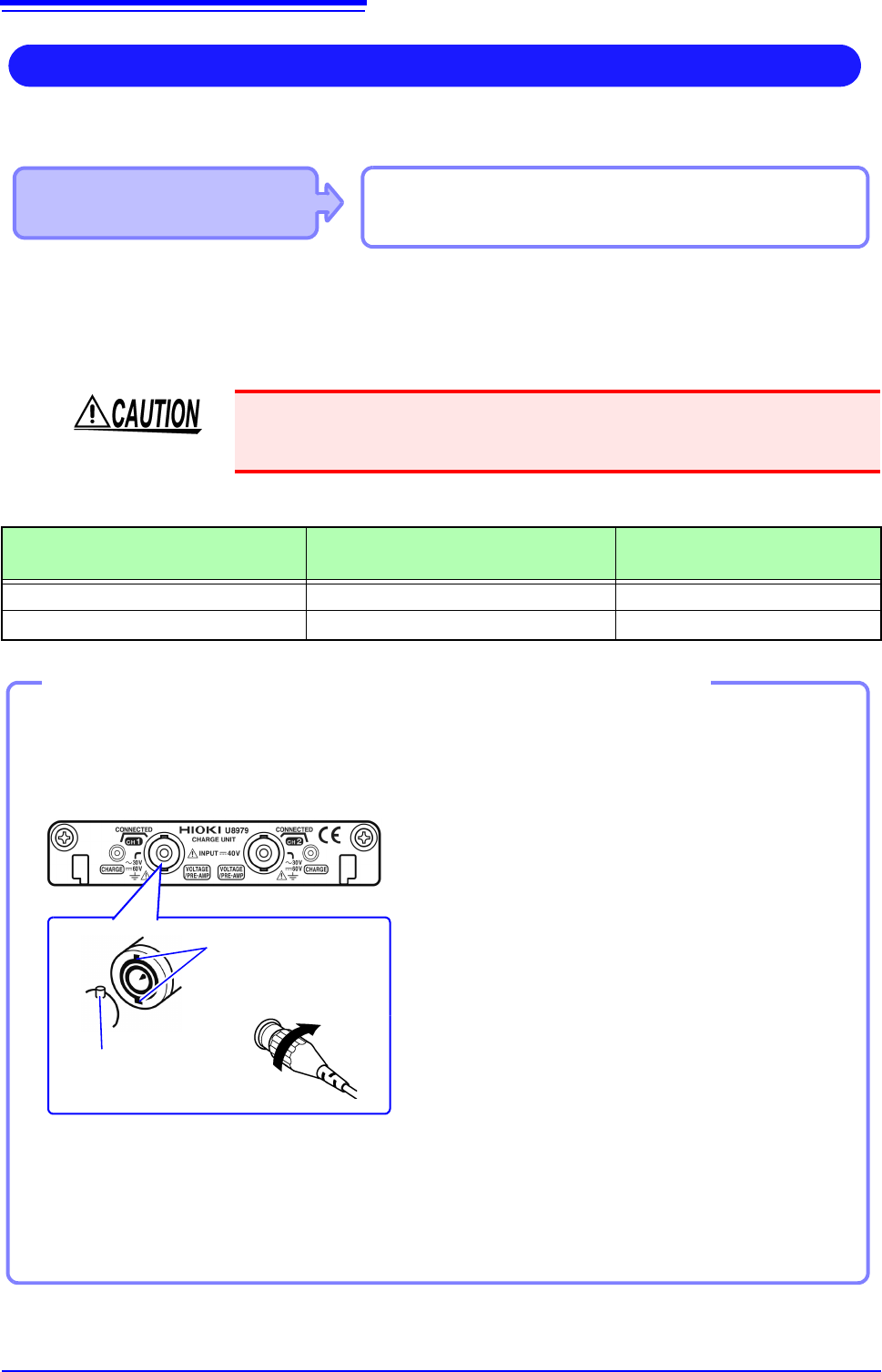
1
Align the slots in the BNC connector
of anacceleration sensor with the
locking studs of a BNC connector on
the module, and insert the connector.
2
Turn the BNC connector of the accel-
eration sensor clockwise until it locks.
3
Attach the acceleration sensor with
the built-in pre-amplifier to a measure-
ment target.
Connecting a BNC-output acceleration sensor with a built-in pre-amplifier
Connecting an acceleration sensor with a built-in pre-amplifier
Model U8979 Charge Unit
Locking studs of
module side Locking
studs
BNC connector slots
Lock
1
2
Connecting an acceleration sensor other than a sensor with a built-in pre-amplifier
Convert the output connector into the BNC connector using a commercially available conversion con-
nector or conversion cable to connect the sensor.
How to remove the acceleration sensor
Turn the BNC connector of the acceleration
sensor counter-clockwise to release the lock
and remove the connector.