MR8740、MR8741_user_manual_eng_20191016H.pdf - 第165页
7.4 Converting Input Values (Scaling Function) 153 6 Chapter 7 Utility Functions 7 object. The conversion method depe nds on the conditions in which the strain gauge is used. See: "Appendix 2.6 Scaling Method Whe n …
7.4 Converting Input Values (Scaling Function)
152
When a calibration factor is stated in the strain gauge transducer inspec-
tion records ________________________________________________________
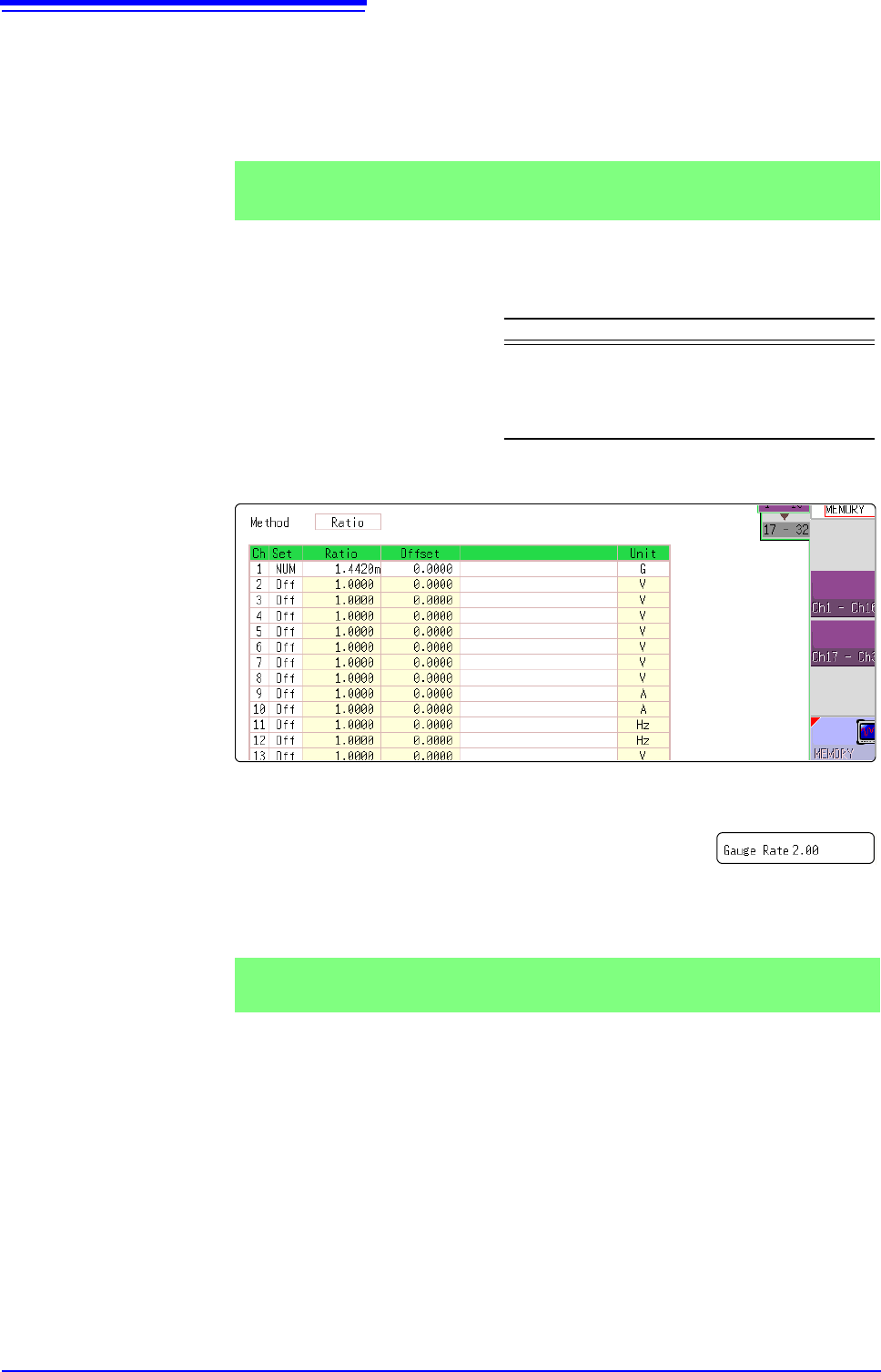
Set the [Method] item on the [Scaling] sheet to [Ratio].
The value of the calibration factor (0.001442 [G]) is set as the conversion ratio.
(* 10
-6
strain = )
Move the flashing cursor to the channel to set, and making settings as follows.
Using a strain gauge with a Gauge Factor other than 2.0_______________
The 8969 or U8969 Strain Unit measures the Gauge Rate
as 2.0.
When using the other strain gauge, the Gauge Factor
needs to be set as the conversion ratio. For example, if the
Gauge Factor is 2.1, the conversion ratio is 0.952 (2
÷2.1).
The scaling (conversion ratio) needs to be calculated to include both Gauge Fac-
tor and physical value conversions. In this case, the conversion ratio setting is
the product of the conversion ratios of the Gauge Factor and measurement unit
scaling.
The Gauge Factor component of the conversion ratio is 0.952, and the physical
value component is 0.001442*
Conversion Ratio = 0.952 x 0.001442 = 0.0013728
As in Example 3, enter [0.0013728] as the conversion ratio.
* To convert measurement values to physical values when using a strain gauge,
calculate using the Young's modulus or Poisson's ratio of the measurement
Example 3
Measure using a strain gauge transducer with a calibration factor of
0.001442 G / 1 x 10
-6
strain
*
, and display the measured data in [G] units.
Setting Items Setting Choice
Disp NUM
Unit G
Ratio
(Conversion ratio)
0.001442 [G]
(displays as 1.4420m)
This value cannot be
changed.
Example 4
Measure using a strain gauge (2.1 Gauge Factor), and display the mea-
sured data in [G] units.
7.4 Converting Input Values (Scaling Function)
154
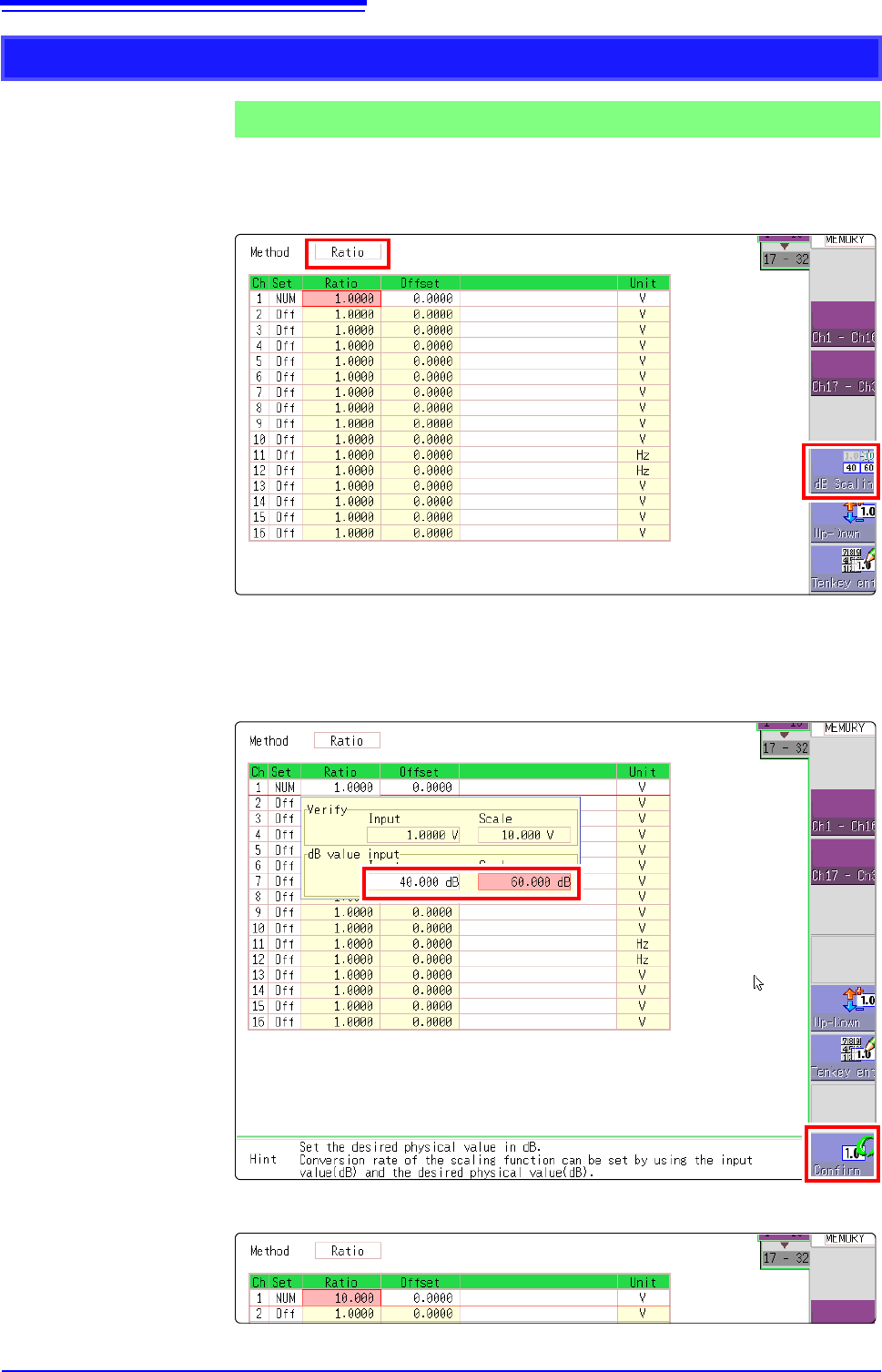
1. For scaling, set the [Method] to [Ratio].
2. Point the flashing cursor to the conversion rate setting and select [dB Scal-
ing].
3. In the displayed entry field and physical quantity field, enter 40 dB and 60 dB,
respectively.
After entering the values, select [Confirm].
See: "7.1.3 Alphanumeric Input" (p.141)
The conversion rate for the entered dB value is entered. (The offset becomes 0.)
Using the dB value
Example 5
Acquiring the conversion rate to convert 40 dB input to 60 dB
1
2
2