MR8740、MR8741_user_manual_eng_20191016H.pdf - 第338页
15.2 Performing Remote Operations on the Instrument (Use an Internet Browser) 326 You can specify strings to be used as ti tle co mment, logic channel comment, and analog ch annel comment. Information about the module ty…
15.2 Performing Remote Operations on the Instrument (Use an Internet Browser)
325
12
Chapter 15 Connection to a Computer
14
15
Acquiring data by communication commands ______________________
Transferring storage data (measurement values)
Use :MEMory:VDTA? A.
Transferring storage data in binary format
Use :MEMory:BDATA? A.
Procedure
1
:MEMory:MAXPoint?
The number of data samples stored in the memory of the instrument is acquired.
Check that storage data exists.
2.
:MEMory:POINt CH$,A
The output point of the storage data is specified.
(If you want to acquire the data from the beginning, change the value of A to 0.)
3.
:MEMory:VDATA? A
Just the number of data samples of the storage data (measurement values) specified with A is transferred
from the instrument to the computer. The output point is also incremented by the number of data samples.
• From 1 to 80 values can be acquired at one time with the VDATA command. If
you want to acquire more values than that, send the command in step
3
repeatedly.
• The maximum number of data samples that can be acquired is the value
acquired with the MAXPoint command.
Procedure
1
:MEMory:MAXPoint?
The number of data samples stored in the memory of the instrument is acquired.
Check that storage data exists.
2.
:MEMory:POINt CH$,A
The output point of the storage data is specified.
(If you want to acquire the data from the beginning, change the value of A to 0.)
3.
:MEMory: BDATA? A
Just the number of data samples of the storage data (binary) specified with A is transferred from the instru-
ment to the computer. The output point is also incremented by the number of data samples.
• From 1 to 400 values can be acquired at one time with the BDATA command.If
you want to acquire more values than that, send the command in step
3
repeatedly.
• The maximum number of data samples that can be acquired is the value
acquired with the MAXPoint command.
• #0 (indicates binary format) is added to the beginning of the output data.
• After #0, the storage data is transmitted two bytes at a time.
15.2 Performing Remote Operations on the Instrument (Use an Internet Browser)
326
You can specify strings to be used as title comment, logic channel comment, and analog channel
comment.
Information about the module type and channel (installation location in the instrument) can be
obtained and used only for the respective channel.
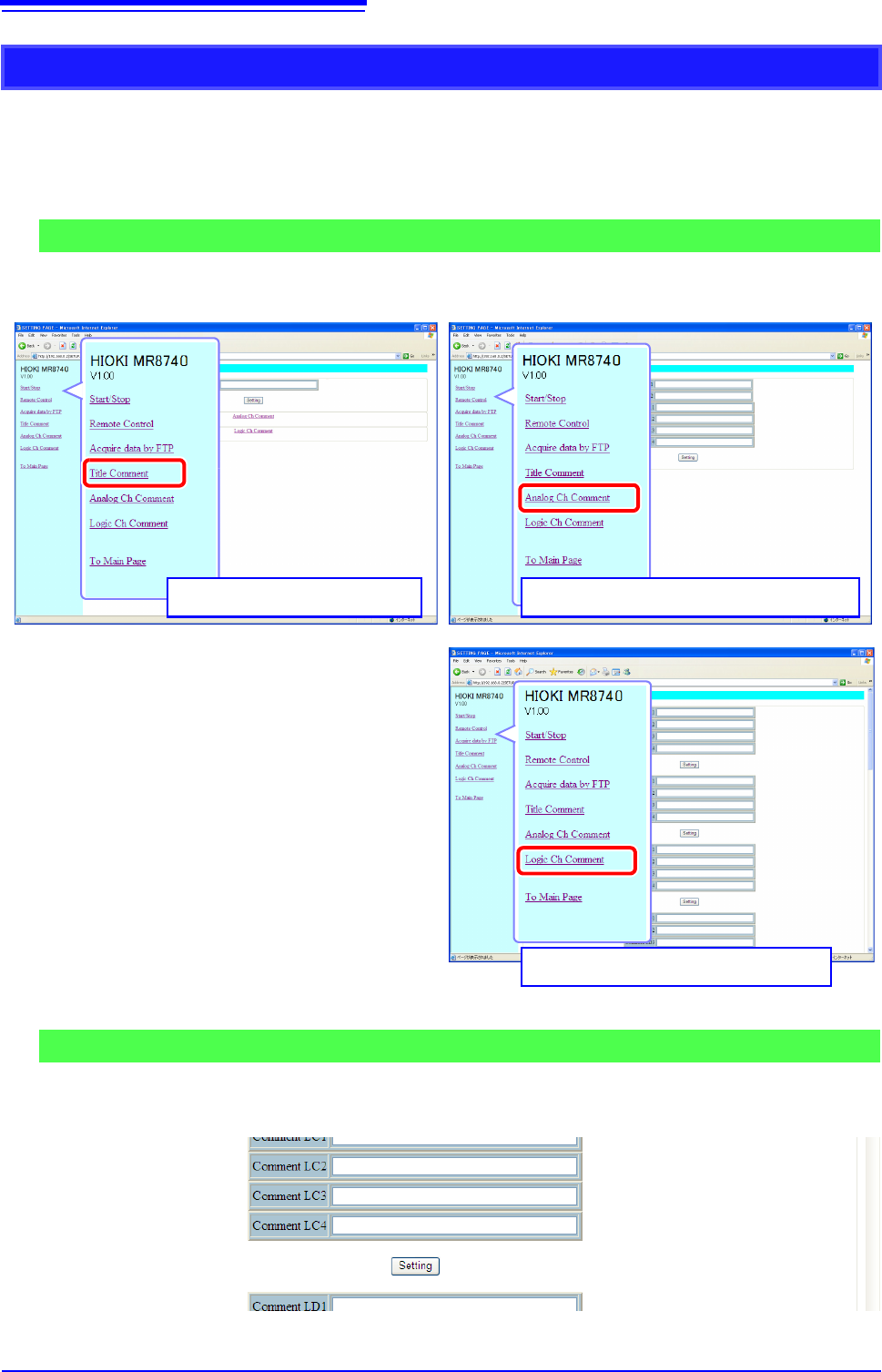
To open the screen: Click [Title Comment], [Analog Ch Comment], or [Logic Ch Comment] on list of
operations.
Enter a string in the comment input field and click the [Setting] button.
The comment string can be up to 40 characters long.
Entering a Comment
Comment Setting Screen
Analog Channel Comment Setting Screen
Title Comment Setting Screen
Logic Channel Comment Setting Screen
Procedure
15.3 Accessing the Files on the Instrument From a Computer (Using FTP)
327
12
Chapter 15 Connection to a Computer
14
15
By using a PC FTP client, you can transfer files from the instrument's media to the PC and perform
other file operations.
• This instrument is equipped with an FTP (File-Transfer-Protocol, RFC959
compliant) server.
• You can use Internet Explorer
or other popular FTP clients.
To use FTP, the instrument must be properly set up and connected via LAN cable to
the PC.
See: "15.1.1 Making LAN Settings at the Instrument" (p.314)
"15.1.2 Connecting Instrument and PC With LAN Cable" (p.318)
Relationship Between
Storage Media and
Directories
Each of the various types of storage media appears as a directory on the FTP
server.
/RAM ............... Internal memory
/USB1.............. USB memory stick
/STORAGE ....... Storage memory
Limitations • During measurement, file access is not possible.
• Storage data can be forwarded directly to the PC.
The STORAGE folder will be displayed when there is a storage waveform.
After storage, the following files can be stored in the STORAGE folder:
• Setting file
• Waveform binary file (data.xxx extension, based on the function, are mem,
rec, xyc, and fft)
• Waveform text file(data.csv)
15.3 Accessing the Files on the Instrument From
a Computer (Using FTP)
• The FTP server of the instrument allows only one connection at a time. More
than one PC cannot access the server simultaneously.
• If no command is sent from a PC for more than one minute after connecting to
the FTP server, the FTP may disconnect the PC. Reconnect the FTP.
• FTP operation will be interrupted when measurement is started.
• Before inserting or removing a USB memory stick, terminate the FTP connection.
• Do not perform file operations while FTP is being used.
• With Internet Explorer
, the refresh date of files may not match those of the
main instrument.
• With Internet Explorer
, temporary internet files may retain data from their previ-
ous access, so the previous data may be obtained instead of the newest data.
Be careful when moving files by FTP, as some FTP client/browser programs may
delete all selected files or folders from the source if you cancel a transfer before
completion. Rather than moving files in one step, we recommend copying
(downloading) and then manually deleting from the source.
Things to Check Before Using FTP
About the Storage Folder
• lData between the AB cursors will be saved when the time axis/trace cursor is
displayed.
• lData for the channel which is ON will be saved.
• lWaveform for the block which is displayed during memory division will be displayed.
• lThinning setting will not be considered during text saving. All data is saved at
all times.