MR8740、MR8741_user_manual_eng_20191016H.pdf - 第260页
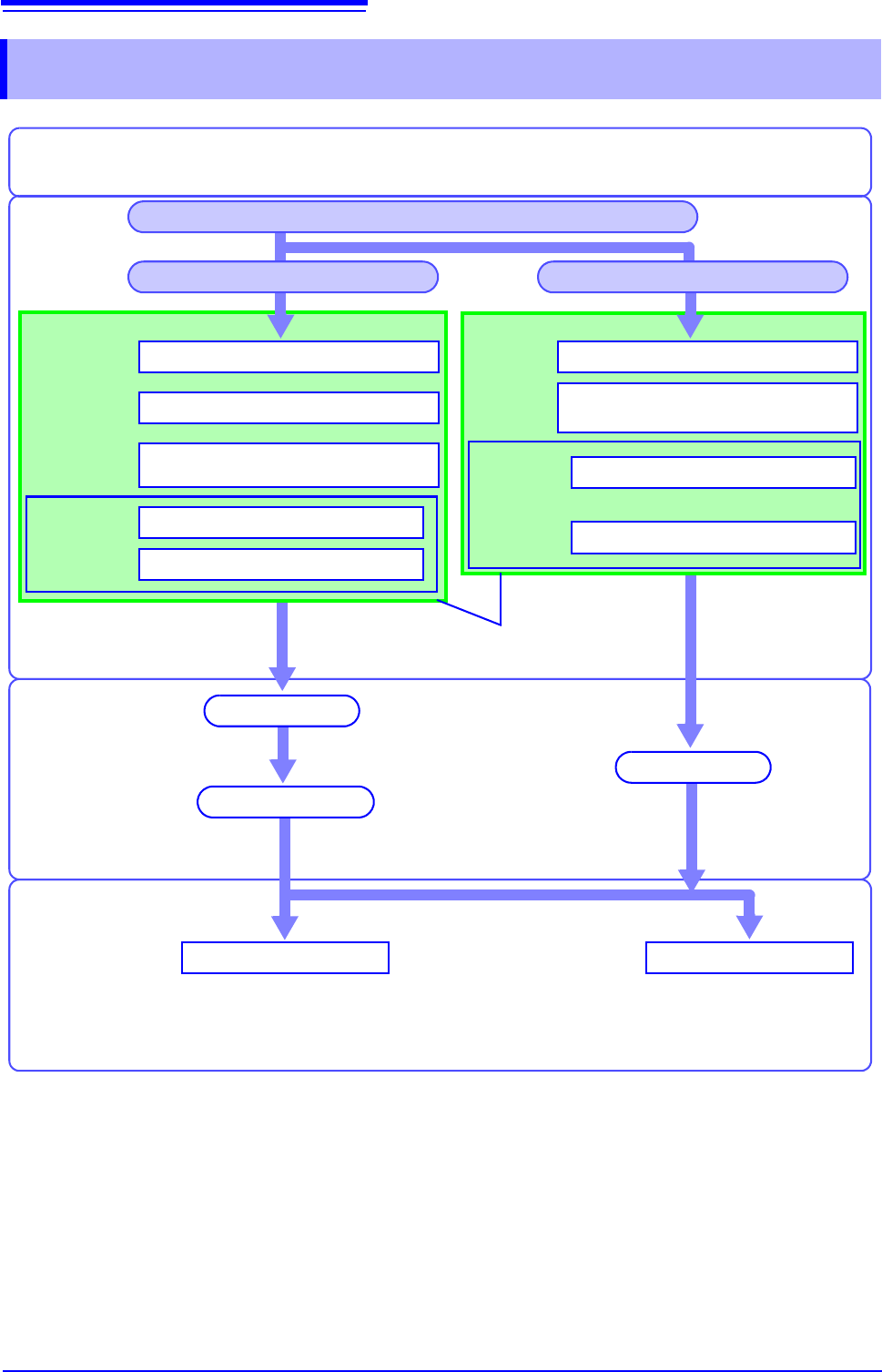
12.2 Operation Workflow 248 12.2 Operation Workflow Recording and Calculation Settings Set FFT analysis (p.24 9) Set the input channel (p.266) *1 Set trigger criteria (p.189) *1 Analysis and Saving Save Analyze [Exec] or…
12.1 Overview and Features
247
11
Chapter 12 FFT Function
12
FFT analysis can only be used with the FFT function.
The FFT (Fast-Fourier Transform) functions provide frequency analysis of input signal data.
Use these functions for frequency analysis of rotating objects, vibrations, sounds and etc.
For details, refer to "Appendix 4 FFT Definitions" (p.A13).
Analysis can be performed on data as it is being measured, on pre-existing analog waveform data previ-
ously acquired with the Memory function, and on data output from waveform calculations.
When Model 8968 High Resolution Unit or Model U8979 Charge Unit, each of which is equipped with the
anti-aliasing filter, is used, the cut-off frequency can be set automatically by linking with the frequency
range setting.
Major Features
•FFT analysis frequency range: 133 mHz to 8 MHz
•FFT Analysis Modes (16 types)
* Not available when using external sampling.
For phase spectra, only the required phase information is highlighted and displayed.
See:"12.3.8 Emphasizing Analysis Results (phase spectra only)" (p.259)
so, when performing FFT analysis with the instrument connected to a sound level or vibration meter, scal-
ing by dB can be set from the Channel Settings screen if you want to read values directly in calibrated
units of measurement.
See:"Scaling" (p.266)
Refer to the "17.2.3 FFT Function" (p.346) for FFT function specifications.
FFT Function
Chapter 12
12.1 Overview and Features
• Storage Waveform • Cross-power Spectrum
• Histogram • Impulse Response
• Linear Spectrum • Coherence Function
• RMS Spectrum • Phase Spectrum
• Power Spectrum • Auto-correlation Function
• Power Spectrum Density* • Cross-correlation Function
• LPC analysis (Power Spectrum
Density)
*
• 1/1 Octave Analysis*
• Transfer Function • 1/3 Octave Analysis*
To suppress the effects of aliasing distortion
• We recommend using Model 8968 High Resolution Unit that are equipped with anti-aliasing filter-
ing to suppress the effects of aliasing distortion when sampling.
• FFT analysis cannot be performed for MR8990 Digital Voltmeter Unit.
See: Aliasing Distortion and Anti-Aliasing Filters
"Appendix 4 FFT Definitions" (p.A13)
12.2 Operation Workflow
248
12.2 Operation Workflow
Recording and
Calculation
Settings
Set FFT analysis (p.249)
Set the input channel (p.266)*1
Set trigger criteria (p.189) *1
Analysis and
Saving
SaveAnalyze
[Exec]
or
[START]
Waveform screen
Installation & Connections
"Chapter 2 Measurement Preparations" (p.35)
See: "12.6 Saving Analysis
Results" (p.272)
See: "12.7 Analysis with the
Waveform Screen" (p.273)
Settings for saving (p.272) *1, *2
Set the screen layout of the
Waveform screen (p.267)
Turn Power On
Finish by clicking [STOP] or automatically
(depending on trigger settings)
*1: Settings are the same as for the Memory function.
*2: Even after analysis, save settings can be set manually.
Finished Recording
Recording Starts
Measure with New Settings Measure with Existing Settings
Set as occasion demands.
Set FFT analysis (p.249)
[START]
Calculation occurs after acquiring the
waveform.
FFT calculation
Set up input channels (p.266)*1
Set the screen layout of the
Waveform screen (p.267)
Settings for saving (p.272)*1, *2
About internal
operation
"Trigger Modes and Aver-
aging" (p.258)
[Status]
sheet
Set the Function to FFT (p.249)
[Status] sheet
Channel set-
tings window,
[Each Ch]
sheet
[Status] sheet
Trigger set-
tings window
[File Save]
sheet
Channel set-
tings window,
[Each Ch]
sheet
[File Save]
sheet
12.3 Setting FFT Analysis Conditions
249
11
Chapter 12 FFT Function
12
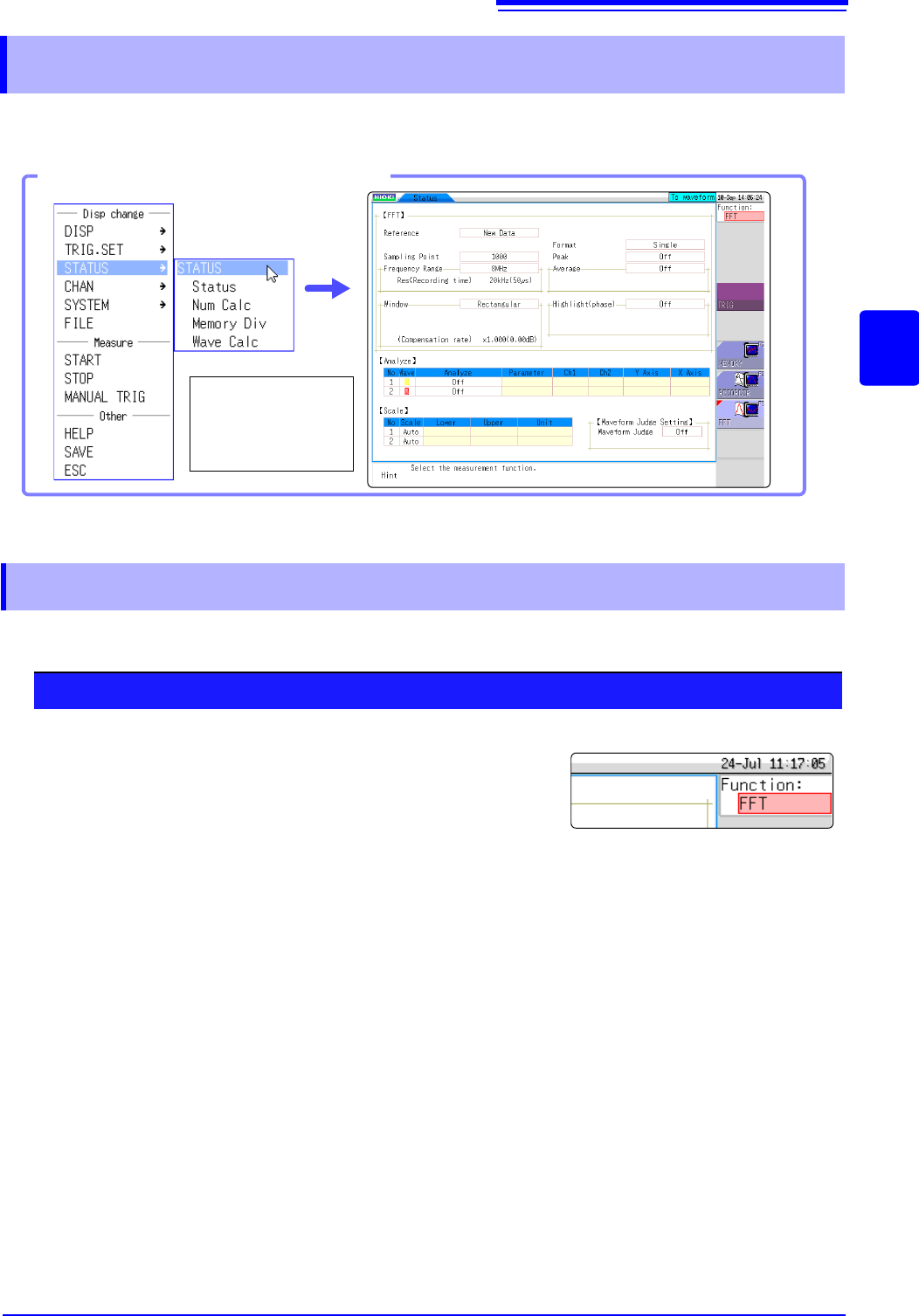
Basic measurement configuration settings are performed on the Status screen-[Status] sheet. Measure-
ment configuration can be performed from the Waveform screen
(p.265).
The FFT function can be selected at screens other than the file screen.
12.3 Setting FFT Analysis Conditions
Opening the [Status] sheet
Select [STATUS]
and then [Status]
from the right-click
menu.
12.3.1 Selecting the FFT Function
Procedure
1
Move the flashing cursor to the function item (the upper most
column of the Settings window).
2
Select [FFT].