MR8740、MR8741_user_manual_eng_20191016H.pdf - 第107页
4.2 Saving Data 95 4 Chapter 4 Saving/Loading Dat a & Managing Files • If the MR8990 is inst alled, one data ite m more than the number of data items specified with the A and B cursors may be saved. • T he data that …
4.2 Saving Data
94
4
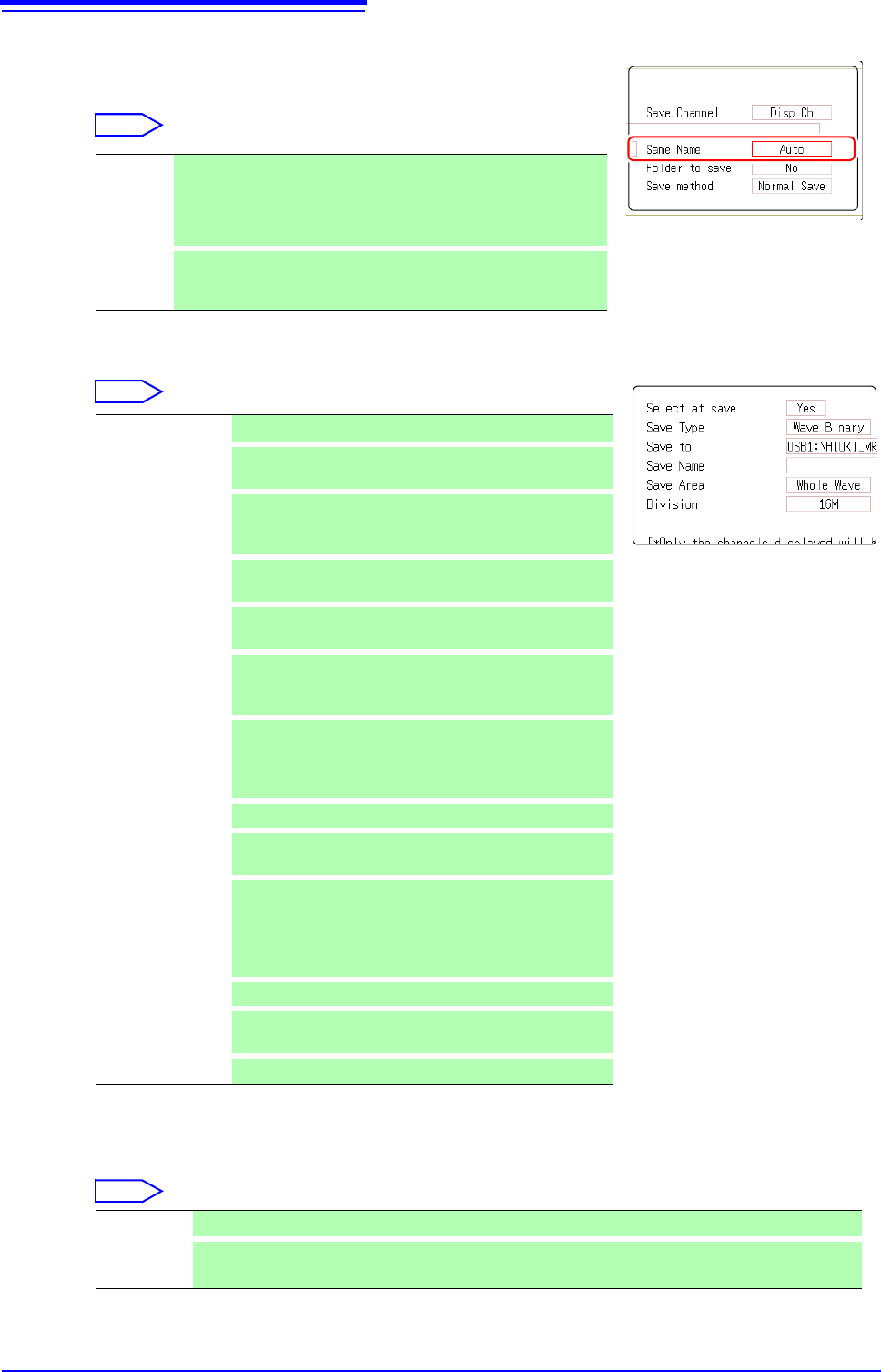
Specify the action if a file with the same name exists in the
target folder.
Move the cursor to [Same Name].
Select
5
Set the data to save.
Move the flashing cursor to the [Save Type]
item.
Select
6
(When Wave Binary or Wave Text was selected)
Set the save area.
Move the flashing cursor to the
[Save Area] item.
Select
The channel displayed on the screen will be saved.
Auto If no files with the same name exist, saves the file with the desig-
nated name. Otherwise, a 4-digit number is automatically added to
the beginning of the file name (default setting).
If the first character of the file name is a numeral, the added num-
ber will continue sequentially from that number.
Serial
Unconditionally, a 4-digit number is automatically added to the be-
ginning of the file name. If a file with the same name exists, saves
the file, adding the 4-digit number that is increased by 1.
Set Save the settings data.
Wave
Binary
Save waveform data in binary format.
Select this to reload the waveform into the instrument.
Wave Text
Save waveform data in text format.
Select this to use the waveform in a PC. (Memory/Record-
er/FFT Function only)
ALL-Wave Bin
Data of all blocks is saved in binary format. (Only when the
memory division setting is On.)
ALL-Wave Txt
Data of all blocks is saved in text format. (When the mem-
ory division setting is On)
Screen Copy
Save screen display data as a BMP file.
Data saved in BMP format can be displayed on a PC with
image viewing software.
Wave Image
Convert the waveform data to a paper image and save it
in BMP format.
Data saved in BMP format can be displayed on a PC with
image viewing software.
Calc Result
Save the numerical calculation results. (Memory Function only)
Waveform evalua-
tion setting
Save settings data and waveform evaluation areas.
(MR8741 only)
Waveform evalua-
tion area
Save evaluation areas created with the waveform evalua-
tion function as black-and-white BMP files. Saved data
can be edited on a computer and loaded back into the in-
strument. (MR8741 only)
Edit images in black and white only.
Pulse pattern
Saves pulse patterns registerd in the MR8791.
Arbitrary wave-
form
Saves arbitrary waveforms registered in the U8793.
Program
Saves program data registered in the U8793.
Whole Wave Save all recorded data.(default setting)
A-B Wave Data between the A/B cursor pair are saved. If only cursor A is used, all data after the cursor are saved.
(A/B Cursor Specification Method (p.124))
6
5
4.2 Saving Data
95
4
Chapter 4 Saving/Loading Data & Managing Files
• If the MR8990 is installed, one data item more than the number of data items
specified with the A and B cursors may be saved.
• The data that is measured and saved with the MR8990 will be the same data
twice in a row.
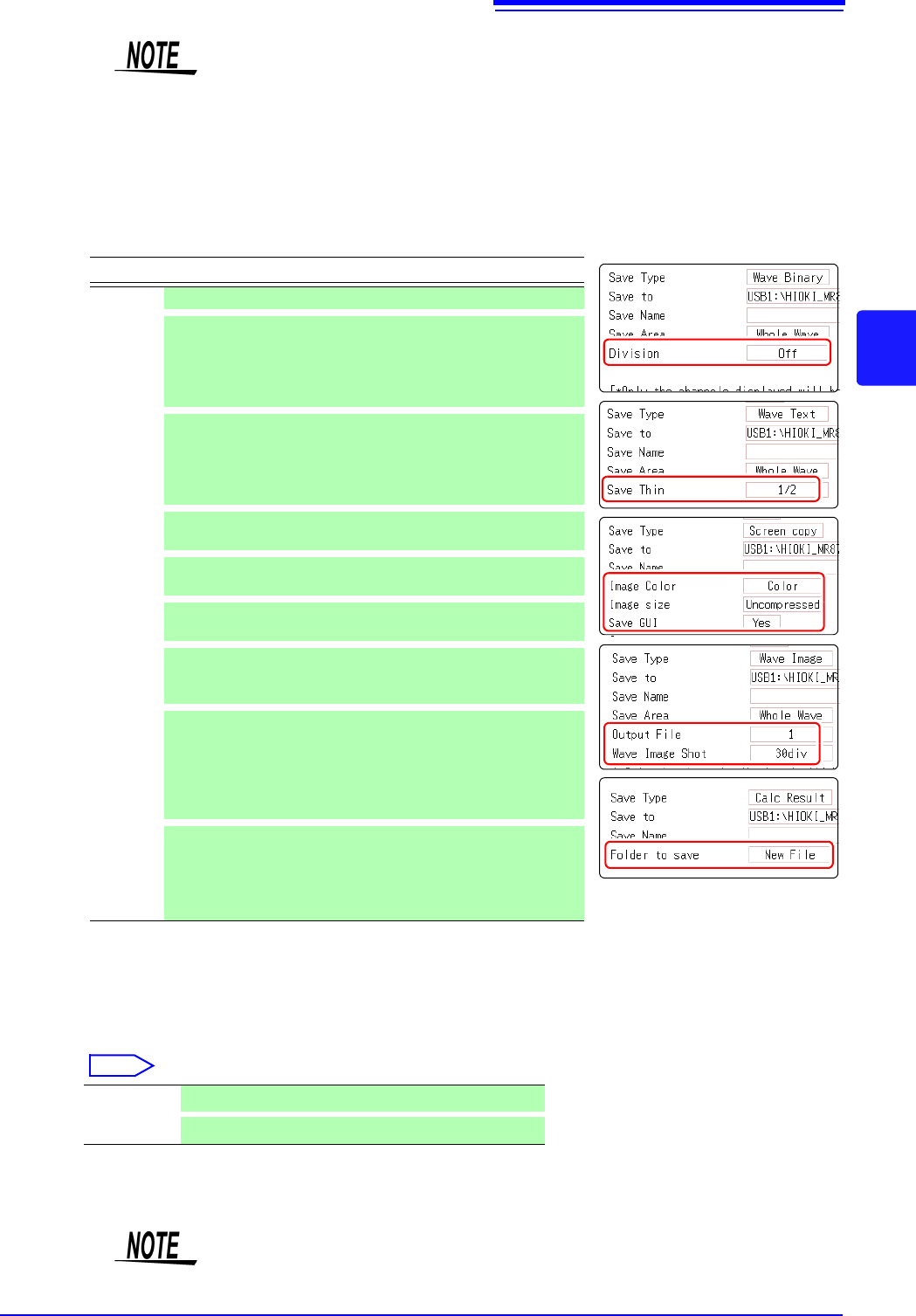
7
Making advanced settings
Available settings will differ, depending on the save type. Refer
to the table below.
8
(For memory function)
When using the memory division function
Select the blocks to be saved
Move the flashing cursor to the [Save Block].
Select
This completes the data save settings. When [SAVE] is clicked,
the saving operation will use these settings.
Save Type Settings Description
Setting - -
Wave
Binary
Division (Off, 16 M, 32 M, 64 M)
Select this to divide a large file into several files for
saving.
A folder with the specified name is created and data
are saved as multiple files in that folder.
Wave Text
Save Thin (Off, 1/2 to 1/1000)
Select this to use thinning (sub-sampling) when sav-
ing data.
Only a specified subset (one out of several data) is re-
tained.
Screen
Copy
(Hard
copy of
the
display)
Image Color (Color, Gray, Mono, Mono (Rev))
Specifies the color for the created image file.
Image
size
(UnCompressed, Compressed)
Determines whether the image file is compressed.
Save GUI (Yes, No)
Determines whether the GUI section is also saved.
Wave
Image
(Print
Image)
Output File (All, 1 to 250)
Specifies the number of files to save.
(Memory Function and Recorder Function)
Wave Image
Shot
(1 to 60 div)
Specifies the data volume per file.
If the number of measurement data is lower than the
number of selected divisions, only the number of
measurement data will be saved. (Memory Function
and Recorder Function)
Calc
Result
Folder to
save
(New File, Existing File)
Determines whether data are saved under a new file
name every time (with automatically incremented
number if the same file name exists), or appended to
the same file.
All Blks Blocks with waveforms are all saved.
Start-End
All used blocks from the start block are saved.
If [Image size] is used when saving a display image file, the image may not be
viewable with some image viewer applications.
4.2 Saving Data
96
For details on mouse operations for basic file screens, see "1.5.7 File Operations" (p.34).
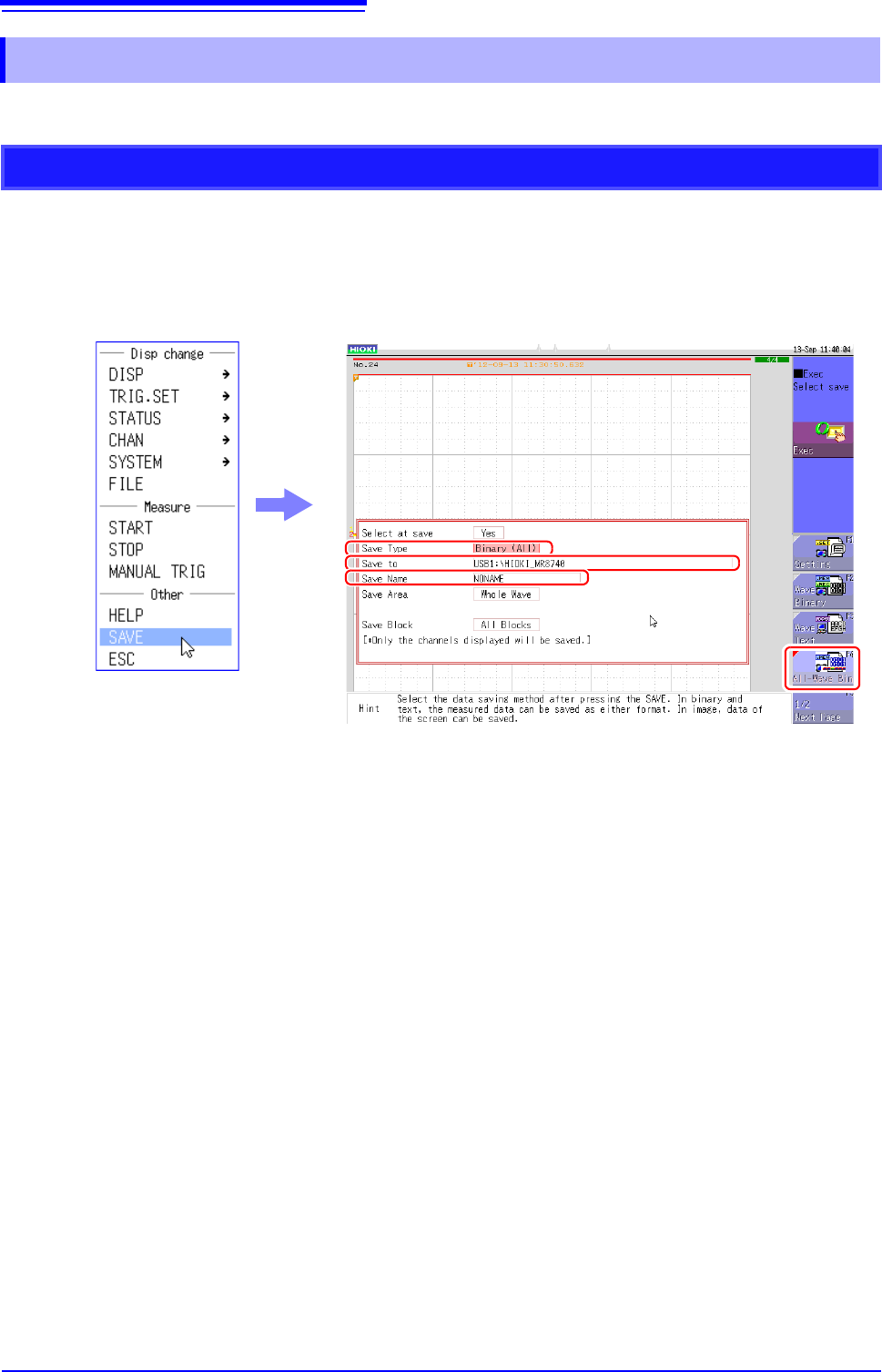
4.2.4 Saving Example (Saving for Memory Division)
Saving a Memory Division Waveform File
1
Configure the memory division settings, and then perform measurement.
See: "Chapter 11 Memory Division Function" (p.241)
2
Right-click to display the list menu, and then click [SAVE].
3
Set [Save Type] to [ALL-Wave Bin].
(The setting item indication is "ALL Bin".)
If you select [Wave Binary] instead of [ALL-Wave Bin] here, the data of the currently displayed
block is saved.
4
Set [Save To].
See: "4.2.3 Saving Data Selectively (SAVE)" (p.93)
5
Set [Save Name].
See: "4.2.3 Saving Data Selectively (SAVE)" (p.93)
3
4
5