MR8740、MR8741_user_manual_eng_20191016H.pdf - 第54页
2.2 Connecting Cords 42 Applicable Modules • 8967 TEMP Unit Use to connect: Thermocouple (Compatible wire: AWG 16 to 26, 0.4 to 1.2 mm diameter) Connect to terminal block Measuring T emperature Connect to the terminal bl…
2.2 Connecting Cords
41
2
Chapter 2 Measurement Preparations
Applicable Modules
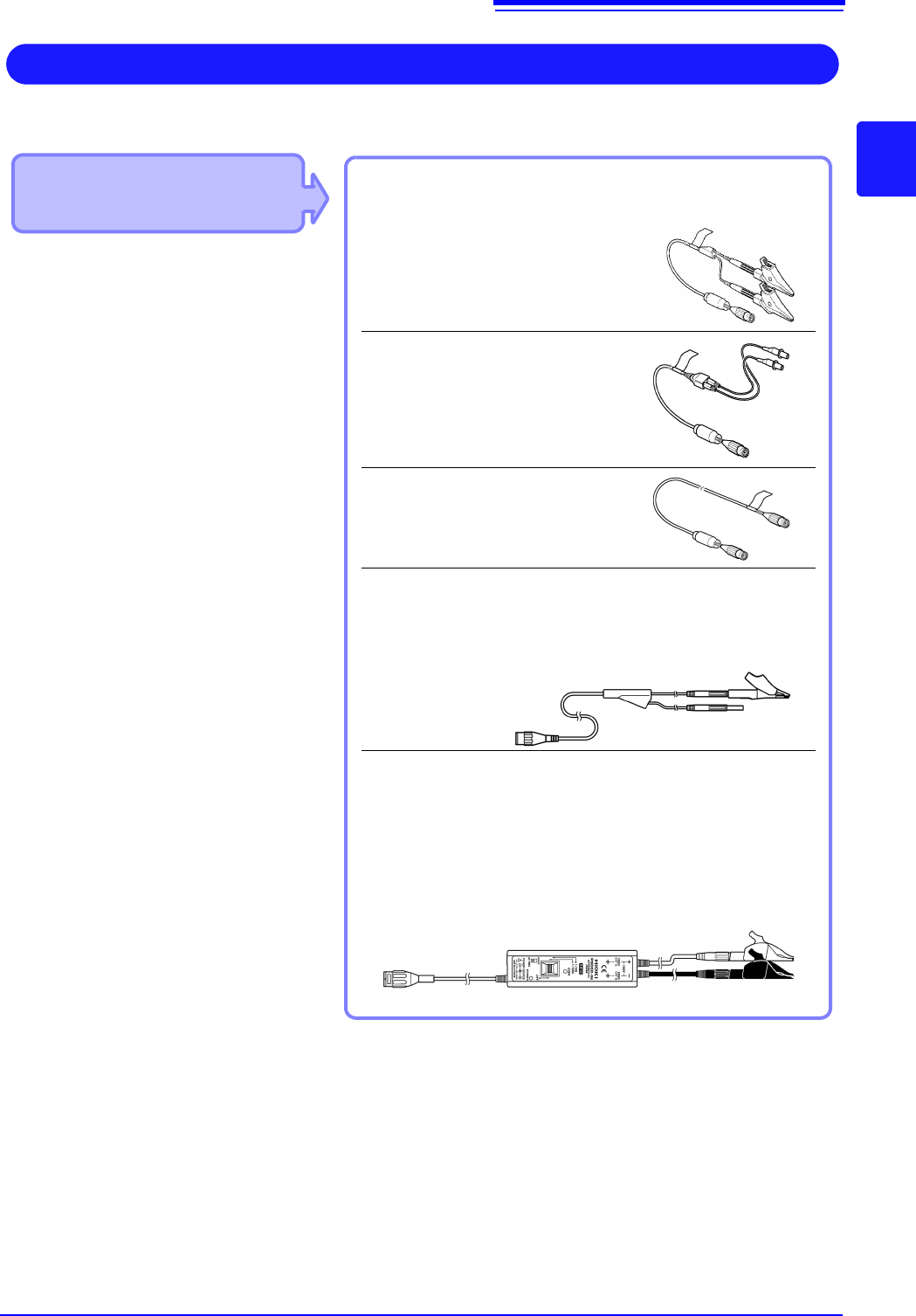
• Model 8970 Freq Unit
Use to connect: Connection cords
• L9197 Connection Cord
(Maximum input voltage: 600 V)
Large alligator clip type
• L9198 Connection Cord
(Maximum input voltage: 300 V)
Small alligator clip type
• L9217 Connection Cord
(Maximum input voltage: 300 V)
For measuring BNC output
• IModel L9790 Connection Cord
(Maximum input voltage: 600 V)
Terminal type: Alligator, contact, grabber
Example: Terminal type: Alligator
IIf the voltage to be measured exceeds the maximum input rating
of the module being used
• Model 9322 Differential Probe
*1
• Model 9665 10:1 Probe
• Model 9666 100:1 Probe
• Model P9000-01/-02 Differential Probe
*2
Example: Model P9000-02 Differential Probe
Measuring Frequency, Number of Rotations and Count
Connect to the BNC jack on a module.
*1 An optional power cord or AC adapter is re-
quired.
*2 An optional AC adapter or a commercially
available USB cable is required.
Refer to (p.40) for details about connecting to BNC terminals.
2.2 Connecting Cords
42
Applicable Modules
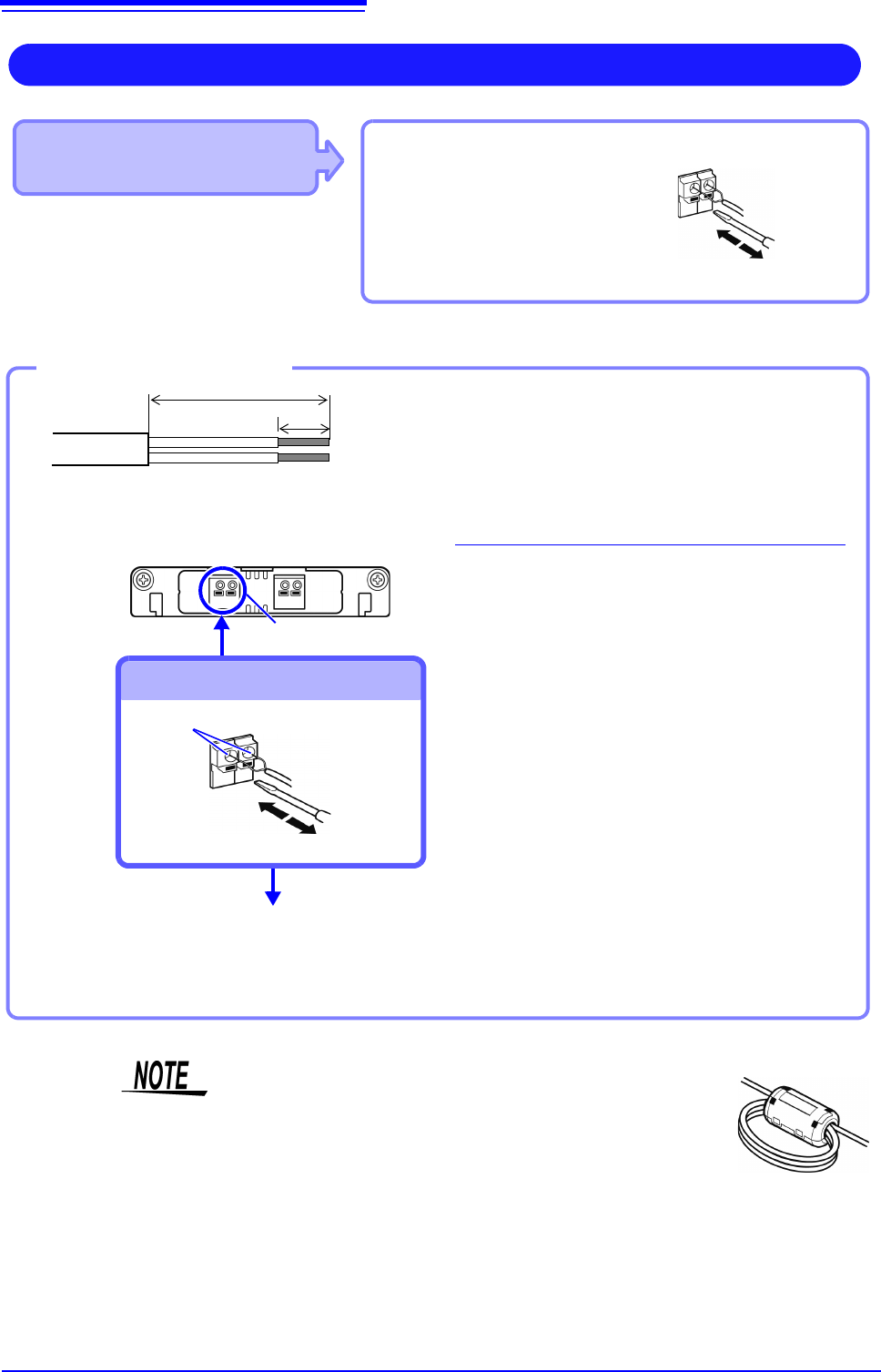
• 8967 TEMP Unit
Use to connect: Thermocouple
(Compatible wire: AWG 16 to 26, 0.4
to 1.2 mm diameter)
Connect to terminal block
Measuring Temperature
Connect to the terminal block on the input
module.
Terminal Block
Connection Holes
Insert to terminal block
Outer Insulation
10 mm
25 mm
Thermocouple
single wires
Inner insulation
Attach to the measurement object
Inserting a Thermocouple
2
1
3
4
5
1
Strip insulation from the thermocouple
wires as shown at the left.
Stripping length: approx. 10 mm
2
Push the blade of a flat screwdriver
into the button on the terminal block of
the module.
3
Insert each thermocouple wire into the
appropriate terminal hole while press-
ing the button.
Confirm proper polarity.
4
Release the button.
The thermocouple is connected.
5
Attach to the measurement object.
To remove the thermocouple
Hold the button while pulling the ther-
mocouple wire out.
Required item:
Thermocouple, Ferrite clamp-on choke (8967’s option),
flat-blade screwdriver (2.6-mm blade)
Recommended wire:
Compatible wire:Single-strand thermocouple wire, 0.4
to 1.2-mm diameter
Stripping length:10 mm
If surrounding equipment is affected by noise, coil the ther-
mocouple several times and then attach the included ferrite
clamp-on choke (as seen in the diagram to the right).
2.2 Connecting Cords
43
2
Chapter 2 Measurement Preparations
Applicable Modules
• Model U8969 Strain Unit
• Model 8969 Strain Unit
The following device can be connected to the module.
• Strain Gauge Transducer (Not available from Hioki)
• Connect L9769 or 9769 Conversion Cable to the strain gauge
Measuring vibration or displacement with a strain gauge transducer
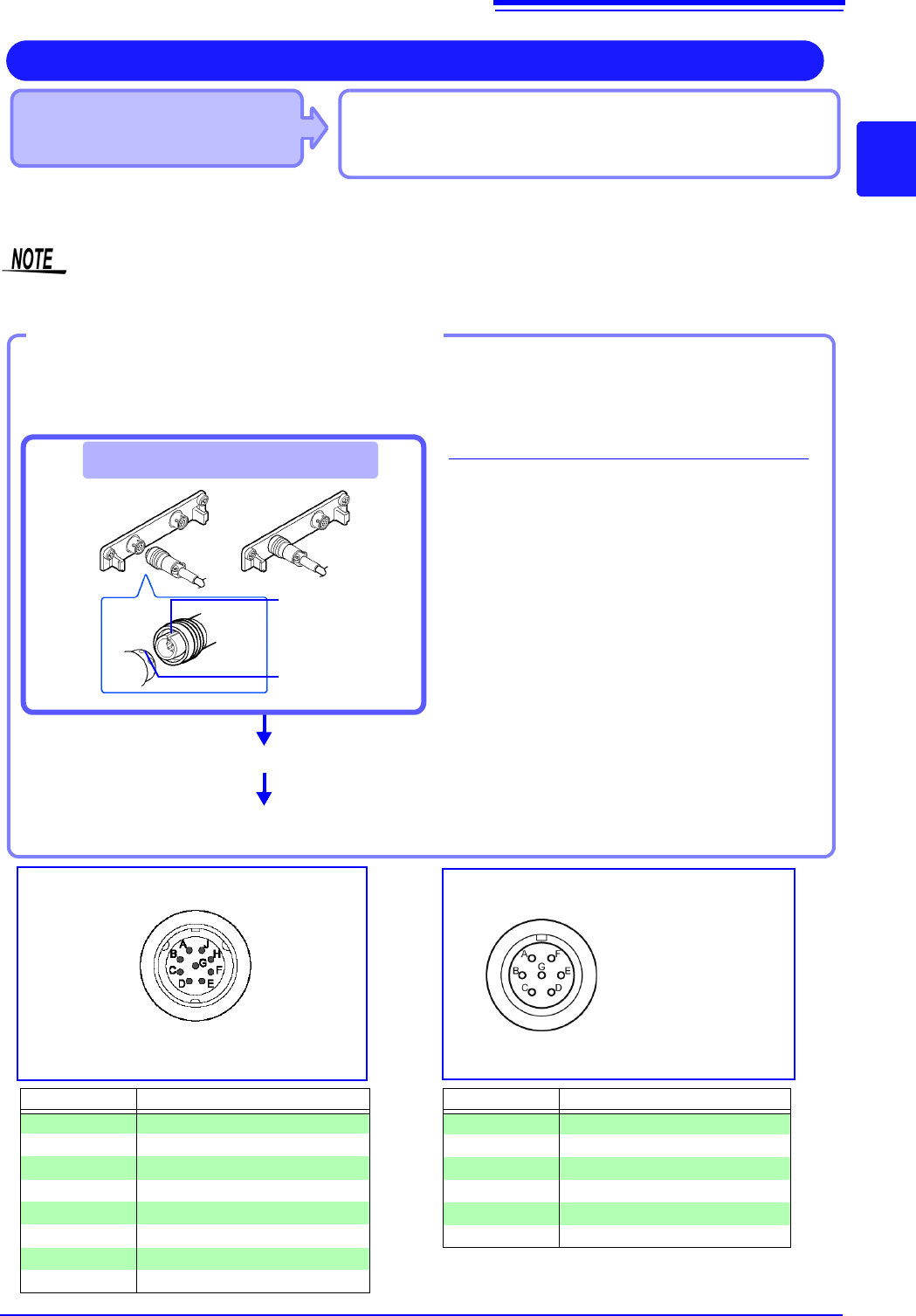
Connect a strain gauge transducer to a connector on Model U8969 Strain Unit via Model L9769 Conversion Cable; Mod-
el 8969 Strain Unit via Model 9769 Conversion Cable.
The instrument describes Model U8969 as “8969”.
Connect the strain gauge transducer to a
measurement object.
Connecting the L9769
1
Insert Model L9769 into a connector of
Model U8969 with the slot of the plug
aligned with the outward indentation of
the connector.
2
Insert the plug into the connector until
they are locked together.
3
Connect Model L9769 to the strain
gauge transducer.
4
Connect the strain gauge transducer to
a measurement object.
Example: Connecting the strain gauge transducer to Model U8969 Strain Unit via Model L9769 Con-
version Cable
Required items:
Model L9769 Conversion Cable, strain gauge trans-
ducer
Connect to module's terminal
Connect Model L9769 to the strain gauge
transducer.
Applied voltage: bridge
voltage of 2 V
Connector Pinout of the L9769 Conversion
Cable on strain gauge transducer side
4
3
1
The metal shell is connected to the GND
of the instrument.
Connector Pinout of the U8969
Pin Mark Description
A BRIDGE+
B INPUT+
C BRIDGE-
D INPUT+
E FLOATING COMMON
F SENSE+
G SENSE-
H, J N.C.
Pin Mark Description
A BRIDGE+, SENSE+
BINPUT-
C BRIDGE-, SENSE-
DINPUT+
E FLOATING COMMON
F, G N.C.
The metal shell is connected to the GND
of the instrument.
How to disconnect Model L9769
Pull the sleeve of the plug gently, releasing the
plug, and disconnect the cable.
2
Plug’s slot
Connector’s inden-
tation