MR8740、MR8741_user_manual_eng_20191016H.pdf - 第306页
12.8 FFT Analysis Modes 294
12.8 FFT Analysis Modes
293
11
Chapter 12 FFT Function
12
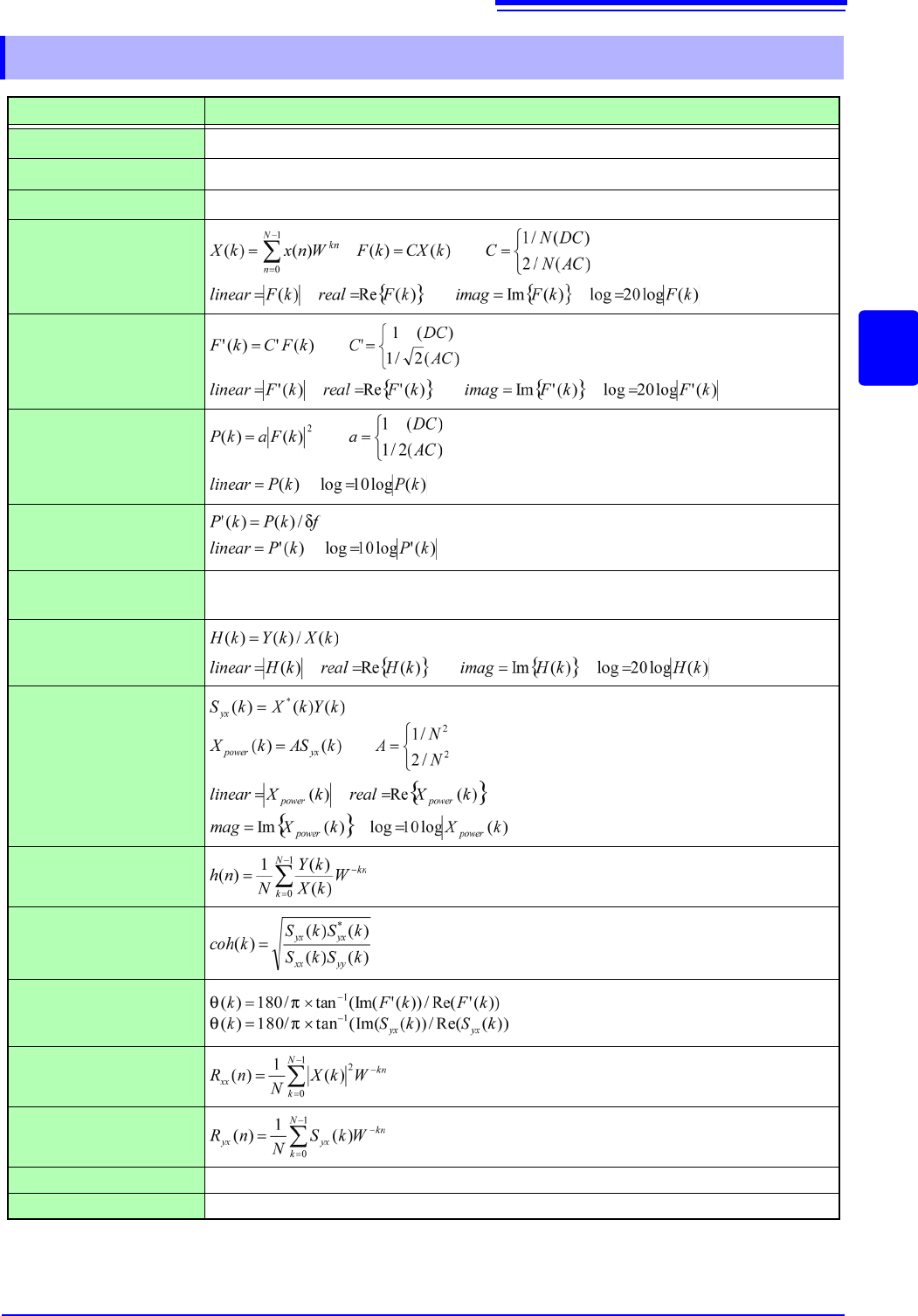
12.8.2 Analysis Mode Functions
Analysis Mode Internal analysis formula (linear, real, imag [imaginary], log [logarithm])
OFF
No analysis.
Storage Waveform
A waveform obtained by applying the window function to a time-domain waveform.
Histogram
Counts amplitude data.
Linear Spectrum
RMS Spectrum
Power Spectrum
Power Spectrum Density
LPC analysis(Power
Spectrum Density)
(Abbr.) Spectrum approximation from Linear Predictive Coding.
See: "Linear Predictive Coding (LPC)" (p.A26)
Transfer Function
Cross Power Spectrum
Impulse Response
Coherence Function
Phase Spectrum
Auto-correlation Func-
tion
Cross-correlation Func-
tion
1/1 Ovtave Analysis (Abbr.)
1/3 Ovtave Analysis (Abbr.)
f: Frequency resolution
: Cross Spectrum
(recursive convolution)
(recursive convolution)

12.8 FFT Analysis Modes
294
13.1 Waveform GO/NG Evaluation (MEM, FFT Function)
295
11
Chapter 13 Waveform Evaluation Function (MR8741 Only)
12
13
Only MR8741 supports the waveform evaluation function.
• The waveform evaluation function can be used from the Memory function (single screen, X-Y single
screen), FFT function (1 screen standard, 1 screen Nyquist).
• GO (pass) or NG (fail) evaluation of the input signal waveform can be performed using an evaluation area
specified by the user.
• This can serve to detect irregular waveforms.
• Depend on evaluation result, GO and NG terminal output the signal.
• All displayed channels can be used for GO/NG evaluation.
Waveform Evaluation
Function
(MR8741 Only) Chapter 13
13.1 Waveform GO/NG Evaluation
(MEM, FFT Function)
OUT
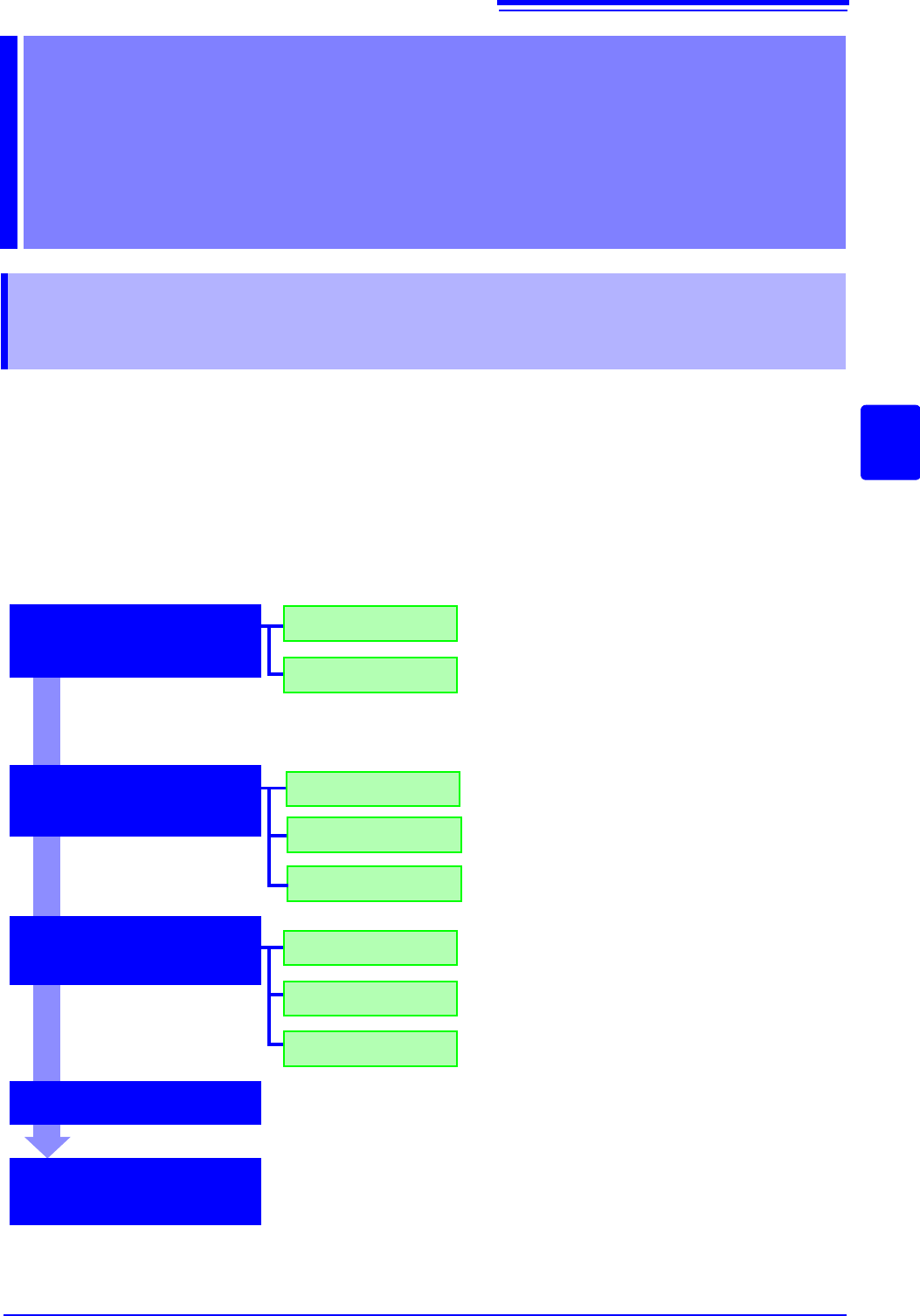
Loading
Creating new area
Load the created evaluation area and settings. Use
the File screen.
OFF
ALL OUT
GO
NG
Stop recording on GO result.
GO&ïNG
Setting the evaluation
area
Setting the wave-
form evaluation
Setting the GO/NG
stop mode
Measurement starts
Executing waveform
GO/NG evaluation
Create the evaluation area by using the eight types of
commands.
Store the evaluation area in memory, and after that,
store the data on the media on the File screen.
Disable waveform evaluation.
Return NG if any part of the waveform leaves the
evaluation area.
Return NG if the entire waveform leaves the evalua-
tion area.
Stop recording on NG result.
Stop recording on GO or NG result.
Clicking
[START] starts measurement.
Data acquisition starts when the trigger conditions are met.
Once the evaluation process is complete, the result will be output as the signals
from the external control terminals. If the evaluation result satisfies the stop con-
ditions, automatic saving and automatic printing will be performed, if enabled.
When using memory segmentation, the same block is repeatedly measured as
long as the stop conditions are not satisfied. Once the stop conditions are sat-
isfied, measurement moves to the next block.