KJ-01.02.Instruction Manual.REV.02.pdf - 第137页
5 − 41 (2) Com ponent pack aging st yle setting item s ① Setting items of a tape com ponent A vailable setting range Display ed item Descripti on Mini mum va lue Maxi mum va lue T eachi ng 1 T ape width None Either of 8m…
5 − 40
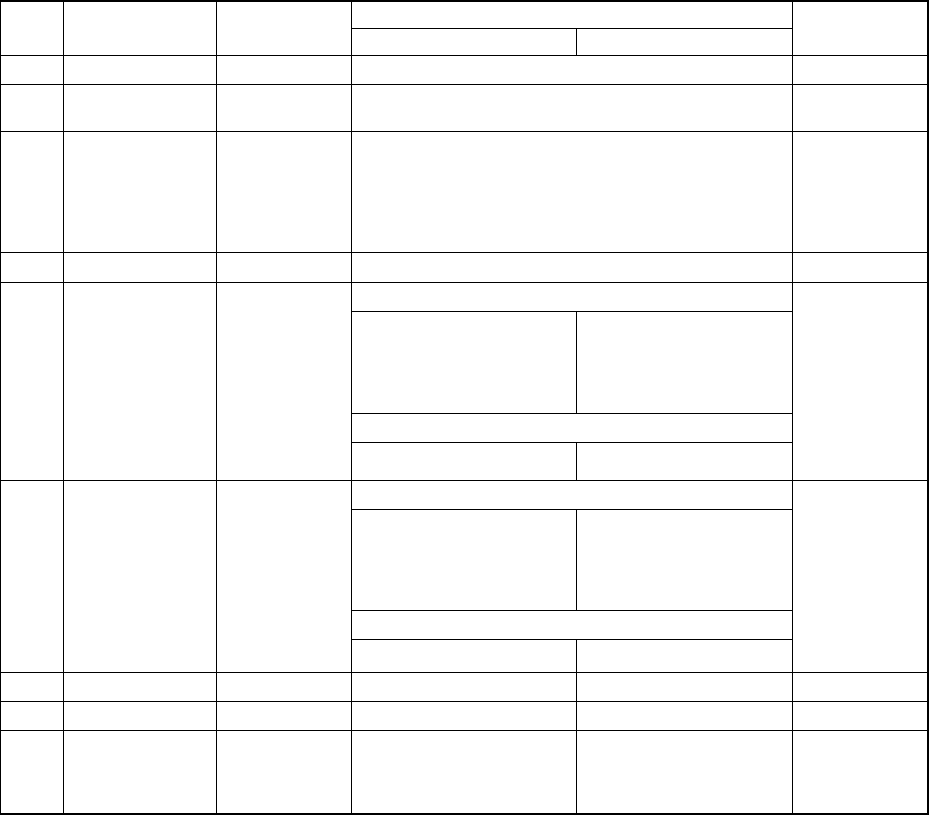
Table 5.5.2 Component data setting range
(1) Component data basic setting items
Available setting range
Displayed item Description
Minimum value Maximum value
Teaching
1 Comment None 30 characters or less Not available
2
Component
packaging
None
Either of Tape, Stick, Tray or Bulk
Not available
3 Component type None
Square chip, MELF, aluminum electrolytic capacitor, SOT,
SOP, SOP with a heat sink, SOJ, QFP, PLCC (OFJ),
PQFP (BQFP), TSOP, TSOP2, BGA, network resistor,
trimmer, unidirectional lead connector, bi-directional lead
connector, Z-lead connector, J-lead socket, gull-wing
socket, socket with a bumper, or other components
Not available
4 Centering method Laser centering Either of Laser centering or Vision centering Not available
For laser centering method
0.30 mm
(When you enter “0.30 mm”,
the minimum length of a
component becomes 0.60
mm.)
20.00 mm
(Only when the component
length is 11.0 mm or less,
you can enter up to 23.5
mm.)
For vision centering method
5
Component width
None
3.00mm 24.00mm
Not available
For laser centering method
0.30 mm
(When you enter “0.30 mm”,
the minimum width of a
component becomes 0.60
mm.)
20.00 mm
(Only when the component
width is 11.0 mm or less,
you can enter up to 23.5
mm.)
For vision centering method
6 Component length None
3.00mm 24.00mm
Not available
7 Component height None 0.10mm 12.00mm Not available
8 Nozzle number None 500 999 Not available
9
Pick vacuum
pressure
Automatically
set according to
the nozzle
number.
-760.00mmHg 0.00mmHg Not available
*
The KJ-01 can support the laser centering method only.
*
By default, you can specify nozzles whose numbers are from 501 to 508. If you
want to specify another number nozzle, install it with the [Nozzle data installation]
command on the Machine setup screen.
5 − 41
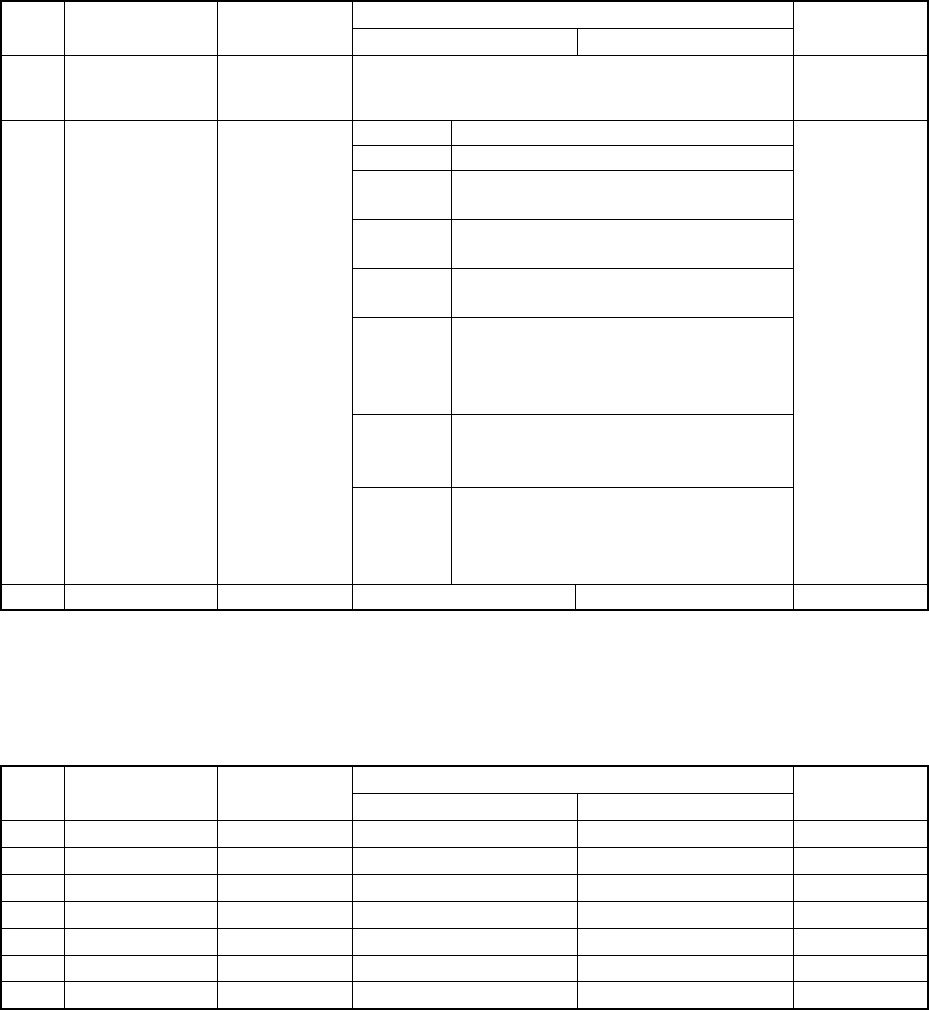
(2) Component packaging style setting items
① Setting items of a tape component
Available setting range
Displayed item Description
Minimum value Maximum value
Teaching
1 Tape width None
Either of 8mm(paper tape), 8mm(emboss), 12mm, 16mm,
24mm, 32mm(paper tape), 32mm(emboss), 44mm,
or56mm
Not available
Tape width Feeding pitch
8mm 2mm(2*1),4mm(4*1)
12mm 4mm(4*1),8mm(8*1),8mm(4*2),
12mm(12*1),12mm(6*2),12mm(3*4)
16mm 4mm(4*1),8mm(8*1),8mm(4*2),
12mm(12*1),12mm(6*1),16mm(8*2)
24mm 8mm(8*1),12mm(12*1),12mm(6*1),
16mm(8*2),20mm(10*2),24mm(12*2)
32mm 8mm(8*1),12mm(12*1),12mm(6*2),
16mm(16*1),16mm(8*2),20mm(10*2),
24mm(12*2),24mm(8*3),28mm(14*2),
28mm(4*7),32mm(16*2),32mm(8*4)
44mm 8mm(8*1),12mm(6*2),16mm(16*1),
24mm(12*2),28mm(14*2),32mm(16*2),
36mm(18*2),40mm(20*2),44mm(22*2)
2 Feeding pitch None
56mm 12mm(12*1),16mm(16*1),24mm(12*2),
32mm(16*2),36mm(18*2),40mm(20*2),
44mm(22*2),48mm(16*3),52mm(13*4),
56mm(14*4)
Not available
3 Supply direction None 0° 359° Not available
* Values in parentheses indicates (“Feeding pitch per knock” * “Number of feeder
knocks”).
② Setting items of a tray component
Available setting range
Displayed item Description
Minimum value Maximum value
Teaching
1 First pos. X
None 0.00mm 340.00mm Not available
2 First pos. Y
None 0.00mm 230.00mm Not available
3
Pitch width None 0.00mm 340.00mm Not available
4
Pitch length None 0.00mm 230.00mm Not available
5 No. of row
None 1 99 Not available
6 No. of line
None 1 99 Not available
7 Tray thick
None 0.00mm 15.00mm Not available
5 − 42
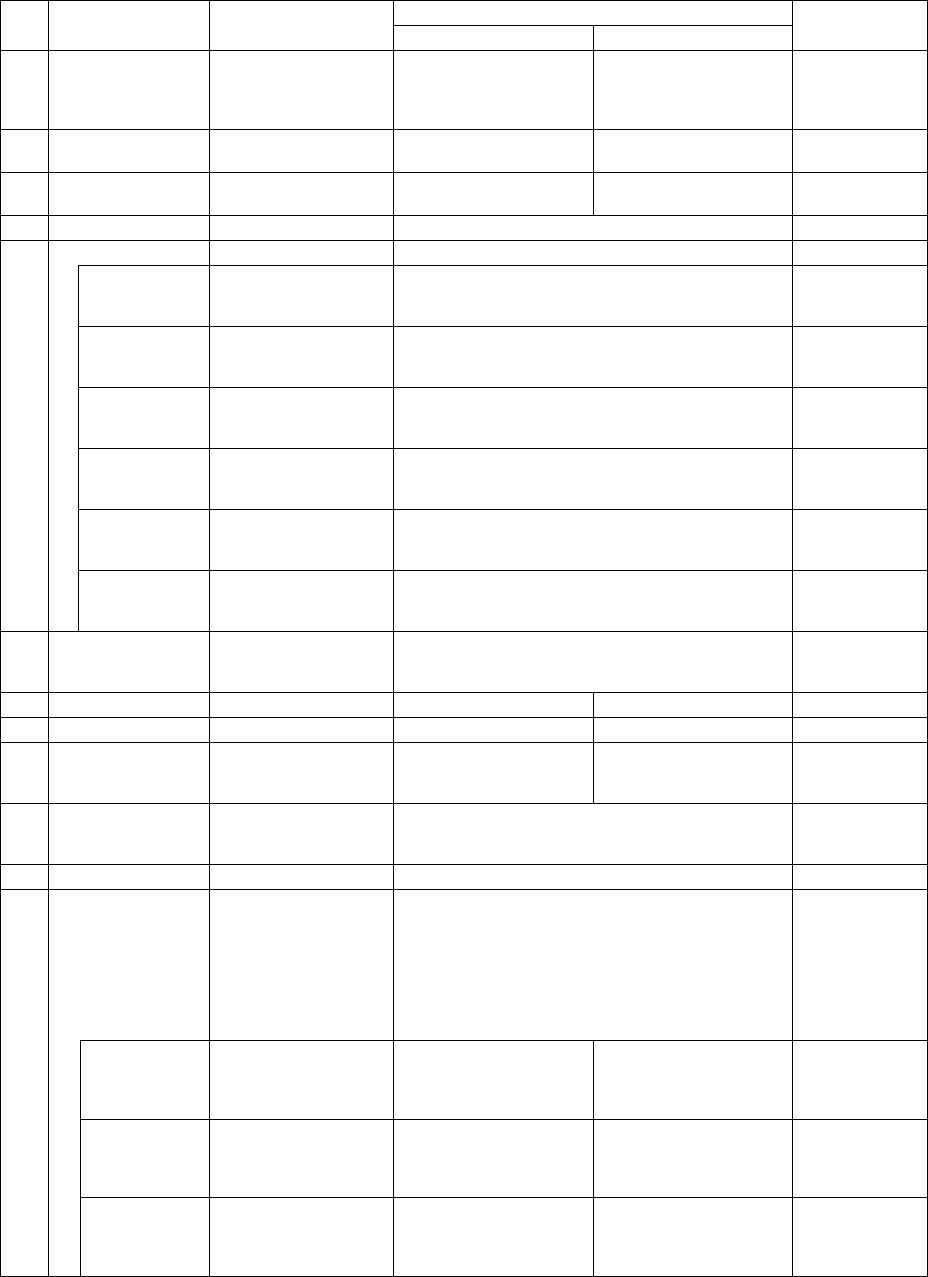
(4) Extension setting items
① Items when a component is centered with laser
Available setting range
Displayed item Description
Minimum value Maximum value
Teaching
1 Retry times
1
(The machine tries to
pick up a component
up to twice.)
0 9 Not available
2 Placing stroke
0.5 mm
(without any sign)
0.0mm 4.0mm Not available
3 Picking stroke
0.5 mm
(without any sign)
0.0mm 4.0mm Not available
4 Trial No Either “Yes” or “No” Not available
Speed
XY speed Automatically
calculated according
to the component type.
Fast
Mid (Middle), or
Slow
Not available
Picking Z down Automatically
calculated according
to the component type.
Fast
Mid (Middle), or
Slow
Not available
Picking Z up Automatically
calculated according
to the component type.
Fast
Mid (Middle), or
Slow
Not available
Placing Z down Automatically
calculated according
to the component type.
Fast
Mid (Middle), or
Slow
Not available
Placing Z up Automatically
calculated according
to the component type.
Fast
Mid (Middle), or
Slow
Not available
5
Theta speed Automatically
calculated according
to the component type.
Fast
Mid (Middle), or
Slow
Not available
6
Compo. aband.
(Component
abandonment)
Trash box Either “Trash box” or “Trash Conveyor.” Not available
7 Placing offset X 0 -99.00mm 99.00mm Not available
8 Placing offset Y 0 -99.00mm 99.00mm Not available
9 Laser position
Automatically
calculated according
to the component type.
Not available
10 Laser algorithm
Automatically
calculated according
to the component type.
Algorithm 1 (14, -14) or
Algorithm 2 (14, 14)
Not available
11 Release check No Either “Yes” or “No” Not available
Tombstone det.
The machine checks
whether a component
stands on its side if the
component type is
chip or MELF.
Otherwise, the
machine will not check
it.
Either “Yes” or “No” Not available
W (width)
Automatically
calculated based on
the dimensions of a
component.
0.00mm
Up to twice of the
maximum dimension
Not available
L (length)
Automatically
calculated based on
the dimensions of a
component.
0.00mm
Up to twice of the
maximum dimension
Not available
12
H (height)
Automatically
calculated based on
the dimensions of a
component.
0.00mm
Up to twice of the
maximum dimension
Not available