KJ-01.02.Instruction Manual.REV.02.pdf - 第249页
6 − 45 (5) Loading another pat tern This f unction copies t he pattern dat a already created and stor ed in another area, then aut omatically adjust s its size according t he specified size to load it . Figure 6.5. 4.4.3…
6 − 44
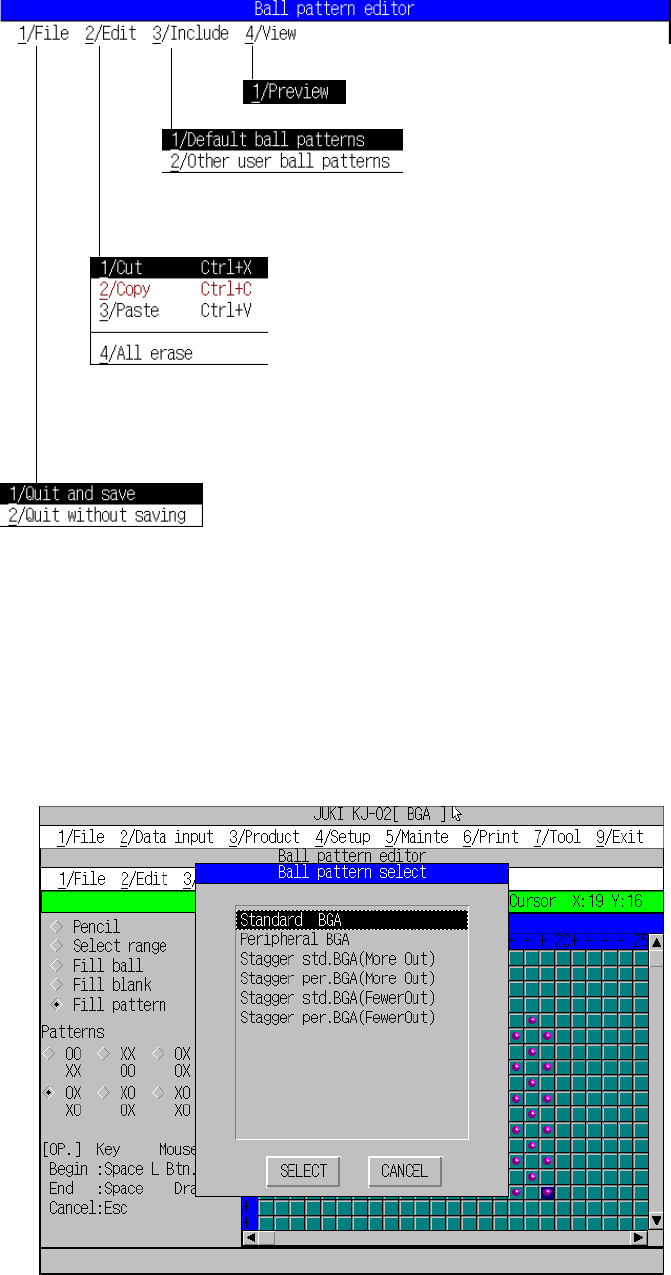
(3) About the menu
This section explains the menu displayed with the ball pattern editor.
*1 Clipboard: Work pattern data buffer. It stores the data loaded.
(4) Loading the default pattern
This function automatically loads the pattern initially stored in the system and
adjusts its size according to the specified size.
Figure 6.5.4.4.2 Loading the default pattern
Exit:
Stores the data, then quits this menu.
Cancel:
Cancels the entered/changed data, then quits this menu.
Preview:
displays the pattern in the reduced size.
Loading the default pattern:
Selects the default pattern, then stores it.
Loading another pattern:
Selects the pattern in another data area.
Cut:
Erases the selected area, then stores it on the clipboard *1).
Copy:
Loads the selected area into the clipboard.
Paste:
Pastes the data stored on the clipboard onto the cursor
location.
All erase
Clears all balls drawn on the drawing window.
Exit:
Stores the data, then quits this menu.
Cancel:
Cancels the entered/changed data, then quits this menu.
6 − 45
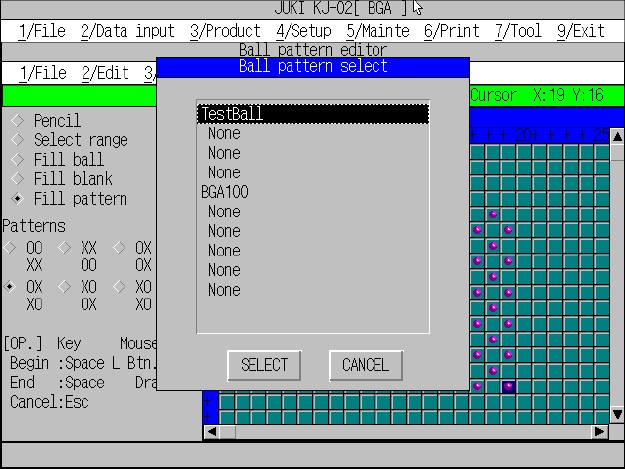
(5) Loading another pattern
This function copies the pattern data already created and stored in another
area, then automatically adjusts its size according the specified size to load it.
Figure 6.5.4.4.3 Loading another pattern

6 − 46
6.6 Menu commands
The following table lists the menu commands available from the Pickup data editing
Table 6.4.3.1
Pickup
data menu commands
1/File
2/Edit 3/Chng 4/Dspl 5/Cnvr 6/Meas. 9/Exit
1/Open...
2/Save
3/New...
4/Save as...
9/Exit
○
○
○
○
○
1/Copy 2/Delete
2/Delate
3/Move
4/Insert
5/Duplicate
6/Jump
7/Find
8/Vision copy
9/Nozzle sort
A/Component name
B/Pick point recalc
C/Mark database
×
×
×
×
×
×
×
×
×
×
×
×
1/PWB data
2/Placement data
3/Component data
4/Pickup data
5/Vision data
6/Data compl. state
○
△
△
×
○
○
1/Component form
2/Component list
3/Pick input
4/Feeder order
5/ Vision List
6/ Vision Form
×
×
×
×
△
△
1/PWB load
2/PWB eject
3/BOC align
○
○
○
1/Single
measurement
×
9/Exit
○
○: Available △: Available dependent on conditions ×: Unavailable
6.6.1 File menu
The same as the PWB data.
6.6.2 Edit menu
No command is available.
6.6.3 Chng (Change) menu
The operation is the same as that for “Data change” of PWB data.
6.6.4 Dspl. (Display) menu
No command is available.
6.6.5 Cnvr. (Conveyor) menu
This command loads and unloads the PWBs.
The operation is the same as that for “PWB transport” of PWB data.
6.6.6 Meas. (Measurement)
No command is available.
6.6.7 Exit
The same as the production end.