KJ-01.02.Instruction Manual.REV.02.pdf - 第308页
8 − 41 8.4.3 Placement tracki ng (1) Auto matic run W hen “Automat ic” is selected in the “ Placement camer a” f ield the placement monitor cam era moves over a point of placement af ter t rial run, shoot s the stat us o…

8 − 40
8.4.1 Starting the trial run
To start the trial run, press the START key after setting the trial run condition.
CAUTION
The head starts to move immediately after the START key is pressed,
and then Starting the trial run
To avoid a risk of injury, do not place your hand in the machine, nor
move your face or head close to the machine during operation.
Before pressing the START key, check that there is no one who is
working in the machine.
Before pressing the START key, check that there is no one who can
be injured when the head starts to move.
Before pressing the START key, check that there are no obstacles
(tools and jigs) left in the machine.
Even though you press the STOP key to interrupt the current trial
production, the machine replaces a nozzle with another one.
Therefore, the XY-axis and head continue moving.
To prevent you from being injured when you interrupt the trial
production, do not place your hand in the machine, nor move your
face or head close to the machine while it is operating.
The signal lights indicate that the machine is producing a PWB.
8.4.2 Display of the production status
When the START key is pressed and the production starts, the status of the
production (the same as that of the board production) appears on the screen.
For details, see “Display of the production status” of the “PC board production”.
The Pause, Stop, and Quit commands in the execution of the test production are the
same as those of the board production.
8 − 41
8.4.3
Placement tracking
(1) Automatic run
When “Automatic” is selected in the “Placement camera” field the placement
monitor camera moves over a point of placement after trial run, shoots the status
of placement, and outputs the result to the monitor screen.
The camera stops over the point for a time period set by “Automatic interval”,
then goes to the next point of placement to be monitored.
CAUTION
After trial run, tracking by the camera continues. To avoid a risk of
injury, do not place your hand in the machine, nor move your face or
head close to the machine during operation of the machine.
① To stop the camera
To temporarily stop the camera, press the PAUSE key (on the HOD) or Stop
key. The camera pauses at the next point of placement when the camera is
moving, or at the current position when the camera rests there.
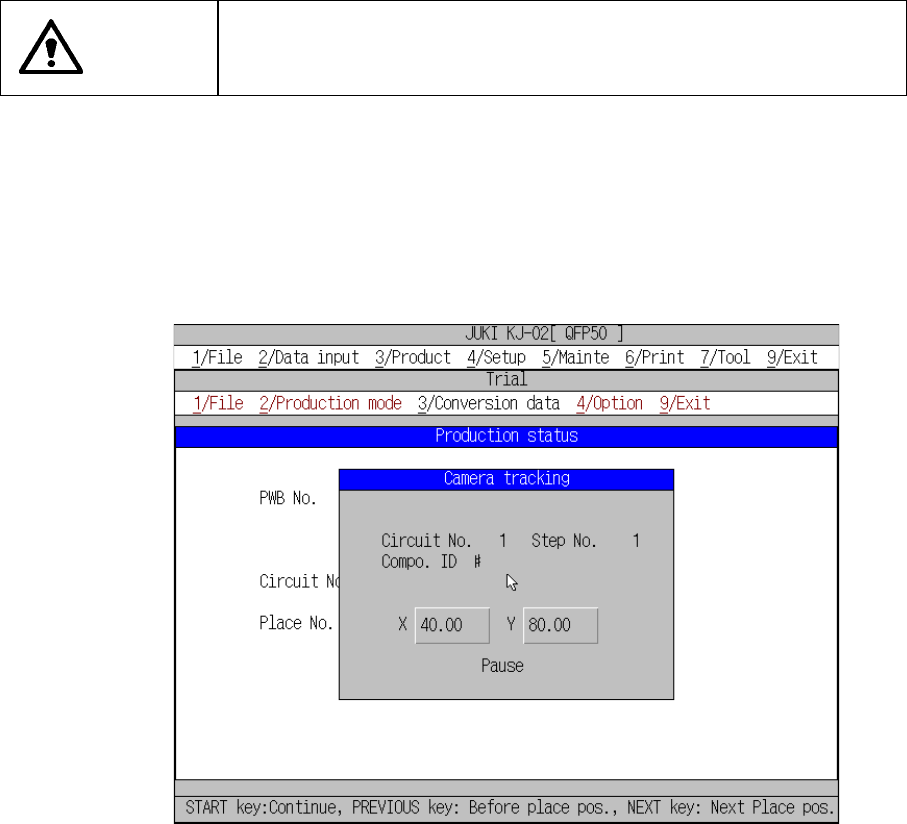
Figure 8.5.3.1 shows the place camera tracking dialog box.
Figure 8.4.3.1 “Camera tracking” pause screen
To cancel the pause condition, press the START key to restart tracking with a
camera, or press the STOP key to cancel tracking operation. When you press
the STOP key, the tracking interruption confirmation screen appears.
8 − 42
CAUTION
The head starts to move immediately after the START key is pressed,
and then
placement tracking
.
To avoid a risk of injury, do not place your hand in the machine, nor
move your face or head close to the machine during operation.
Before pressing the START key, check that there is no one who is
working in the machine.
Before pressing the START key, check that there is no one who can be
injured when the head starts to move.
Before pressing the START key, check that there are no obstacles
(tools and jigs) left in the machine.
Even though you press the STOP key to interrupt the current
placement tracking
, the machine replaces a nozzle with another one.
Therefore, the XY-axis and head continue moving.
To prevent you from being injured when you interrupt the
placement
tracking
, do not place your hand in the machine, nor move your face or
head close to the machine while it is operating.
② Changing points of placement
While the machine pauses, press the CAMERA key of the HOD to teach the
component placement position. The machine cannot accept any key of the
HOD other than the CAMERA key.
CAUTION
To avoid a risk of injury, do not place your hand in the machine, nor
move your face or head close to the machine during operation of the
HOD. Note that the head moves to the X and Y coordinates according
the entered values when the cursor is moved after the X and Y values
are entered.
③ Returning to the previous point of placement
While the machine pauses, you can return to the previous point of placement
by pressing the PREVIOUS key of the HOD. The pause status is still held
even after the camera returns to the previous point of placement.
CAUTION
The head starts to move immediately after the PREVIOUS key is
pressed.
To avoid a risk of injury, do not place your hand in the machine, nor
move your face or head close to the machine during operation of the
HOD.
Before pressing the PREVIOUS key, check that there is no one who is
working in the machine.
Before pressing the PREVIOUS key, check that there is no one who
can be injured when the head starts to move.
Before pressing the PREVIOUS key, check that there are no obstacles
(tools and jigs) left in the machine.