KJ-01.02.Instruction Manual.REV.02.pdf - 第346页
10 − 21 10.4.6 .4 I/O port data dis play W hen you select the [6/Others] command on the menu bar , and then the [9/I/O port data display] com mand on the displayed menu, t he dialog box fo r displaying the I/O port data …
10 − 20
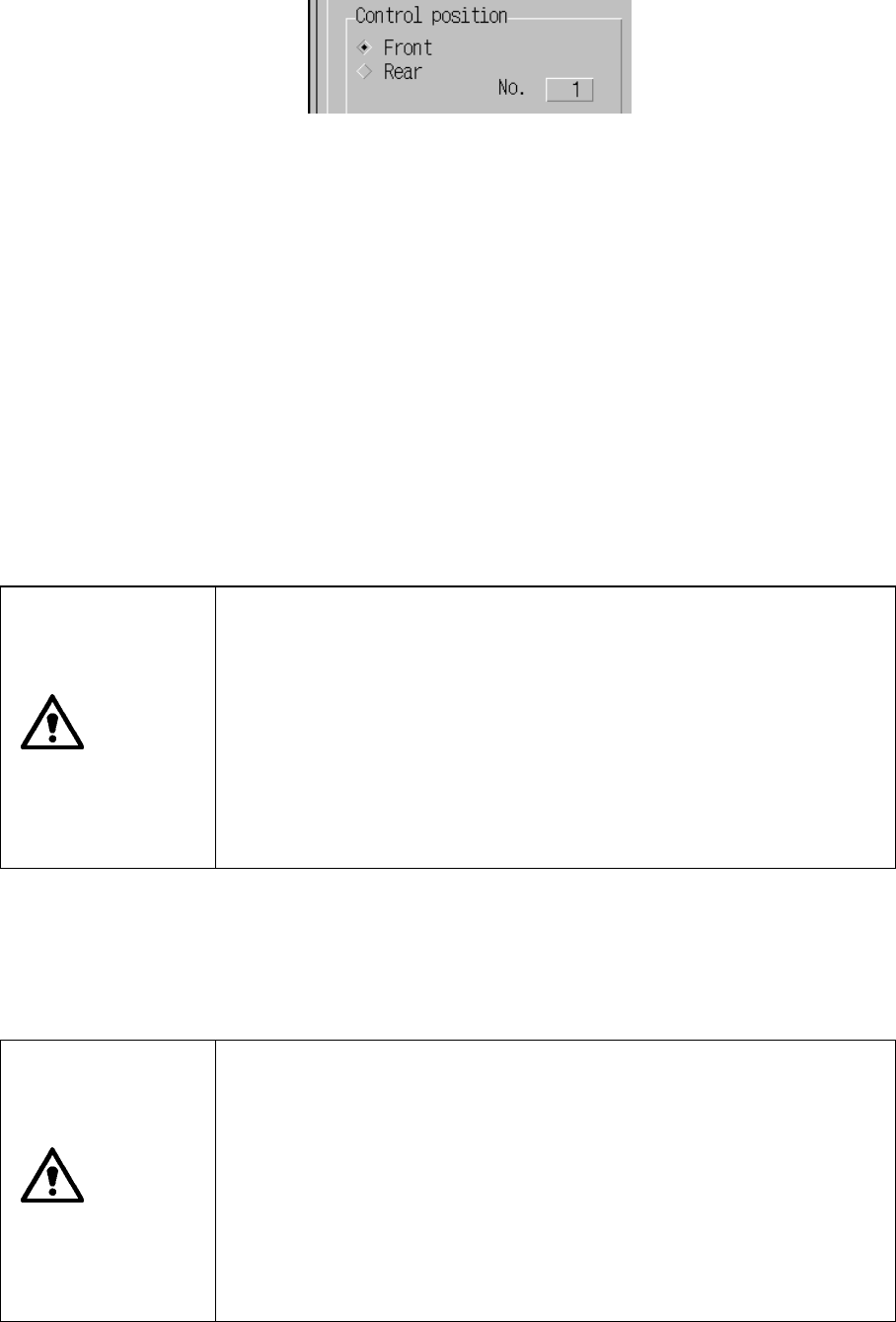
When you select the control item “Direct knock action”, select the pin position
(group) to be controlled by checking the radio button displayed next to the side to
be controlled.
− Kind of feeder
When you select the control item “Tape feeding action”, select the tape width and
pitch from the combo box.
When you select the control item “Direct knock action”, you cannot set the feeder
type here.
− Control button
When you click the control button <EXEC>, the machine performs the control
operation as specified.
(1) Tape feeding action control
The machine feeds a tape.
When you select the control item “Tape feeding action”, click the <EXEC>
button or press the F3 key.
CAUTION
The machine starts feeder knocking operation immediately after you
select an item.
To avoid risk of injury, do not place your hand in the machine, nor
move your face or head close to the machine during operation.
Before selecting an item, check to see if there is no one who is
working the internal parts of the machine.
Before selecting an item, check to see if there is no one who is near
the machine and can be injured when the machine warms up.
Before selecting an item, check to see there is no obstacle (tools and
jigs) attached or left in the machine that may prevent any part inside
the machine from operating.
(2) Direct knock action control
The machine performs knocking operation per feeder bank.
When you check the control item “Direct knock action”, click the <EXEC>
button or <STOP> button, or press the F3 or F4 key.
CAUTION
The machine starts feeder knocking operation immediately after you
select an item.
To avoid risk of injury, do not place your hand in the machine, nor
move your face or head close to the machine during operation.
Before selecting an item, check to see if there is no one who is
working the internal parts of the machine.
Before selecting an item, check to see if there is no one who is near
the machine and can be injured when the machine warms up.
Before selecting an item, check to see there is no obstacle (tools and
jigs) attached or left in the machine that may prevent any part inside
the machine from operating.
10 − 21
10.4.6.4 I/O port data display
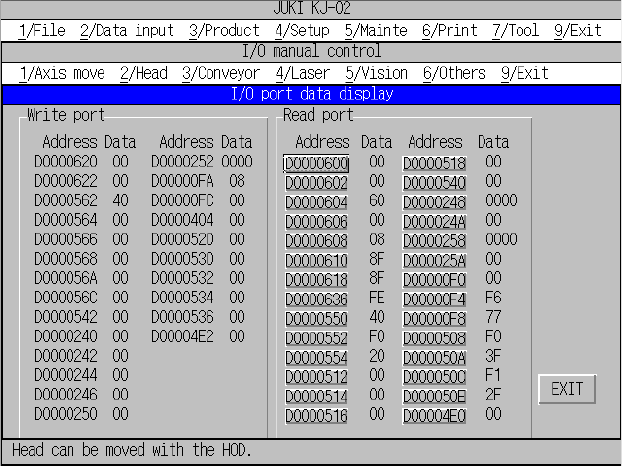
When you select the [6/Others] command on the menu bar, and then the [9/I/O
port data display] command on the displayed menu, the dialog box for displaying
the I/O port data appears on the screen as shown in Figure 10.4.6.4.1.
Figure 10.4.6.4.1 “I/O port data display” dialog box
“Write port” data shows data written to the port until you open the “I/O port data
display” dialog box.
“Read port” data accesses (that is, read) data in real time and displays it.
Addresses under “Read port” function as a button. When you select a <port
address> button, you can select the read access (toggled).
“**” appears at the port data not accessed (read).
11 − 1
Chapter 11 PRINTING
11.1 Overview of Printing Operations
11.1.1 Printing
This section describes preparations necessary for outputting data such as a
production program to a printer.
① Connect a printer cable to the machine and a printer.
② Printers available to this machine are limited to Centronics-compatible and
ESC/P type printers.
③ Since a serial printer does not have any mechanism for detecting a TOF (Top of
Form) generally, adjust the initial printing paper position before power-on
manually.
11.1.2 List of printable data
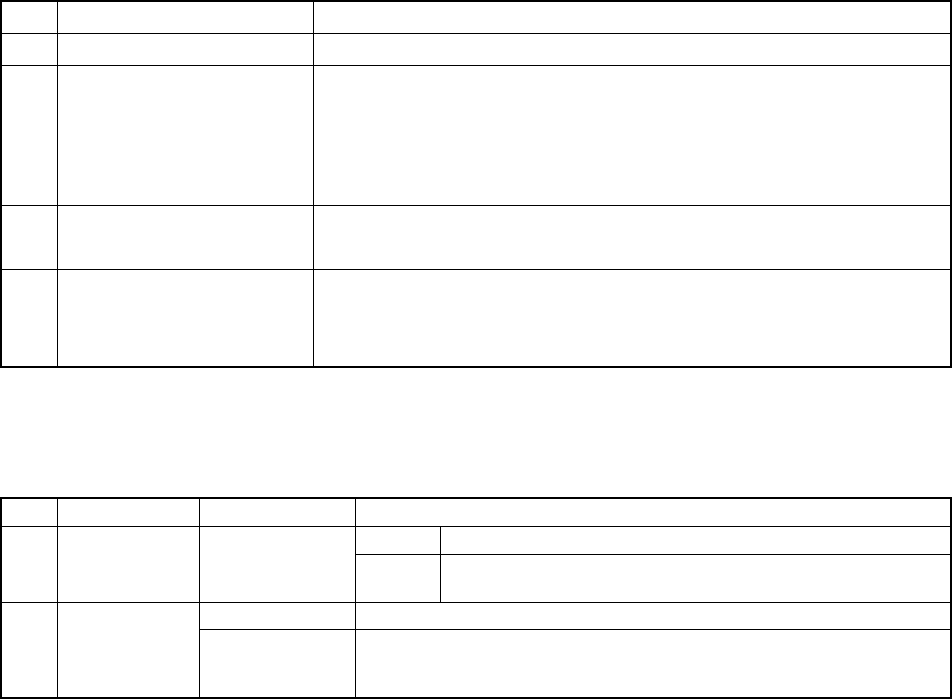
Table 11.1.2.1 lists the printable data.
Table 11.1.2.1 List of the printable data
No. Printing command Description
1 Data file list Prints the list of production programs stored under the specified directory.
2 Production data Prints production programs stored in the current memory:
− PWB data list
− Placement data list
− Component data list
− Pick data list
− Vision data list
3 Setup Prints the current setup data list.
− Machine setup settings and optional unit system
4 Production info Prints the production information stored in the current memory.
− Production information list
− Component information list
− Number of components list
Table 11.1.2.2 shows the data actually printed.
Table 11.1.2.2 Data to be printed
No. Major key Minor key Data to be printed
Header Title, printing date/time, and page 1 Data file list
Data No., production program name, last update date, number of
placement steps, and PWB ID
Common header Title, printing date/time, page, production program name, and PWB ID 2 Production
data
PWB data Reference, PWB configuration, BOC type, Bad mark type, PWB
Reference, Circuit division number, Circuit pitch, BOC mark position,
Bad mark position, PWB height and Circuit position.