KJ-01.02.Instruction Manual.REV.02.pdf - 第302页
8 − 35 8.3.3 Cover was open W hen y ou open the prot ection cover of t he machine while the machine is producing a PW B, the machine stops at the r egulated posit ion and pauses. W hen y ou press the ST ART key , the m a…
8 − 34
If the stocked components run out, press the START key to restart production.
When you press the STOP key, the production interruption confirmation screen
appears, and the machine starts stopping the current production.
CAUTION
The head starts to move immediately after the START key is pressed,
and then the machine starts PC board production.
To avoid a risk of injury, do not place your hand in the machine, nor
move your face or head close to the machine during operation.
Before pressing the START key, check that there is no one who is
working in the machine.
Before pressing the START key, check that there is no one who can be
injured when the head starts to move.
Before pressing the START key, check that there are no obstacles
(tools and jigs) left in the machine.
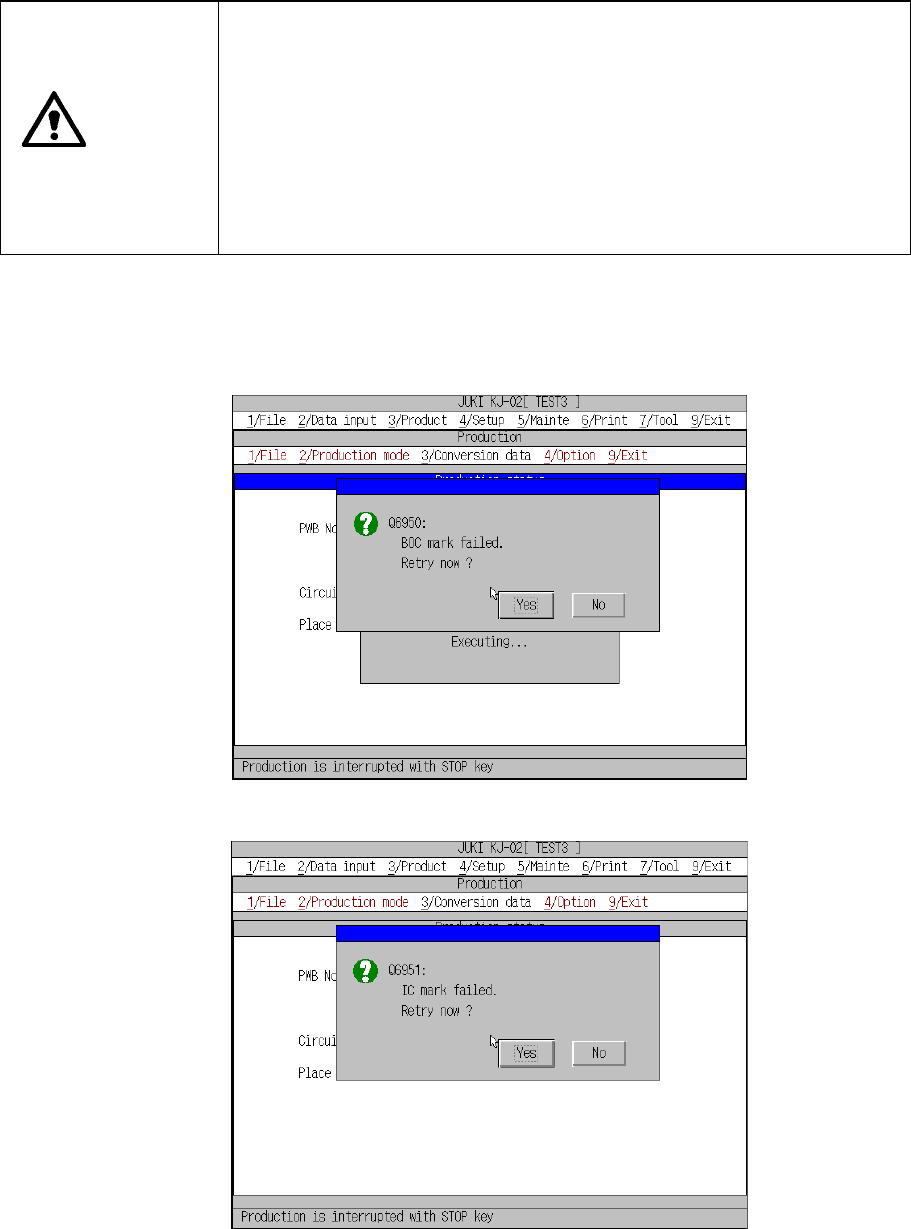
8.3.2 Mark recognition error
If a mark recognition error occurs while the machine is recognizing a BOC mark or IC
mark, the machine displays the recognition error screen, and then pauses.
BOC mark recognition error dialog box
IC mark recognition error dialog box
If the machine pauses due to a mark recognition error, the machine will not place a
component on a board correctly until you have the machine recognize a mark again
or set the mark position on the PWB data screen, and then restart production.
8 − 35
8.3.3 Cover was open
When you open the protection cover of the machine while the machine is producing a
PWB, the machine stops at the regulated position and pauses.
When you press the START key, the machine restarts the suspended production. If
you press the STOP key, the machine displays the production interrupting
confirmation screen, and then starts interrupting the suspended production.
If you press the START key to restart the suspended production although the cover is
still opened, the machine produces a PWB at low speed.
8.3.4 Detect feeder sensor
If the feeder float sensor detects a floating feeder at start of the XY-axis operation or
while the XY-axis is moving, a feeder float error occurs.
− If you do not check the check box “Stop by detected fdr. float” on the “Use unit”
menu invoked from the Setup menu
If the machine detects a feeder float error while the XY-axis is moving, it
operates at the same speed as it does when the cover is opened.
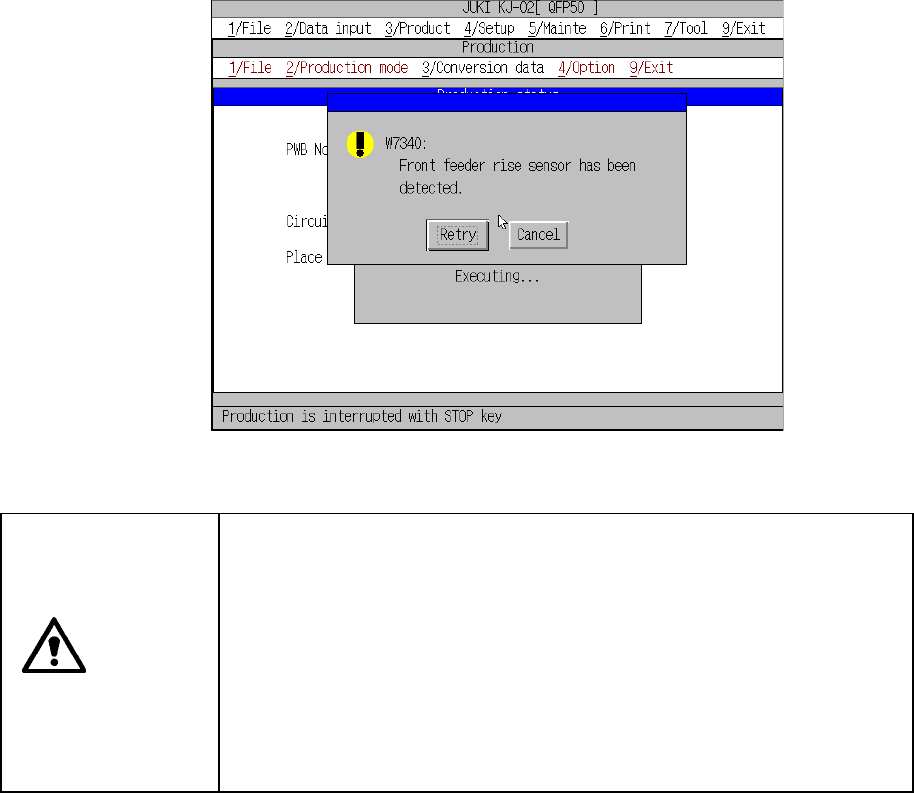
If the machine detects a feeder float error at start of the XY-axis, the following
feeder float error detection screen appears. When you click the <Retry> button
on this screen, the machine starts up again if the machine detects no feeder float
error again. When you click the <Cancel> button, the
returning-to-home-position confirmation dialog box appears, and then the initial
production screen reappears.
Floating feeder error detection screen displayed
if you do not check the check box “Stop by detected fdr. float”
CAUTION
The XY-axis starts moving immediately after you click the <Retry> or
<Cancel> button. To avoid risk of injury, do not place your hand in the
machine, nor move your face or head close to the machine while it is
operating.
Before clicking the <Retry> or <Cancel> button, check to see if there is
no one who is working the internal parts of the machine.
Before clicking the <Retry> or <Cancel> button, check to see if there is
no one who is near the machine and can be injured when the machine
warms up.
Before clicking the <Retry> or <Cancel> button, check to see there is
no obstacle (tools and jigs) attached or left in the machine that may
prevent any part inside the machine from operating.
8 − 36
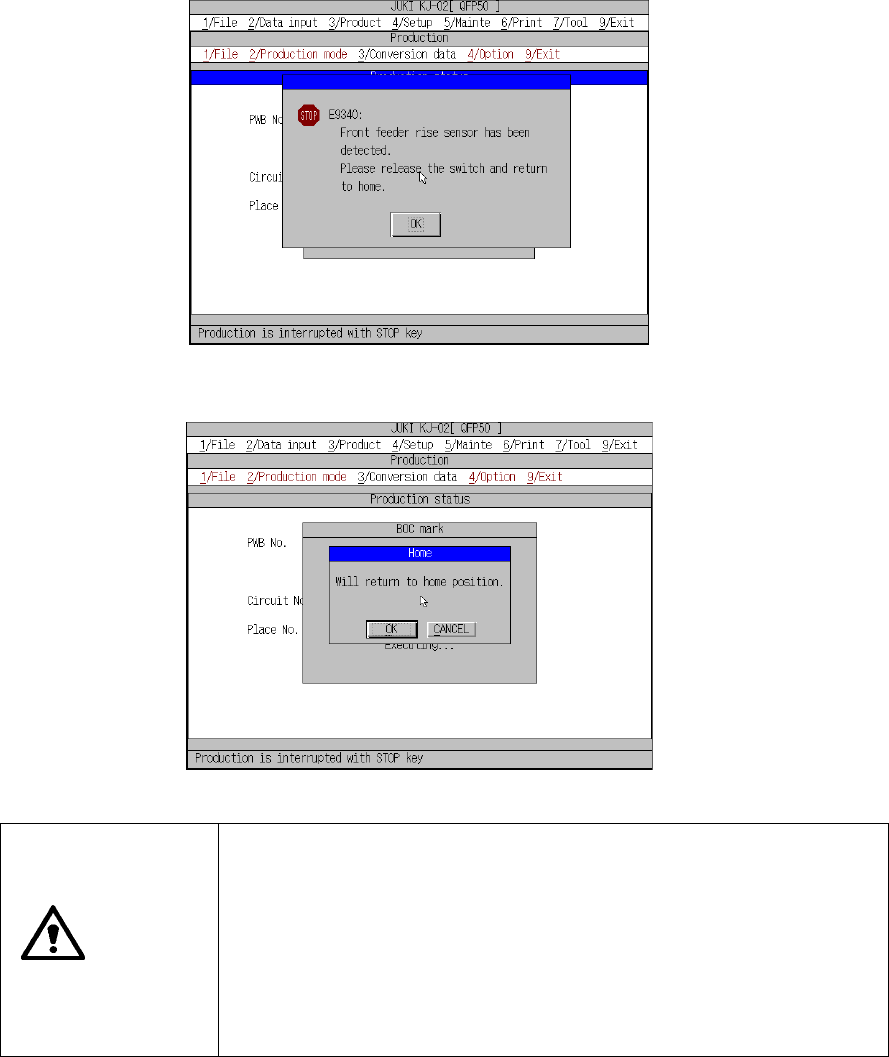
− If you check the check box “Stop by detected fdr. float” on the “Use unit” menu
invoked from the Setup menu
The following screen appears at start of the XY-axis or while it is moving. When
you click the <OK> button, the returning-to-home-position confirmation screen
appears, and then the initial production screen reappears.
Floating feeder error detection screen displayed
if you check the check box “Stop by detected fdr. float”
Returning-to-home-position confirmation screen.
CAUTION
The XY-axis starts returning to its home position immediately after you
click the <OK> button.
To avoid risk of injury, do not place your hand in the machine, nor move
your face or head close to the machine while it is operating.
Before clicking the <OK> button, check to see if there is no one who is
working the internal parts of the machine.
Before clicking the <OK> button, check to see if there is no one who is
near the machine and can be injured when the machine warms up.
Before clicking the <OK> button, check to see there is no obstacle (tools
and jigs) attached or left in the machine that may prevent any part inside
the machine from operating.
If a nozzle is still attached on the head after the axes return to their home
positions respectively, the machine returns the nozzle to the ATC holder, and
displays the initial screen again.
When you click the <CANCEL> button on the returning-to-home-position screen,
the machine displays the initial screen again without returning any axis to its
home position.
In this case, the returning-to-home-position screen reappears if you press the
START key to start production.