KJ-01.02.Instruction Manual.REV.02.pdf - 第285页
8 − 18 ② Items to be set 1 Initial Set the number of components supplied as packed and before using them. The number of remained components also changes w hen the initial setting is changed or a new v alue is entered. Th…

8 − 17
④ Placement ofs.
In case a certain production lot has a specific offset (in printing process or
in reference holing process), enter the X and Y offsets in this field. The
position of placement that has been entered can be offset.
⑤ Starting pos.
This setting is effective for the board under production but which is put in
production halt with some components already be placed.
When production is put in halt, the position to be continued is indicated and
the production can be continued immediately from that last status. Or, if
necessary, a new number can be entered to start newly the production at
aspecific sequence. This setting is effective, however, only for the first
boardif multiple production boards are used. For the “Ckt. No” field, the
number of circuits of the production board is displayed.
For a single pattern board, the “Ckt. No” field be displayed is 1, and any
circuit number other than 1 cannot be set in the “Circuit” field.
8.2.1.2 Setting the number of components
When you set a component on a tray holder, which is set as a component feeder
unit (tape feeder, stick feeder, bulk feeder, or tray holder) on the Pick data screen,
set the number of components of a tray holder to the machine.
For a tape, stick or bulk feeder, you cannot set the number of components.
The machine has a function for using the signal light to announce that the stocked
components run out during production when the number of components set on a
tray holder becomes below the certain value. When you set the number of
components, you can activate this function.
If a component pick-up retry over error occurs at a tape feeder, stick feeder, bulk
feeder or tray holder, the machine handles the feeder or tray holder as a faulty
device.
After adjusting the machine so that the feeder/tray holder can pick up a component,
you have to clear the error to continue the suspended production. Replenish the
feeder/tray holder with components. The error is cleared.
(1) Setting items
① Items being displayed when called
No. Item Description
1 No. Displays the component supply number (position).
2 Pkg (Package) Displays the package of the components. (Tape, stick, tray, bulk, etc.)
3 Component name Displays the name of components.
8 − 18
② Items to be set
1 Initial Set the number of components supplied as packed and before using them.
The number of remained components also changes when the initial setting is
changed or a new value is entered.
This value is automatically set by referring to the row and line numbers of the
tray in the tray window.
− When setting is made with 0
The subtraction of the remained number is not performed, and production
continues until an retry over occurs.
− When setting is made with any number other than 0
This value is entered for the remaining number when the [1/Replenish
component] command in the menu bar is used. The remaining number is
counted down, and when it becomes below the specified value, the signal light
flashes to warn the operator.
2 Remain
− Displays the number of remaining components when the number of
components is referred to.
The number is counted down every time a component is picked during
production.
− No subtraction is made when the initial value is 0.
− When the initial value is changed, the number of remaining components
changes accordingly
Only the number of remaining components can be changed depending on the
supplied components.
− When the number of components becomes below the specified value, the
signal light flashes to warn the operator.
− The status is set as an error when the number of the remaining quantity
becomes zero.
− When multiple trays are installed, the number of remaining components is
checked for the last tray, and the signal light flashes in yellow.
3 Level When the number of remaining components becomes below the specified
value in the “Level” field, the yellow signal light flashes to warn the operator.
This is not effective when the initial value is set to 0. When a initial value is set,
the level is set to 0.
4 Warning Displays an error for the component feeding.
*: This indicates that the number of components is below the specified value.
E:This indicates that a pick up retry over occurred, and pick up action from that
feeder or tray is stopped.
To exit from this status, When you enter the number of components or
execute the reset command.
(2) When the signal lights indicate that the stocked components run out
In the following cases, the main unit uses the signal lights to indicate that the
stocked components run out and warn the operator.
Table 8.2.1.2.1 Conditions for the signal light flashing in yellow
No. Feeder type Conditions of the yellow signal light to flash
1 Tape feeder
Stick feeder
Bulk feeder
For each feeder:
- When a pick up retry over occurred.
2 Tray holder For each component:
- When the number of remaining components becomes below the specified
value.
- When a pick up retry over occurred.
- When all the parts set for the number of components have been used.
8 − 19
Operation
<1> Invocation
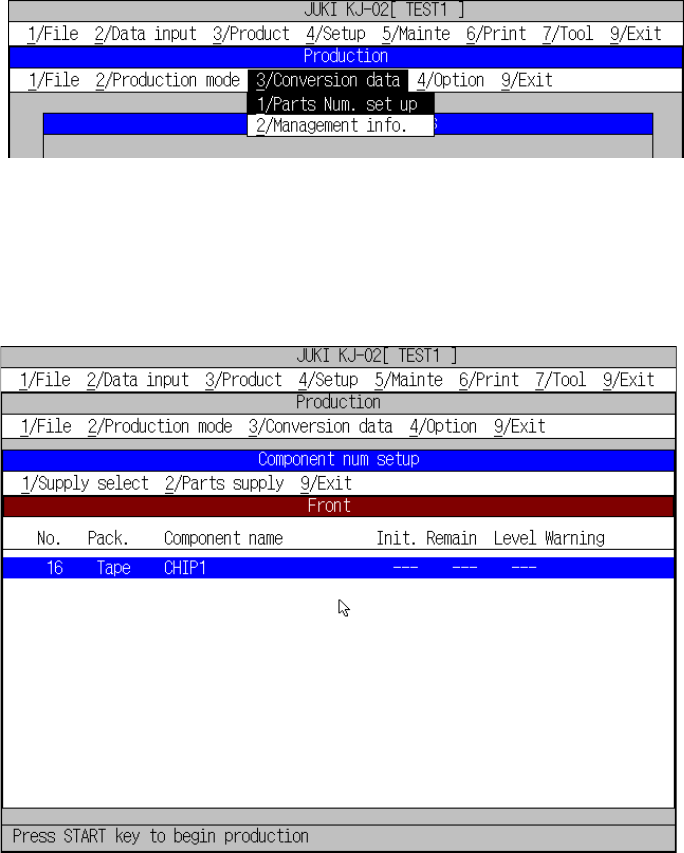
Select [3/ Conversion data] in the menu bar of the PWB production screen.
The “Component num setup” screen is displayed in the form of list, and it
consists of three sections of data: Front side, Rear side and tray holder
respectively. To switch those sections with each other, click the [1/Supply
select] command on the menu bar of the “Component num setup” screen.
Figure 8.2.1.2.1 shows how to invoke the “The components number setup”
dialog box.
Figure 8.2.1.2.1 The components number setup
− “Component num setup” screen for the front/rear sides
Figure 8.2.1.2.2 Number of component for the front side setting screen