KJ-01.02.Instruction Manual.REV.02.pdf - 第288页
8 − 21 <2> Commands The f ig ure below shows the local commands that can be called in the components number set up screen. 1/Supply select 2/Parts supply 9/Exit (1) [ 1/ Supply select] This com mand switches the “C…
8 − 20
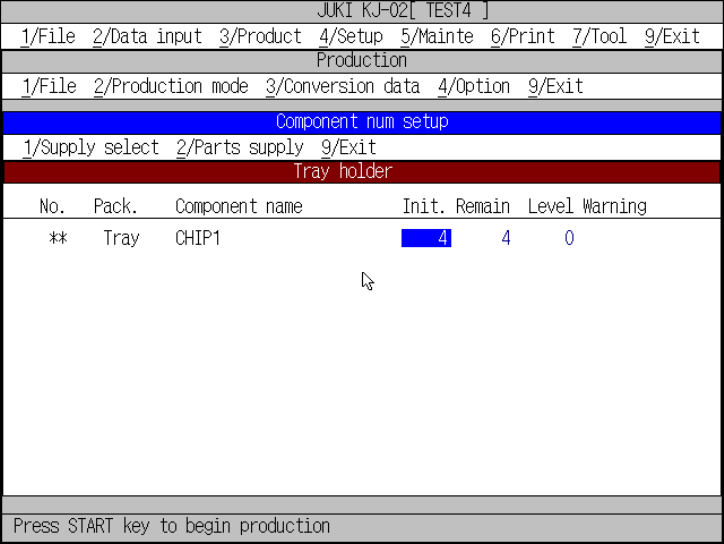
− “Component num setup” screen for a tray holder
When you select a tray holder with the [1/Supply select] command, the screen
shown in Figure 8.2.1.2.3 appears.
Figure 8.2.1.2.3 Number of component for the try holder setting screen
(1) Initial
Enter an initial value at the cursor position.
(2) Remain
Enter the number of remaining components at the cursor position.
(3) Level
Enter the level of the number of remaining components at which a warning
is output.
(4) Warning
The cursor does not move to this item. The indication disappears when the
number of remaining components is entered or any item of the [2/ Parts
supply] command menu is executed.
Move the cursor to a desired entry field by the ”(UP), ”(DOWN),
SCROLL, PAGE-UP, and PAGE-DOWN keys.
8 − 21
<2> Commands
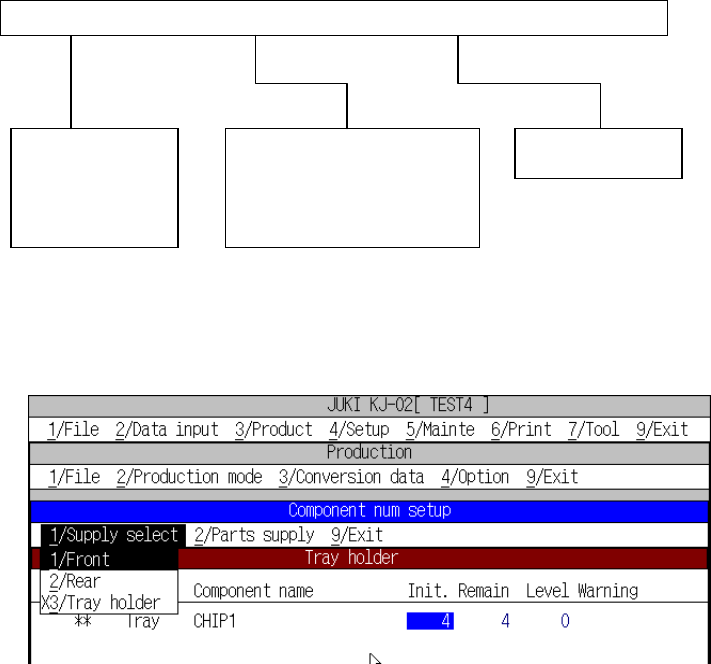
The figure below shows the local commands that can be called in the
components number setup screen.
1/Supply select 2/Parts supply 9/Exit
(1) [1/ Supply select]
This command switches the “Component num setup” screen types each other.
Figure of supply select pull-down menu
① [1/ Front]
When the components number setup screen is called, parts set on the
feeders on the front side only are displayed on the screen.
② [2/ Rear]
This components number setup screen lists the parts set on the feeders on
the rear side only.
③ [3/ Tray holder]
This components number setup screen lists the parts set on the tray holder
only.
1/Front
2/Rear
3/Tray holder
1/Replenish component
2/Replenish all feeders
3/Reflesh
9/Exit
8 − 22
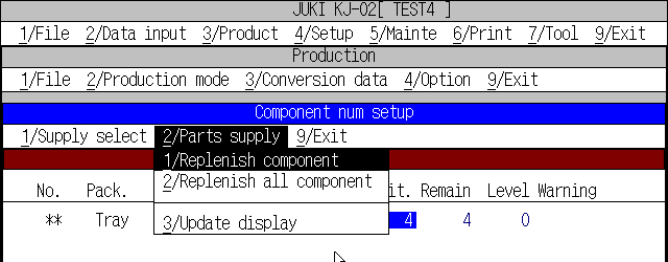
(2) [2/ Parts supply]
This command makes the value on the cursor line or all number of parts full or
clears them.
However, to supply parts, the system has to produce no part or has to stop
temporarily.
Figure of parts supply pull-down menu
① Replenish component
Resets the number of remaining components on the cursor line (when the
command is called) to the initial value and clears all warnings.
② Replenish all feeders
Performs the “1/ Replenish component” operation for all components.
③ Reflesh
Refreshes the screen. The screen is updated when the number of parts is
updated with corresponding to the execution of a pickup and placement
operation while the components number setup screen is being displayed.
(3) [9/ Exit]
Ends the setting of components number function, then returns control to the
caller (Setting of production condition or Setting of production status screen).