KJ-01.02.Instruction Manual.REV.02.pdf - 第291页
8 − 24 ① PW B No. T his item displays the number of PW Bs already produced. (a)Produced: displays the num ber of PW Bs already produced since you pressed the ST ART key . (b)Remain: displays the number of PW Bs to be pro…
8 − 23
8.2.2 Start of production
After setting the number of PC boards to be produced, press the START key on the
operator panel to start production.
CAUTION
The head starts to move immediately after the START key is pressed,
and then the machine starts PC board production.
To avoid a risk of injury, do not place your hand in the machine, nor
move your face or head close to the machine during operation.
Before pressing the START key, check that there is no one who is
working in the machine.
Before pressing the START key, check that there is no one who can
be injured when the head starts to move.
Before pressing the START key, check that there are no obstacles
(tools and jigs) left in the machine.
The PC board production starts and the green signal lamp lights to indicate that PC
board production is in progress.
If home positioning has not been completed when the START key is pressed, press
the HOME key to execute home positioning, then press the START key again.
<1> Display of production status
When PC board production starts with the START key pressed, the status of
production is displayed on the screen.
(1) While PC board production is in progress
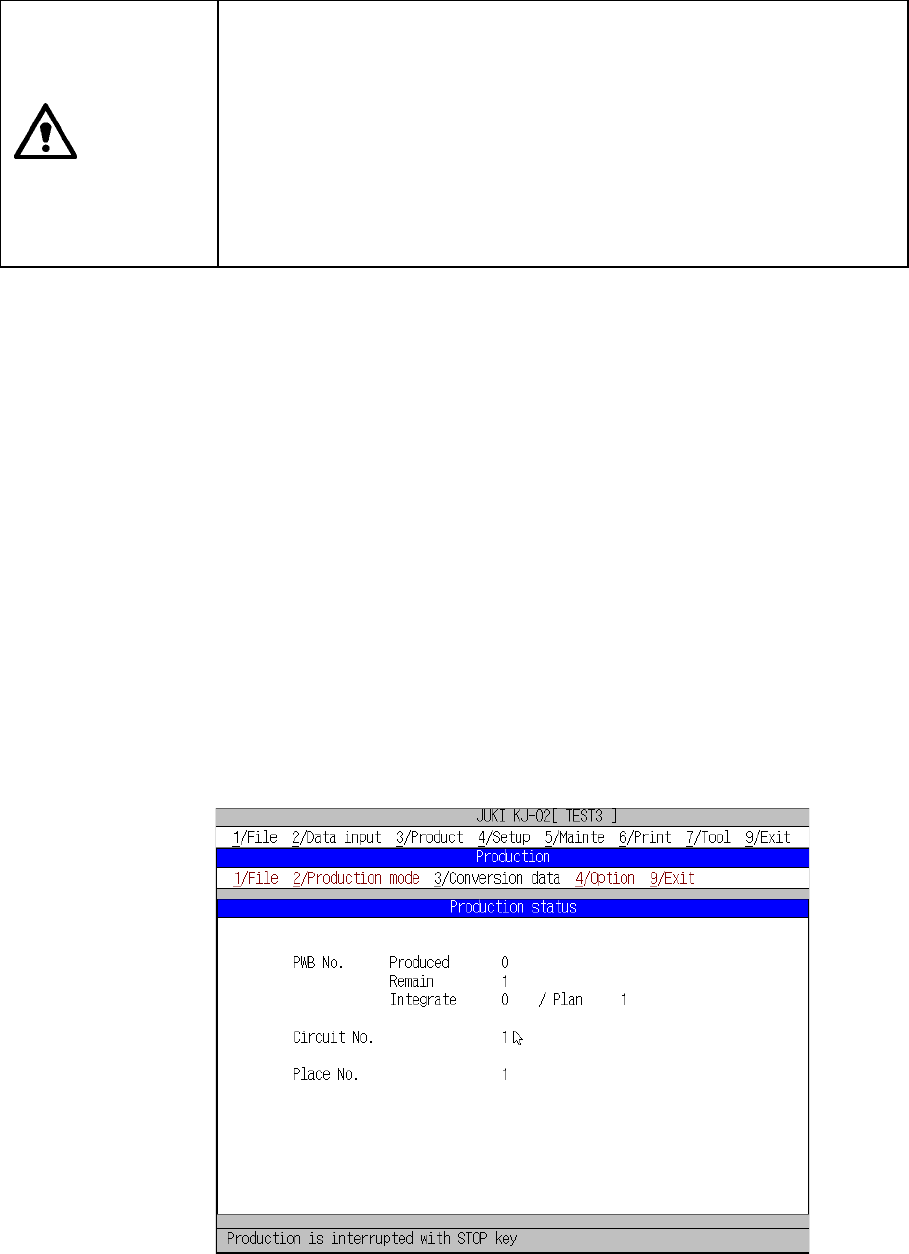
Figure 8.2.2.1 shows the “Production status” screen that is displayed
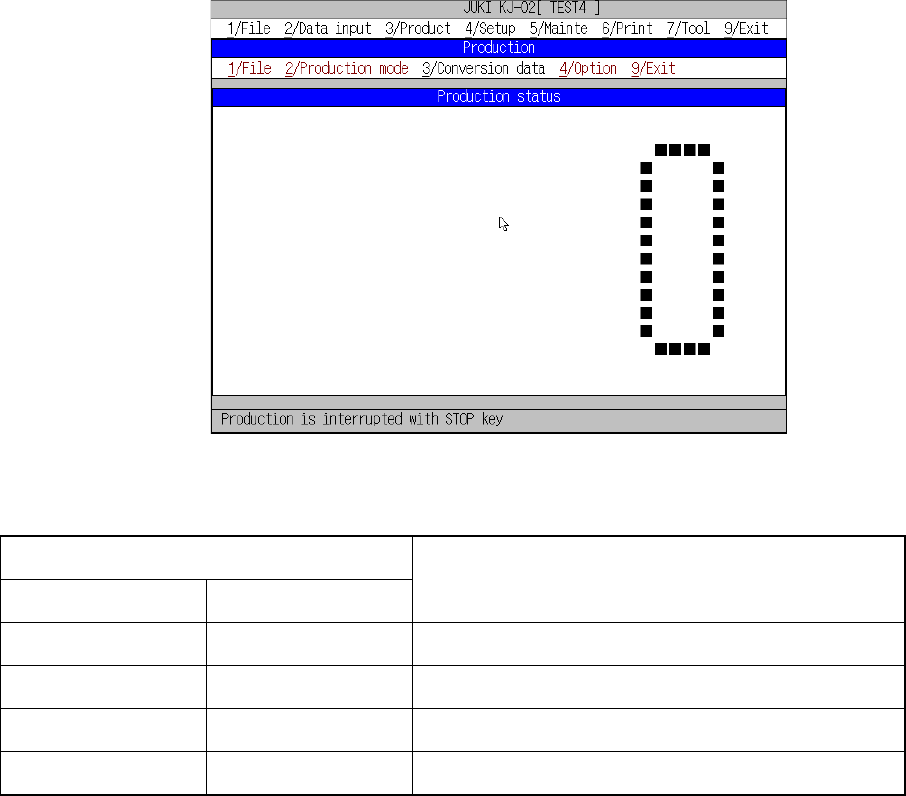
normally when the machine starts production, while Figure 8.2.2.2 shows the
“Production status” screen displayed if you check the item “Shows the
number of boards produced in large characters.” on the “Operation option”
screen.
– Display of normal production status
Figure 8.2.2.1 Production status screen (1)
8 − 24
① PWB No.
This item displays the number of PWBs already produced.
(a)Produced: displays the number of PWBs already produced since you
pressed the START key.
(b)Remain: displays the number of PWBs to be produced hereinafter.
(c)Integrate: displays the total number of PWBs already produced since
the currently loaded production program set the number of
PWBs that was planned to be produced on the Production
Conditions screen. “Plan” displays the number of PWBs
that is planned to be produced.
② Circuit No.
Shows the number of a circuit on which a component is being placed
currently. When the machine is producing a single-plane board, this item
always shows “1.”
③ Place No.
Shows the Placement data number of a component that is being placed
currently.
When the check box “Display num. of PWBs produced in capital ltr.” is
checked on the Operation option menu
Figure 8.2.2.2 Production status screen (2)
① Values displayed on the Production status screen
Checking status of the check boxes on the
“Operation option” menu
Count down num. of
PWB produced.
Integrate num. of
PWB produced.
Description
OFF OFF
Produced: Number of PWBs that were already produced since
you pressed the <START> key.
OFF ON
Total: Number of PWBs that were produced by the
production program currently loaded
ON OFF
Number of PWBs calculated by subtracting the number shown in
“Produced” from the number of PWBs planned to be produced
ON ON
Number of PWBs calculated by subtracting he number shown in
“Total” from the number of PWBs planned to be produced.
When the machine finishes producing the number of PWBs you planned, it starts the
production end process.
8 − 25
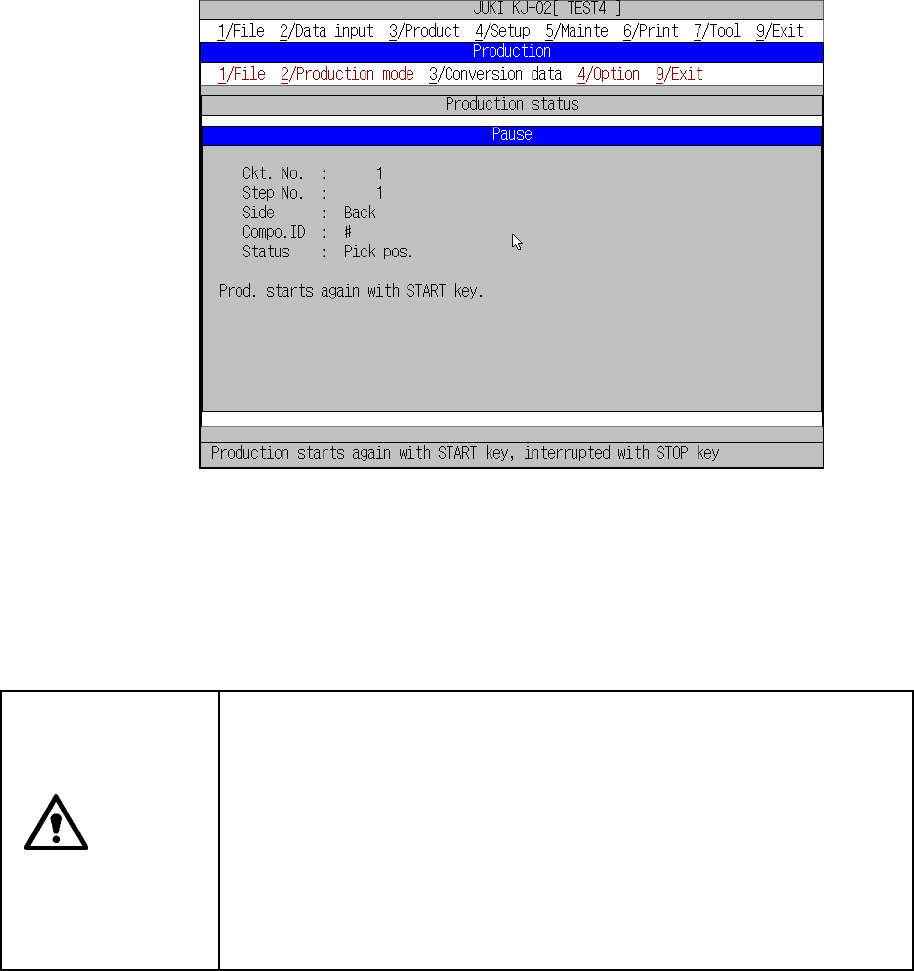
<2> Pause condition
To temporarily stop board production, press the STOP button on the operator
panel.
When the STOP key is pressed in the Continuous execution mode, or when the
production in the Step execution mode stops at a step position, the machine
enters the pause status.
Figure 8.2.2.3 shows the Pause status information box.
When the START key is pressed, the Pause information box disappears and the
machine exits the pause status. When the STOP button is pressed, the machine
goes to end processing.
CAUTION
The head starts to move immediately after the START key is pressed,
and then the machine starts PC board production.
To avoid a risk of injury, do not place your hand in the machine, nor
move your face or head close to the machine during operation.
Before pressing the START key, check that there is no one who is
working in the machine.
Before pressing the START key, check that there is no one who can be
injured when the head starts to move.
Before pressing the START key, check that there are no obstacles
(tools and jigs) left in the machine.
When the machine is in Pause condition, you can change coordinate data of the
component pick-up position or placement position specified in a production
program thorough teaching operation.
When the machine is put in the pause mode during production, the following data
can be taught according to the cause and position of the pause.