KJ-01.02.Instruction Manual.REV.02.pdf - 第70页
3 − 13 3.3.5 Menu organization T op menu * The menu item s appeared in red cannot be selected. Local menu (1) Machine setup local menu 1/File 2/Dat a input 3/Produc t 4/S etup 5/Mainte 6/ Print 7/T ool 9/Exit 1/PW D data…
3 − 12
(5) Insert
The Insert key toggles between the insert mode and overtype mode.
INSERT mode Cursor shape
Insert Blinking
Overtype – Blinking
(6) Function keys
Each of the function keys is numbered and labeled to perform a specific function
as detailed below.
List of Function Keys and Their Functions
Function key Function
F1 Not used
F2 Edit key for the formula bar
When there is data already in the cell in focus, the previous data in the operation
panel will be cleared and replaced by the new data. This function key shows the
previous data in the formula bar and places the cursor at the end of the data
(entered characters) to be ready to start editing.
Display key for the floating menu When the cell in focus being selected has data
entered, shows the floating menu again.
F3 Copy
F4 Delete
F5 Move
F6 Moves to the next window.
F7
Repeated search ↓
F8
Repeated search ↑
F9 Toggles between the list and form display (component data only).
F10 Not used
F11 Not used
F12 Not used
3 − 13
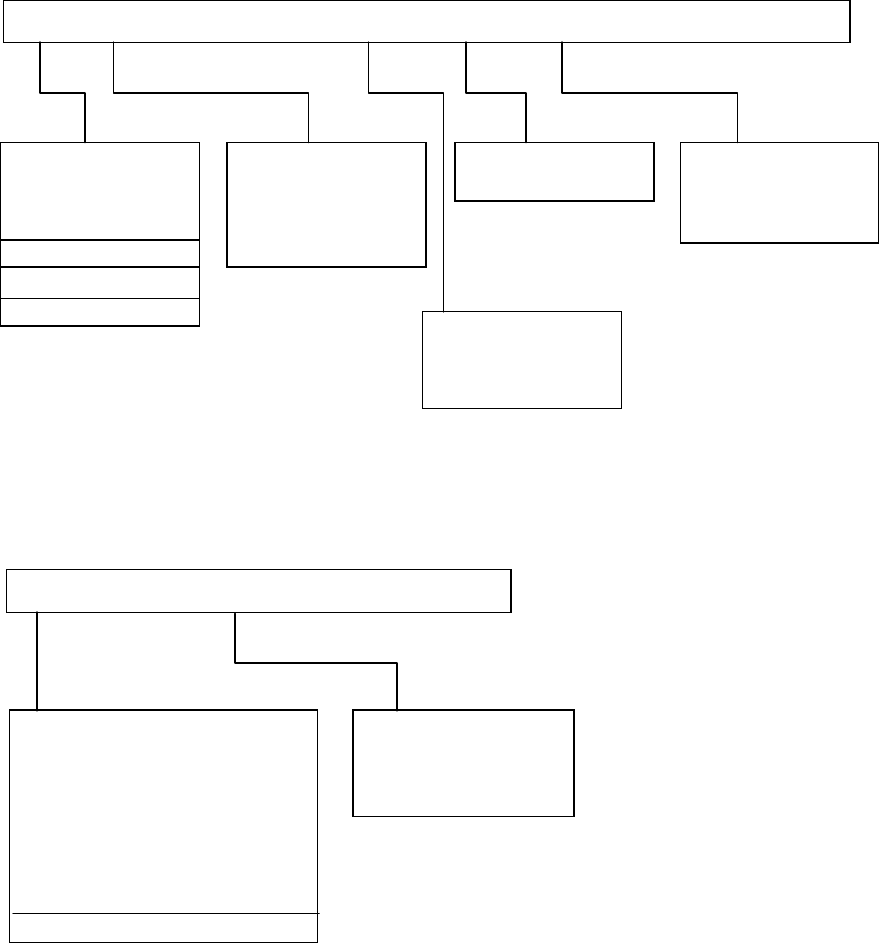
3.3.5 Menu organization
Top menu
* The menu items appeared in red cannot be selected.
Local menu
(1) Machine setup local menu
1/File 2/Data input 3/Product 4/Setup 5/Mainte 6/Print 7/Tool 9/Exit
1/PWD data
2/Placement data
3/Component data
4/Pick data
5/Vision data
1/Warm up
2/Idle mode
1/Data file list
2/Production data
3/Setup
4/Production info
1/Unit...
2/Opn. option...
3/Machine setup...
4/Manual control...
1/Set up group 2/PWB conveyor 9/Exit
1/ATC nozzle setup...
2/Vacuum value without nozzle...
3/Device enable...
4/Reference pin position...
5/Shape clamp position...
6/Component scrap position...
7/Trash conveyor belt position...
8/PWB conveyor...
A/Signal light
9/Exit
1/Initialize
2/Load PWB
3/ Eject PWB
4/ Release clamp
1/Open...
2/Save
3/New...
4/Save as...
5/File maintenance...
9/Exit
A/About program
3 − 14
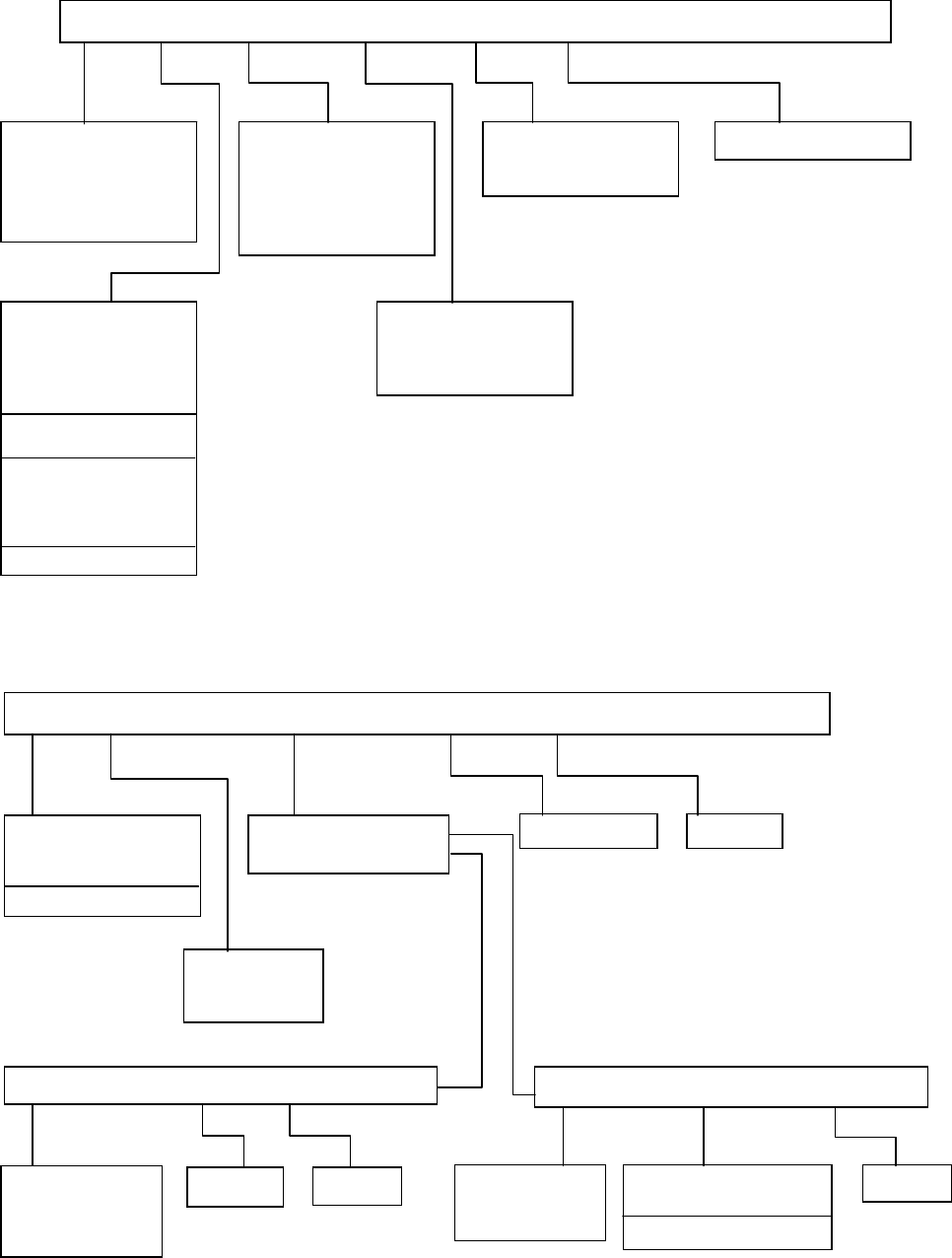
(2) Program edit local menu
(3) Production local menu
1/File 2/Edit 3/Chng(F6) 4/Dspl.(F9) 5/Cnvr 6/Meas. 9/Exit
1/Open...
2/Save
3/New...
4/Save as...
9/Exit
1/Copy F3
2/Delete F4
3/Move F5
4/Insert
5/Duplicate
6/Jump
7/Find
8/Vision copy
9/Nozzle sort
A/Component name
B/Pick point recalc
C/Mark database
1/PWB load
2/PWB eject
3/BOC align
1/PWB data
2/Placement data
3/Component data
4/Pickup data
5/Vision data
6/Data compl. state
1/Component form
2/Component list
3/Pick input
4/Feeder order
1/Current comp.
1/File 2/Production mode 3/Conversion data 4/Option 9/Exit
1/Open...
2/Save
3/Save as...
9/Exit
1/PWB prod.
2/Trial
3/Dry run
9/Exit
1/Parts No. set up
2/Management info.
1/Option
1/Select expression 2/Clear 9/Exit
1/Total
2/Front
3/Rear
4/Tray holder
1/Clear 9/Exit
1/Supply select 2/Parts supply 9/Exit
1/Front
2/Rear
3/Tray holder
1/Replenish component
2/Replenish all feeders
3/Update display
9/Exit