KJ-01.02.Instruction Manual.REV.02.pdf - 第376页
14 − 7 14.2.6 Transport pulley Check that the pulley turns without resistance. If it is necessary to replace t he pulley , f ollow the procedure below . (1) Transfer pulley replacement 1) As shown in Figures 14.2.6. 1, t…
14 − 6
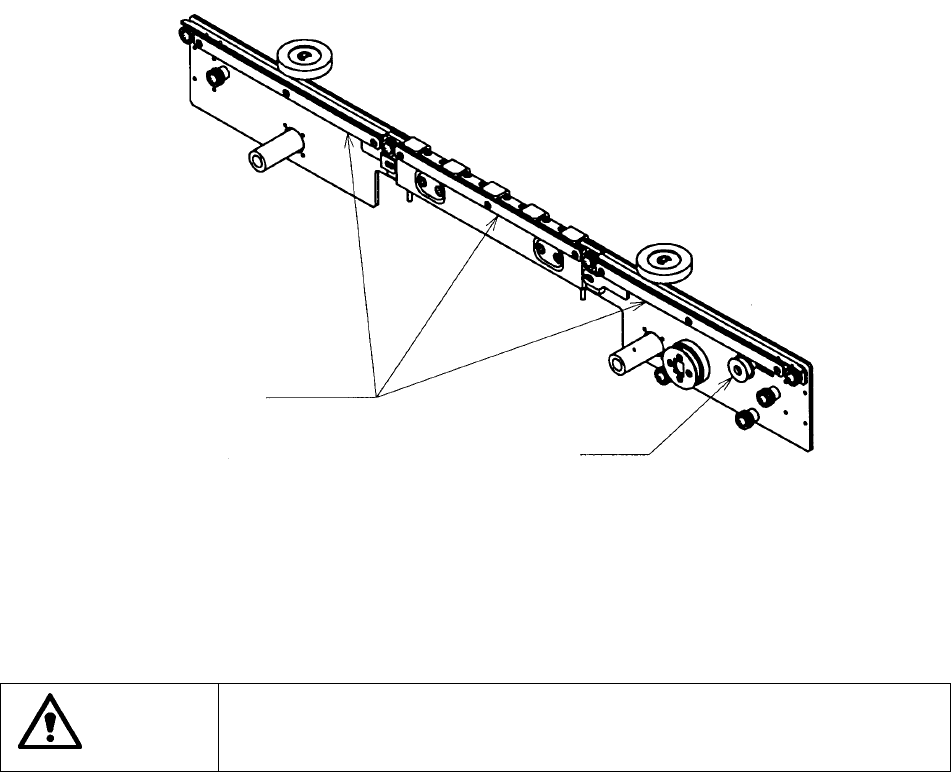
14.2.5 Transport belt
Check that the belt is severely worn-out, damaged, or stretched. If it is necessary
to replace the belt, follow the procedure below.
1) Loosen all screw and nut of the transport pulley as shown in Figure 13.2.5.1 to
loosen tension of the belt.
2) Loosen the flush bolts of the PWB transport belt as shown in Figure 13.2.5.1 to
remove the PWB transport belt guides. At this point, you can remove/attach
the PWB transport belt.
Figure 14.2.5.1
CAUTION
To prevent the body from injury which can be caused by accidental
activation of the machine, turn off the power of the machine before
following the operation above.
PWB transport belt guides
Transport pulley
14 − 7
14.2.6 Transport pulley
Check that the pulley turns without resistance.
If it is necessary to replace the pulley, follow the procedure below.
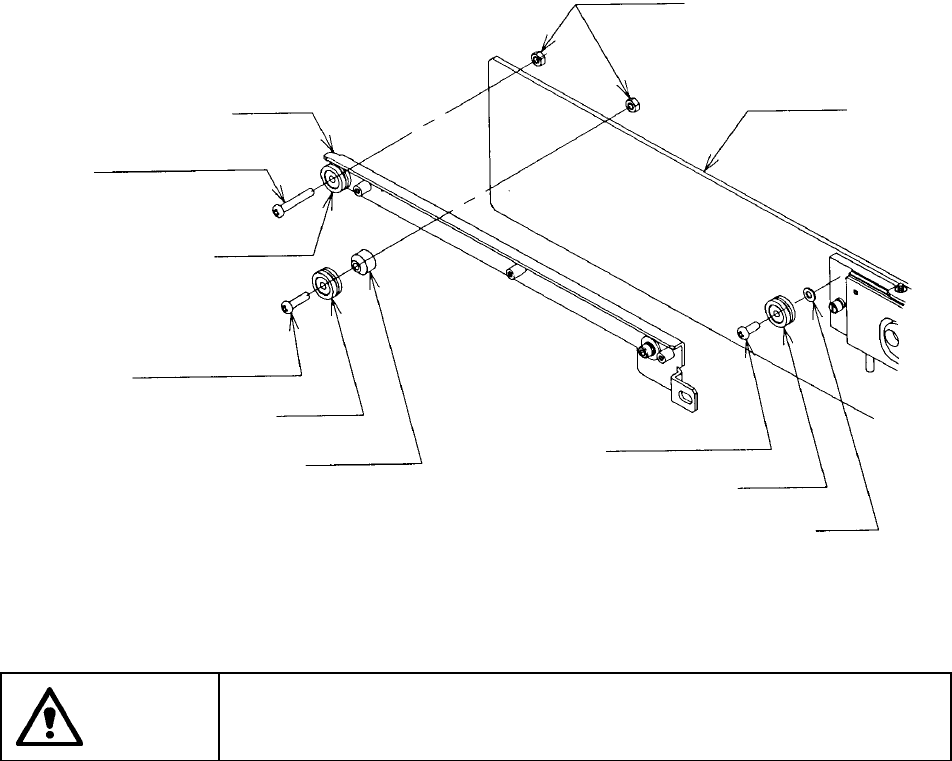
(1) Transfer pulley replacement
1) As shown in Figures 14.2.6.1, the transport pulleys are fixed at the front
and rear rail plates. Loosen the screws used to fix the pulleys to replace
them.
2) The same as for the transport belt replacement, perform tension
adjustment of the transport belt.
Figures 14.2.6.1
CAUTION
To prevent the body from injury which can be caused by accidental
activation of the machine, turn off the power of the machine before
following the operation above.
PWB transport rail
Screw (pan-headed screw)
Transport pulley
Screw (pan-headed screw)
Transport pulley
Pulley stopper
Screw (pan-headed screw)
Transport pulley
Flat washer
Rail guide
Flange nuts
14 − 8
14.2.7 Notice on Electricity
14.2.7.1 General notices
WARNING
Cut off the power to the machine before starting to disconnect or connect
the connectors.
CAUTION
Never use the machine with any voltage other than those specified.
Before switching on the machine, be sure that the machine is in a safe
conditions.
Before switching on the machine, be sure that there is no one who is
working in the machine.
Before switching on the machine, be sure that there are no obstacles
(tools and jigs) left in the machine.
Turn off the machine to supply air.
14.2.7.2 Daily routine checks
1. Make sure that the supply voltage is the rated voltage ± 10%.
2. Make sure that the connectors (of devices such as a keyboard and HOD) are
all seated firmly.
WARNING
To avoid a risk of serious injury or death caused by electric shock hazard,
turn off the main power switch of the house current which is installed in
the building where the machine is used.
Note that it is not the main power switch of the machine.