KJ-01.02.Instruction Manual.REV.02.pdf - 第83页
4 − 12 4.3.2 Vacuum value without nozzle W hen y ou select the [ 2/V acuum value without nozzle] command fr om the [1/ Set up group] menu, the “ V acuum value without nozzle” dialog box appears on the screen as shown in …
4 − 11
② Setting the vacuum value
– Set the vacuum value when a nozzle is mounted.
– When you click the <EXEC.> button, the vacuum value is automatically
obtained. You can enter characters to the “Vacuum” column on which
the input focus is located also.
③ Setting the nozzle height
– Set the offset value of the mounted nozzle with respect to the reference
nozzle.
– When you click the <EXEC.> button, the nozzle height is automatically
obtained. This item can be entered automatically only.
(2) Purpose of usage
– The machine judges whether a nozzle is attached or not with checking these
settings and the setting of the next item “Vacuum value without nozzle”
together.
– The machine samples the vacuum value before picking up a component, and
then samples it also after picking up a component to check whether a
component is located at the pick-up position based on the difference of these
sampled values.
4 − 12
4.3.2 Vacuum value without nozzle
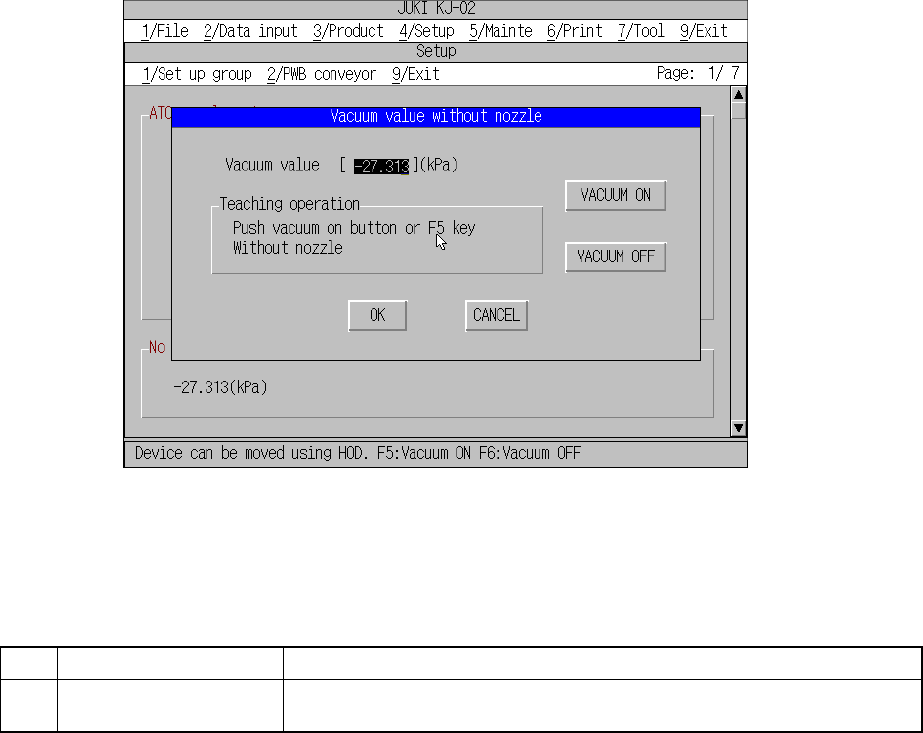
When you select the [2/Vacuum value without nozzle] command from the [1/Set up
group] menu, the “Vacuum value without nozzle” dialog box appears on the screen as
shown in Figure 4.3.2.1.
Figure 4.3.2.1 Vacuum value without nozzle setting dialog box
(1) Setting items
No. Item Description
1 Vacuum value without
nozzle
The vacuum value without the nozzle attached (for automatic operation only)
(2) How to set
– By the head button
Use the field selection key to select the <VACUUM ON> button or press the
F5 key to obtain the vacuum value.
4 − 13
4.3.3 Use Unit
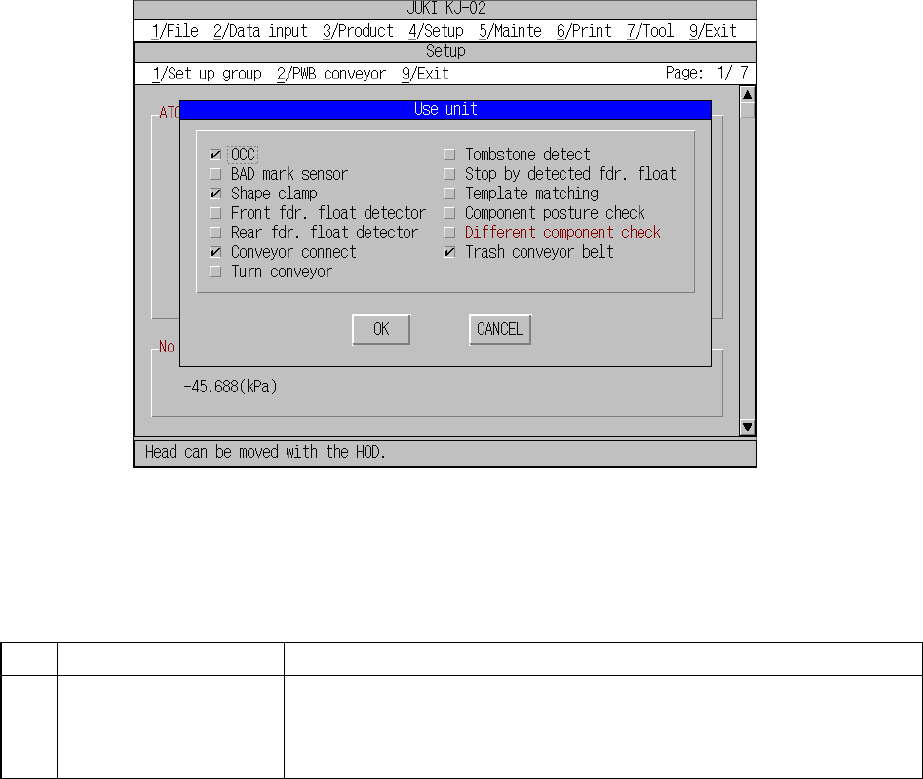
When you select the [3/Use Unit] command from the [1/Set up group] menu, the “Use
Unit” dialog box appears on the screen as shown in Figure 4.3.3.1.
Figure 4.3.3.1 Use Unit setting dialog box
(1) Setting items
No. Item Description
1 Use Unit
Unit to be used/not used
Should a system unit develop a malfunction, that unit may be defined as "a
unit not used" using this command. This allows the pick-and-place sequence
to be executed without modifying the production program data.
Table 4.3.3.1 shows whether or not a pick-and-place sequence can be completed
if the production program requires the unit defined as to be used before it can
complete itself.
(2) Setting the unit
– Specify the device unit to be used with the check box.
– Any unit without option setting being made cannot be checked.