KJ-01.02.Instruction Manual.REV.02.pdf - 第266页
7 − 16 3) Patt ern which cannot be register ed as the user def ined templat e ① IC marks ② Silk (charact er) patt ern Since the pat tern and pad g eneration pr ocess is totally diff erent f rom the silk printing pr ocess…
7 − 15
Notes on setting of a template
1) You cannot register any IC mark as a user-defined template.
2) Check to see if there is no pattern similar with the template set inside the
detection frame.
3) Specify 0.5 to 3 mm as the pattern size in the same manner as the standard
mark.
4) Use the designed values (CAD data) as the coordinate value. With the user
defined template data, the center position of the pattern cannot be calculated
correctly. Since the mark is taught with moving the cross-hair cursor, the user
defined position becomes the center position (the normal mark generates no
error because the calculated center position becomes the center position of the
pattern).
5) The vision copy of the user defined template cannot be made.
6) The machine stores user-defined template data to the VCS as a full-path
production program name. If an error message “Specified template data full.
Delete not used template data.” appears on the screen, select the [1/File]
command on the menu bar, select the [5/File maintenance] command on the
displayed “File” menu, and select the [Delete template] command in this order to
delete unnecessary template data.
7) If you use a production program that uses a user-defined template with another
mounter, perform teaching operation again.
8) If you want to perform file operation such as copying and renaming of a
production program that is stored in the flash memory, be sure to select the
[1/File] command, and then the [5/File maintenance] command
9) The length of a production program name including a path should be 32
characters or less.
(If you enter a production program name whose length is longer than 32
characters, the interface error between the VCS and the machine occurs, and
the machine cannot create any template data.)
Patterns which can be registered as the user defined template
1) Patterns which can be registered as the user defined template
① Wiring pattern
② Pad and land pattern where no screen is printed (no solder paste is put)
③ PWB marks other than JUKI standard marks (whole or part)
2) Notes on registration as the user defined template
① Through hole and pier hole
Since the pattern generation process is different from the holing process, the
same positioning cannot be always achieved. (The hole position is
undefined for a pattern.)
To register the template based on the through hole or pier hole, include the
wiring pattern around the hole.
7 − 16
3) Pattern which cannot be registered as the user defined template
① IC marks
② Silk (character) pattern
Since the pattern and pad generation process is totally different from the silk
printing process, the placement position cannot be determined based on the
silk print.
③ Pad and land pattern printed on the silk screen
The solder paste on the screen is in the form of grains, so lighting cannot be
stable depending on the environment or condition. The template matching
is highly appropriate for change of lighting conditions, but not for the change
of polarity (positive and negative).
④ The similar pattern is located on the same recognition screen
⑤ Template whose contrast difference is insufficient
7 − 17
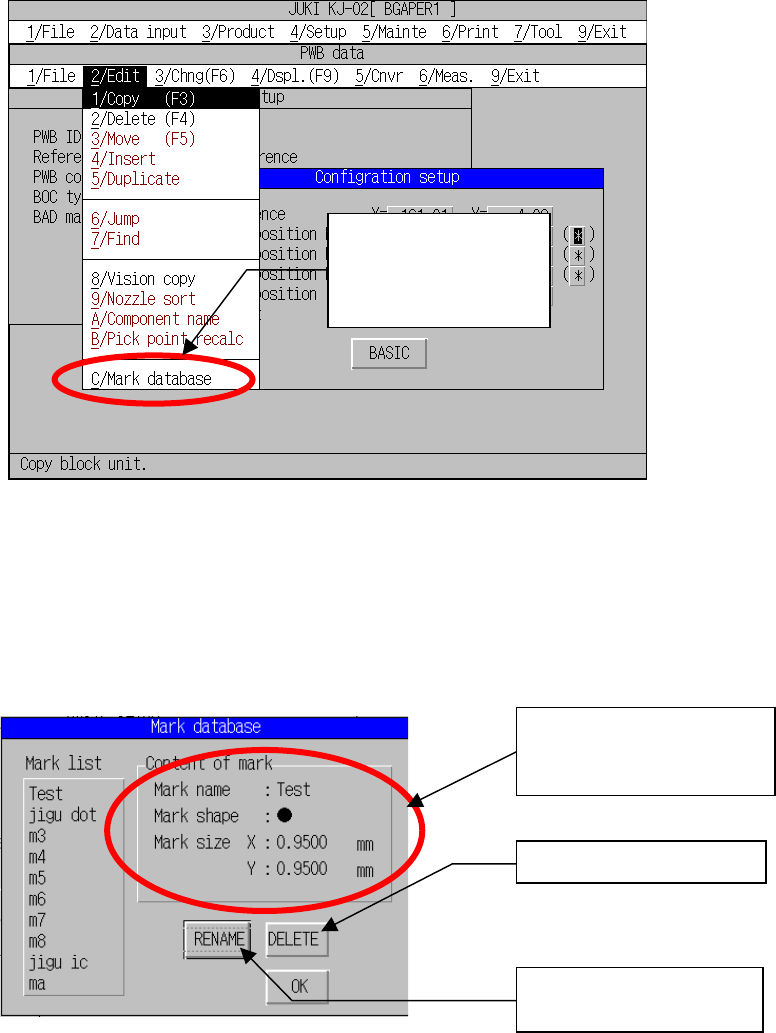
7.4 Mark Database Management
This command deletes or edits data registered in the mark database.
1) Select [D/Mark database...] on the Edit menu.
Fig. 7.4.1.1 “Edit” Menu Mark
2) Displays the mark database management
This dialog box allows you to edit the mark database.
Fig. 7.4.2.1 Mark Database Management Dialog Organization
“Mark database
management” has been
added to the program
editing menu.
Changes the mark data
name.
The display of the contents
of mark registration has
been added.
Deletes mark data.