KJ-01.02.Instruction Manual.REV.02.pdf - 第333页
10 − 8 Each command is described on T able 10.4.1. 1.1. T able 10.4.1.1.1 Descri ption of each command No. Sub menu name Descripti on 1 Hom e posit ion Moves the head to t he XY home posit ion viewed from the nozzle. 2 H…
10 − 7
10.4 Operations
10.4.1 Moving the axes
10.4.1.1 Moving the XY-axis
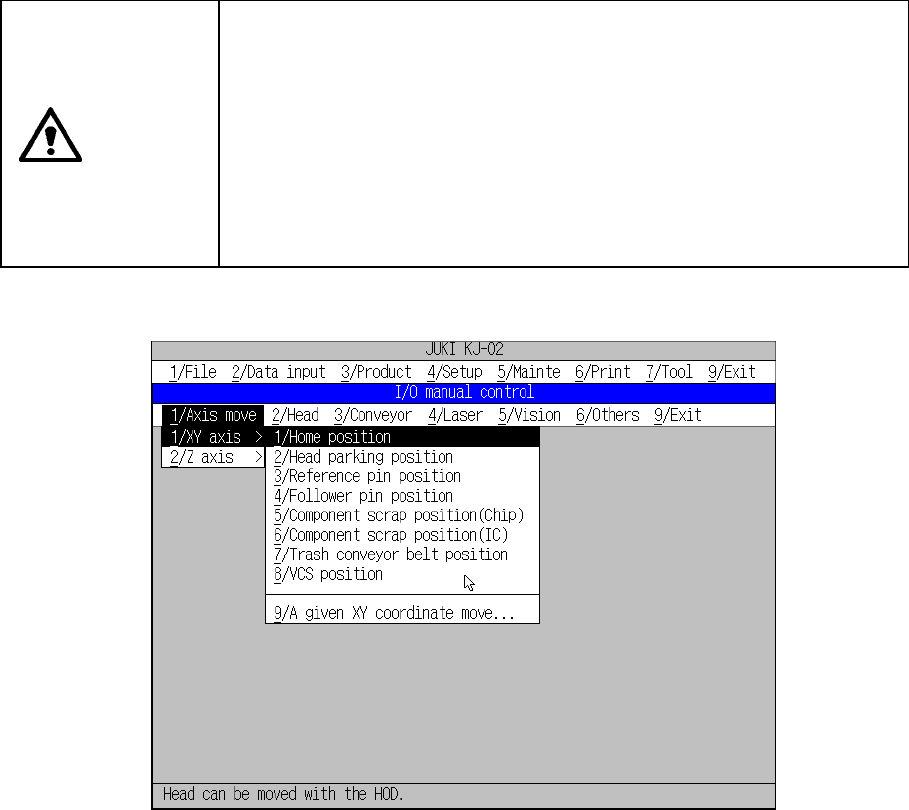
When you select the [1/Axis move] on the menu bar, then the [1/XY axis] command
on the displayed menu, the command menu appears as shown in Figure 10.4.1.1.1.
Selecting the desired command from this command menu has the machine start
controlling the corresponding device.
CAUTION
The XY-axis starts moving immediately after you select a command.
To avoid risk of injury, do not place your hand in the machine, nor
move your face or head close to the machine during operation.
Before selecting a command, check to see if there is no one who is
working the internal parts of the machine.
Before selecting a command, check to see if there is no one who is
near the machine and can be injured when the machine warms up.
Before selecting a command, check to see there is no obstacle (tools
and jigs) attached or left in the machine that may prevent any part
inside the machine from operating.
Figure 10.4.1.1.1 Axis (XY-axis) control menu
10 − 8
Each command is described on Table 10.4.1.1.1.
Table 10.4.1.1.1 Description of each command
No. Sub menu name Description
1 Home position Moves the head to the XY home position viewed from the nozzle.
2 Head parking position Moves the head to the head waiting position viewed from the nozzle.
3 Reference pin position Moves the head to the reference pin position viewed from the nozzle.
4 Follower pin position Moves the head to the follower pin position viewed from the nozzle.
5 Component scrap position (Chip) Moves the head to the component discarding position (chip) viewed from the nozzle
6 Component scrap position (IC) Moves the head to the component discarding position (IC) viewed from the nozzle.
7 Trash conveyor belt position Moves the head to the component discarding position of the IC trash conveyor belt
with viewed from the nozzle.
8 VCS position Moves the head to the VCS position viewed from the nozzle.
9 A given XY coordinate move Moves the head to the position indicated by the coordinate you specified with viewed
from the nozzle.
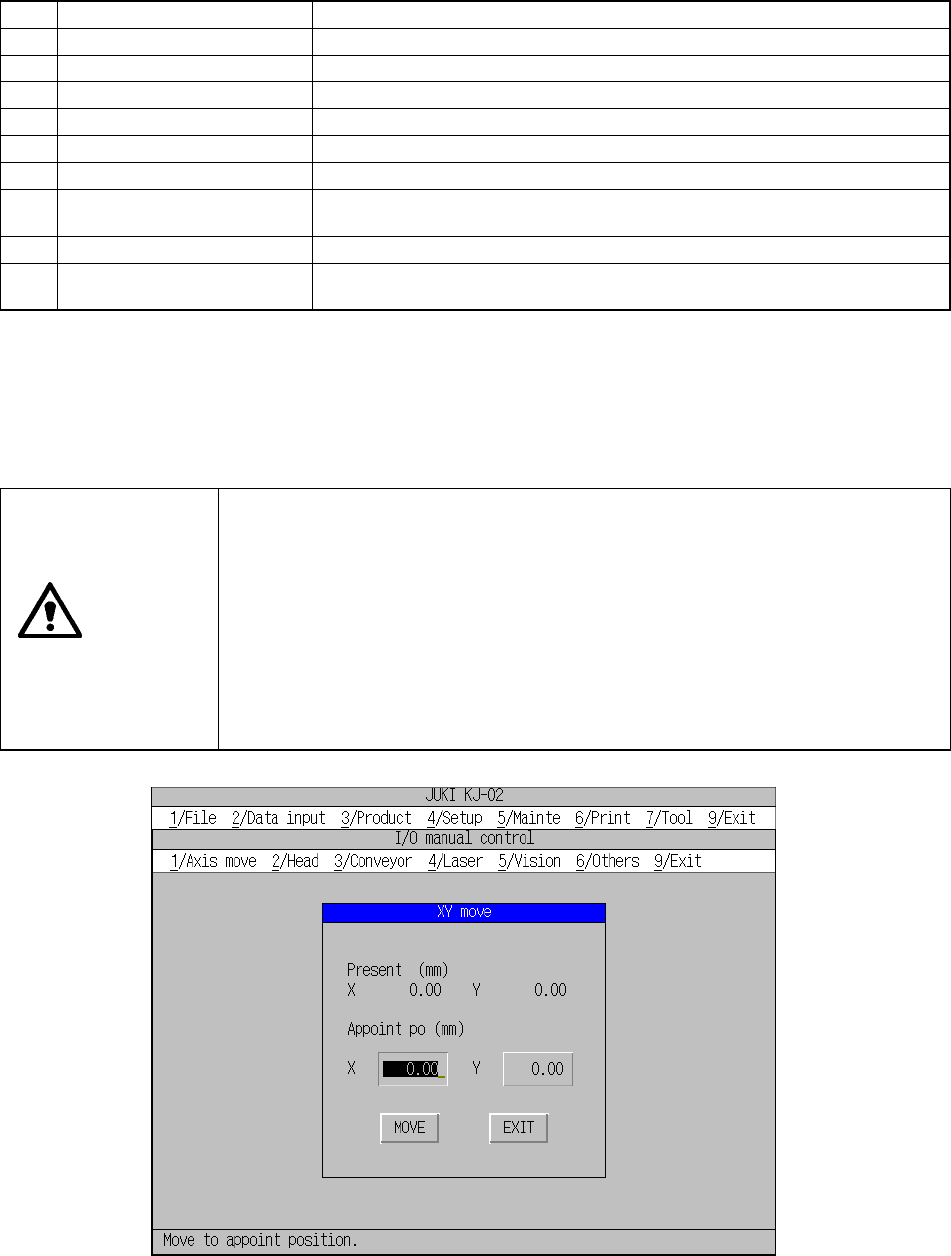
When you select the [9/A give XY coordinate move] command, the dialog box
appears, which asks you to enter the XY coordinates of the position the head is
supposed to move to as shown in Figure 10.4.1.1.2. Enter the head moving
destination coordinates, and click the <MOVE> button. The head moves to the
position you specified.
CAUTION
The XY-axis starts moving immediately after you click the <MOVE> button.
To avoid risk of injury, do not place your hand in the machine, nor move
your face or head close to the machine during operation.
Before clicking the <MOVE> button, check to see if there is no one who is
working the internal parts of the machine
Before clicking the <MOVE> button, check to see if there is no one who is
near the machine and can be injured when the machine warms up.
Before clicking the <MOVE> button, check to see there is no obstacle
(tools and jigs) attached or left in the machine that may prevent any part
inside the machine from operating.
Figure 10.4.1.1.2 “XY move” dialog box
10 − 9
10.4.1.2 Moving the Z-axis
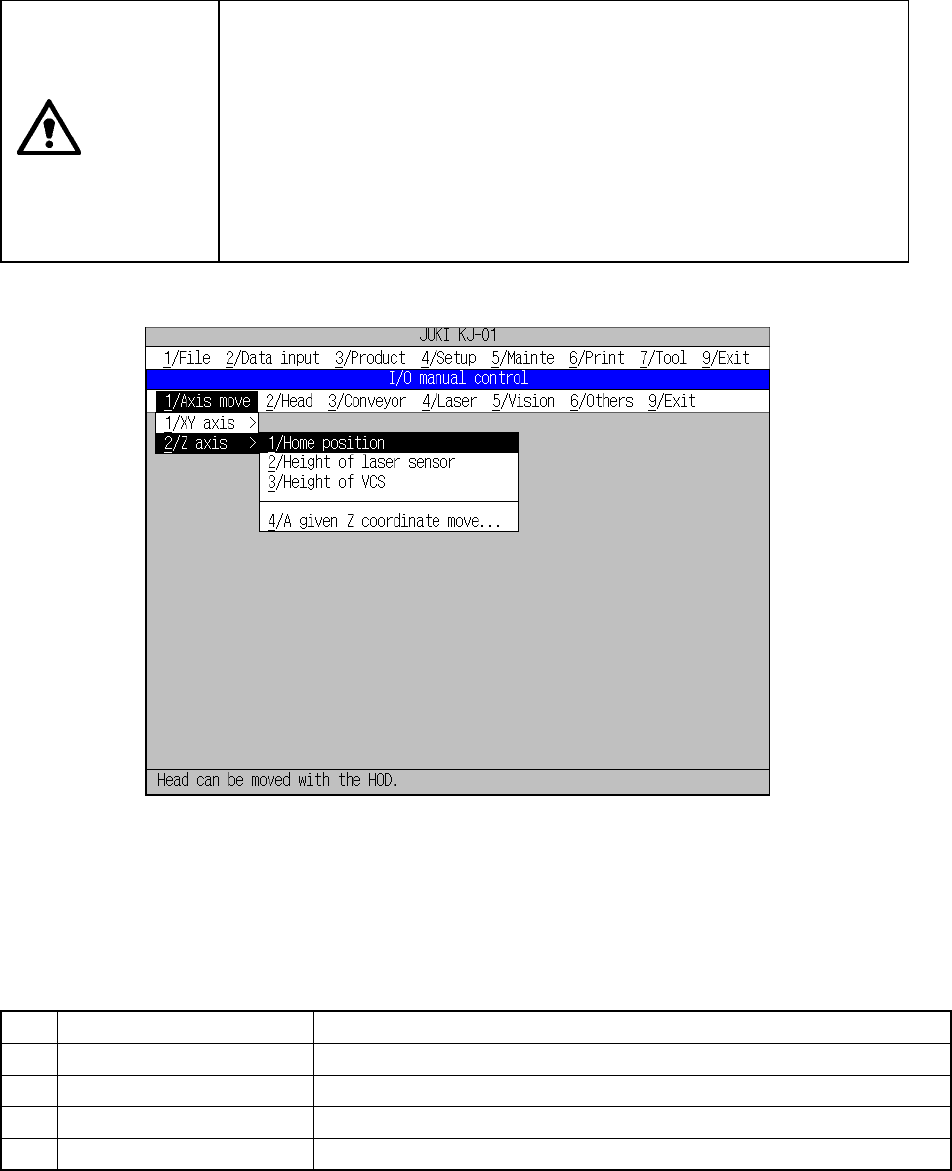
When you select the [1/Axis move] command on the menu bar, and then the [2/Z
axis] command on the displayed menu, the command menu appears on the screen
as shown in Figure 10.4.1.2.1.
When you select a command from this command menu, the machine starts
controlling the Z-axis operation.
CAUTION
The Z-axis starts moving immediately after you select a command.
To avoid risk of injury, do not place your hand in the machine, nor
move your face or head close to the machine during operation.
Before selecting a command, check to see if there is no one who is
working the internal parts of the machine.
Before selecting a command, check to see if there is no one who is
near the machine and can be injured when the machine warms up.
Before selecting a command, check to see there is no obstacle (tools
and jigs) attached or left in the machine that may prevent any part
inside the machine from operating.
Figure 10.4.1.2.1 Axis control (Z-axis) menu
Each command is described on Table 10.4.1.2.1.
Table 10.4.1.2.1 Description of each command
No. Sub menu name Description
1 Home position Moves the nozzle to the Z-axis home position.
2 Height of laser sensor Moves the nozzle to the height of the laser sensor.
3 Height of VCS Moves the nozzle to the height of the VCS.
4 A given Z coordinate move Moves the nozzle to the position whose coordinates are specified.