KJ-01.02.Instruction Manual.REV.02.pdf - 第405页
9 On Setting Up Error No. Error Message Correctiv e Action E4101 Illegal charactor or format error . This error message appears when you enter an alphabetic character for the item for which a numeric character should be …
8
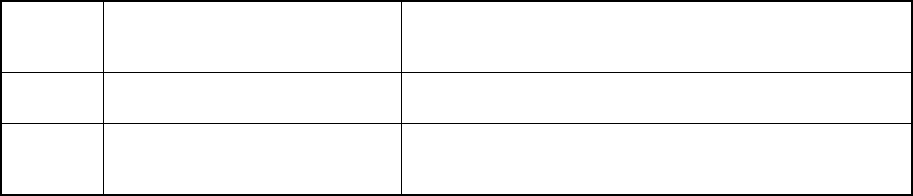
E2660 Enter angle ranges is between
0(deg.)|and 359(deg.).
You can set the component supply direction within the range
from 0 to 359 degrees only. Set the direction so that it can
be within this range.
E2661 Tray data is max. Cannot be used. Up to five trays can be set for one tray holder unit. You
cannot specify any number exceeding this limit.
E2305 Component name'****'is
incompleted.
On the Component data edit screen, you can copy a
component whose data is completely entered. Before
copying data, create Component data completely.
9
On Setting Up
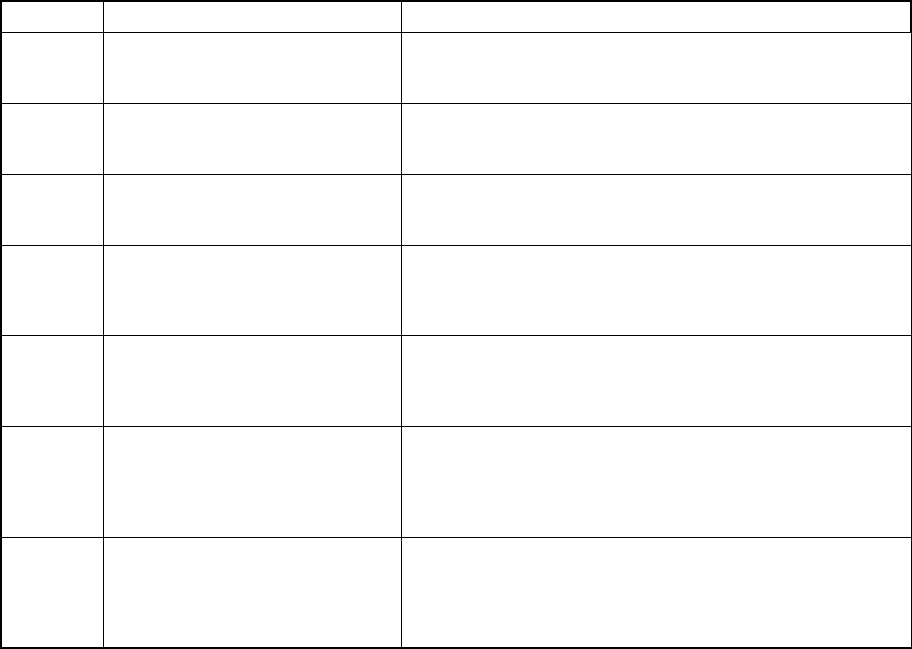
Error No. Error Message Corrective Action
E4101 Illegal charactor or format error. This error message appears when you enter an alphabetic
character for the item for which a numeric character should
be entered.
E4102 Limit over You entered data that exceeded the range regulated for the
item. Check the regulated data entry range to enter
appropriate data.
E4122 Select error. (Select conveyer
connect or turn conveyer)
You tried to check the check boxes “Conveyor connect” and
“Turn conveyor” on the “Use unit” menu.
You can check either of these check boxes.
E4126 Shape reference can't be used. This error message appears on the screen if you check the
check box “Shape clamp” on the “Use unit” menu although
the machine is not equipped with a shape clamp unit. You
cannot use a shape clamp unit.
E4127 BAD mark sensor is not install. This error message appears on the screen if you check the
check box “BAD mark sensor” although the machine is not
equipped with a bad mark sensor. You cannot use a bad
mark sensor.
E4128 Front feeder rise sensor is not
install.
This error message appears on the screen if you check the
check box “Front fdr. Float detector” on the “Use unit” menu
although the machine is not equipped with a feeder float
detector on its front. You cannot use a feeder float detector
(on the front side
E4129 Rear feeder rise sensor is not
install.
This error message appears on the screen if you check the
check box “Rear fdr. Float detector” on the “Use unit” menu
although the machine is not equipped with a feeder float
detector on its rear. You cannot use a feeder float detector
(on the rear side).
10
On I/O Manual Operations
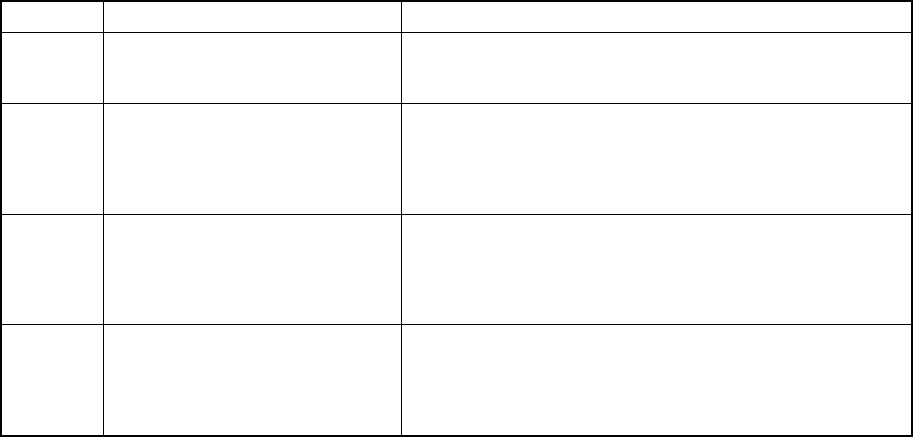
Error No. Error Message Corrective Action
W4200 Z position limit over. The entered Z-axis coordinate exceeds the allowable setting
range. Check the allowable range to enter the coordinate
again.
W4231 Can't use bad mark sensor.
Please check 'Installed options
' of SETUP.
Although the check box “BAD mark sensor” is not checked
on the “Use unit” menu invoked from the Setup menu, you try
to operate the bad mark device to perform teaching
operation. Check the settings of the “Use unit” menu with
invoking it from the Setup menu.
W4232 Can't use BOC. Please check '
Installed options
'
of SETUP.
Although the check box “BOC camera” is not checked on the
“Use unit” menu invoked from the Setup menu, you try to
operate the camera device to perform teaching operation.
Check the settings of the “Use unit” menu with invoking it
from the Setup menu.
W4240 Can't use PWB conveyer.
Please check 'Installed options
' of SETUP.
Although the check box “Conveyor connect” is not checked
on the “Use unit” menu invoked from the Setup menu, you try
to operate the automatic board conveyor. Check the
settings of the “Use unit” menu with invoking it from the
Setup menu.