KJ-01.02.Instruction Manual.REV.02.pdf - 第355页
11 − 9 1 1.2.1. 6 Canceli ng the printi ng operation ① W hen you press the Esc k ey or click the <CANCEL> but ton during printing , the machine stops print ing and displays the print cancel scr een as shown in Figu…
11 − 8
11.2.1.5 Production information
① When you select the [6/Print] command on the main menu, and then the
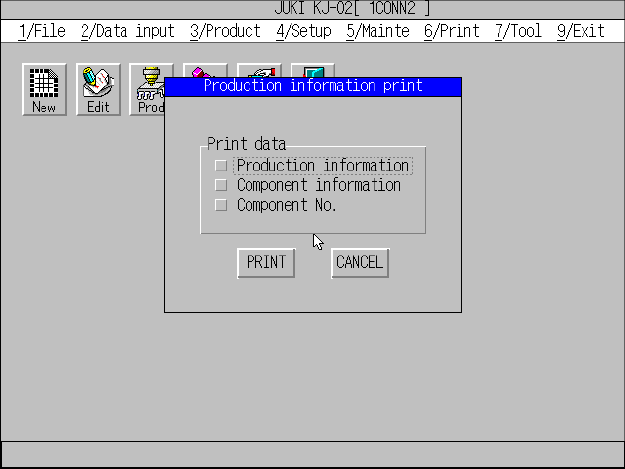
[Production info] command on the displayed menu, the “Production information
print” screen appears as shown in Figure 11.2.1.5.1.
Figure 11.2.1.5.1 “Production information print” dialog box
② Check the check box for the data to be printed, and click the <PRITN> button.
The machine starts printing data.
③ When the machine starts printing, the “PRITN” message box appears. When
the machine finishes printing data, this message box disappears, and the main
menu reappears.
④ Note that you have to press the Esc key or click the <CANCEL> button to
cancel the current printing operation after the machine starts printing.
Note: For the production information list, you cannot select it at Step 1 if the
machine has not produced any PWB.
11 − 9
11.2.1.6 Canceling the printing operation
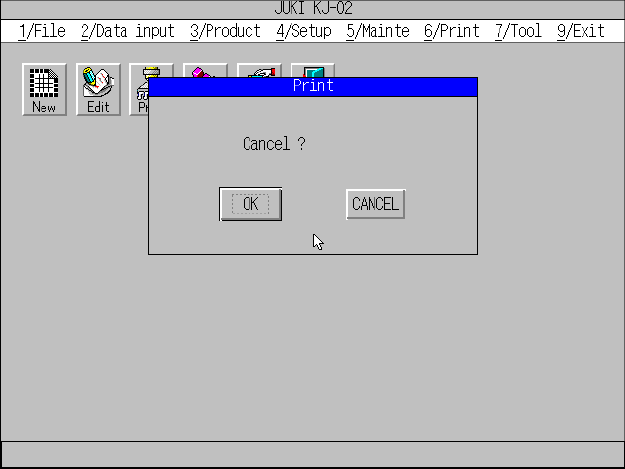
① When you press the Esc key or click the <CANCEL> button during printing, the
machine stops printing and displays the print cancel screen as shown in Figure
11.2.1.6.1.
Figure 11.2.1.6.1 Print cancel dialog box.
② When you click the <OK> button, the main menu reappears.
③ When you click the <CANCEL> button, the machine restarts printing and
displays the “PRINT” message box.
11 − 10
11.2.1.7 Printer errors
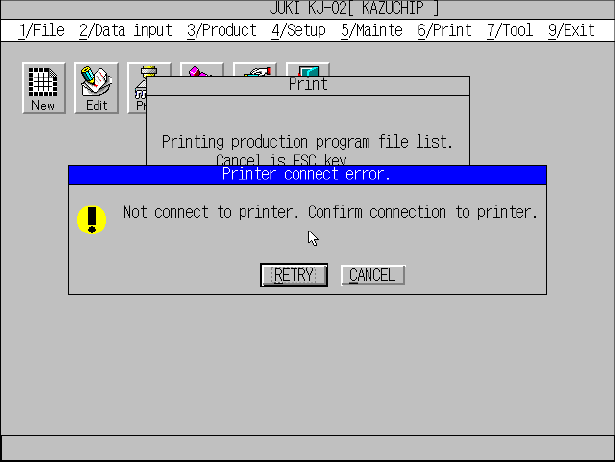
① When the printer becomes unable to print data during printing, it stops printing
and displays the message box as shown in Figure 11.2.1.7.1.
Figure 11.2.1.7.1 Printer error message
② Recover the printer from the error, and click the <RETRY> button. The printer
restarts printing data.
③ When you click the <CANCEL> button, the main menu reappears and the
printer cancels the current printing operation.