KJ-01.02.Instruction Manual.REV.02.pdf - 第221页
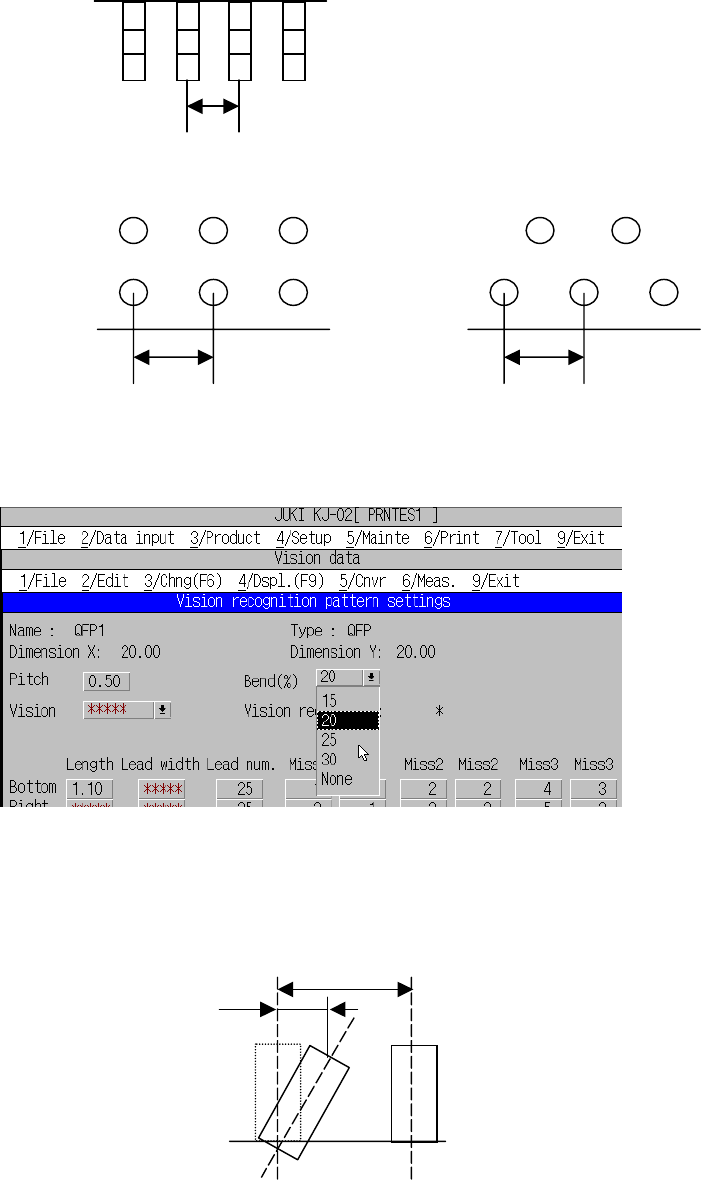
6 − 17 ② Pitch Enter the lead pitch ( ball pitch f or a BG A component). a. Lead pitch b. Ball pitch( Normal assig nment ) Ball pitch(Stagg er assig nment) ③ Bend Select t he bending lead detect ion level from the combo …

6 − 16
(2) Vision data list screen
The vision data list screen lists vision data.
You can see the data only, and cannot edit any data. If you want to enter any
data, switch the vision data list screen to the vision data form screen.
1) Displayed items
No Displayed item name Description
1 Compo. name Component name set on the Placement data screen
2 Type Component type set on the Component data screen
3 SizeX Width of a component set on the Component data screen
4 SizeY Length of a component set on the Component data screen
5 Bot (bottom) Number of leads set on the Vision data screen
*** indicates that you do not have to set this item.
6 Right Number of leads set on the Vision data screen
*** indicates that you do not have to set this item.
7 Top Number of leads set on the Vision data screen
*** indicates that you do not have to set this item.
8 Left Number of leads set on the Vision data screen
*** indicates that you do not have to set this item.
9 Compl (Complete
status)
Whether Vision data is completely created or not:
“OK” indicates that data is completely created, and “NG”
indicates that it is not created completely.
Use the ↑ or ↓ key to move the cursor up or down. To scroll one page of
the screen, press the PageUp or PageDown key.
To switch the Vision data list screen to the Vision data form screen, press the
F9 key or select the [4/Displ.] command on the menu bar, select the
[6/Vision form] command on the displayed menu, and press the Enter key.
The machine displays the vision data form screen corresponding to the line
on which the cursor was located on the Vision data list screen.
(3) Vision data form screen
The Vision data form screen allows you to enter Vision data.
To switch to the next Vision data, press the PageDown key. To switch to the
previous Vision data, press the PageUp key.
1) Items
① Compo. name, Type and Dimension X and Y
This screen displays the same data as that displayed on the Vision data
list screen.
6 − 17
② Pitch
Enter the lead pitch (ball pitch for a BGA component).
a. Lead pitch
b. Ball pitch(Normal assignment) Ball pitch(Stagger assignment)
③ Bend
Select the bending lead detection level from the combo box.
Figure 6.2.3.3 Bent lead detection level setting screen
Bent lead detection level =△L/L
Bent lead detection level definition
Ball
p
itch
L
△L
Ball
p
itch
Lead
p
itch
6 − 18
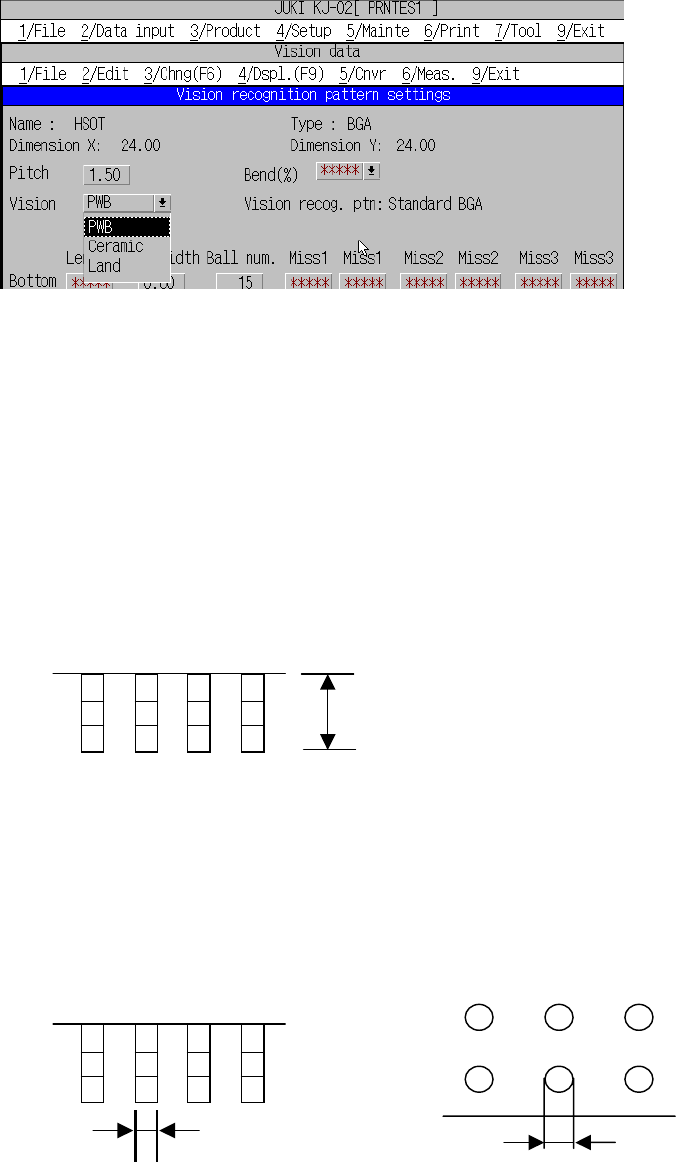
④ Vision
Select the method for recognizing a BGA component from the menu shown in
the figure below. See Table 6.2.2.1.4 for the meaning of each item.
Figure 6.2.3.4 BGA recognition pattern type setting
⑤ Vision recog. ptn (Vision recognition pattern)
The machine displays the pattern for recognizing a
BGA/FBGA/connector/outline-to-be-recognized component currently set.
⑥ Len Bot. (Lead length for bottom), R, Top, L
Enter the overall length of the lead. If the item appears with asterisk (*), it is not
necessary to enter any value for that item.
- Lead length
⑦ Width Bot. (Lead width for bottom) right, top, and left
Enter the width of the lead (for BGA, it is ball diameter).
If the item appears with asterisk (*), it is not necessary to enter any value for that
item.
a. Lead width b. Ball diameter
Lead width Ball diameter
Lead len
g
th