KJ-01.02.Instruction Manual.REV.02.pdf - 第237页
6 − 33 3) User patt ern Select the user ball pat tern. Create a pat tern with the “Pt n. edit” button in advance according to the descr iptions of Section 6.5. 4 “Editing t he BGA component user ball pat tern”) . 4) Patt…
6 − 32
2) Default pattern
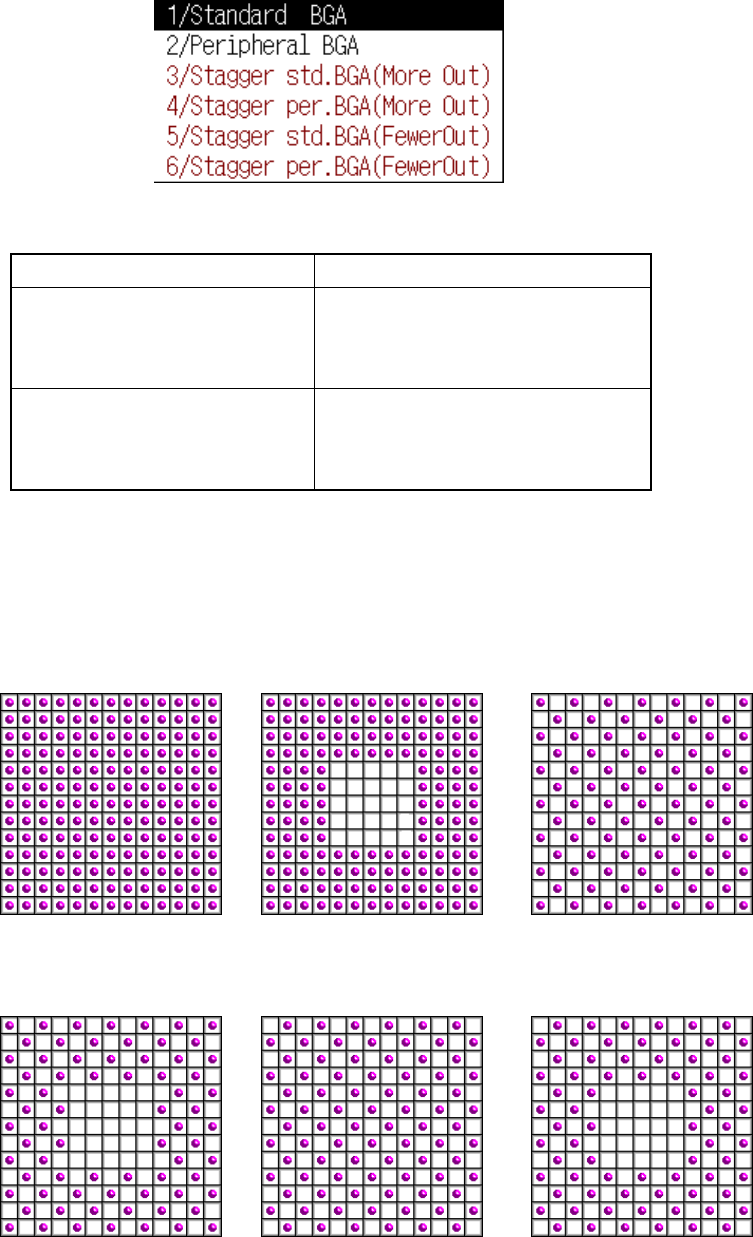
Using the following pop-up menu, set the default ball pattern incorporated into
the system. The selectable pattern depends on a lead (ball) pitch. See Table
6.5.2.2.
Table 6.5.2.2 Requirements for selecting the default pattern
Lead pitch (Ball pitch) Selectable pattern type
BGA
1.00 mm to 1.99 mm
FBGA
0.50 mm to 0.99 mm
Standard BGA
Peripheral BGA
User pattern
BGA
2.00 mm to 3.00 mm
FBGA
1.00 mm to 2.00 mm
Stagger Std. BGA (More OUT)
Stagger Std. BGA (Fewer OUT)
Stagger Per. BGA (More OUT)
Stagger Per. BGA (Fewer OUT)
If you want to use a user pattern when you select the staggered pattern, regard
the staggered pattern as the standard pattern, and suppose that a ball is located
at an area on which no ball is located. The ball pitch becomes half of the actual
one. Enter this ball pitch, which is reduced to the half, and select a user pattern.
Default pattern sample images
Standard BGA Peripheral BGA
Stagger Std. BGA
(More OUT)
Stagger Per. BGA
(More OUT)
Stagger Std. BGA
(Fewer OUT)
Stagger Per. BGA
(Fewer OUT)
6 − 33
3) User pattern
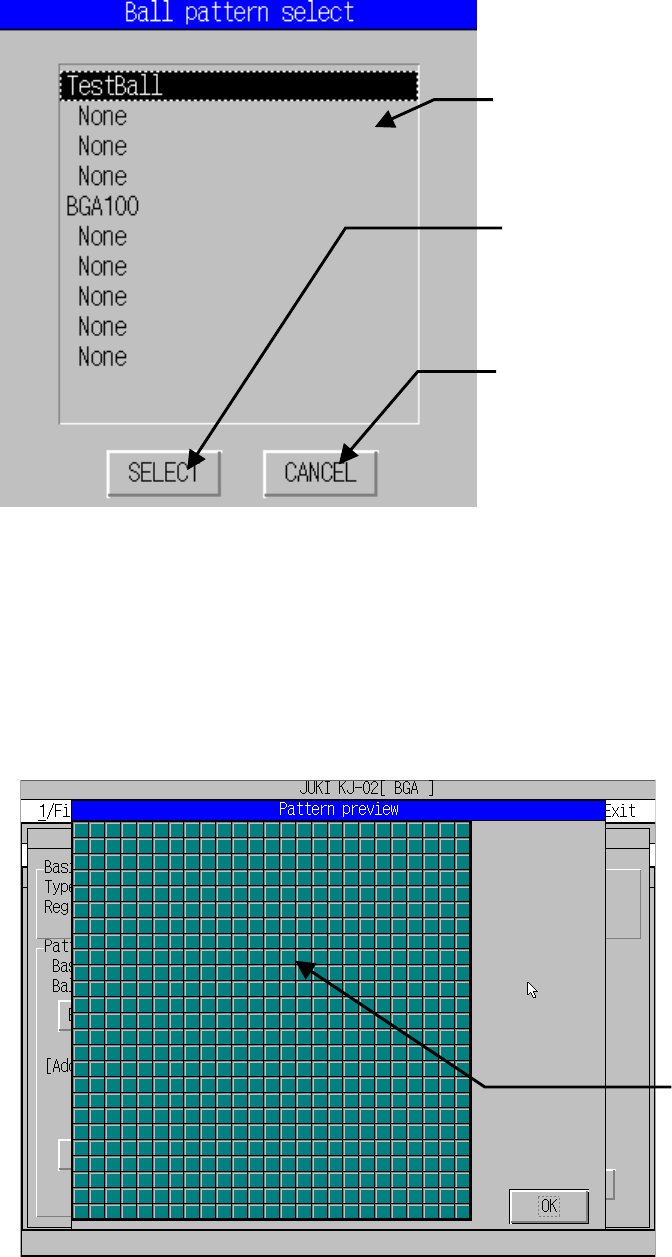
Select the user ball pattern. Create a pattern with the “Ptn. edit” button in
advance according to the descriptions of Section 6.5.4 “Editing the BGA
component user ball pattern”).
4) Pattern editing
This function calls the editing function which creates a user unique ball pattern.
See Section 6.2.3 “Editing the BGA component user ball pattern” for details.
5) Preview
This function displays the set pattern.
Lists the names of the patterns which have
been created with the user pattern editing
function here.
When you move the cursor over the
pattern to be used, then press this button,
the pattern is selected.
Returns to the previous screen.
Ball pattern image
based on the set data
6 − 34
6) Add. Info
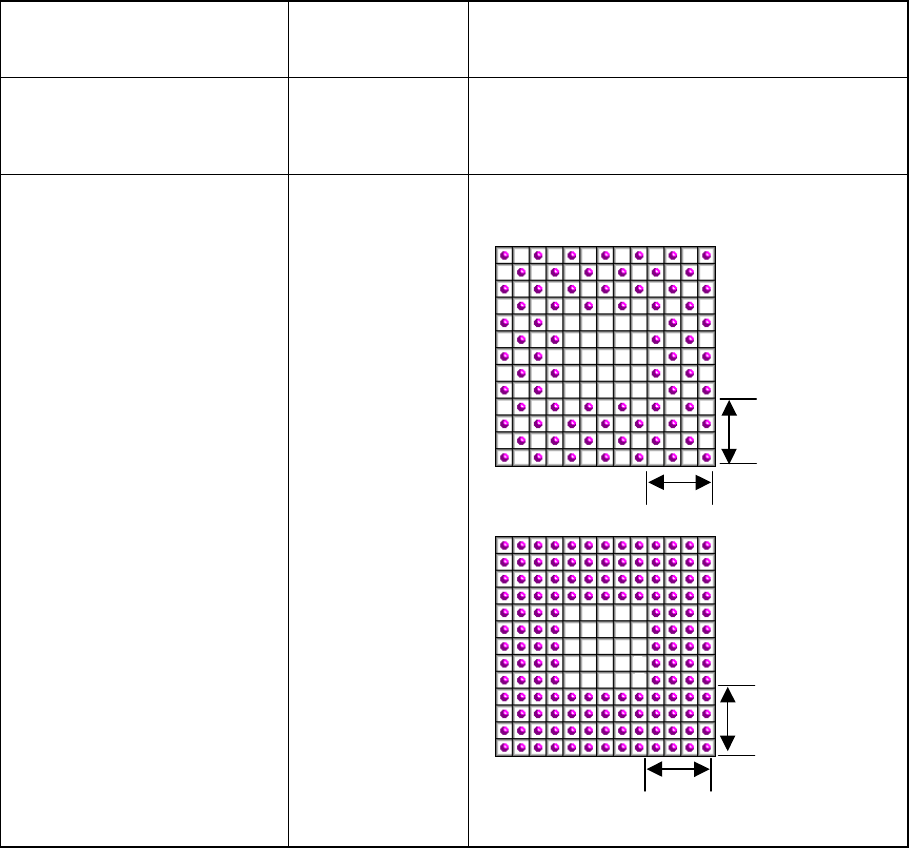
Set the parameters unique to each default pattern. Do not use this function when
you select the user pattern.
Table 6.5.2.3 Additional information
Default pattern type
Parameters
necessary to set
the details
Description
Standard BGA
Stagger Std. BGA (More OUT)
Stagger Std. BGA (Fewer OUT)
None
Peripheral BGA
Stagger Per. BGA (More OUT)
Stagger Per. BGA (Fewer OUT)
Ball existence lne Number of lines where balls are actually located on
the outer
Number of lines
where balls are
located in this
range“4” is
specified in this
example.
4
4
4
4