KJ-01.02.Instruction Manual.REV.02.pdf - 第300页
8 − 33 8.3 Err ors Occurr ing Duri ng Production If one of t he following events occurs, the machine displays the corr esponding err or message, and st ops production. − The st ocked component s run out (a com ponent pic…
8 − 32
(2) Clear
This command clears all production information. You cannot clear the
production management information while the machine is producing a PWB or
pauses.
(3) Refresh
Refreshes the display contents.
(4) Exit
This command returns control to the screen from which the Production
information box was called.
Note: The production management information in the log is not shown as a
realtime data. It can be updated when the screen is changed.
8.2.3.3 Storing the production management information
When you perform the “Save” command for a file after production, you can save the
production management information as a file separately.
8 − 33
8.3 Errors Occurring During Production
If one of the following events occurs, the machine displays the corresponding error
message, and stops production.
− The stocked components run out (a component pick-up retry over error occurs).
− A BOC or IC mark recognition error occurs.
− A tombstone error occurs.
− A laser/VCS recognition error occurs.
− A component drops off the machine.
− The specified option is not installed on the machine.
− The machine detects a floating feeder error.
− The cover is opened (this is not an error, but the machine pauses to prevent any
danger).
8.3.1 Run-out of components stock
(1) When one of the following events (indicating a runout of parts stock) occurs, ake
the actions stated below.
① In case a Retry Over event occurs in picking up a part from a tape feeder, a
stick feeder, or a tray. If a component pick-up retry over error occurs due to
the feeder error or tape error, the machine handles this as an error indicating
that the stocked components run out also.
② For the tray part, all the components set as Component number have been
used. When more than one tray of the same type are installed, this can be
happen only with the last tray.
(2) If the stocked components run out, the machine performs the following process:
① The signal lights indicate that the stocked components run out.
② The machine continues production.
If the machine is equipped with an alternative feeder, the machine uses it
from the next component pick-up/placement cycle.
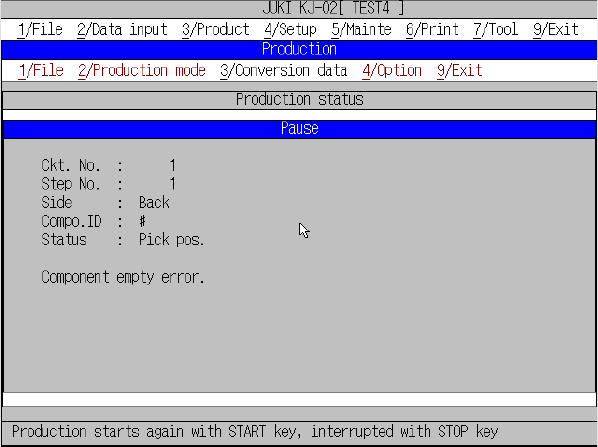
“Pause” screen displayed when the stocked components run out
8 − 34
If the stocked components run out, press the START key to restart production.
When you press the STOP key, the production interruption confirmation screen
appears, and the machine starts stopping the current production.
CAUTION
The head starts to move immediately after the START key is pressed,
and then the machine starts PC board production.
To avoid a risk of injury, do not place your hand in the machine, nor
move your face or head close to the machine during operation.
Before pressing the START key, check that there is no one who is
working in the machine.
Before pressing the START key, check that there is no one who can be
injured when the head starts to move.
Before pressing the START key, check that there are no obstacles
(tools and jigs) left in the machine.
8.3.2 Mark recognition error
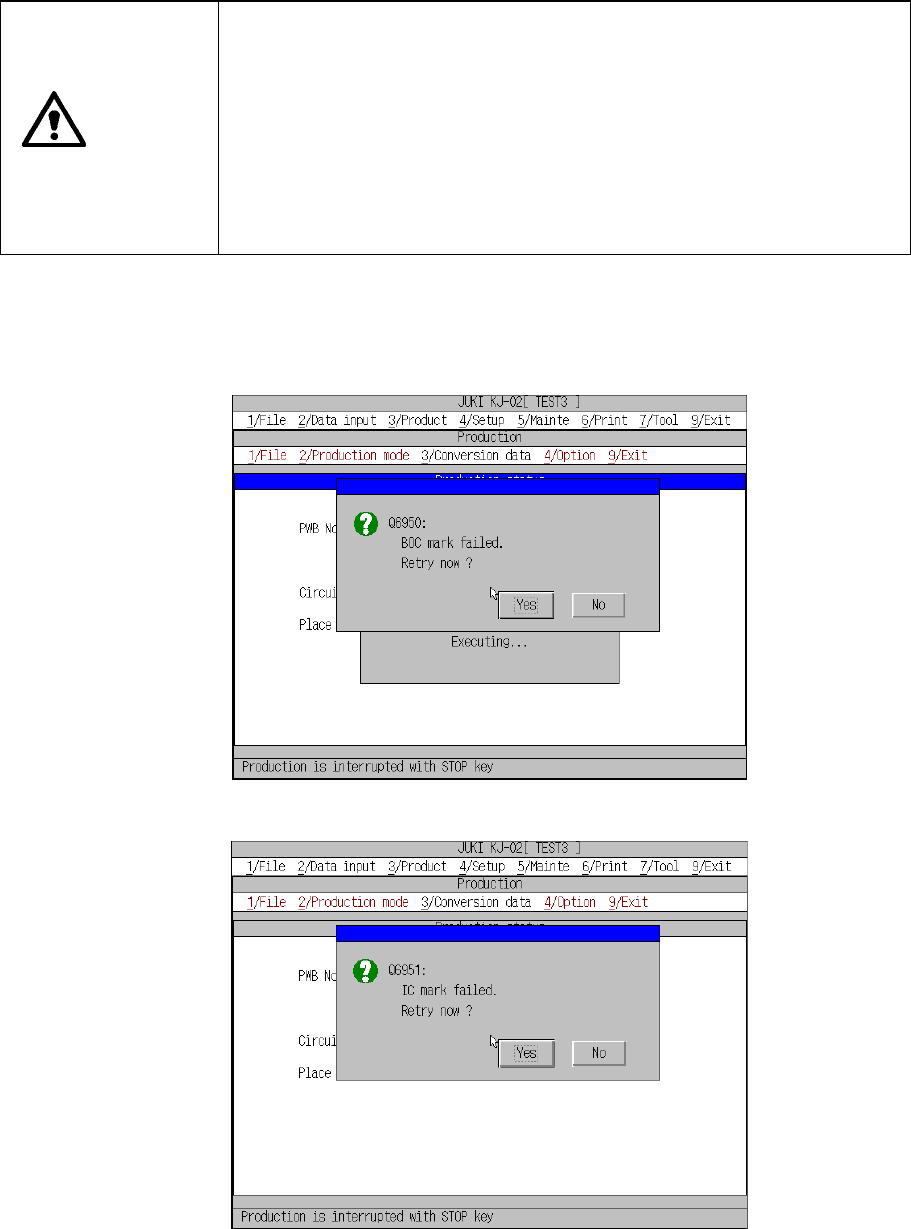
If a mark recognition error occurs while the machine is recognizing a BOC mark or IC
mark, the machine displays the recognition error screen, and then pauses.
BOC mark recognition error dialog box
IC mark recognition error dialog box
If the machine pauses due to a mark recognition error, the machine will not place a
component on a board correctly until you have the machine recognize a mark again
or set the mark position on the PWB data screen, and then restart production.