KJ-01.02.Instruction Manual.REV.02.pdf - 第239页
6 − 35 6.5.3 Ball inspection settings This f unction sets det ails of each ball shape inspect ion. • nspecting the diameter of a ball The leng th and width of a ball is m easured by t he ball diameter inspection funct io…
6 − 34
6) Add. Info
Set the parameters unique to each default pattern. Do not use this function when
you select the user pattern.
Table 6.5.2.3 Additional information
Default pattern type
Parameters
necessary to set
the details
Description
Standard BGA
Stagger Std. BGA (More OUT)
Stagger Std. BGA (Fewer OUT)
None
Peripheral BGA
Stagger Per. BGA (More OUT)
Stagger Per. BGA (Fewer OUT)
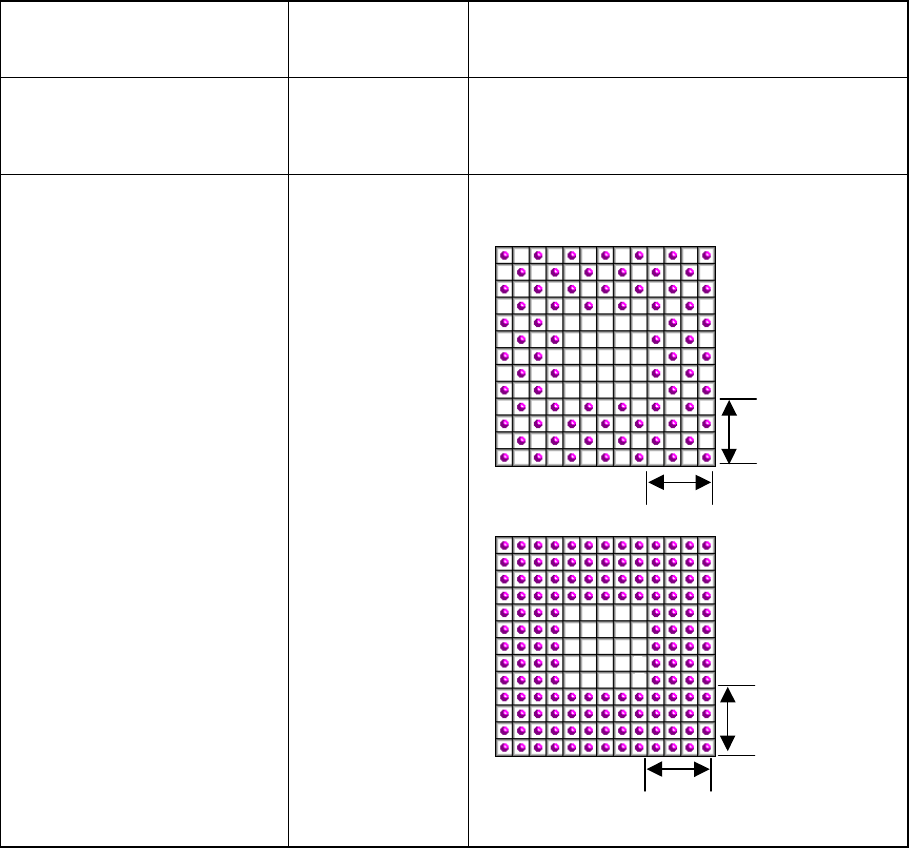
Ball existence lne Number of lines where balls are actually located on
the outer
Number of lines
where balls are
located in this
range“4” is
specified in this
example.
4
4
4
4
6 − 35
6.5.3 Ball inspection settings
This function sets details of each ball shape inspection.
• nspecting the diameter of a ball
The length and width of a ball is measured by the ball diameter inspection function.
If either of these measurements is not within the setting range, the recognition
error is supposed to occur. The diameter of a ball is inspected based on the
entered value, so enter the correct diameter of a ball. We recommend that you
specify 40 % or higher as the inspection level.
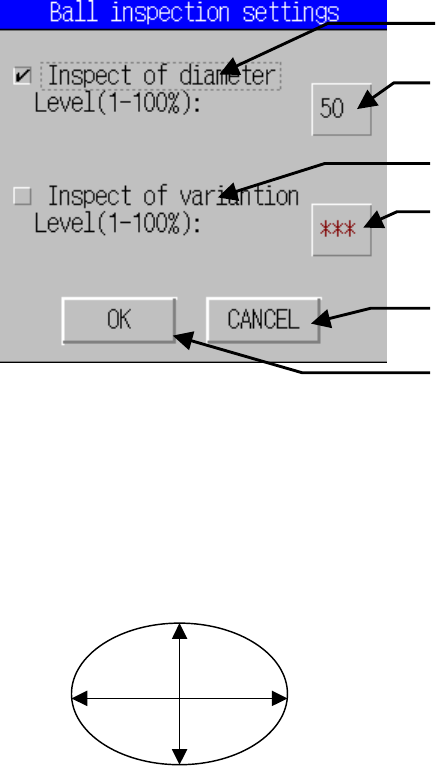
The entered value for the ball diameter is
supposed to be R. If either of 1 -( H/R) or 1 -
(V/R) is greater or smaller than the set value
(%), the ball diameter is regarded as “illegal”.
• Inspecting the variation
This means the ball area inspection. The area of a ball is converted into binary
data, then its bright pixels are counted. The threshold of the binary data is
optimized for each ball. If the number of pixels counted is smaller or larger than
the value set for the ball area which is calculated from the entered diameter value,
the recognition error occurs. The ball area which is calculated from the entered
diameter value is converted into the number of pixels, then inspected. Enter the
correct ball diameter value in the same manner as that for the ball diameter
inspection. This function performs the stricter inspection than the ball diameter
inspection, so we recommend that you specify 45 % or higher as the inspection
level.
• Inspecting lack of a ball
If you specify “Inspect of diameter” or “Inspect of variation”, the system checks
whether any ball is omitted or not. This inspection is based on the average value
of each ball brightness and the total of each ball brightness to decide if a ball
should be omitted or not. A ball which is darker than other balls is handled as
nonexisting.
Note: The system cannot check an LGA (Land-Grid-Array) component. Do not
perform any ball inspection.
Specifies whether to inspect the diameter
of a ball or not.
Enter the diameter inspection level.
The default value is 50%.
Specifies whether to check to see if the
shape of a ball is odd or not.
Enter the ball odd shape inspection level.
The default value is 50%.
Cancels the entered data, then closes this
dialog box.
Validates the entered data, then closes the
dialog box.
H
V
6 − 36
6.5.4 Editing the BGA component user ball pattern
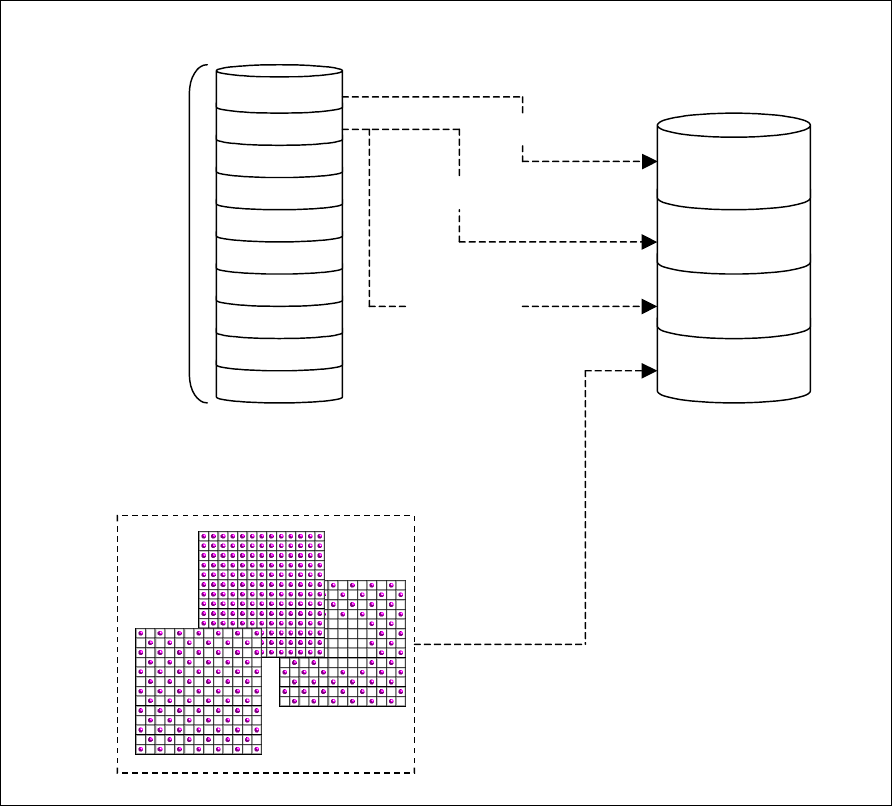
This function creates the user ball pattern which is used for setting the BGA image
recognition pattern in the Vision data. The pattern data created with this function can
be referred together with the default pattern from the vision data on each BGA.
Figure 6.5.4.1 Overview of the ball patterns
BGA
component A
BGA
component B
BGA
component C
BGA
component D
Pattern X
Pattern Y
User pattern
Vision data
Selection of a default pattern
10 pattern area
Default pattern
Pattern selection
Pattern X
Pattern Y
Pattern Y