KJ-01.02.Instruction Manual.REV.02.pdf - 第199页
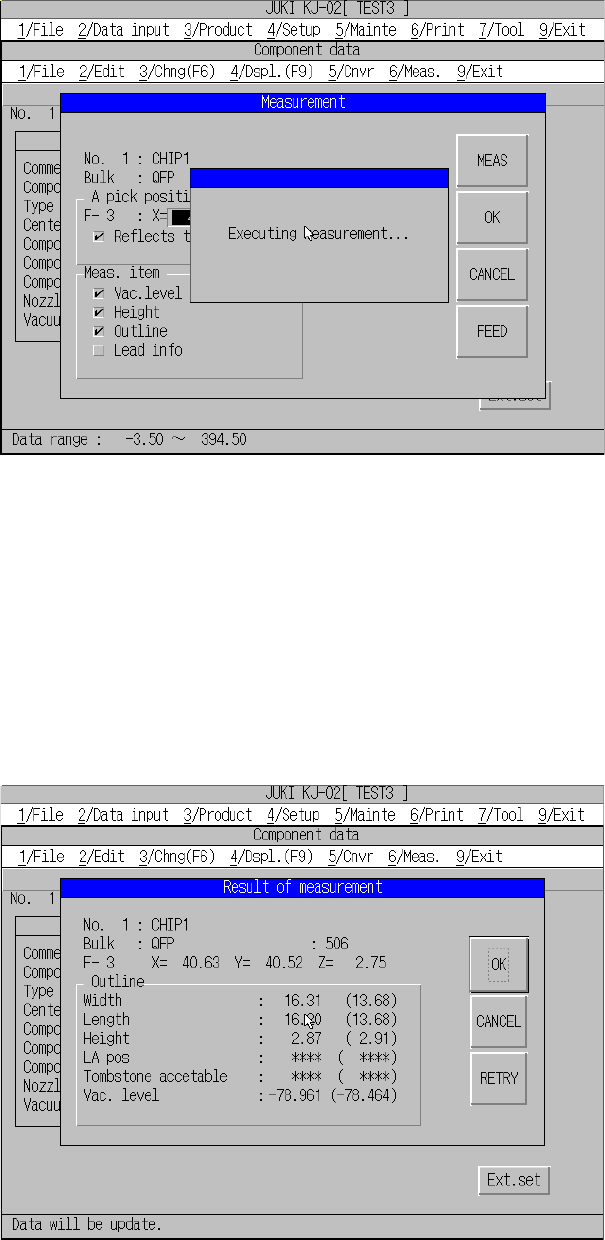
5 − 103 5.7.2.3 Execution of singl e measurement A screen shown below appears during measurement . Executing measurement screen 5.10.2.4 Storing t he measurement result W hen measurement is complete, the f ollowing measu…
5 − 102
(2) Pick position
① X, Y, and Z coordinates:
The coordinates of the current pick position
Manual input and teaching are possible.
Note: These coordinates are not stored to Pick data.
② Stored as the “Pick data”
If “Stored as Pick data” is checked, the pick position can be stored as the
Pick data.
Note: The components fed with a tray cannot be stored as the Pick data.
(3) Measurement items
① Vac. level of comp. pick (Vacuum level of component picking):
Measures the vacuum pressure used for picking up a component.
② Height:
Measures the component height.
③ Outline:
Measures the dimensions of the component package.
④ Lead info.:
Measures the component lead information.
See “5.10.1.2 Functions” for what to be measured.
Notes:
−
No measurement is possible if the “Component data” or “Pick
data” is incomplete.
−
The measurement result is displayed on the Measurement
result screen.
−
If a component pick error, or laser or VCS recognition error
occurs, the error type is displayed without measurement result.
(4) Operation buttons
① Measurement button (F10 key):
Performs the selected measurement.
② OK button:
Makes the stored data valid, then exits the screen.
③ Cancel button:
Makes the stored data invalid, then exits the screen.
④ Feed button (F4 key):
Feeds a component with a feeder other than a 32 mm paper feeders.
Every time you press the button, the feeder feeds a component.
5 − 103
5.7.2.3 Execution of single measurement
A screen shown below appears during measurement.
Executing measurement screen
5.10.2.4 Storing the measurement result
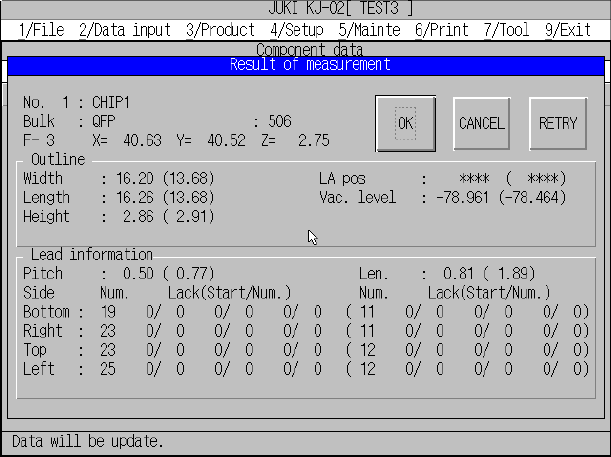
When measurement is complete, the following measurement results are displayed.
The displayed results are to be stored as “Component data”. When selecting the
OK button, the data displayed are stored as each data. When selecting the Cancel
button, no data are stored.
− Measurement result obtained if you have not selected “Lead info.”
Measurement result obtained if you have not selected “Lead info.” screen
5 − 104
− Measurement result obtained if you have selected “Lead info.”
Measurement result obtained if you have selected “Lead info.” screen
(1) Operation buttons
① OK button:
Stores the displayed measurement results as the “Component data”, then
returns to the Measurement conditions screen.
② Cancel button:
Makes the displayed measurement results invalid, then returns to the
Measurement conditions screen.
③ Retry button:
Remeasures the pick component.
Notes: 1. Only the results corresponding to the selected measurement
items are displayed.
2. Since the values in parentheses indicate the “Component data”
before the Single measurement menu is selected, they are not
updated during single measurement operation.
3. When the Cancel button is selected, the “Component data”
indicate the results from the previous measurement if the OK
button was selected at that time. If the OK button was never
selected, the data in parentheses appears on the screen.
A component picked up from a tray holder will be returned to the pick position
regardless of the setting of the menu item “Component aband.” on the
Component data screen. A component picked up from other feeders will be
discarded onto the IC trash belt or into the Trash box.
Note: If the IC trash belt is full of discarded components, the confirmation
message appears on the screen. Remove the discarded components
from the IC trash belt, and reset the belt. When you click the <OK>
button, the machine discards a component onto the IC trash belt. If the
IC trash belt is full of components even after you click the <OK> button,
the machine discards a component into the trash box.