KJ-01.02.Instruction Manual.REV.02.pdf - 第356页
11 − 10 1 1.2.1.7 P rinter e rrors ① W hen the pr inter becomes unable t o print dat a during pr inting, it stops print ing and displays the message box as shown in Figure 1 1. 2.1.7. 1. Figure 1 1.2.1.7.1 Printer error …
11 − 9
11.2.1.6 Canceling the printing operation
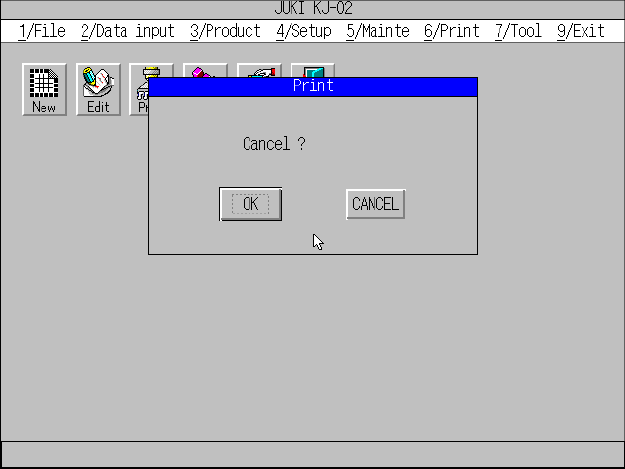
① When you press the Esc key or click the <CANCEL> button during printing, the
machine stops printing and displays the print cancel screen as shown in Figure
11.2.1.6.1.
Figure 11.2.1.6.1 Print cancel dialog box.
② When you click the <OK> button, the main menu reappears.
③ When you click the <CANCEL> button, the machine restarts printing and
displays the “PRINT” message box.
11 − 10
11.2.1.7 Printer errors
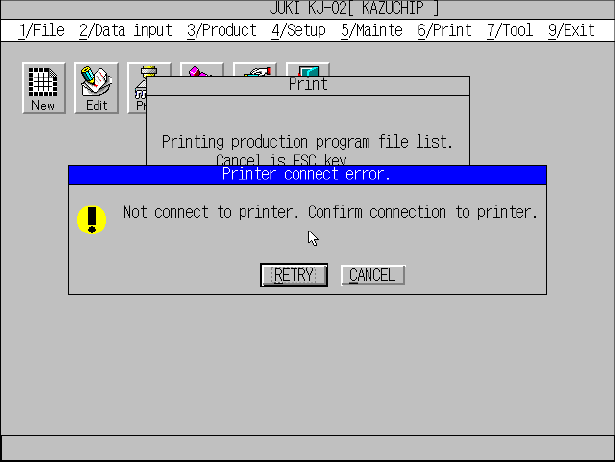
① When the printer becomes unable to print data during printing, it stops printing
and displays the message box as shown in Figure 11.2.1.7.1.
Figure 11.2.1.7.1 Printer error message
② Recover the printer from the error, and click the <RETRY> button. The printer
restarts printing data.
③ When you click the <CANCEL> button, the main menu reappears and the
printer cancels the current printing operation.
11 − 11
11.2.1.8 Paper out error
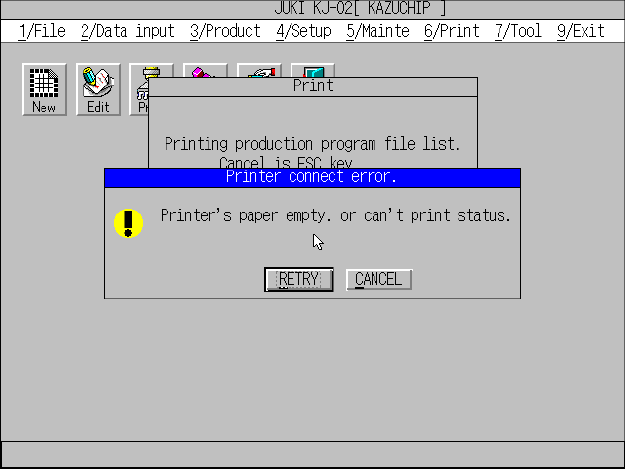
① When the printer runs out paper during printing, it stops printing, and the
message screen appears as shown in Figure 11.2.1.8.1.
Figure 11.2.1.8.1 Paper out message (Screen example when you use a KJ-02)
② Replenish the printer with paper, and click the <RETRY> button. The printer
restarts printing.
③ When you click the <CANCEL> button, the main menu reappears, and the
printer cancels printing the current data.