KJ-01.02.Instruction Manual.REV.02.pdf - 第316页
8 − 49 8.6 Production Opti ons W hen y ou select the [ 3/Product] command on the t op menu, and then t he [2/ O ption] command, or you select the [ 3/Product] command on t he top menu, and t hen the [1/ PW B Production] …
8 − 48
④ Moving to the next component placement point
When the machine pauses, press the NEXT key of the HOD, the head
moves to the next component placement position. Even after the head
moves to the next component placement position, the machine keeps
pausing. After you check the last component placement position, the
machine performs the end of production process.
CAUTION
The head starts to move immediately after the NEXT key is pressed.
To avoid a risk of injury, do not place your hand in the machine, nor
move your face or head close to the machine during operation of the
HOD.
Before pressing the NEXT key, check that there is no one who is
working in the machine.
Before pressing the NEXT key, check that there is no one who can be
injured when the head starts to move.
Before pressing the NEXT key, check that there are no obstacles (tools
and jigs) left in the machine.
(2) Manual run
When you select “Manual” as “Place tracking” on the “Trial conditions” screen,
the monitoring camera moves over the first point of placement after blank run,
shoots the status of placement, outputs it to the monitor screen, and pauses
there.
The pause screen for “Manual” is the same as that for “Automatic”.
CAUTION
After blank run has been completed, the camera continues to move to
the the first point of placement. To avoid a risk of injury, do not place
your hand in the machine, nor move your face or head close to the
machine during operation of the HOD.
8 − 49
8.6 Production Options
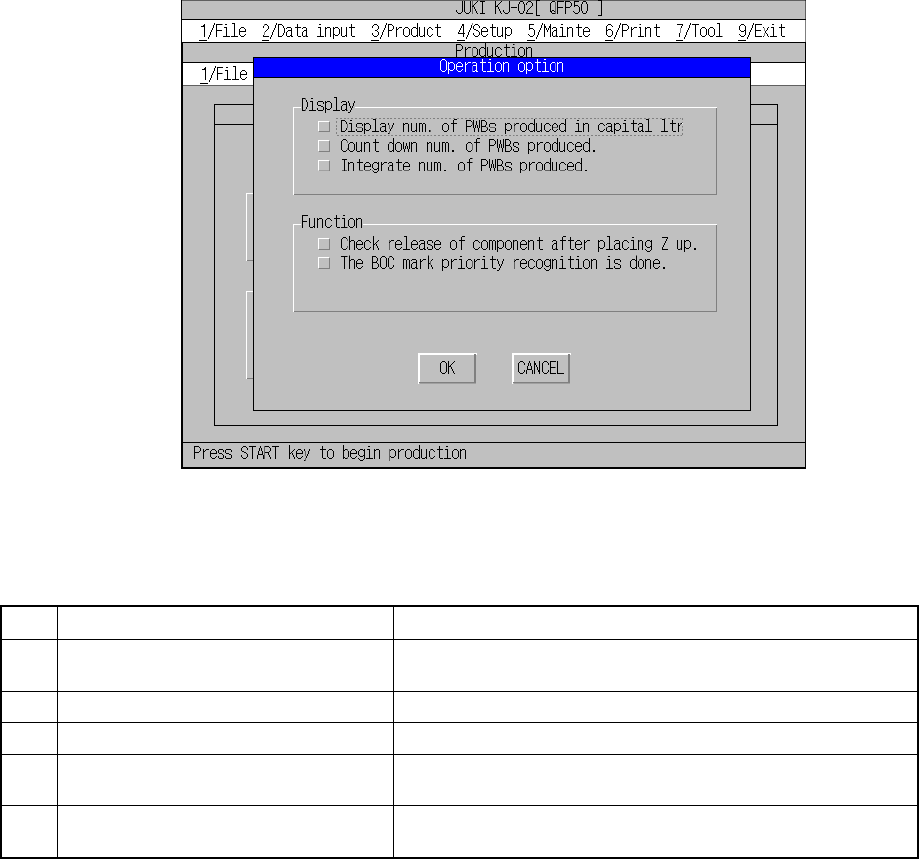
When you select the [3/Product] command on the top menu, and then the [2/ Option]
command, or you select the [3/Product] command on the top menu, and then the [1/
PWB Production] command and [4/Option] command in this order, the “Operation
option” screen appears.
Figure 8.6.1 Operation option screen
(1) Setting items
No. Item Description
1 Display num. of PWBs produced in
capital ltr.
Sets how to display the number of PWBs produced.
2 Count down num. of PWB produced. Sets how to display the number of PWBs produced.
3 Integrate num. of PWB produced. Sets how to display the number of PWBs produced.
4 Check release of component after
placing Z up.
Checks if a component is detached from a nozzle when it is
placed on a board.
5 The BOC mark priority recognition is
done.
Sets whether the machine should recognize a BOC mark
prior to a bad mark or not.
(2) How to set
① Display num. of PWBs produced in capital ltr.
− Set how to display the number of PWBs already produced by checking the
check box.
− When you check this check box, the machine displays the number of PWBs
produced during the current production in large characters.
8 − 50
② Count down num. of PWB produced.
− Set how to display the number of PWBs already produced by checking the
check box.
− When you check this check box, the machine displays the number of PWBs
not produced yet.
− When you do not check this check box, the machine displays the number of
PWBs already produced.
③ Integrate num. of PWB produced.
− Set how to display the number of PWBs already produced by checking the
check box.
− When you check this check box, the machine adds up the number of PWBs
already produced until you clear the production management information.
(The machine displays the total number of PWBs produced.)
− When you do not check this check box, the total number of PWBs produced
is cleared to zero when you press the <Start> key.
④ Check release of component after placing Z up.
− Set whether to check to see if a component is detached from the nozzle
when it is placed on a board by checking the check box.
− When you check this check box, the machine uses laser to check to if a
component is not attached on a nozzle when the Z-axis moves up after
component placement. Note that the machine does not perform component
release check for a component centered with the VCS.
− When you do not check this check box, the machine ignores the setting of
“Release check” on the Component data screen, and will not check the
existence of a component onto a nozzle.
⑤ The BOC mark priority recognition is done.
− Set whether to recognize a BOC mark prior to a bad mark.
− When you check this check box, the machine recognizes a BOC mark prior
to a bad mark.