KJ-01.02.Instruction Manual.REV.02.pdf - 第139页
5 − 43 A vailable setting range Di splay ed item Description Mini mum va lue Maximum v alue T eachi ng Dimens ion chec k No Eit her “Y es” or “No” Not available Std. Size W . (Standard s ize width) Automatically calcul a…
5 − 42
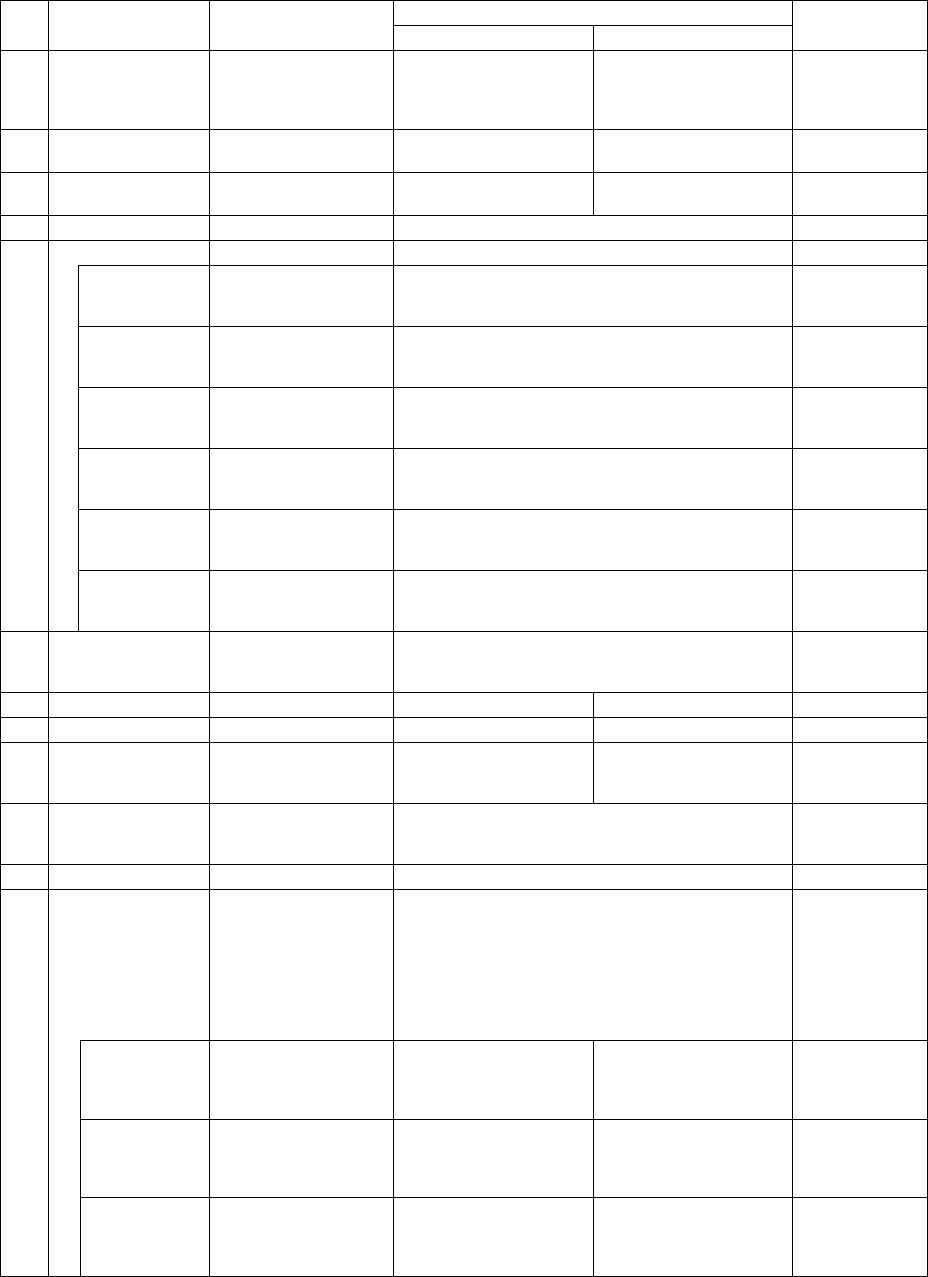
(4) Extension setting items
① Items when a component is centered with laser
Available setting range
Displayed item Description
Minimum value Maximum value
Teaching
1 Retry times
1
(The machine tries to
pick up a component
up to twice.)
0 9 Not available
2 Placing stroke
0.5 mm
(without any sign)
0.0mm 4.0mm Not available
3 Picking stroke
0.5 mm
(without any sign)
0.0mm 4.0mm Not available
4 Trial No Either “Yes” or “No” Not available
Speed
XY speed Automatically
calculated according
to the component type.
Fast
Mid (Middle), or
Slow
Not available
Picking Z down Automatically
calculated according
to the component type.
Fast
Mid (Middle), or
Slow
Not available
Picking Z up Automatically
calculated according
to the component type.
Fast
Mid (Middle), or
Slow
Not available
Placing Z down Automatically
calculated according
to the component type.
Fast
Mid (Middle), or
Slow
Not available
Placing Z up Automatically
calculated according
to the component type.
Fast
Mid (Middle), or
Slow
Not available
5
Theta speed Automatically
calculated according
to the component type.
Fast
Mid (Middle), or
Slow
Not available
6
Compo. aband.
(Component
abandonment)
Trash box Either “Trash box” or “Trash Conveyor.” Not available
7 Placing offset X 0 -99.00mm 99.00mm Not available
8 Placing offset Y 0 -99.00mm 99.00mm Not available
9 Laser position
Automatically
calculated according
to the component type.
Not available
10 Laser algorithm
Automatically
calculated according
to the component type.
Algorithm 1 (14, -14) or
Algorithm 2 (14, 14)
Not available
11 Release check No Either “Yes” or “No” Not available
Tombstone det.
The machine checks
whether a component
stands on its side if the
component type is
chip or MELF.
Otherwise, the
machine will not check
it.
Either “Yes” or “No” Not available
W (width)
Automatically
calculated based on
the dimensions of a
component.
0.00mm
Up to twice of the
maximum dimension
Not available
L (length)
Automatically
calculated based on
the dimensions of a
component.
0.00mm
Up to twice of the
maximum dimension
Not available
12
H (height)
Automatically
calculated based on
the dimensions of a
component.
0.00mm
Up to twice of the
maximum dimension
Not available
5 − 43
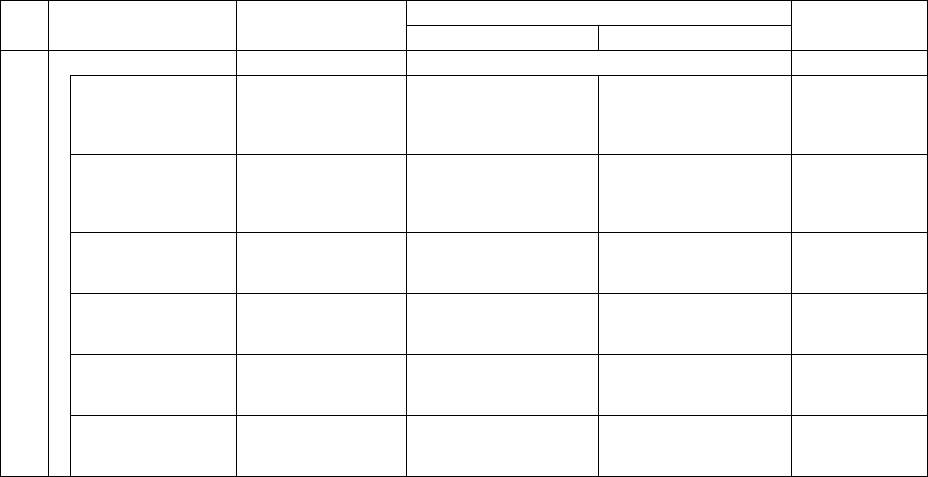
Available setting range
Displayed item Description
Minimum value Maximum value
Teaching
Dimension check No Either “Yes” or “No” Not available
Std. Size W.
(Standard size
width)
Automatically
calculated based on
the dimensions of a
component.
0.00mm Width of a component Not available
Std. Size L.
(Standard size
length)
Automatically
calculated based on
the dimensions of a
component.
0.00mm Width of a component Not available
W. Judge Max.
(Width judgment
maximum level)
15% 1% 100% Not available
W. Judge Min
(Width judgment
maximum level)
15% 1% 100% Not available
L. Judge Max
(Length judgment
maximum level)
15% 1% 100% Not available
13
L. Judge Min
(Length judgment
minimum level)
15% 1% 100% Not available
* The current version of machine (1.10) does not perform a dimension check.
* For a 0603 chip, the value of “Placing stroke” is 0.2 mm by default, and that of
“Picking stroke” is 0.3 mm by default.
5 − 44
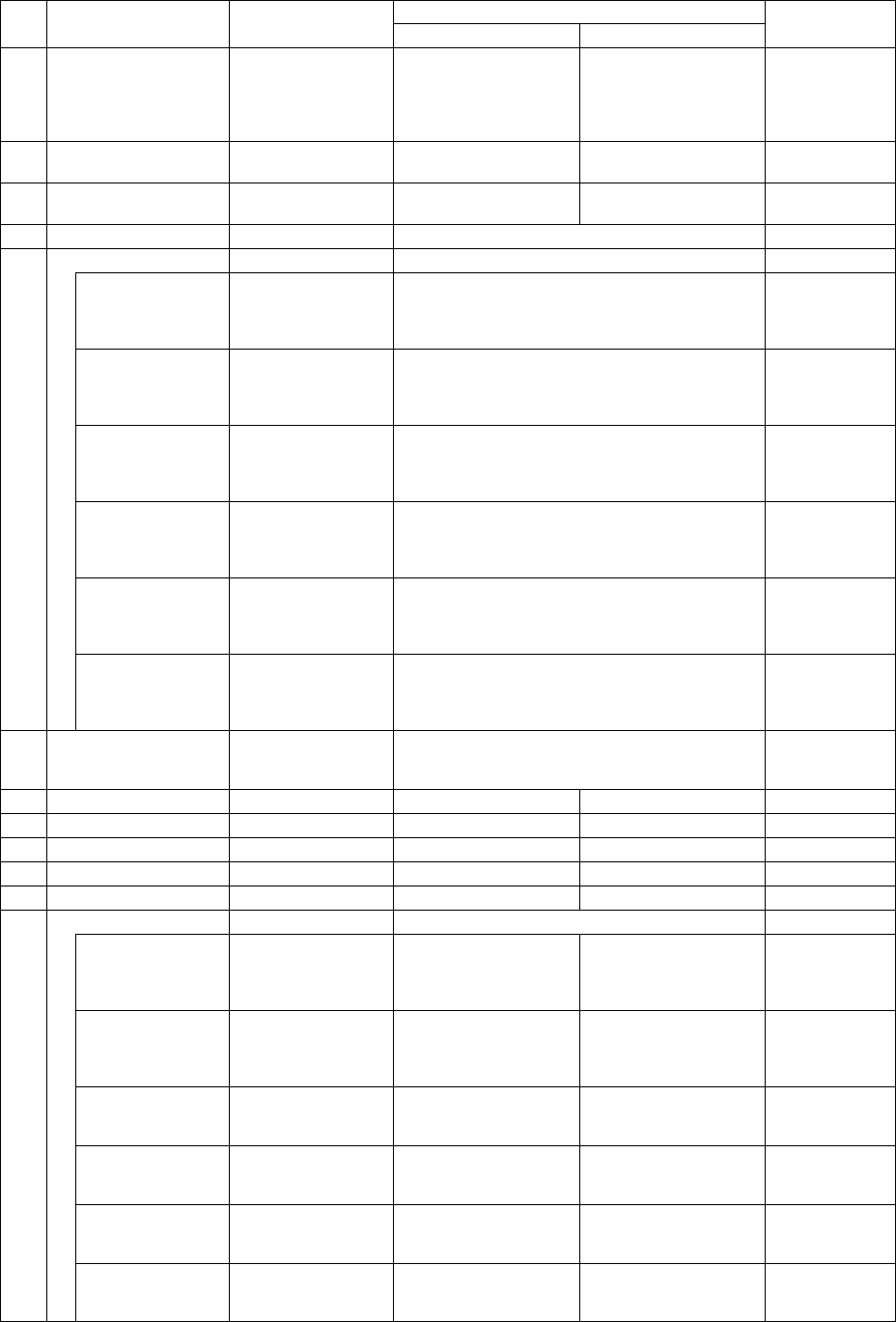
② Items when a component is centered with the VCS
Available setting range
Displayed item Description
Minimum value Maximum value
Teaching
1 Retry times
1
(The machine tries
to pick up a
component up to
twice.)
0 9 Not available
2 Placing stroke
0.5 mm
(without any sign)
0.0mm 4.0mm Not available
3 Picking stroke
0.5 mm
(without any sign)
0.0mm 4.0mm Not available
4 Trial No Either “Yes” or “No” Not available
Speed
XY speed Automatically
calculated according
to the component
type.
Fast
Mid (Middle), or
Slow
Not available
Picking Z down Automatically
calculated according
to the component
type.
Fast
Mid (Middle), or
Slow
Not available
Picking Z up Automatically
calculated according
to the component
type.
Fast
Mid (Middle), or
Slow
Not available
Placing Z down Automatically
calculated according
to the component
type.
Fast
Mid (Middle), or
Slow
Not available
Placing Z up Automatically
calculated according
to the component
type.
Fast
Mid (Middle), or
Slow
Not available
5
Theta speed Automatically
calculated according
to the component
type.
Fast
Mid (Middle), or
Slow
Not available
6
Compo. aband.
(Component
abandonment)
Trash box Either “Trash box” or “Trash Conveyor.” Not available
7 Placing offset X 0.00mm -99.00mm 99.00mm Not available
8 Placing offset Y 0.00mm -99.00mm 99.00mm Not available
9 Picking depth 0.00mm 0.00mm 12.00mm Not available
10 Recog. offset X 0.00mm -50.00mm 50.00mm Not available
11 Recog. offset Y 0.00mm -50.00mm 50.00mm Not available
Dimension check No Either “Yes” or “No” Not available
Std. Size W.
(Standard size
width)
Automatically
calculated based on
the dimensions of a
component.
0.00mm Width of a component Not available
Std. Size L.
(Standard size
length)
Automatically
calculated based on
the dimensions of a
component.
0.00mm Width of a component Not available
W. Judge Max.
(Width judgment
maximum level)
15% 1% 100% Not available
W. Judge Min
(Width judgment
maximum level)
15% 1% 100% Not available
L. Judge Max
(Length judgment
maximum level)
15% 1% 100% Not available
12
L. Judge Min
(Length judgment
minimum level)
15% 1% 100% Not available