Hanwha SM481 PLUS Series Administrator’s Guide Eng.pdf.pdf - 第101页
4-19 Tools Shortcut M enu 4.7. Manual Tool Execute this menu for manual op e ration as follows. Th is m enu should onl y be e xe cuted by a user with the proper service user autho rization. Executed to o perate each ax…

4-18
Fast Flexible Placer SM481(L) PLUS Administrator’s Guide
Indicates the presently rotated angle from the home position of R axis for head 9.
Head 10/Axis Z
When the check box for <From home sensor> is not ticked, the height of the
nozzle tip of head 10 on the PCB is indicated.
Head 10/Axis R
Indicates the presently rotated angle from the home position of R axis for head 10.
Mirror
Indicates the presently rotated angle from the home position of mirror rotation axis for
fly camera.
<Close> button
Close the <Position> dialog box, End the <Current Position> command.
4-19
Tools Shortcut Menu
4.7. Manual Tool
Execute this menu for manual operation as follows. This menu should only be executed by
a user with the proper service user authorization.
Executed to operate each axis motor of the machine manually and obtain the
coordinates of the corresponding axis
Executed to check the camera status or capture the vision image
Executed to check the light for the camera or to check the head movement
Performs manual operation of the equipment. When this command is selected, the
following dialog box is displayed.
4.7.1. Axis Tab dialog box
Used for moving the selected object by operating the motor for each axis, or for obtaining
the present coordinates of the object.
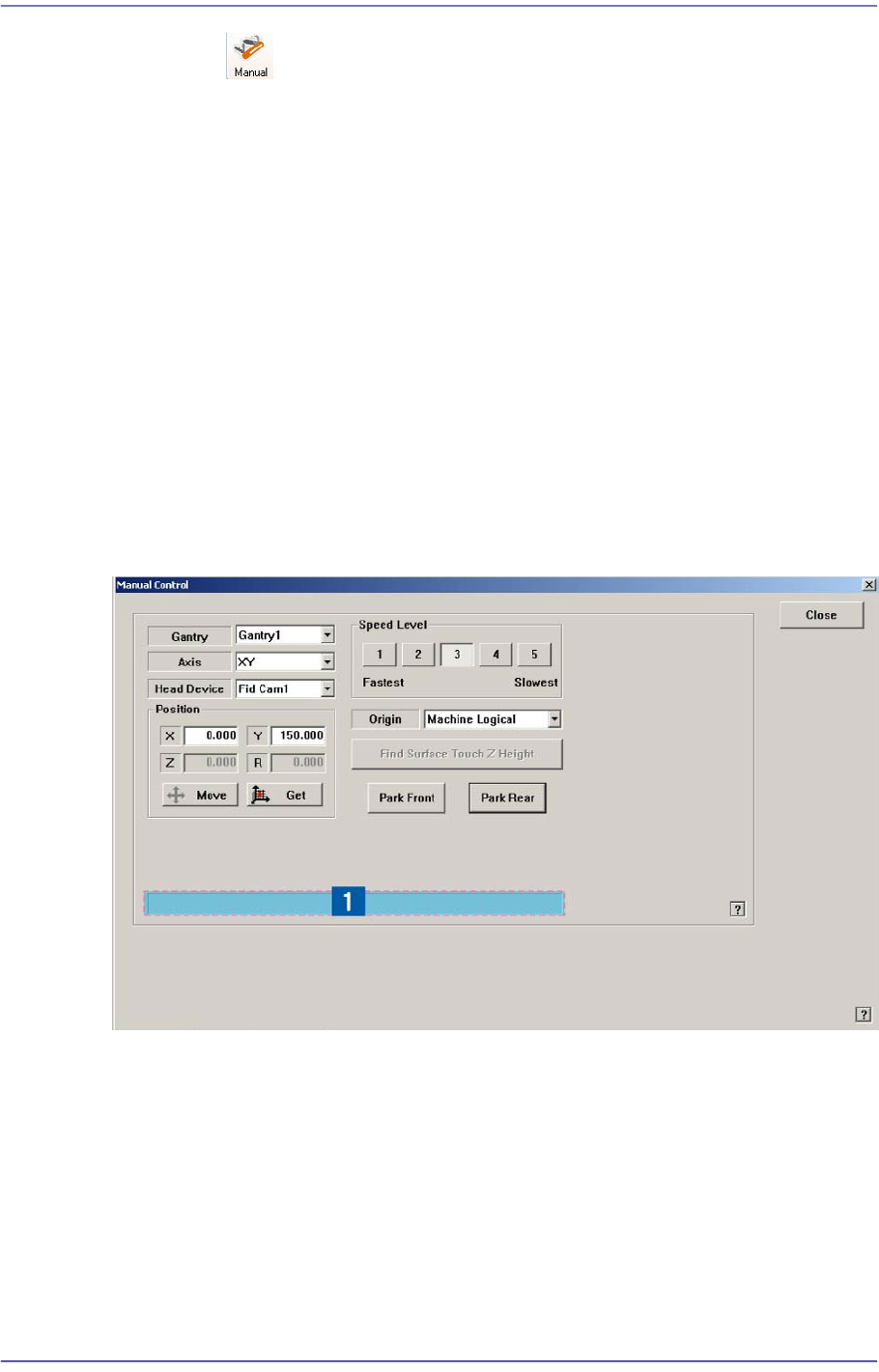
Figure4.7 “Manual Control – Axis” dialog box
1: Status Indication Area
<Gantry> combo box
Select the gantry to be operated manually.
<Axis> combo box
Select the driving motor to be operated. Selectable driving motors are as follows;
XY: Select the driving motor for X-axis and Y-axis.
Z: Select Z-axis driving motor of the head.

4-20
Fast Flexible Placer SM481(L) PLUS Administrator’s Guide
R: Select R-axis driving motor of the head
Mirror: Select the driving motor of mirror for the fly camera.
Conv. Width: Select the motor for adjustment of conveyor width.
<Head Device> combo box
Select the object becoming the reference of the coordinates for the corresponding
position when moving to the position setup in the <Position> area using the driving
motor selected in the <Axis> combo box. Selectable objects are as follows;
Fid Cam1: Set the coordinate based on the position of the front fiducial camera.
Head1~Head6: Set the position coordinates based on the positions of the #1 ~ #6
heads.
The SM421F Model set the position coordinates based on the positions of the #1 ~
#4 heads.
<Speed Level> group
Select the speed level while operating the selected driving motor.
Selectable speed levels are as follows;
1: Operate the selected motor at the fastest speed.
2: Operate the selected motor at the fast speed.
3: Operate the selected motor at the middle speed.
4: Operate the selected motor at the slow speed.
5: Operate the selected motor at the slowest speed.
<Position> group
Used for inputting the coordinates of the position to move, moving the object as a
reference to the selected device for the position of inputted coordinates, and obtaining
the present coordinates of the object. The values input in the edit box are as follows.
X: Coordinates of X-axis
Y: Coordinates of Y-axis
If the selected object is the motor for adjustment of conveyor width, the input
value is not the Y coordinate but rather the conveyor width.
Z: Coordinates of Z-axis
R: Angle of Theta-axis
<Move> button
Used for moving the object to the position of input coordinates with reference to
the selected device.
<Get> button
Obtain the present position (coordinates or angle) of the selected object and
indicate the result in the status indication area.