Hanwha SM481 PLUS Series Administrator’s Guide Eng.pdf.pdf - 第443页
15-7 System Setup <Use Rail Fiducial> check box This check bo x i s selected when us ing the fidu c ial o n the conveyor rail in orde r to check the current width of the pla cement station. When pe rf orming ‘ Ho…

15-6
Fast Flexible Placer SM481(L) PLUS Administrator’s Guide
<Rail Homing> edit box
If the Rail Homing is not completed within the set period of time, it is
regarded by the machine that an error occurred during operation.
<Rail Find Limit> edit box
If the Rail Find Limit is not completed within the set period of time, it is
regarded by the machine that an error occurred during operation.
<Rail Move> edit box
If the Rail Move is not completed within the set period of time, it is regarded
by the machine that an error occurred during operation.
<Delays> group
<PCB Lock> edit box
The delay time until PCB Clamping is completed after sensing the Backup
Table Up sensor.
<Edge Fixer Delay> edit box
The delay time until PCB alignment is completed after the edge fixer is
operated.
<Sensor Re-Check> edit box
After the PCB detection sensor detects the PCB on the conveyor first, it
detects the PCB again after the lapse of time as long as the set delay time,
preventing the malfunction of the sensor.
<Station> combo box
Select the station for which the stopper related delay is to be set.
<Stopper Up> edit box
The delay time until PCB Clamping is completed after sensing the Stopper Up
sensor.
<Stopper Down> edit box
The delay time until PCB Clamping is completed after sensing the Stopper
Down sensor.
<Conveyor Rail Width Setting> button
Checks the current width of the placement station by recognizing the fiducial on the
conveyor rail when performing ‘Home’ ( ) for the equipment after booting it, and
compares this width with the saved width information before turning off the power
supply. It performs 'Home’ of the conveyor rail when there is a change.
Set whether to use the fiducial on the conveyor rail in order to perform ‘Home’
quickly for the placement station. This function is enabled in the SM411 model. (Dual
Lane Conveyor)
15-7
System Setup
<Use Rail Fiducial> check box
This check box is selected when using the fiducial on the conveyor rail in order to
check the current width of the placement station.
When performing ‘Home’ ( ) for the equipment since the width of the placement
station is changed when turning off the power supply, if the fiducial on the conveyor
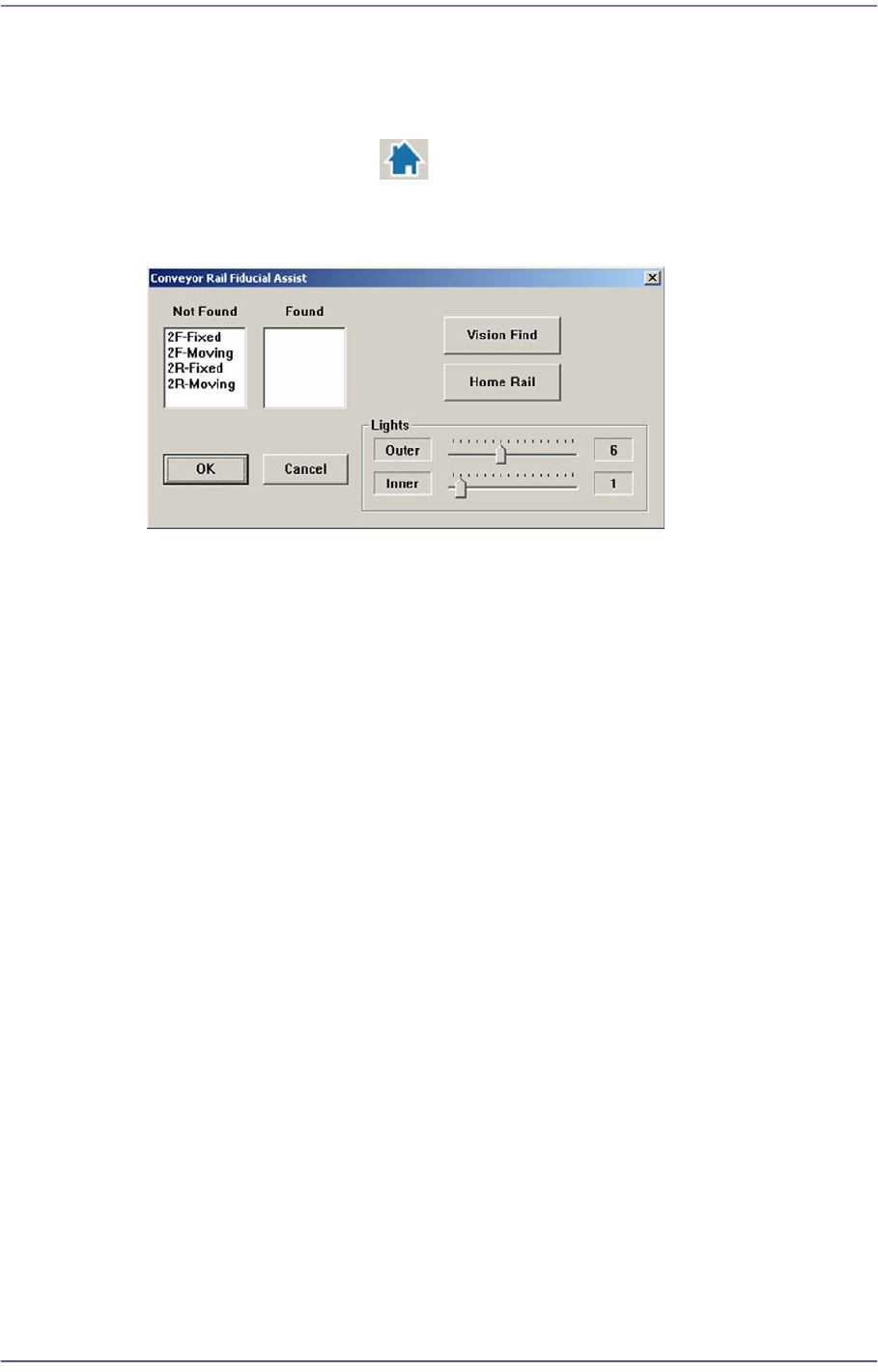
rail is not recognized, the following dialog box is displayed.
<Not Found> list box
Indicates the fiducial on the conveyor rail for which recognition has failed.
<Found> list box
Indicates the fiducial on the conveyor rail for which recognition has succeeded.
<Vision Find> button
Performs recognition of the fiducial on the conveyor rail again.
<Home Rail> button
Performs ‘Home’ of the Width Servo Motor to move the movable rail of the
conveyor to the home position.
At this time, remove the backup pin installed in the backup table.
<Shuttle Position Offset> group
Refers to the shuttle conveyor type option.
Sets the offset of the shuttle conveyor movement to the front or rear work station
Entry: Sets the movement offset of the entry conveyor.
Exit: Sets the movement offset of the Exit conveyor.
<Update> button
Saves the set data and closes the screen.
15-8
Fast Flexible Placer SM481(L) PLUS Administrator’s Guide
15.2. Position [F4]
Sets various origins of the equipment and the position of the system dump box.
15.2.1. <Feeder base> tab dialog
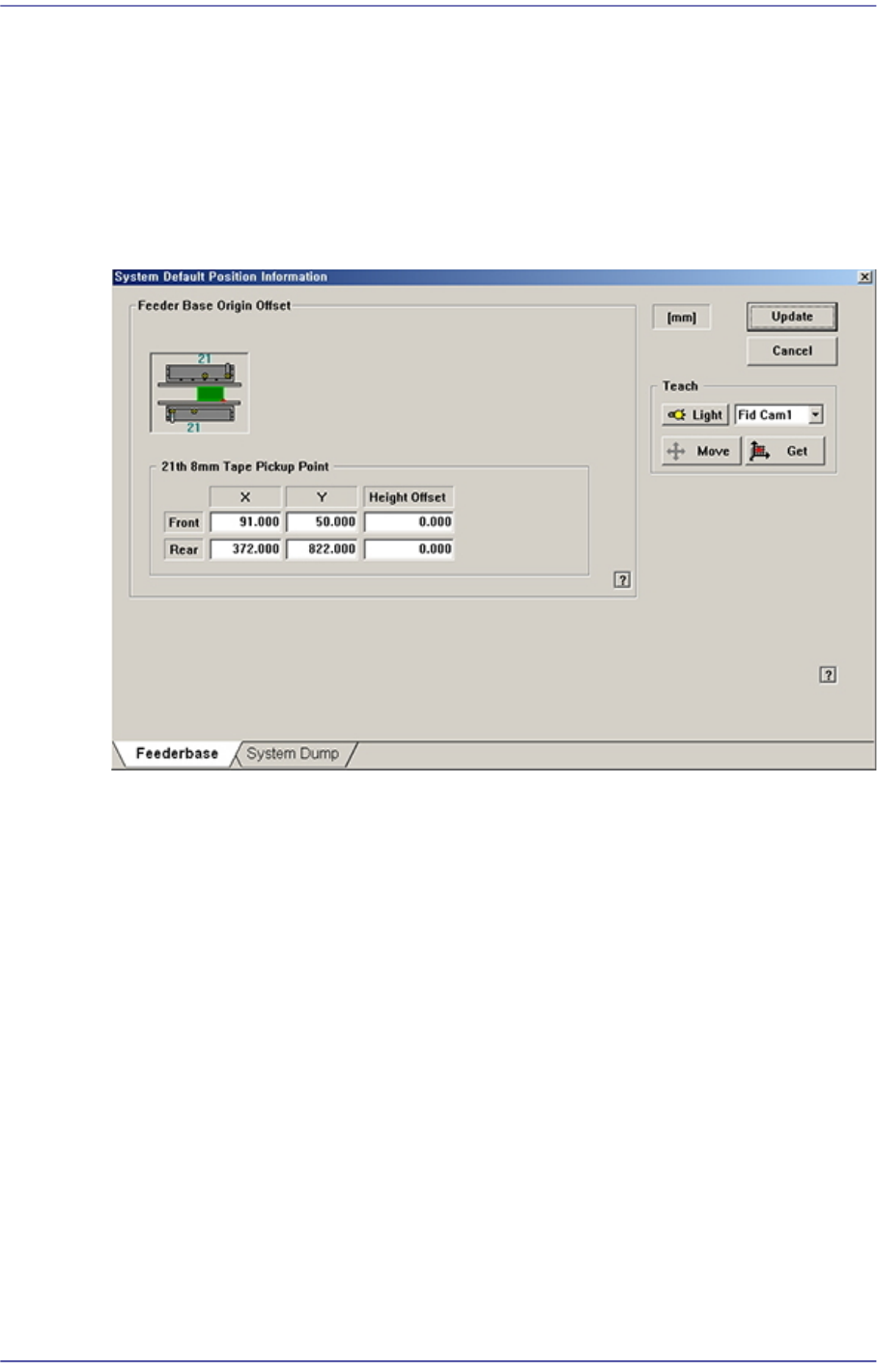
Sets origin of each component of the equipment.
Figure15.5 “Feeder base” tab dialog
<Feeder Base Origin Offset> group
Sets feeder base related data.
<21th 8mm Tape Pickup Point> edit box
Sets the origin of the Feeder Base.
Method of setting up the ‘Feeder Base Origin’ is as follows;
1. Place reel of the smallest part (0603, 1005) and install in the 21st slot of the
front feeder base.
Before installing the feeder, be sure to check if there is any abandoned part on
the feeder base. Remove if any.
2. Select the <21st 8mm Tape Pickup Point> edit box with the mouse and select
‘Fid Cam’ in the Combo Box of the <Teach> area.
3. By clicking on the <Move> button, move the fiducial camera to the pickup
point of the tape feeder installed in the 21st slot of the front feeder base.