Hanwha SM481 PLUS Series Administrator’s Guide Eng.pdf.pdf - 第30页
Fast Flexible Placer SM481(L) PLUS Administ r ator’s Guide xvi Switching of Operation Panel Figurei.5 Operation Panel Switching operation on the operation panel is described below . Main switch Has a function of s up p…

Preface
xv
SM481PLUS
(2 Docking Option)
1,625
Height=900mm
The mass which does not
include the Docking Cart
and Feeder.
1,685
Height=950mm
The mass which does not
include the Docking Cart
and Feeder.
SM481PLUS
(1Standard Feeder base
+ 1 Docking Option)
1,635
Height=900mm
The mass which does not
include the Docking Cart
and Feeder.
1,695
Height=950mm
The mass which does not
include the Docking Cart
and Feeder.
SM481PLUS
(Front 1 feeder base)
1,615
Height=900mm
T
he mass which does not
include the Feeder.
1,665
Height=950mm
The mass which does not
include the Feeder.
SM481PLUS
(Front 1 Docking Option)
1,600
Height=900mm
The mass which does not
include the Docking Cart
and Feeder.
1,650
Height=950mm
The mass which does not
include the Docking Cart
and Feeder.
Type Mass (kg) Remarks
Fast Flexible Placer SM481(L) PLUS Administrator’s Guide
xvi
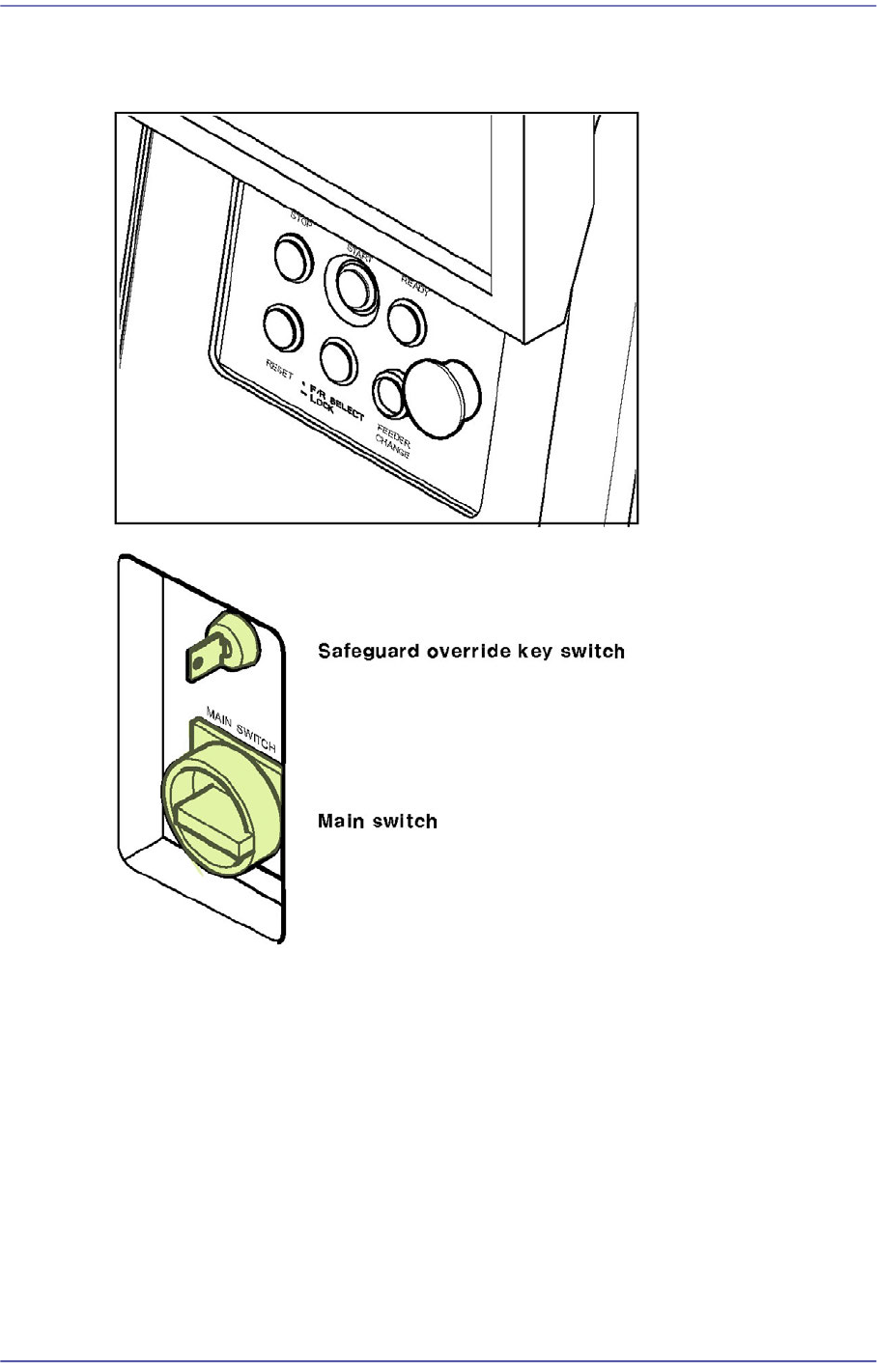
Switching of Operation Panel
Figurei.5 Operation Panel
Switching operation on the operation panel is described below.
Main switch
Has a function of supplying or stopping the main power to the machine. Power is
supplied to a controller by turning the switch. A power lamp is lighted and a working
screen is shown on the programming monitor after a short delay. During the initial
stage, power is not turned on for the drivers such as motor. The power should be
turned off only after terminating the MMI. If the power is suddenly turned off, the data
and the main body may be damaged and the machine malfunction may occur at the
next power up.
Preface
xvii
Warning If power supply is cut off suddenly, it could result in the
damage of data and machine.
And the machine might be damaged due to abnormal
operation when power is supplied again.Before turning off
power, be sure to end the MMI, turn off the main switch,
then turn on the main switch after 5-10 seconds.
Safeguard override key switch
This is a key switch that can be operated artificially to prevent the door switch from
operating. It should be used limitedly only when performing initial setting or
maintenance of the machine.
Danger The Safeguard override key switch must be used by the
designated responsible personnel. It must be carefully used
for machine operation. Failure to do so may result in death
or serious personal injury if the operator approached the
drive with the safety cover Open.
Operation Panel (OP Panel)
Consists of Buttons for machine operation and the emergency stop switch.
STOP Button (Red Color)
This is a Button for temporary stopping of the operation. Automatic operation of
this machine is temporarily stopped if this Button is pressed. If this Button is
pressed while the placement is in progress, the operation is stopped after the
present operation is completed. This Button can also be used for turning off alarm
sound due to an error.
START Button (Green Color)
This is a switch for initiating the operation of this machine. Automatic operation is
initiated if this switch is pressed.
Warning Pressing the START Button without checking the presence
of worker nearby could cause injury.Be sure to check if
there is any worker near the machine before pressing the
START Button.
READY Button
This is a switch for initiating the operation of this machine. The power is supplied