Hanwha SM481 PLUS Series Administrator’s Guide Eng.pdf.pdf - 第59页
2-1 Structure of MMI Menu Chapter2. Structure of MMI Menu The menu structure and the functions of each menu of MMI (Man-Machine Interface), which serves as the application program for t he operation of this machine, are …
2-1
Structure of MMI Menu
Chapter2. Structure of MMI Menu
The menu structure and the functions of each menu of MMI (Man-Machine Interface),
which serves as the application program for the operation of this machine, are briefly
explained in this chapter. For detailed information on each menu, please refer to “Chapter
6Board Definition” ~ “Chapter 16 Production Information Management”.
2.1. Man-Machine Interface (MMI)
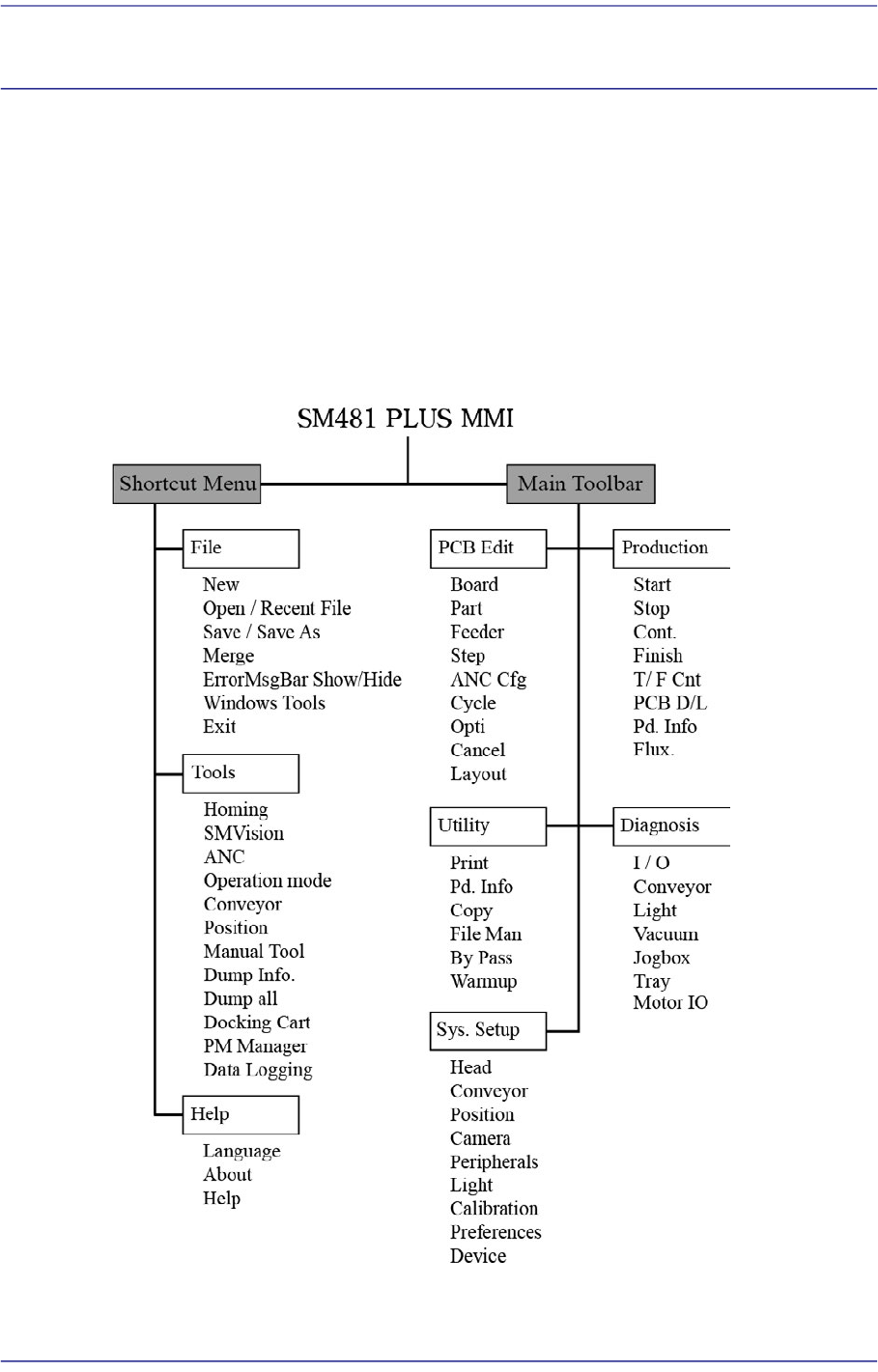
2.1.1. Menu Tree
Figure2.1 Menu Tree of MMI

2-2
Fast Flexible Placer SM481(L) PLUS Administrator’s Guide
2.1.2. Summary of functions
This section includes information on all the menus that are displayed on the MMI main
window.
2.1.2.1. The submenus of Shortcut Menu
2.1.2.1.1. File Shortcut Menu
New
Used to create a new PCB file.
Open
Used to edit an existing PCB file.
Save
Used to save an opened file.
Save As
Used to save an opened file under a different name.
Recent File
Displays a list of files worked on recently.
Merge
Merges the part library files.
ErrorMsgBar Show/Hide
Execute ErrorMsgBar dialog box.
Windows Tools
Explorer: Indicates the Windows Explorer.
Calculator: Indicates the calculator.
Paint: Indicates the Paint.
Notepad: Indicates the Notepad.
Exit
Ends MMI session and goes back to Windows or terminates the operation of the
machine.
2.1.2.1.2. Tools Shortcut Menu
Homing
Returns the motors for the X, Y, Z, theta (R) and mirror axes to the point of origin.
SMVision
Changes the operation mode.