Hanwha SM481 PLUS Series Administrator’s Guide Eng.pdf.pdf - 第95页
4-13 Tools Shortcut M enu 1: PCB in standby 2: The r eleased PCB By u til izi ng ‘dr ag and drop’ to m ove a P CB in worki ng station to t he finished PCB location, the PCB is sent to the equipment of the next process.…
4-12
Fast Flexible Placer SM481(L) PLUS Administrator’s Guide
4.4. Operation Mode Change
The accessible MMI menu is different according to the user mode. According to the
purpose of using the MMI, users are classified into Operator, Programmer, Manager and
Service. Please refer to “Chapter 1. Operation Mode and Password Change” for more
information.
4.5. Conveyor
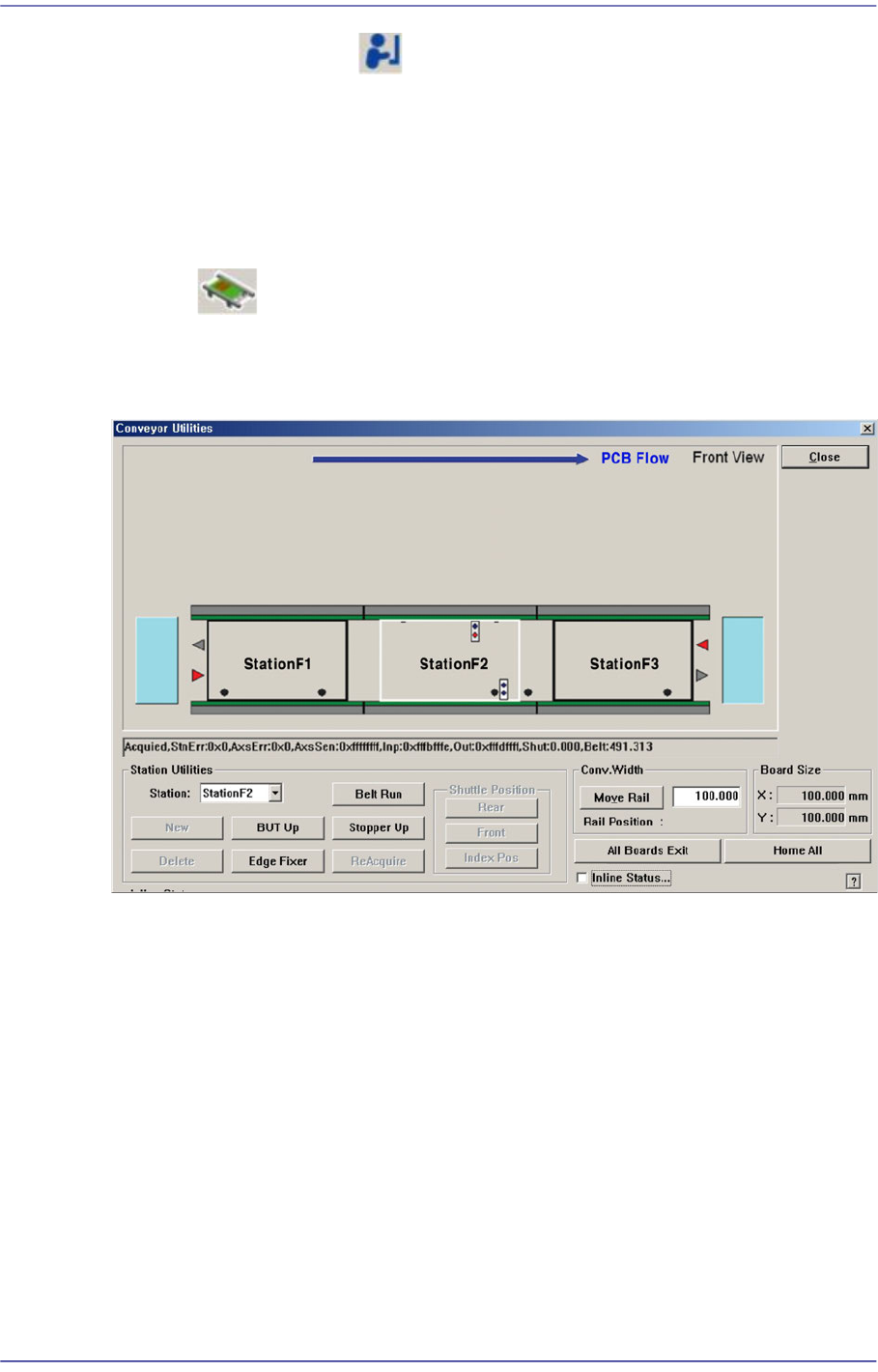
Used to correct the problem occurred during run operation.
Figure4.4 Conveyor System dialog box
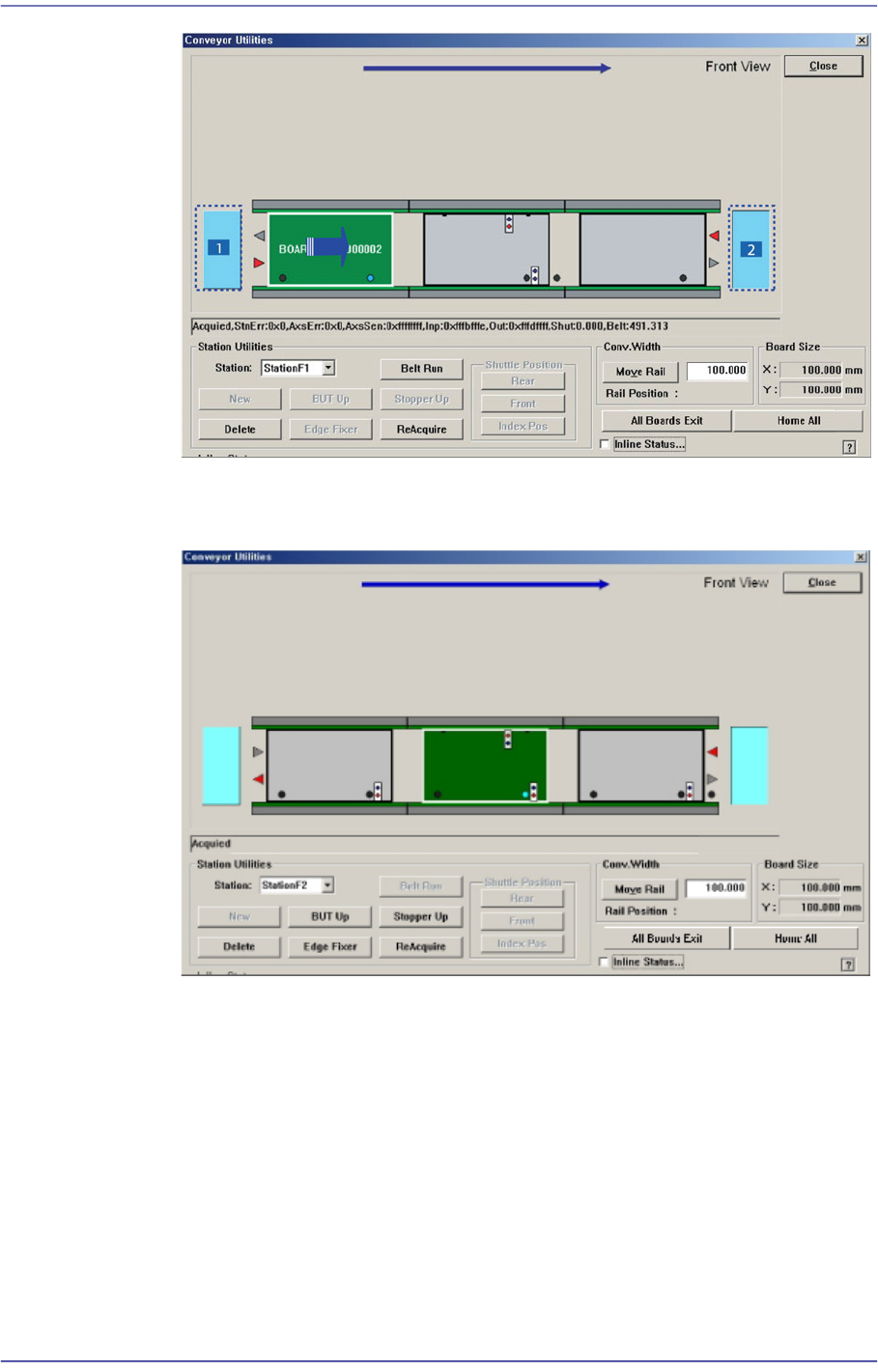
4.5.1. PCB In/Out Function
Able to place PCB in the working station in the conveyor or forward it to the next process
of the working station in the conveyor using ‘drag & drop’ with the mouse.
To put a PCB into the machine, select the light green PCB on the left with the mouse and
drag it to the working station to put and drop it (drag and drop). To release a PCB from the
machine, select the PCB in the working station to release and drag and drop it to the light
green PCB on the left (drag and drop).
Board Flow (left Explain for the instance of right side)
The PCB is moved to the working station by ‘drag and drop’ of a PCB in standby
at the left hand side.
4-13
Tools Shortcut Menu
1: PCB in standby
2: The released PCB
By utilizing ‘drag and drop’ to move a PCB in working station to the finished PCB
location, the PCB is sent to the equipment of the next process.
4.5.2. Manual Control Function
A function used to manually operate the Backup Table /Stopper /Fixer.
Performs manual operation of BUT, stopper, edge fixer and conveyor belt for the entry,
working and exit stations of the conveyor.

4-14
Fast Flexible Placer SM481(L) PLUS Administrator’s Guide
<Station Utilities> group
<Station> combo box
Select the current conveyor station. (StationF1, StationF2, StationF3)
<BUT Up/Down> button
When ‘StationF2’ or ‘StationR2’ is selected in the <Station> combo box, Up/
Down of the backup table is performed.
<Stopper Up/Down> button
Moves up/down the Stopper.
<Edge Fixer> button
When ‘StationF2’ or ‘StationR2’ is selected in the <Station> combo box, performs
operation of edge fixer.
<ReAcquire> button
This is the function used for testing.
<Belt Run> button
Operates the driving belt of selected station.
<New> button
This function is enabled only for the station from which PCBs are removed using
the <Delete> button. It is used to remove the PCB to which an error occurred
during operation and to feed a new PCB to the corresponding station manually.
<Delete> button
This is used to perform forced deletion of the PCB fed to the selected conveyor
station by the program. That is, it is used to remove the PCB from the
corresponding station since an error occurred during operation.
<Conv.Width> group
The width of the conveyor can be adjusted manually.
<Move Rail> button -When the user enters a transport rail width in the edit box
next to this Button and click on this Button, the transport rail width is adjusted to
the corresponding width.
<All Board Exit> button
Discharges all PCBs on the conveyor.
<Inline Status…> check box
The menu that indicates the In-line status of the machine and performs the operation
test of the machine is created.