Hanwha SM481 PLUS Series Administrator’s Guide Eng.pdf.pdf - 第134页
6-24 Fast Flexible Placer SM481(L) PLUS Administ r ator’s Guide <Arm> edit box Set the width of the bar of cross shape fiducial marks. If the fiducial mark is cross s haped, teach the value corresponding to X cor…
6-23
Board Definition
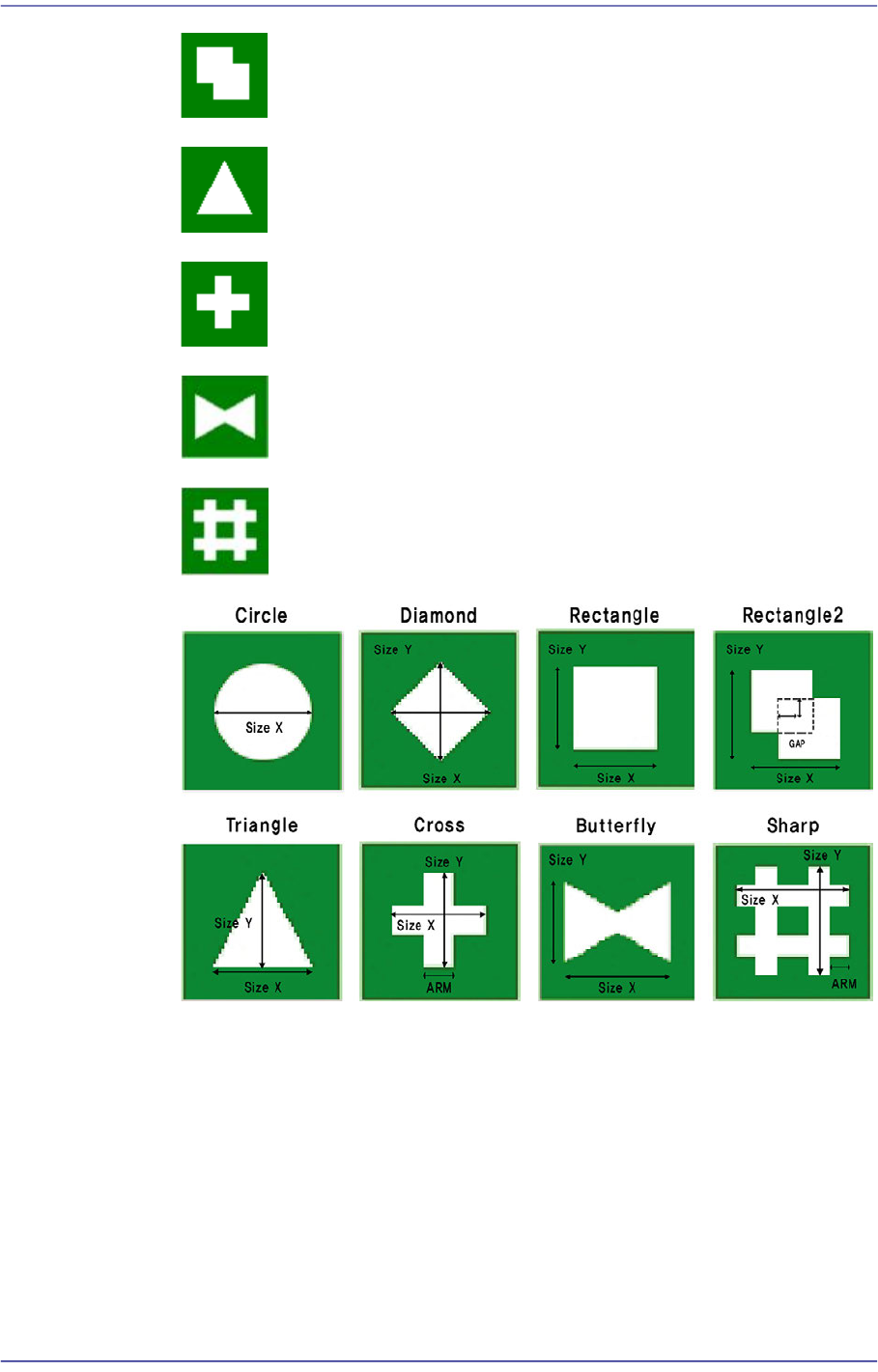
Rectangle2: Overlapping of 2 rectangular fiducial marks.
Triangle: Triangular shape fiducial mark.
Cross: Cross shape fiducial mark.
Butterfly: Butterfly shape fiducial Mark.
Sharp: Sharp(#) shape fiducial mark.
<6. Form Data> group
Data on the shapes of fiducial marks.
<Size X> edit box
Set the size of fiducial mark in X direction.(Based on the machine coordinate
system)
<Size Y> edit box
Set the size of fiducial mark in Y direction.(Based on the machine coordinate
system)
6-24
Fast Flexible Placer SM481(L) PLUS Administrator’s Guide
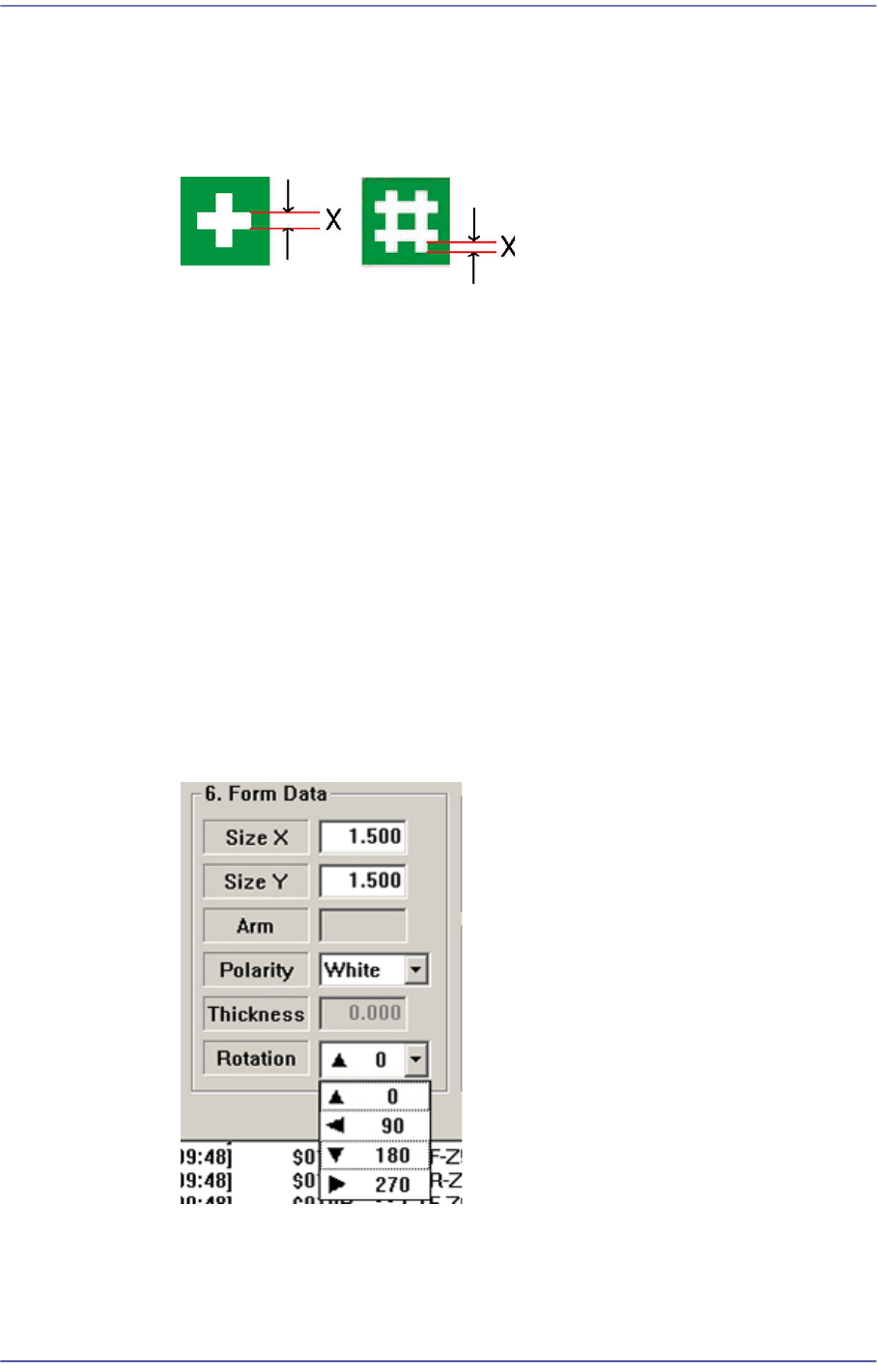
<Arm> edit box
Set the width of the bar of cross shape fiducial marks.
If the fiducial mark is cross shaped, teach the value corresponding to X correctly
and input is in the <Arm> edit box.
<Polarity> combo box
Select the color of fiducial mark. Available colors are as follows.
White: the mark looks lighter than the surroundings.
Black: the mark looks darker than the surroundings.
<Thickness> edit box
Set the thickness of the fiducial mark.
The value of 0 denotes a full fiducial mark.
0 A value other than 0 denotes that value for the thickness of the exterior line.
<Rotation> combo box
Select the rotation angle of fiducial mark. In the case of triangles, the registered
form has the corner facing upward, but there are occasions where the corner is
actually facing sideways.
In those cases, select the rotation angle.
0: the angle of the mark is 0.
90: the mark is rotated to 90.
180: the mark is rotated to 180.

6-25
Board Definition
270: the mark is rotated to 270.
<7. Search Area> group
Set the area in which to search the fiducial mark. The main purpose of this feature is to
limit the search range for when there are forms similar to the mark near the mark such
that they can interfere with recognition on certain PCBs.
<X> edit box
Set the position to start searching for the fiducial mark in X axis. The center of
SMVision is zero (0), and is generally setup as the size of negative (-)value in the
X direction fiducial mark.
<Y> edit box
Set the position to start searching for the fiducial mark in Y axis. The center of
SMVision is zero (0), and is generally setup as the size of negative (-)value in the
Y direction fiducial mark.
<Width X> edit box
Set the value of search range in X axis. Generally setup as twice the value setup in
the <X> edit box of <7. Search Area>.
<Width Y> edit box
Set the value of search range in Y axis. Generally setup as twice the value setup in
the <Y> edit box of <7. Search Area>.
<8. Score> group
Edit box
The “score” is the numericalized value that incates how accurately the inspected
fiducial mark corresponds to the set data. This “score” has a value between 0 and
1000 points. The value to be set in the <Score> indicates at least how much the
“score” value must be if it can be recognized as set data.
Basically, it must be greater than 600 (default value) for correct compensation.
Even in the worst case, it must be greater than 300. If there is a mark of different
shape with similar size in the vicinity (recognition area) of the fiducial mark to be
recognized, the score value must be set high (greater than at least 600).
<9. Light> slide bar
Set the light value when the fiducial mark is inspected. In general, 7 is appropriate but
it can be adjusted according to the condition of PCB and fiducial mark.
<Tuning> button
Obtain the size of fiducial mark actually recognized by MMI using the fiducial mark
data. Perform tuning using the vision system in order to minimize the mark
measurement error.
That is, it means that the machine measures the measurement error again. Use this for
the accurate correction of the fiducial marks.