Hanwha SM481 PLUS Series Administrator’s Guide Eng.pdf.pdf - 第210页
7-52 Fast Flexible Placer SM481(L) PLUS Administ r ator’s Guide <Rank> group Clicking t he <Rank Sett ing> button will di splay t he fo l lowing dialog box that can set the rank. Th is function is used only…
7-51
Part Registration
Set the tolerance to be greater than the value to be set by more than 10%. For
example, when setting the tolerance to 20%, actually apply 30%.
<Ignore Center Offset> check box
If the <Ignore Center Offset> check box is not selected, when the part picked up
deviates from the part center by more than 20% compared to the part size, the
machine will dump the corresponding part.
If the part picked up deviates from the part center by more than 20%, even though
the part center offset is compensated, the machine will dump the corresponding
part because its placement accuracy is reduced.
However, if the <Ignore Center Offset> check box has been selected, the center
offset is not checked when recognizing a part.
For a chip part, if this function is applied, even though the part picked up deviated
slightly from the part center, the corresponding part is placed without being
dumped.
Memo This function is not applied to the Chip-Rect and Trimmer.
<Inspection in only 0°> check box
In the case of a specific part, the difference in the recognition ratio often occurs
according to the direction in which the part is picked up to the nozzle when
recognizing the part.
At this time, if this function is selected after registering the corresponding part
based on the direction for better recognition ratio, the part is recognized always at
the registered angle when recognizing the corresponding part.
<Rough Check> check box
If an error occurs during part recognition because the shape of the part to be
recognized does not exactly correspond to the vision algorithm data, select the
<Rough Check> check box.
If the <Rough Check> check box is selected, even though the special shape of the
part to be recognized is slightly incorrect compared to the vision data, if the part
layout is the same as the set vision data by checking the part layout, the part is
recognized normally.
Memo The 'Rough Check' function is apply only to the Chip-Rect and
Trimmer.
<R Flip Auto Check> check box
Selected when checking the flipping of Chip-R automatically.
7-52
Fast Flexible Placer SM481(L) PLUS Administrator’s Guide
<Rank> group
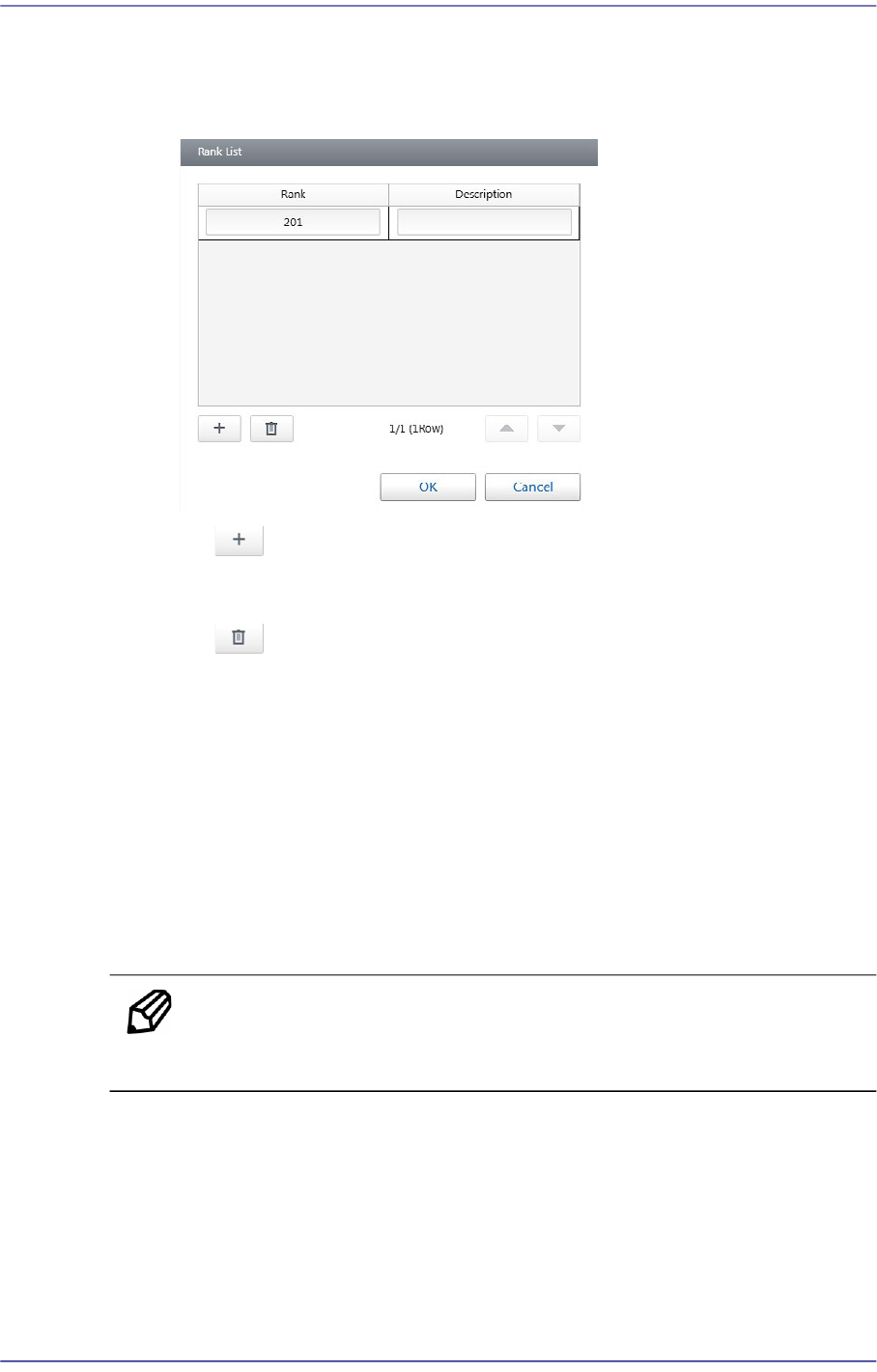
Clicking the <Rank Setting> button will display the following dialog box that can
set the rank. This function is used only for LED parts.
button
Adds a new rank.
button
Deletes the selected rank.
<OK> button.
Saves the changed rank information and closes the dialog box.
<Cancel> button
Closes the window without saving the changed rank information.
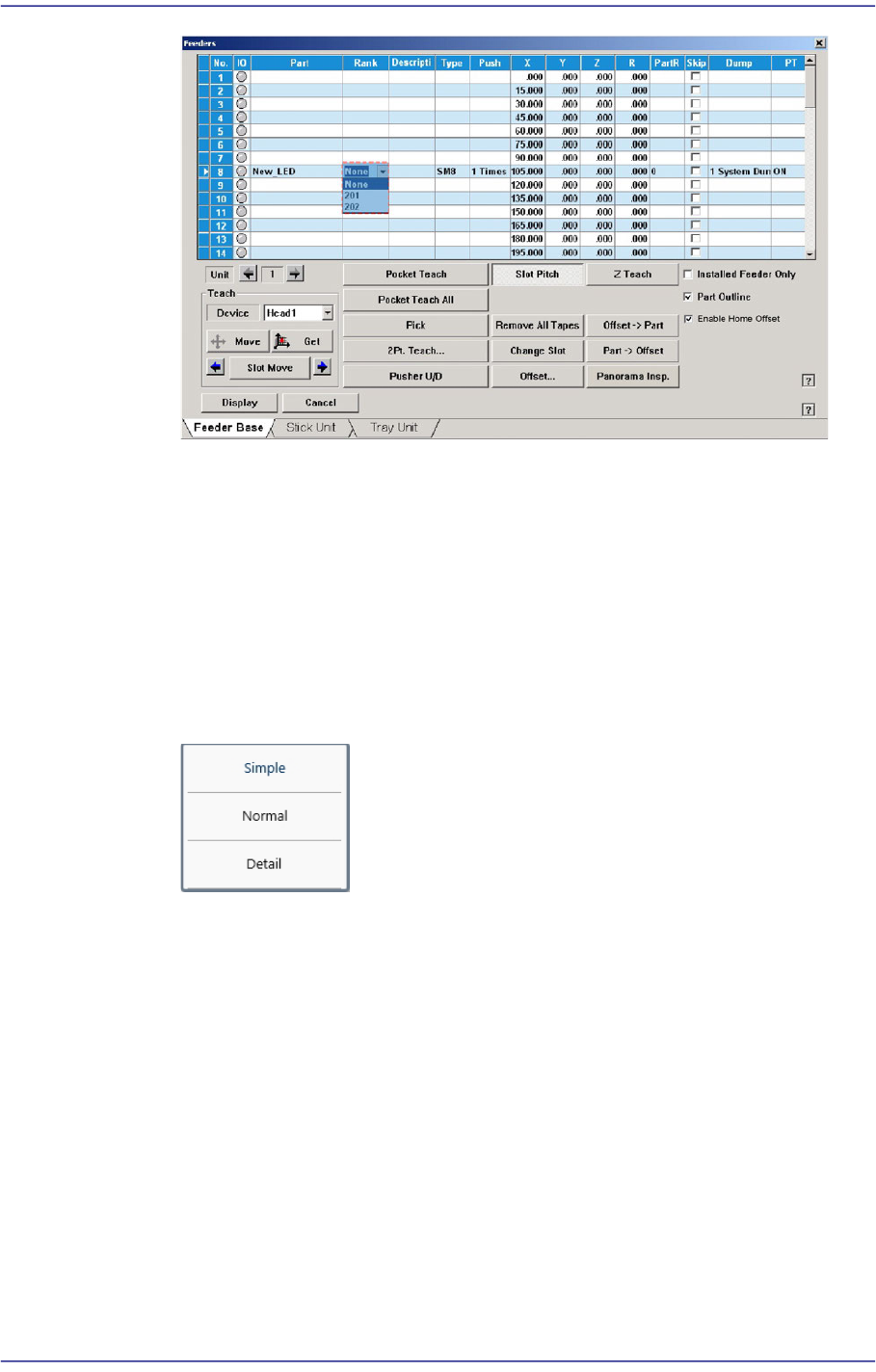
Once the rank is registered, it is possible to select the rank from the “Tape” tab
dialog box as shown in the following figure and check the information on the LED
brightness.
Memo When placing an LED whose rank has been set, check the rank of the
LED supplied from the feeder before starting production.
7-53
Part Registration
When using the rank function, even the same part is considered to be a different
part depending on the rank.
Therefore, considering the LED rank in the T-OLP of the T-Solution, arrange the
tape feeders and perform optimization.
Leaded Part (IC)
Describes the recognition option applied to most of the leaded parts.
<Accuracy Option> Select Box
The user can easily set the detail parameters related to part recognition.
Simple/ Normal/ Detail
It is possible to apply the default set value according to the part recognition
level. If this item is selected, the detail parameter values that can be set by
clicking the <Detail> button will be set according to the items selected from
the <Accuracy Option> selection box.
<Detail> button
Sets the detail parameters related to the recognition of IC parts.