Hanwha SM481 PLUS Series Administrator’s Guide Eng.pdf.pdf - 第356页
14-4 Fast Flexible Placer SM481(L) PLUS Administ r ator’s Guide 14.1.2. “Head Offset” tap dialog box Setup the offset for the mechanical chara c teristics of each head. The head o ffset information displayed here, with t…

14-3
Machine Calibration
Used for moving the selected object to the assigned position of coordinates by
rotating XY, Z axis driving motor, or for obtaining the present coordinates of the
selected object.
Fid Cam2: Select the Fiducial Camera2 on the front gantry.
Head 1 ~ Head 10: Select #1 ~ #10 heads.
<Move> button
Move the object selected in the combo box to the position of the assigned
coordinates. At this time, before executing <Move> button, the edit box
corresponding to the desired position must be clicked on with a mouse.
<Get> button
Obtain coordinates for XY, Z axis with reference to the object selected in the
<Device> combo box. At this time, before executing <Get> button, the edit box
corresponding to the desired position must be clicked on with a mouse.
<Update> button
Transmits the set data to the machine and closes the dialog box.
<Cancel> button
Ignores the set data and closes the dialog box.
14-4
Fast Flexible Placer SM481(L) PLUS Administrator’s Guide
14.1.2. “Head Offset” tap dialog box
Setup the offset for the mechanical characteristics of each head. The head offset
information displayed here, with the exception of that for the Z and R axes is updated
automatically if the head offset calibration is executed during camera calibration and the
result value is reflected.
Caution Do not modify data in the actual placement of each head at
user’s discretion, as damage to head or defective work may
occur if the setup value has changed by the user when
placement is being performed based on the offset value.
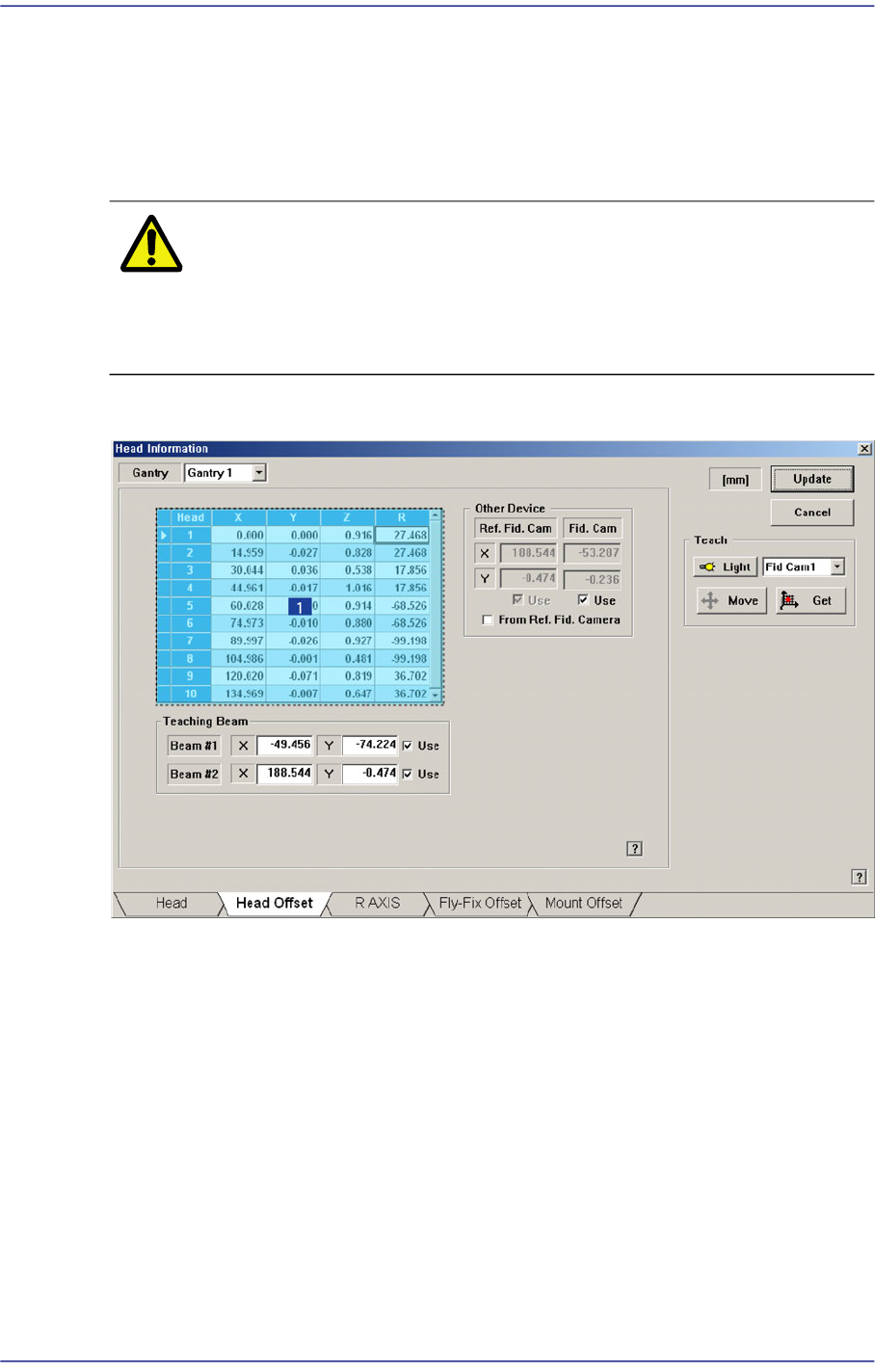
Figure14.2 “Head Offset” tab dialog box
1: Grid group
<Gantry> combo box
Selects the gantry for which setup will be performed.
<Grid> group
Sets the offset between heads.
<Head> column
Displays the head number.
<X> column
Sets the X offset value. Set the X position of the head1 to 0 when the XY axes
reach home and set this value as a reference.
14-5
Machine Calibration
<Y> column
Sets the Y offset value. Set the Y position of the head1 to 0 when the XY axes
reach and set this value as a reference.
<Z> column
Sets the Z offset value. Set the PCB top surface as the reference of the offset value
when the PCB is loaded.
<R> column
Sets the R offset.
<Other Device> group
Sets the offset values of devices other than the head.
<Fiducial Cam> edit box
Sets the XY offset value of the Fiducial camera.
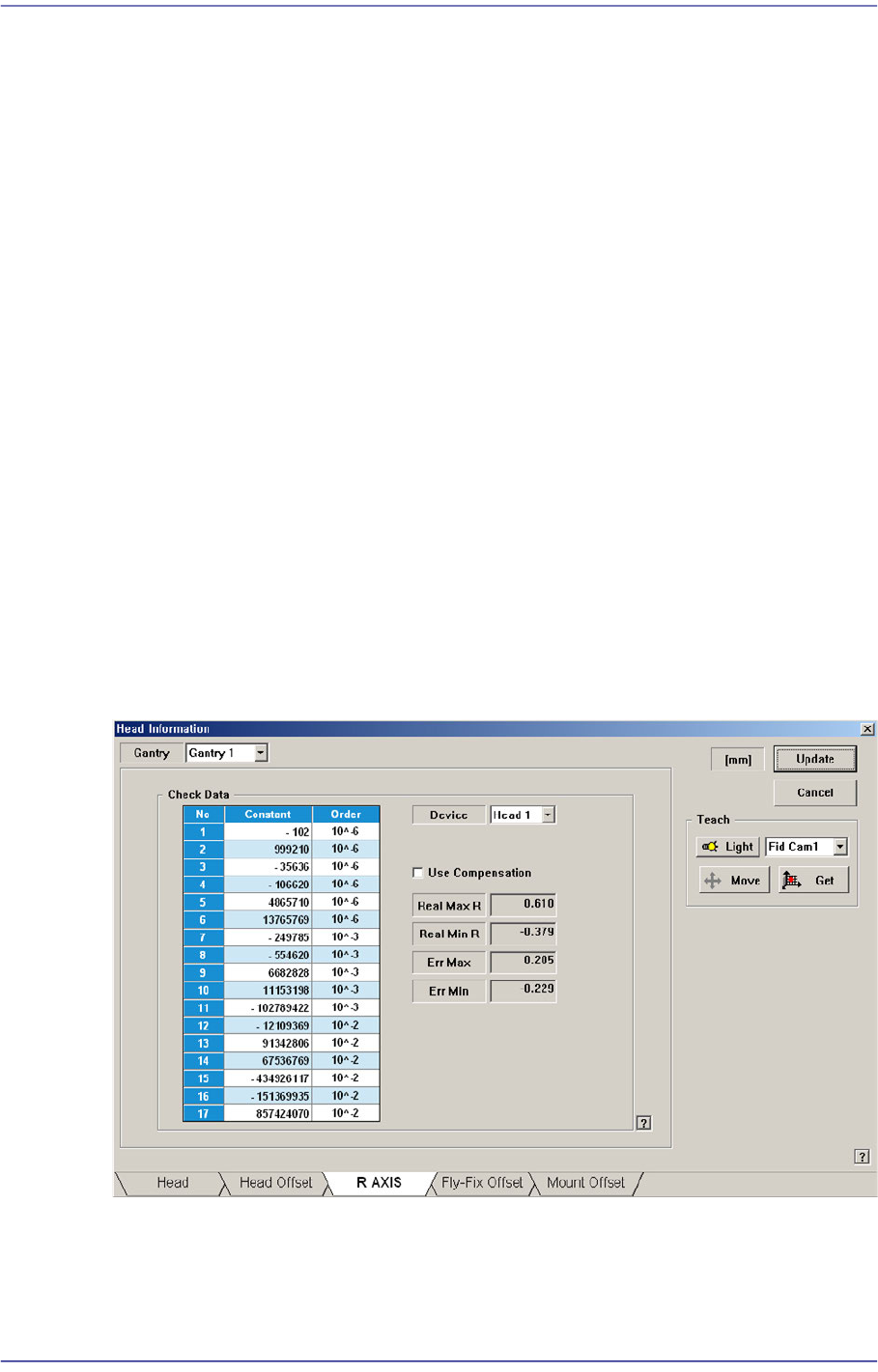
14.1.3. “R AXIS” tab dialog box
Displays the R axis compensation value of each head, or determines whether to
compensate the R axis. Data in this dialog box is updated automatically if the R-Axis
Offset Calibration is executed during camera calibration and the result value is reflected.
Setup whether to apply compensation on the R-axis of each head or not.
Figure14.3 “R AXIS” tab dialog box
<Check Data> group
Indicates the R axis compensation value of each head.