Hanwha SM481 PLUS Series Administrator’s Guide Eng.pdf.pdf - 第64页
2-6 Fast Flexible Placer SM481(L) PLUS Administ r ator’s Guide Jogbox Checks th e T eaching box function. T ray Checks th e T ray Feeder function. Motor IO Indicates the stat us of sensor inputs related with each m…

2-5
Structure of MMI Menu
T/ F Cnt
Sets the position of the pocket to start picking up components from the Tray Feeder.
PCB D/L
Transmits PCB operation data to the equipment. It is possible only when the
equipment status is ‘Finish’.
Pd. Info
Checks the number of pickups, placements, and pickup error rates by head, nozzle,
and feeder.
Flux
Perform setup for the warning message related to the operation of the flux module.
2.1.2.2.3. The submenu tool-bars of the Utility menu tool-bar
Print
Used to print a PCB file or system data.
Pd. Info
Reports various production management data for the equipment (PCB information,
and Log information).
Copy ..
Use it to copy the existing PCB file data to other PCB files.
File Man
Use it to copy, delete, rename and clear the files related to MMI.
By Pass
Use it to bypass a PCB on the conveyor without placement operation.
Warmup
Warms up the driving axis after power supply.
2.1.2.2.4. The submenu tool-bars of the Diagnosis menu tool-bar
I/O
Check the I/O status.
Conveyor
Checks the Stopper, Backup Table, Hole/Edge Fixture, and Conveyor Flow.
Light
Checks the Camera Light.
Vacuum
Checks the Vacuum of each head

2-6
Fast Flexible Placer SM481(L) PLUS Administrator’s Guide
Jogbox
Checks the Teaching box function.
Tray
Checks the Tray Feeder function.
Motor IO
Indicates the status of sensor inputs related with each motor.
2.1.2.2.5. The submenu tool-bars of the Sys-setup menu tool-bar
Head
Calibrates the items related with the head.
Conv.
Sets up the items related with the conveyor.
Pos.
Sets up the items related with the feeder base and system dump box.
Camera
Sets up the items related with the camera and lighting.
Periph.
Perform setups related to the user defined dump box, tray feeder and peripheral
equipment.
Light
Executes light mapping.
Calib.
Perform complete calibration for the equipment.
Pref.
Sets various options necessary for equipment operation.
Device
Manages data related to the Tape, Stick, and Nozzle.
3-1
File Shortcut Menu
Chapter3. File Shortcut Menu
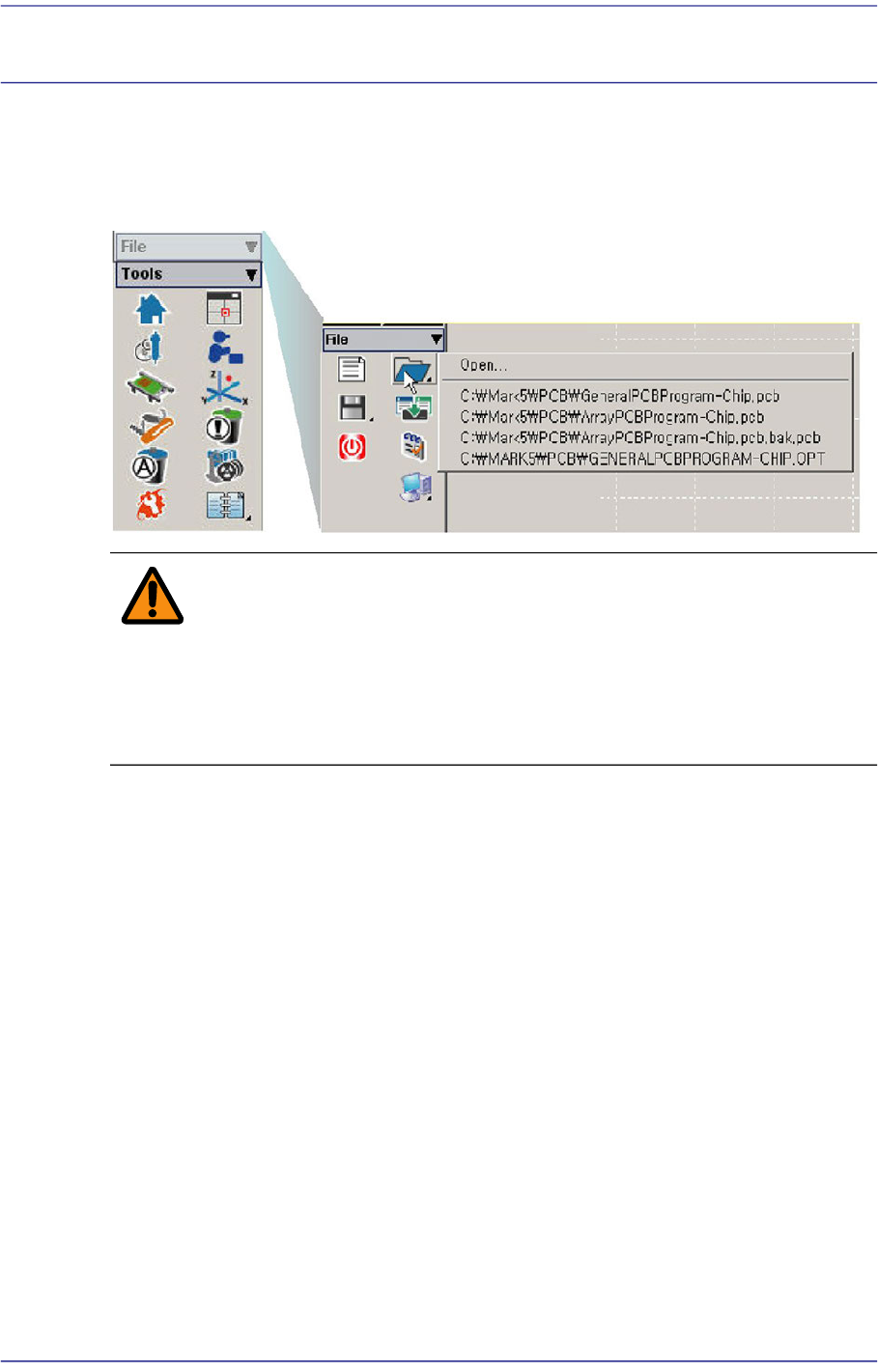
The <File shortcut> menu is composed of the following seven submenus: New, Open,
Save, Save As, Merge, Error MsgBar Show/Hide, Windows Tools, and Exit.
Figure3.1 File Menu and Submenus
Warning Except the PCB file, deleting or moving a system file or data
file arbitrarily could lead to the operation failure of MMI
program.
Except the PCB File, do not delete or remove a system file
or data file arbitrarily.