Hanwha SM481 PLUS Series Administrator’s Guide Eng.pdf.pdf - 第76页
3-12 Fast Flexible Placer SM481(L) PLUS Administ r ator’s Guide <Compare> b utton Compares two DB fil es and i n d icates the pa rt information not e xi sting in the ta rg et DB in the <Ne w:> list b ox in …
3-11
File Shortcut Menu
Caution If the <Save> command is executed, the file cannot be
restored to the previous one before saving. Therefore, be
careful when executing the command.
3.4. Merge Part Library
Performs the function to compare and combine the local DB (UPD.mdb) file or updated
and distributed DB (STDUPD.mdb) of other machines with the local DB (UPD.mdb) file.
It is used mainly in the following cases.
To perform integrated management of part information of PCB files.
To import part information existing in other machines when changing the PCB model.
Memo The standard DB (STDUPD.mdb) file is a read-only file
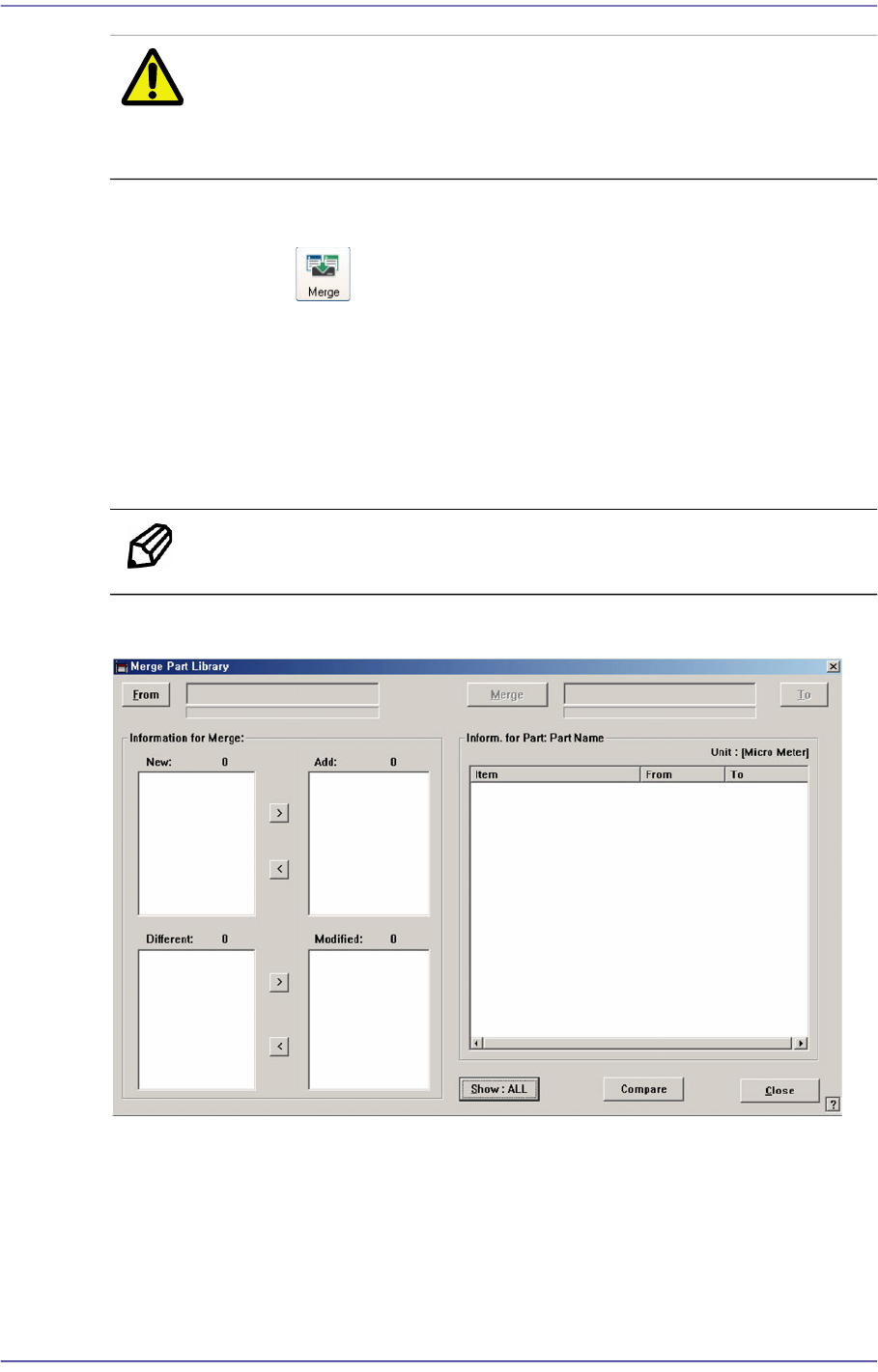
Clicking the ‘Merge Part Library’ icon Button will display the following dialog box.
<From > button
Select the DB file from which the part information is imported. Select the local DB
(UPD.mdb) or standard DB (STDUPD.mdb) that was copied and imported through the
source DB.
<To> button
Select the DB file to be merged. Select the local DB (UPD.mdb) as the target DB.
3-12
Fast Flexible Placer SM481(L) PLUS Administrator’s Guide
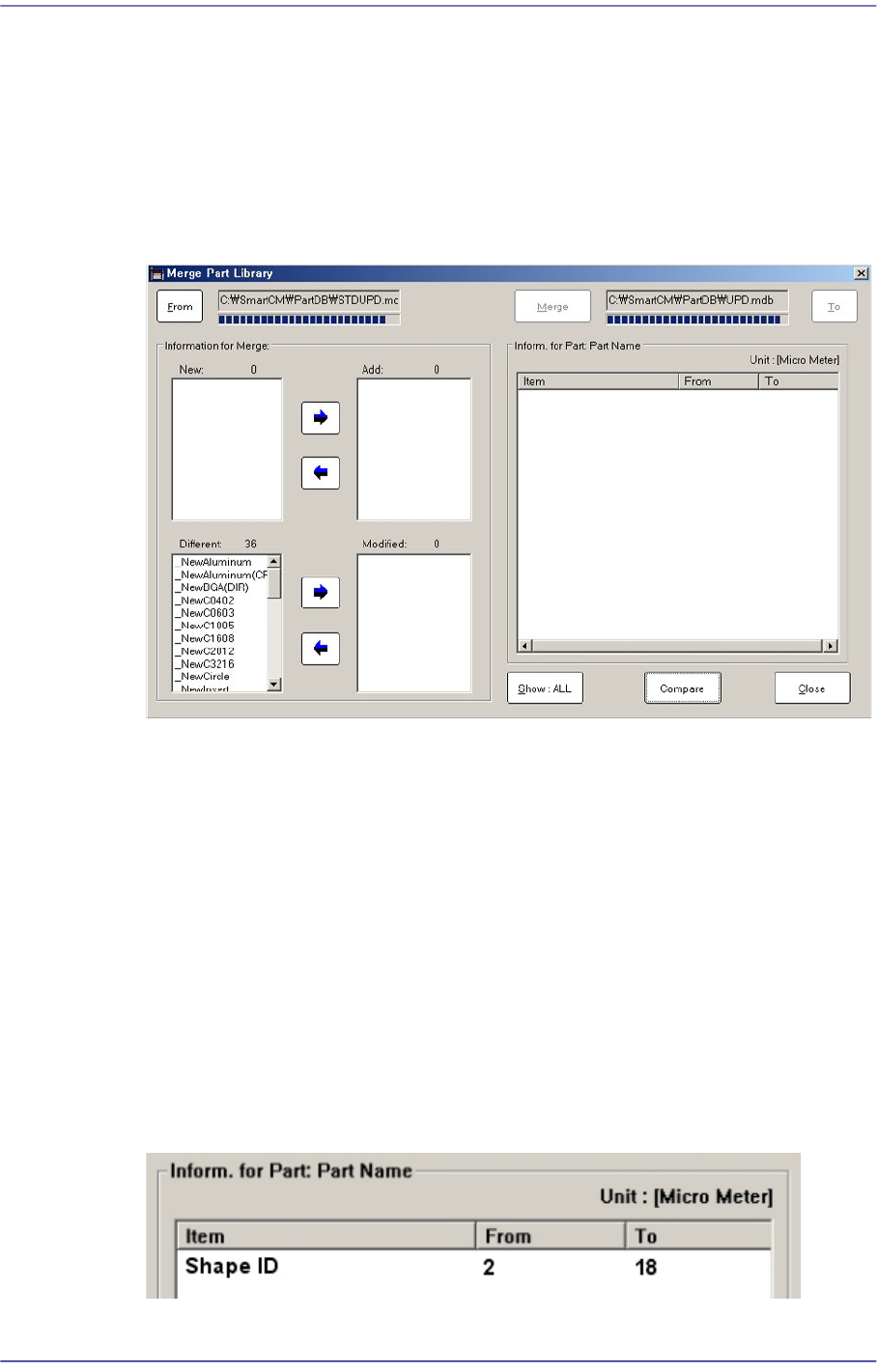
<Compare> button
Compares two DB files and indicates the part information not existing in the target DB
in the <New:> list box in the <Merge Information> group. However, information with
identical part names in the target DB file but with different saved values are indicated
in the <Diff:> list box.
Selecting the source DB file and target DB and clicking this Button will display the
comparison data between two databases as follows:
<Show: ALL> button
There are two functions: “Show: ALL” and “Show: DIFF”. Clicking this Button will
change these two functions in turn.
<Show: ALL>
Selecting the part name in the <New:> or <Different:> list box will display all part
information related to the corresponding part in the <Inform. For Part: Part Name>
group.
<Show: DIFF>
Selecting the part name in the <New:> or <Different:> list box will display only
part information with different values among the part information related to the
corresponding part in the <Inform. For Part: Part Name> group.
Figure3.8 Show :DIFF list box
3-13
File Shortcut Menu
<Item> column
Displays only part information related to the selected part in the <New:> or
<Different:> list box.
<From> column
Displays the values saved in the part information corresponding to the <Item>
column of the parts selected from the <New:> or <Different:> list box in the
source DB file.
<To> column
Displays the values saved in the part information corresponding to the <Item>
column of the parts selected from the <New:> or <Different:> list box in the target
DB file. In this case, when the part name is selected in the <New:> list box, it is
indicated as “New”.
Button
This Button is used to select the part information to be merged with the target DB file
from the <New:> or <Different:> list box and includes the corresponding information
in the <Add:> list box or <Change:> list box.
Button
This Button is used to exclude the item selected to merge into the target DB file from
the <Add:> or <Modified:> list box.
<Merge> button
Once all setups are completed, click this Button to update the target DB file. This
Button is disabled when there is no selected item in the <Add:> or <Modified:> list
box.