Hanwha SM481 PLUS Series Administrator’s Guide Eng.pdf.pdf - 第451页
15-15 System Setup 15.3.3. <Flux> Tab Screen Sets the data related to the flux module. If this t ab is selected, the following dialog box is indicated. Figure15.9 “Tray Feeder” Tab Dialog Box <T ime> group …

15-14
Fast Flexible Placer SM481(L) PLUS Administrator’s Guide
Single Tray[39321]: Refers to the tray installed on the feeder base.
NONE: Means that no tray is installed.
<Use Non Stop Func> combo box
Determines whether to use the non-stop function.
Note: The nonstop function is not used.
Master/Slave: One rack is used as master and another rack is used as slave.
Master/Master: One rack is used until the parts are exhausted, and then
another rack is used.
<Communication> group
Set the data related to RS-232C communication.
<Channel> combo box
Select the RS-232C communication channel. 2 channels are available for the
machine. Perform setup so that it may not be duplicated.
<Comm. ID> combo box
Select the communication ID. The used ID is 1 –3. Since only ID 1 is
supported, set the ID to ID 1.
<Origin> group
Setup origin of the selected ‘Tray Feeder Unit’. This origin is the offset value from
the origin of the equipment.
<Not Usable Lane> group
Sets the feeder base unit and slot occupied by the corresponding tray when using the
selected tray feeder unit.
<Feeder Base> combo box
Selects the feeder base. The selectable feeder base is front (Front Feeder Base or
Rear Feeder Base).
<Lane> edit box
Sets the slot the feeder base.
<Update> button
Transmits the change data to the equipment and closes the dialog box.
<Cancel> button
Ignores the change data and closes the dialog box.
15-15
System Setup
15.3.3. <Flux> Tab Screen
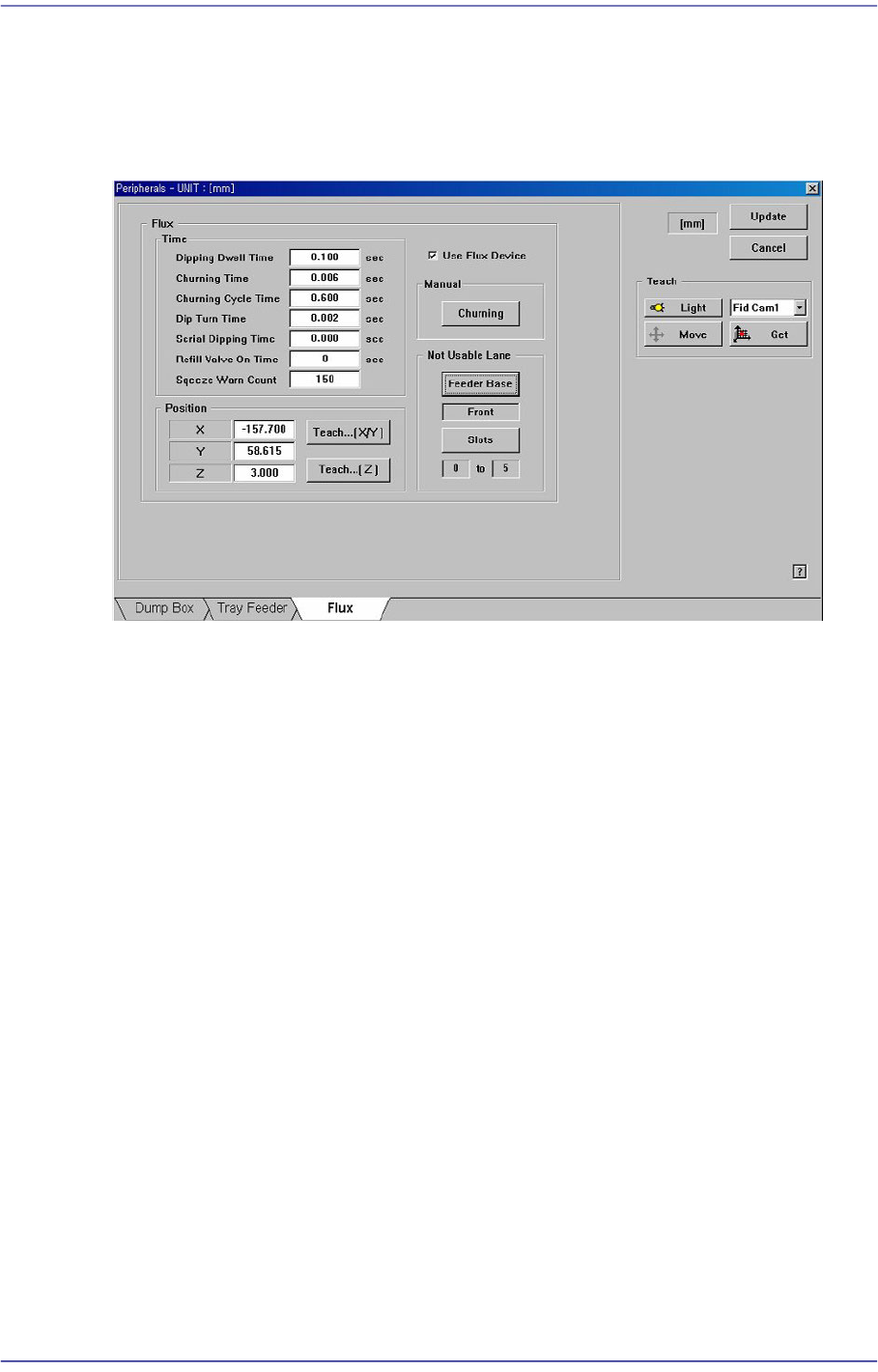
Sets the data related to the flux module. If this tab is selected, the following dialog box is
indicated.
Figure15.9 “Tray Feeder” Tab Dialog Box
<Time> group
This is enabled when the <Use Flux Device> on the right is selected. It sets the item
related to the movement of the flux module.
<Dipping Dwell Time> edit box
Refers to the delay time after the part contacts with the disk of the flux module in
order to apply flux on the part. (Dipping Delay Time)
<Churning Time> edit box
Refers to the period of time required for disk rotation when the flux module is
operated manually.
<Churning Cycle Time> edit box
Refers to the rotating cycle of the flux module disk for flux churning.
<Dip Turn Time> edit box
Refers to the period of time required for flux churning for automatic production.
(Squeezing Time)
<Serial Dipping Time> edit box
Refers to the minimum period of time required for flux churning when several
heads are dipped continuously during automatic production.
<Refill Valve On Time> edit box
Refers to the flux replacement cycle. If it is set to ‘0’, the warning message is not
15-16
Fast Flexible Placer SM481(L) PLUS Administrator’s Guide
indicated.
The set value can be initialized by the submenu ‘Flux.’ of the ‘Product’ menu.
<Squeeze Warn Count> edit box
This is set for cleaning the flux module during automatic production. If the
corresponding count is reached, the warning message is indicated.
The set value can be initialized by the submenu ‘Flux.’ of the ‘Product’ menu.
<Position> group
This is enabled when the <Use Flux Device> on the right is selected. Set the dripping
position. If the setup slot is determined at the feeder base of the flux module, the
dripping position is set automatically.
<X> edit box
Refers to the X coordinate of the dripping position.
<Y> edit box
Refers to the Y coordinate of the dripping position.
<Z> edit box
Refers to the Z coordinate of the dripping position.
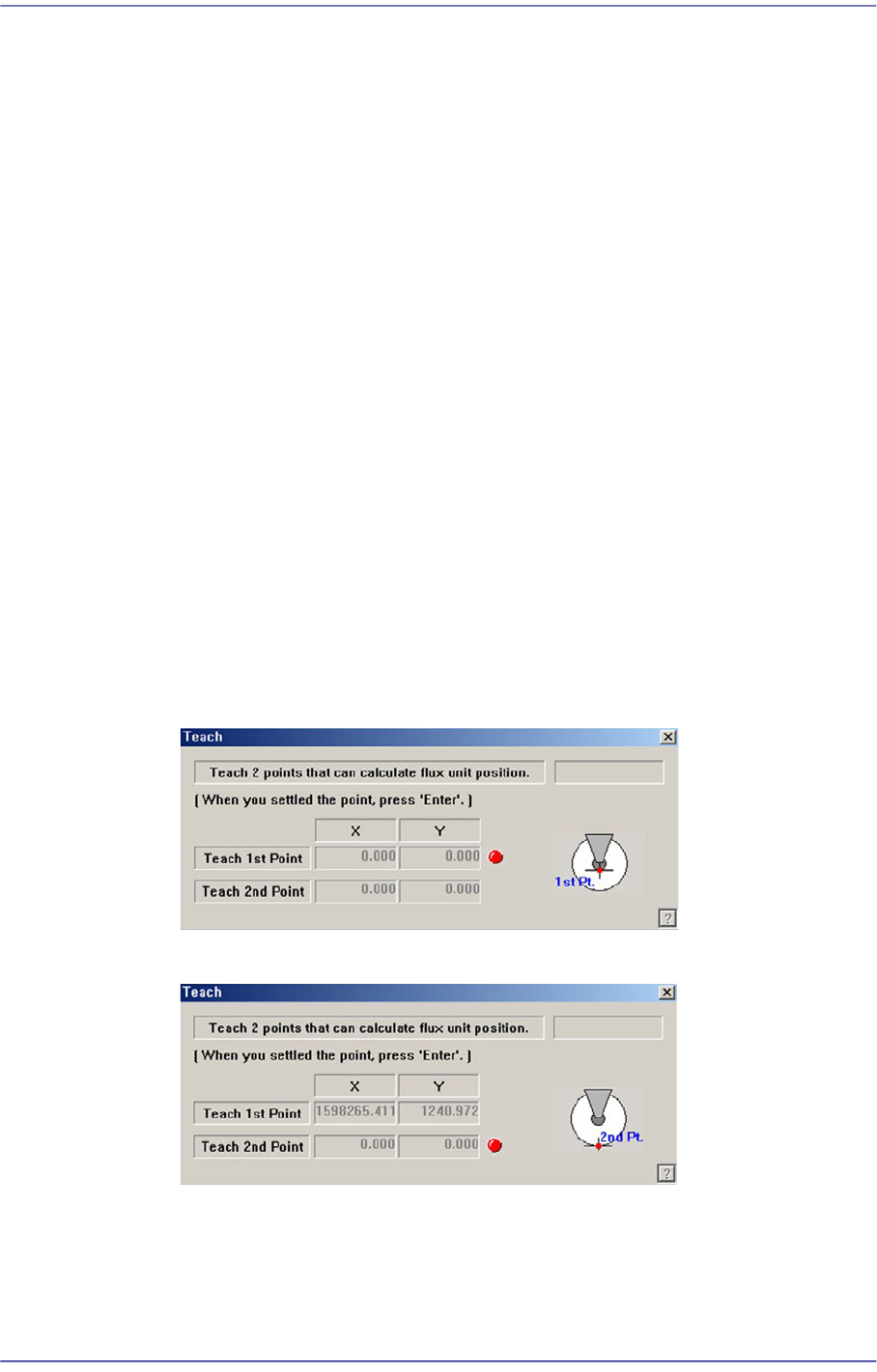
<Teach…X/Y> button
Execute the following dialog box to teach the XY coordinate of the dripping
position.
Set the first point correctly and press the ‘Enter’ key.
Set the second point correctly and press the ‘Enter’ key.
<Teach…[Z]> button
Teach the Z coordinate of the dripping position. The teaching procedure is as
follows: