Hanwha SM481 PLUS Series Administrator’s Guide Eng.pdf.pdf - 第46页
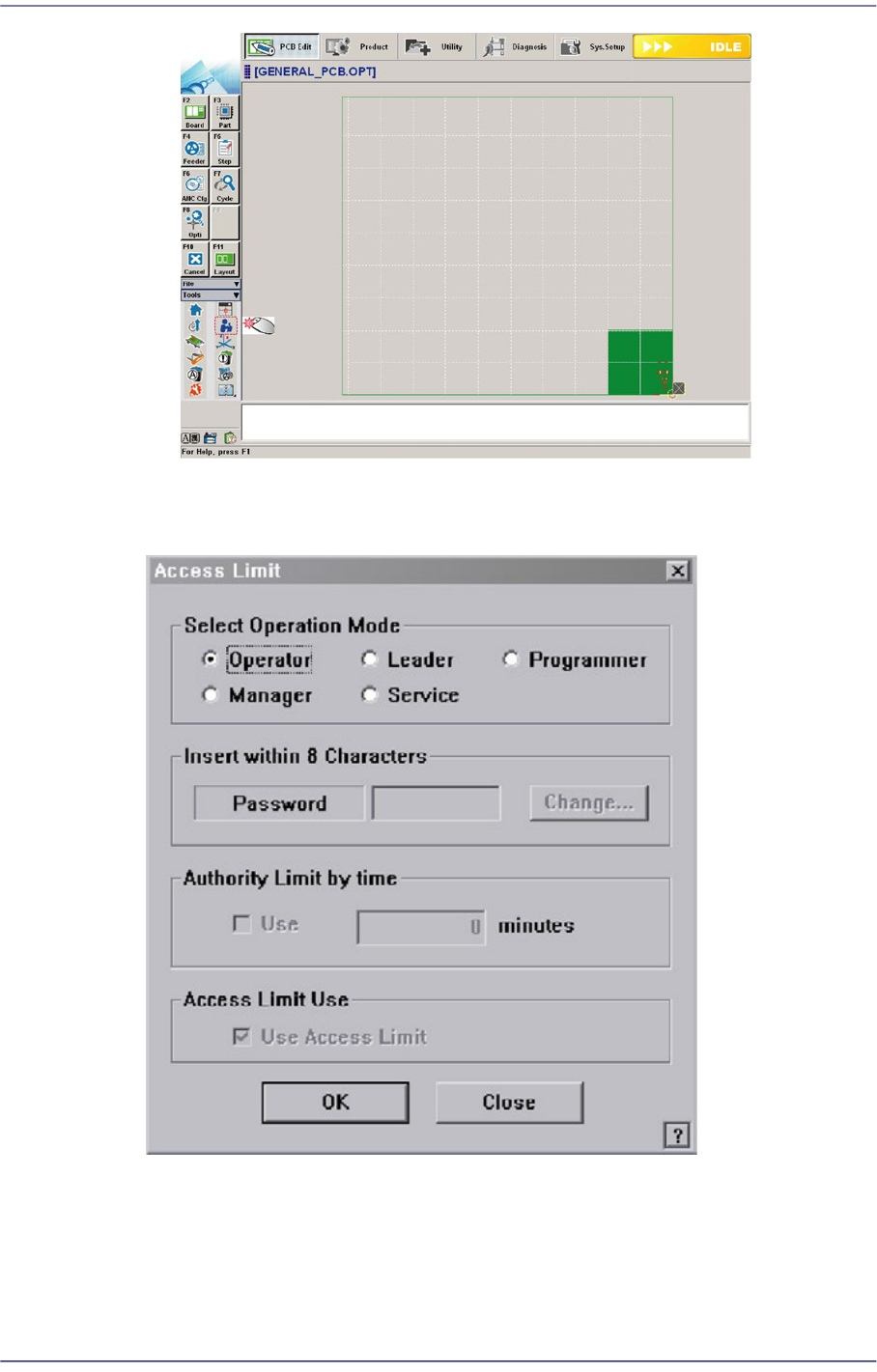
1-2 Fast Flexible Placer SM481(L) PLUS Administ r ator’s Guide Operation Mode C hange Figure1.1 Operation Mode Change <Select Operation Mode> group Select the Operation Mod e of the machine, and Cl ick the <…

1-1
Operation Mode and Password Change
Chapter1. Operation Mode and
Password Change
1.1. Operation Mode
Refers to the mode for operating the machine. There are 4 operation modes. Each mode is
classified according to the user of the machine and the access to the MMI for each mode is
limited.
1.1.1. Operation Mode and Setup
Operation Mode
Operator/ Leader
Refers to a basic operation mode of the machine. The MMI is set as an operation
mode for the plain user. This mode allows only plain production work. It needs no
password.
Programmer
Refers to a user whose level is higher than the plain user. He/she can create and
modify the PCB program.
The password for programmer mode can be changed. When changing the
operation mode from the plain user mode to programmer mode, the programmer
password must be entered.
Manager
Refers to a user whose level is higher than the programmer. He/she can manage
overall items of the machine in addition to the service related items.
The password for the manager mode can be changed. When changing the
operation mode from the plain user mode and programmer mode to the manager
mode, the manager password must be entered.
Service
Refers to the operation mode for the service engineer in charge dispatched from
our designated C/S company when after sales service (A/S) is required due to
machine failure, etc. The user of this mode is the highest level user, who can
access all menus of the machine.
The password for the service mode can be changed. When changing the operation
mode from the plain user mode and programmer mode to the manager mode, the
manager password must be entered.
1-2
Fast Flexible Placer SM481(L) PLUS Administrator’s Guide
Operation Mode Change
Figure1.1 Operation Mode Change
<Select Operation Mode> group
Select the Operation Mode of the machine, and Click the <OK> button and set the
user mode.

1-3
Operation Mode and Password Change
<Operator>/ <Leader> option Button
Select the MMI to set it as the operation mode for a plain user.
<Programmer> option Button
Select the MMI to set it as the operation mode for a programmer.
<Manager> option Button
Set the MMI as the operation mode for a manager.
<Service> option Button
Set the MMI as the operation mode for service.
<Insert within 8 Characters> group
The password for the corresponding mode can be changed.
<Password> edit box
Used to enter the password of the corresponding operation mode in order to
change the operation mode.
<Access Limit Use> group
Performs setup so that the authorization to access the MMI menus can be limited
according to users. This function can be used only in the operation mode higher
than the manager mode.
<Use Access Limit> check box
Select the check box when limiting the access to the MMI menu according to
the users.