Hanwha SM481 PLUS Series Administrator’s Guide Eng.pdf.pdf - 第511页
17-7 Utility following dialog box is displayed. List box List up the PCB files on which the copi e d information will be applied. <Add> button Adds the file defined in the <File Name:> e di t box to the P…
17-6
Fast Flexible Placer SM481(L) PLUS Administrator’s Guide
17.3. Copy...[F4]
Copies the contents of the PCB file already existing in the PCB file to be copied without
creating a new PCB file. .
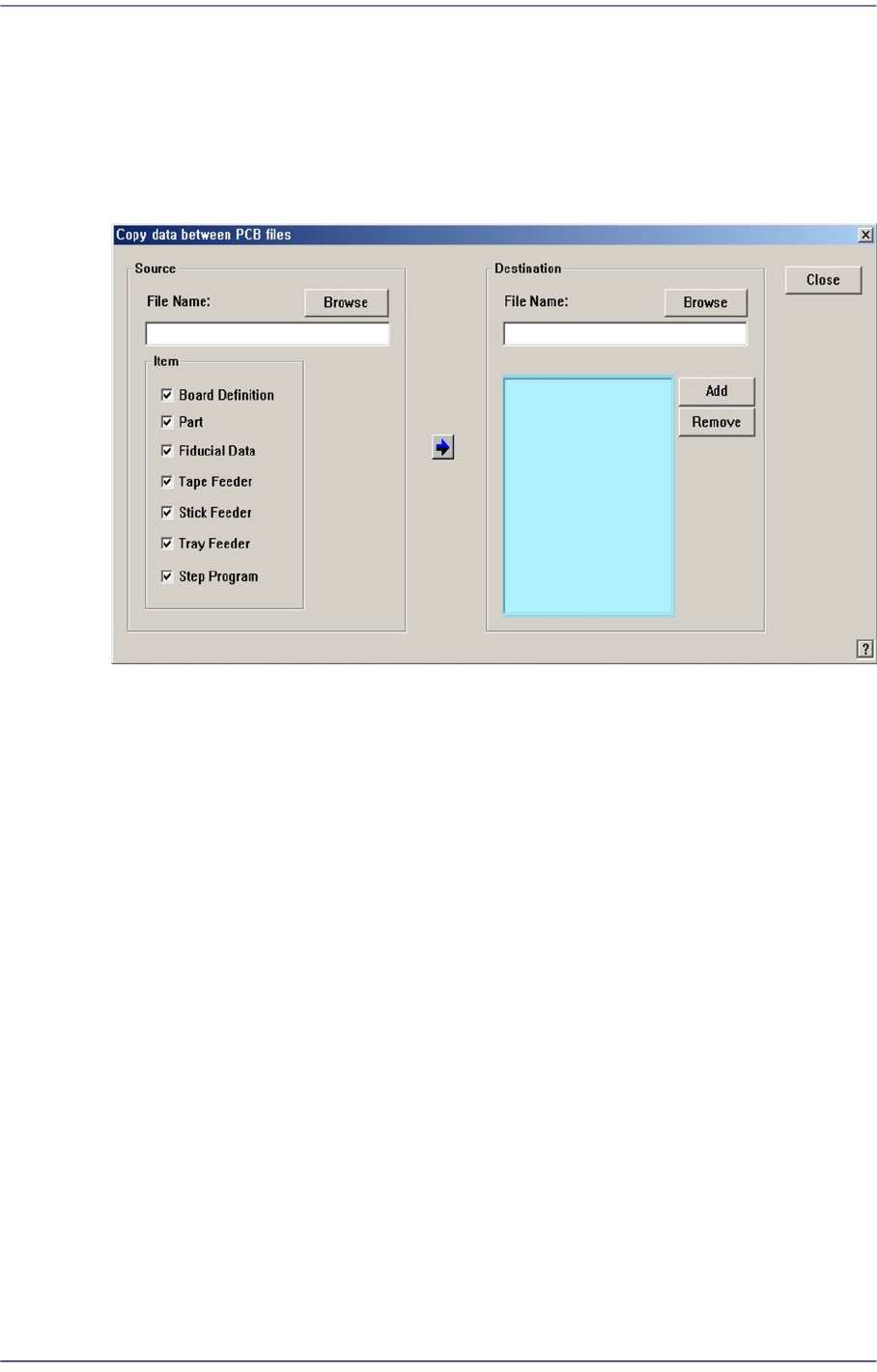
When the ‘Copy’ submenu is selected, the following dialog box is displayed..
Figure17.5 “Copy data between PCB files” dialog box
<Source> group
Used for selecting the original PCB file to copy, and for selecting the information to
copy.
<File Name:> edit box
Used for selecting the original PCB file to copy, and for selecting the information
to copy.
<Item> check box group
Select the information to copy.
<Browse…> button
Used for selecting the original PCB file to copy.
<Destination> group
Used for selecting the object PCB file to apply the copied information from the
original PCB file.
<File Name:> edit box
Directly input the file name of the object file or select the desired file name by
clicking the <Browse…> button.
<Browse…> button
Used for selecting the object PCB file. When this button is clicked on the
17-7
Utility
following dialog box is displayed.
List box
List up the PCB files on which the copied information will be applied.
<Add> button
Adds the file defined in the <File Name:> edit box to the PCB file on which the
copied information will be applied.
<Remove> button
Excludes the selected file in the list box from the object to apply the copied
information.
button
Copy the selected information from the original PCB file to the object PCB file.
17.4. File Man... [F5]
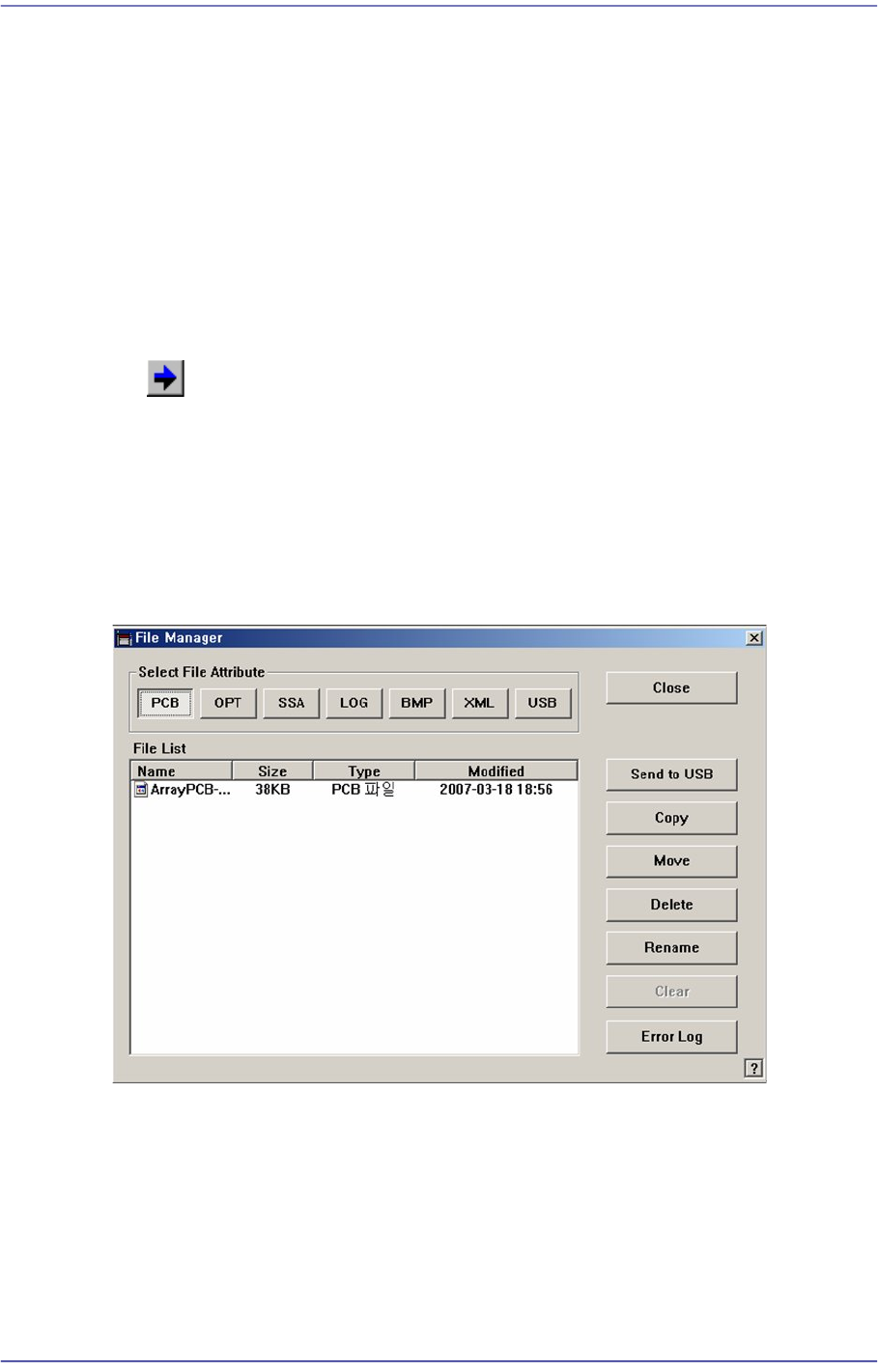
Allows easy file management such as Copy, Move, Delete, etc.
Figure17.6 “File Manager” dialog box
<Select File Attribute:> group
When the extension file button in the <Select File Attribute group> is clicked, the
corresponding contents are indicated in the list.
<Send to USB> button
Save the selected file in the USB storage device.

17-8
Fast Flexible Placer SM481(L) PLUS Administrator’s Guide
<Copy> button
Makes a copy of the selected file and as the original file exists under its original name,
saves the copied file under a different file name when using the <Copy> command.
<Move> button
Moves the selected file to the other folder.
<Delete> button
Deletes the selected file.
<Rename> button
Renames the selected file.
<Clear> button
If the file size of a *.log file is very big, deletes the data saved previously.
<Error Log> button
When machine error occurs, it creates a zip file for all log files of corresponding works
necessary for the examination of the cause of the error to allow easy transmission of
the files to our C/S company and local agent..