Hanwha SM481 PLUS Series Administrator’s Guide Eng.pdf.pdf - 第83页
4-1 Tools Shortcut M enu Chapter4. Tools Shortcut Menu The Shortcut Menu facilitates the use of fre quently used commands. It consists of 12 menus: Return to Origi n, Show SMV isi on , ANC Setup, Operation M ode Chan…
3-18
Fast Flexible Placer SM481(L) PLUS Administrator’s Guide
3.6. Windows Tools
3.6.1. Explorer
Executes the Windows Explorer incorporated in the Windows program.
3.6.2. Calculator
Executes the Calculator incorporated in the Windows program.
3.6.3. Paint
Executes the Picture Pad incorporated in the Windows program.
3.6.4. Notepad
Executes the Memo Pad incorporated in the Windows program.
3.7. Exit
Use the <Exit> command to end an MMI application session. When the <Exit> command
is selected, any MMI session is terminated. It is possible to exit only when the machine is
in idle state.
Memo The MMI can be exited only when the user login has been performed
as Manager or Program Administrator.
Warning System needs to be shut down after normally ending the
MMI, otherwise, the machine might be damaged and injury
could occur due to system error caused by irregular shut
down. Be sure to shut down the system after normally
ending the MMI.
Caution Exiting the MMI forcedly by executing the [Alt+F4]
command without exiting it normally through ‘Exit’
command will delay the exit of the Windows. Be sure to shut
down the system after normally ending the MMI.
4-1
Tools Shortcut Menu
Chapter4. Tools Shortcut Menu
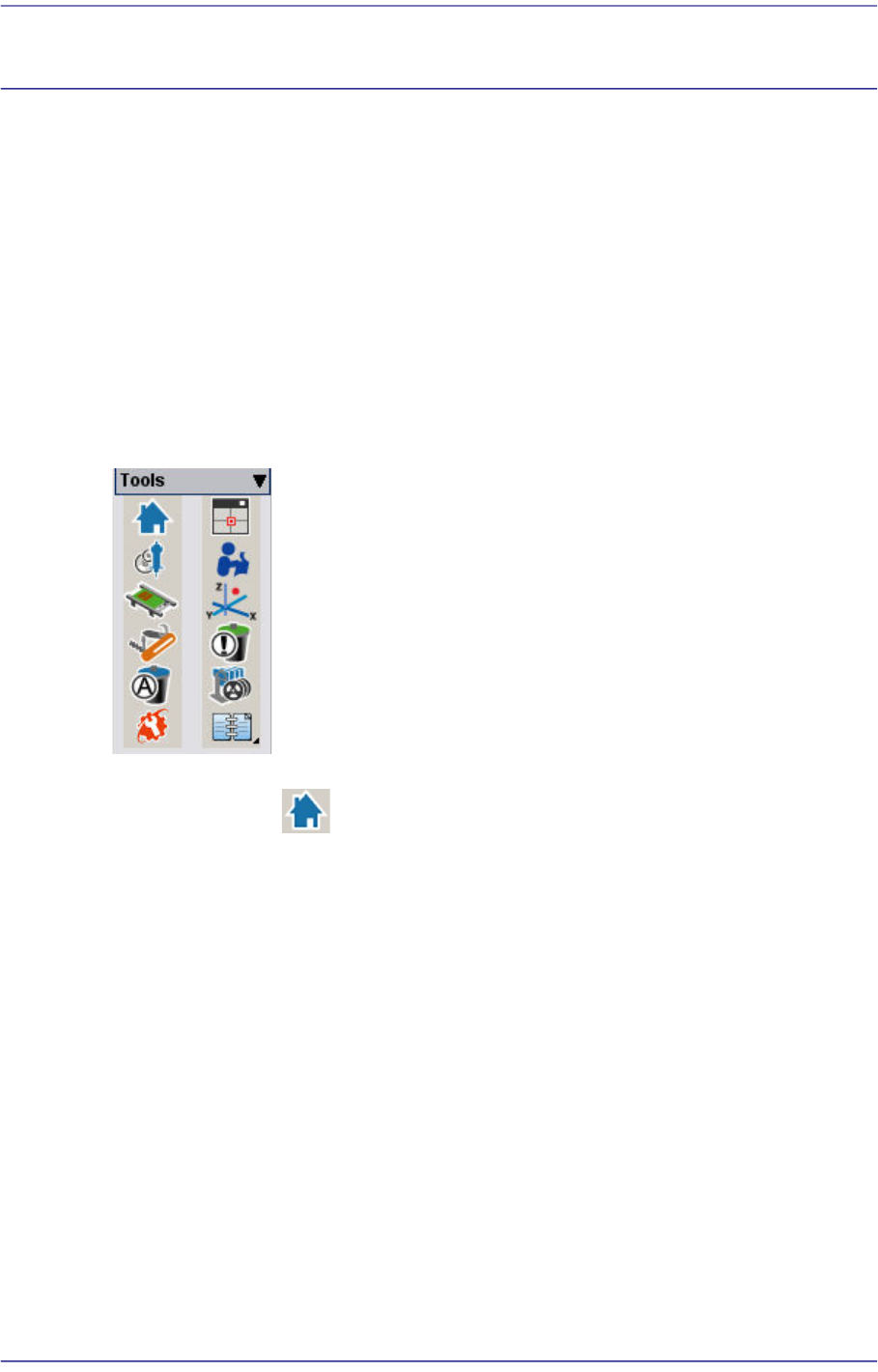
The Shortcut Menu facilitates the use of frequently used commands. It consists of 12
menus:
Return to Origin, Show SMVision,
ANC Setup, Operation Mode Change
Conveyor / Manual Tool
Current Position / Dump Information (Place Error)
Part Dump All / Docking Cart Up/Down
PM Manager / Data Logging
Figure4.1 Shot Cut Bar
4.1. Return To Origin
Returns the X, Y, Z, Theta(R) motors, and Mirror axis to the origin.
4-2
Fast Flexible Placer SM481(L) PLUS Administrator’s Guide
4.2. Show SMVision
4.2.1. SMVision Structure
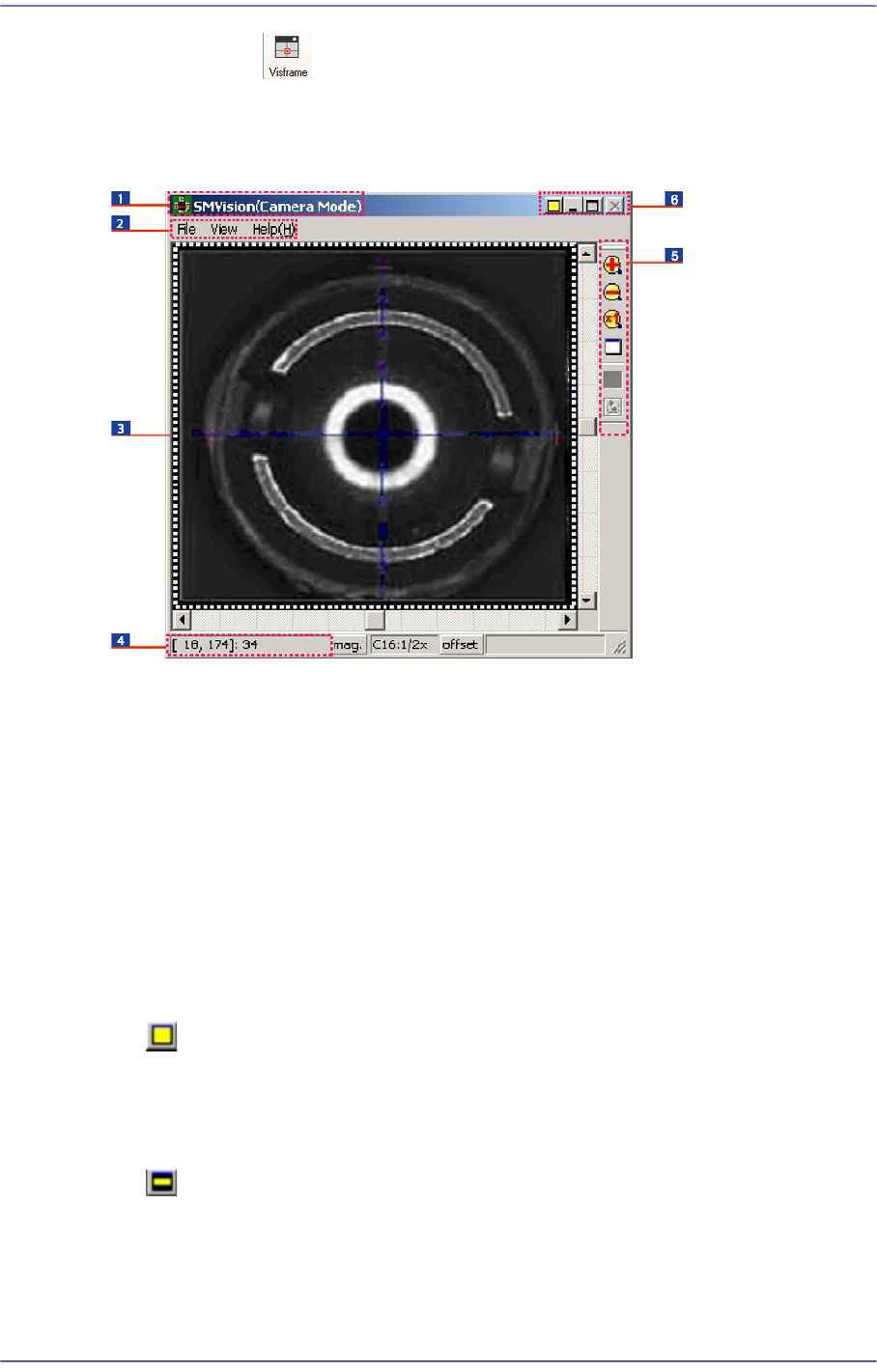
Figure4.2 SMVision window
1: Titlebar
2: Menu
3: Display window
4: Status bar
5: Toolbar
6: System menu
4.2.1.1. Titlebar
Describes the mode status of the SMVision.
4.2.1.2. System menu
Displays the ‘Normal mode’ status of the SMVision. Clicking the Button will change
the move of the SMVision into the ‘Compact mode’. In normal mode, the size of
SMVision is changed or minimized according to the MMI screen.
Displays ‘Compact mode’ of the SMVision. Clicking the Button will change the move
of the SMVision into the ‘Normal mode’. In compact mode, the SMVision is always
on top of the screen, and the size is not changed.