Hanwha SM481 PLUS Series Administrator’s Guide Eng.pdf.pdf - 第98页
4-16 Fast Flexible Placer SM481(L) PLUS Administ r ator’s Guide 4.6. Current Position Mainly used when the present coordinates o f each driving axis need to be re ferenced for teaching or calibration. Figure4.6 “P osi ti…
4-15
Tools Shortcut Menu
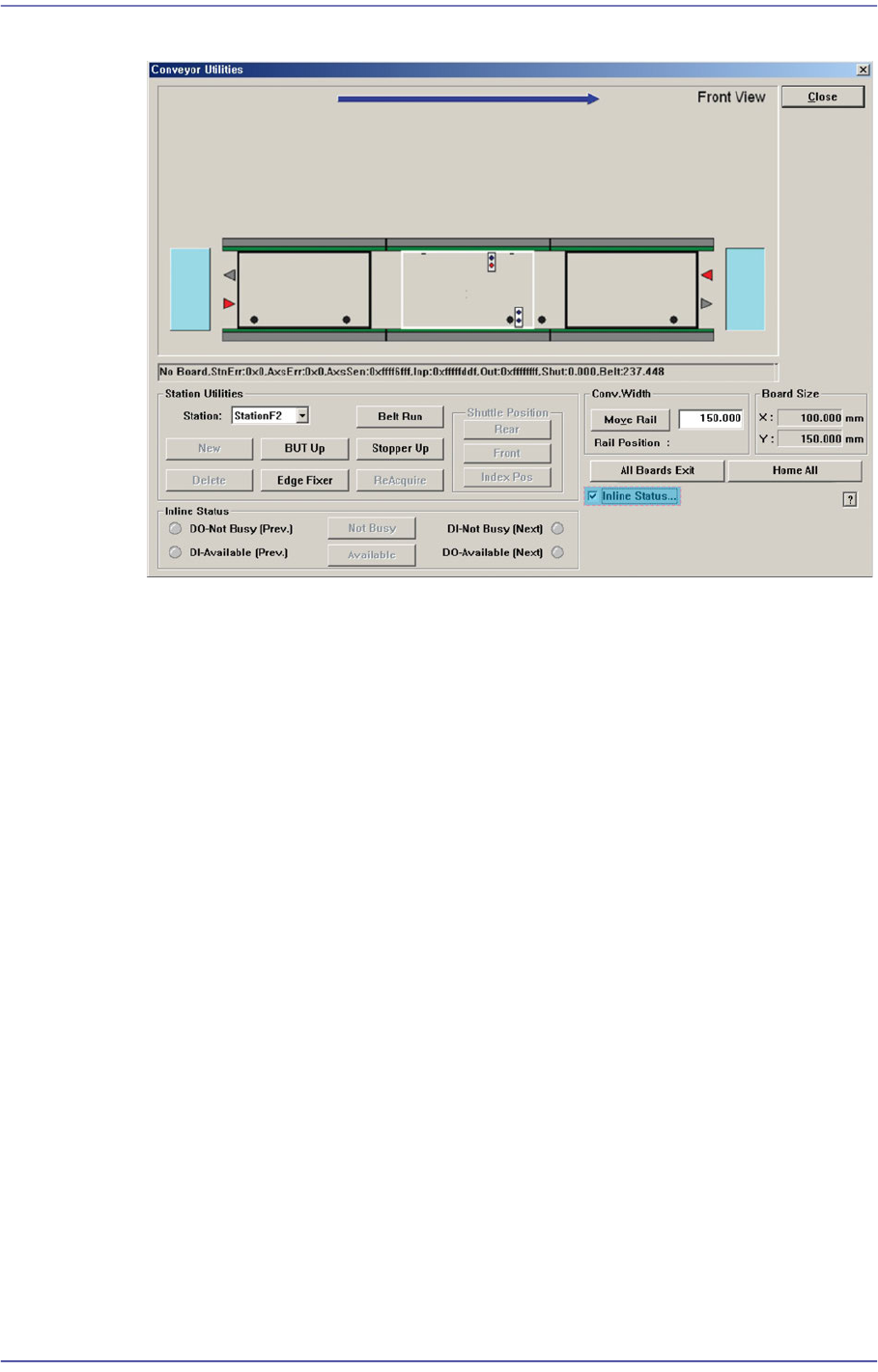
Figure4.5 “Conveyor System-Inline Status” dialog box
<Inline Status> group
Can handle SMEMA related output manually and display the input status (light
on-On, light off-Off).
DO-Not Busy (Pre.)
Sends the signal to be ready for receiving PCBs from the previous machine.
To send the signal manually, click on the <Not Busy> button on the right.
DI-Available (Pre)
Receives the signal that the previous machine is ready for sending PCBs.
DI-Not Busy (Next)
Receives the signal that the next machine is ready for receiving PCBs.
DO-Available (Next)
Sends the signal to be ready for sending PCBs to the next machine. To send
the signal manually, click on the <Available> button on the right.
4-16
Fast Flexible Placer SM481(L) PLUS Administrator’s Guide
4.6. Current Position
Mainly used when the present coordinates of each driving axis need to be referenced for
teaching or calibration.
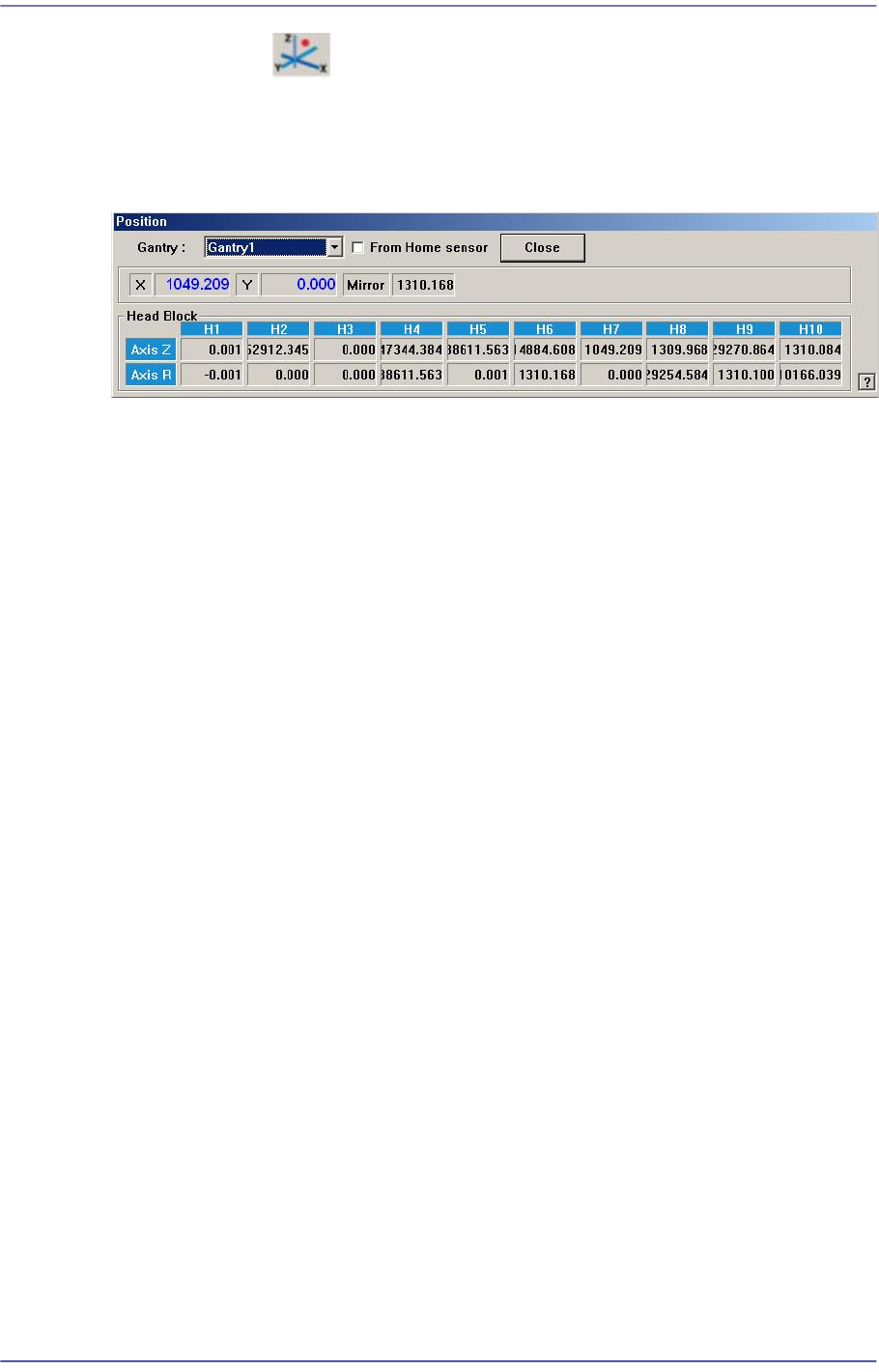
Figure4.6 “Position” dialog box
<Gantry> combo box
Select the gantry for which the coordinate is to be checked.
<From Home sensor> check box
This function is used to see how much the nozzle tip of the head has been lowered
from the position of the home sensor for the Z-axis.
Coordinates
X [When 1F-H1 is selected]
Indicates the present position in X direction of Head 1 at the origin of the
equipment.
Y [When 1F-H1 is selected]
Indicates the present position in Y direction of Head 1 at the origin of the
equipment.
Mirror
Indicates the presently rotated angle from the home position of mirror rotation axis
for fly camera.
Head Block group
Head 1/Axis Z
When the check box for <From home sensor> is not ticked, the height of the
nozzle tip of head 1 on the PCB is indicated.
Head 1/Axis R
Indicates the presently rotated angle from the home position of R axis for head 1.
Head 2/Axis Z
When the check box for <From home sensor> is not ticked, the height of the
nozzle tip of head 2 on the PCB is indicated.
Head 2/Axis R

4-17
Tools Shortcut Menu
Indicates the presently rotated angle from the home position of R axis for head 2.
Head 3/Axis Z
When the check box for <From home sensor> is not ticked, the height of the
nozzle tip of head 3 on the PCB is indicated.
Head 3/Axis R
Indicates the presently rotated angle from the home position of R axis for head 3.
Head 4/Axis Z
When the check box for <From home sensor> is not ticked, the height of the
nozzle tip of head 4 on the PCB is indicated.
Head 4/Axis R
Indicates the presently rotated angle from the home position of R axis for head 4.
Head 5/Axis Z
When the check box for <From home sensor> is not ticked, the height of the
nozzle tip of head 5 on the PCB is indicated.
Head 5/Axis R
Indicates the presently rotated angle from the home position of R axis for head 5.
Head 6/Axis Z
When the check box for <From home sensor> is not ticked, the height of the
nozzle tip of head 6 on the PCB is indicated.
Head 6/Axis R
Indicates the presently rotated angle from the home position of R axis for head 6.
Head 7/Axis Z
When the check box for <From home sensor> is not ticked, the height of the
nozzle tip of head 7 on the PCB is indicated.
Head 7/Axis R
Indicates the presently rotated angle from the home position of R axis for head 7.
Head 8/Axis Z
When the check box for <From home sensor> is not ticked, the height of the
nozzle tip of head 8 on the PCB is indicated.
Head 8/Axis R
Indicates the presently rotated angle from the home position of R axis for head 8.
Head 9/Axis Z
When the check box for <From home sensor> is not ticked, the height of the
nozzle tip of head 9 on the PCB is indicated.
Head 9/Axis R