Hanwha SM481 PLUS Series Administrator’s Guide Eng.pdf.pdf - 第416页
14-64 Fast Flexible Placer SM481(L) PLUS Administ r ator’s Guide Memo Th e ra n ge of the r eference va lue for t he ‘Head Offset C a libration’ are as follows: Head 1 X:-0.06mm~0.06m m , Y : -0.05mm~0.05m m Head 2 X…
14-63
Machine Calibration
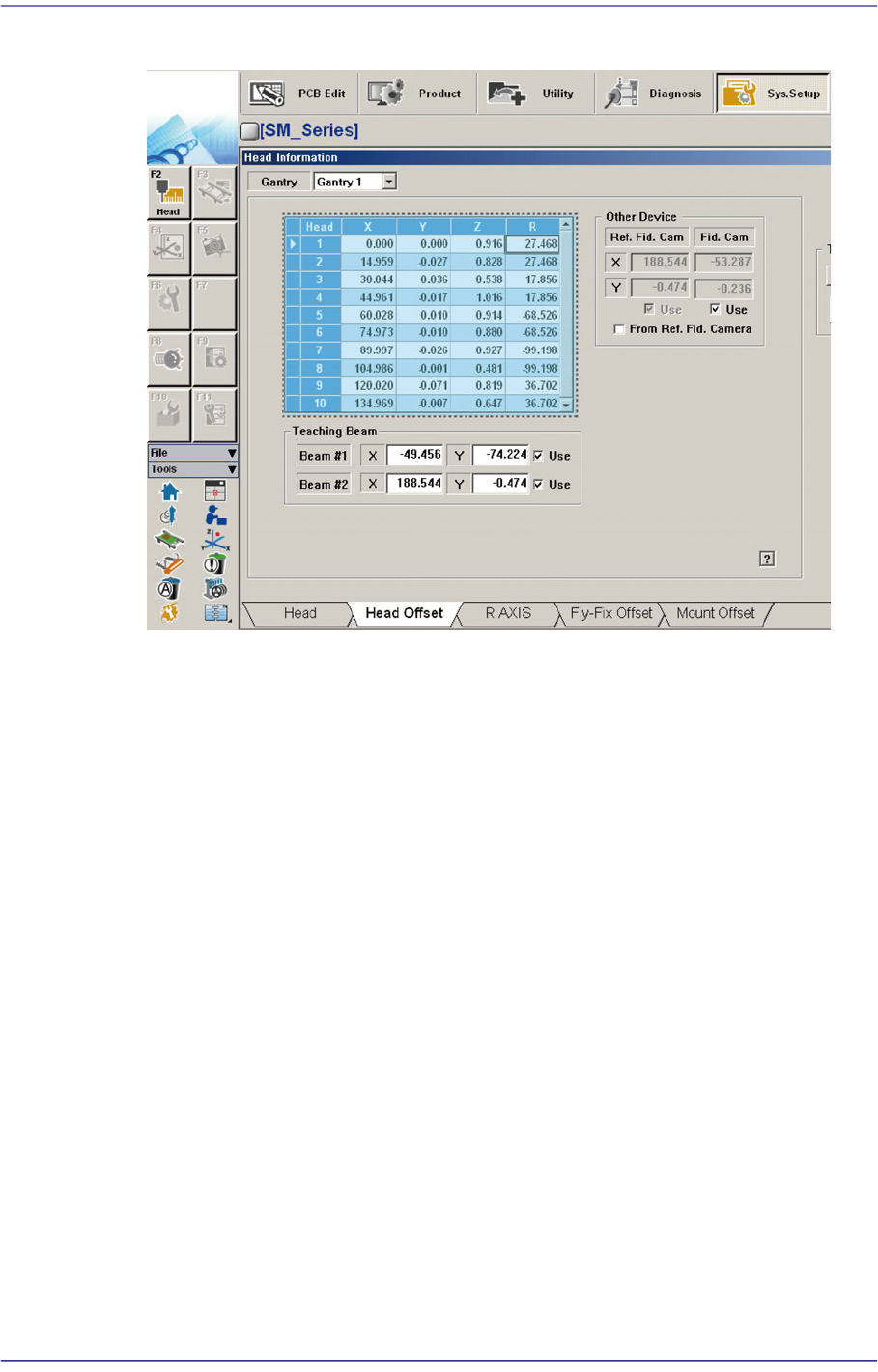
11. The measurement result can be confirmed in the Head Offset dialog box.
14-64
Fast Flexible Placer SM481(L) PLUS Administrator’s Guide
Memo The range of the reference value for the ‘Head Offset Calibration’ are
as follows:
Head 1
X:-0.06mm~0.06mm, Y: -0.05mm~0.05mm
Head 2
X:14.94mm~15.06mm, Y: -0.05mm~0.05mm
Head 3
X:29.94mm~30.06mm, Y: -0.05mm~0.05mm
Head 4
X:44.94mm~45.06mm, Y: -0.05mm~0.05mm
Head 5
X:59.94mm~60.06mm, Y: -0.05mm~0.05mm
Head 6
X:74.94mm~75.06mm, Y: -0.05mm~0.05mm
Head 7
X:89.94mm~90.06mm, Y: -0.05mm~0.05mm
Head 8
X:104.94mm~105.06mm, Y: -0.05mm~0.05mm
Head 9
X:119.94mm~120.06mm, Y: -0.05mm~0.05mm
Head 10
X:134.94mm~135.06mm, Y: -0.05mm~0.05mm
14-65
Machine Calibration
14.3.7.8. Fly Camera Scale Calibration
This calibration is performed to find the scale and rotation offset of the fly-camera. In
order to calibrate the scale and rotation of the fly-camera, the ‘fix-camera calibration’ and
‘head Z-offset calibration’ must be performed in advance and the CNT20 Nozzle must be
used.
The following is the procedure to calibrate the ‘Fly-Camera Scale Calibration’
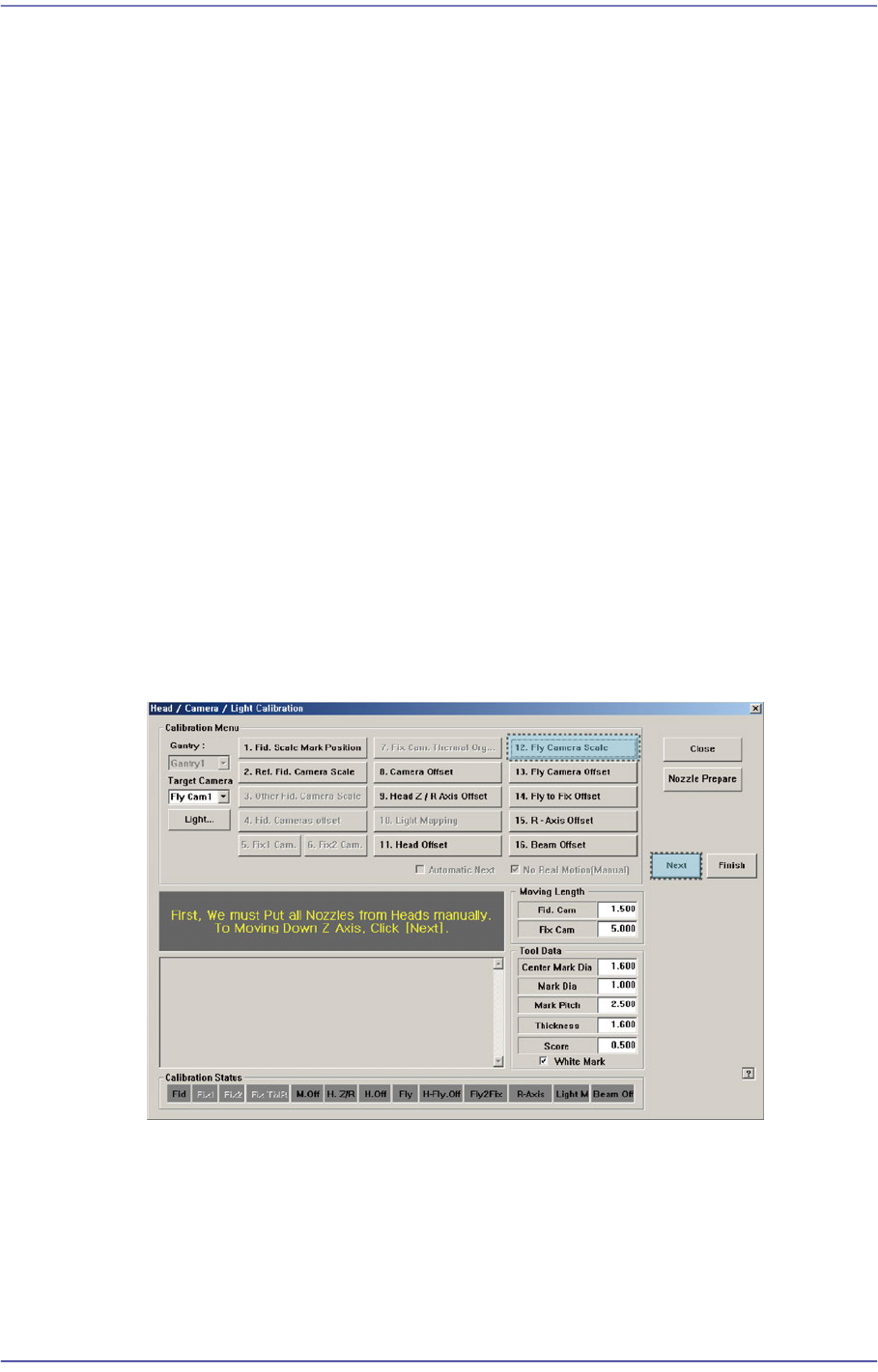
1. Click the <Nozzle Prepare> button and insert the CNT20 nozzle into the No. 1 hole of
the ANC manually.
If the <12. Fly Camera Scale> is clicked after selecting the <Automatic Next> check
box, calibration is performed for the selected gantry automatically.
If calibration is performed after selecting the <No Real Motion [Manual]> check box,
the nozzle is inserted into each head manually. Click the <Next> button to move onto
the next step.
If calibration is performed without selecting either the <Automatic> check box or
<Manual> check box, the nozzle is changed automatically for the currently selected
nozzle. Click the <Next> button to move onto the next step.
2. If the <12. Fly Camera Scale> button is clicked, the message box “First, We must Put
all Nozzles From Heads on Manually. To Move down Z Axis, Click [Next]” appears in
the message box. Click the <Next> button to move down the Z axis of the head in
order to remove all nozzles inserted in the nozzle-holder of the head manually.
3. Then, after the head assembly moves to the designated position, move all Z-axes
down. At this time, remove all inserted nozzles manually.
4. Then the message “Next Attach the Calibration Tool to Head 1. Click [Next] for
Moving Down Head. After Moving, Attach the Tool to head Manually” appears. Click
the <Next> button after inserting the CNT20 nozzle in the nozzle-holder of Head #1
manually.